information protection
36 Topics
Guidance: Sensitivity Labels during Mergers & Acquisitions (separate tenants, non-M365, etc.)
We’re building an internal playbook for how to handle Microsoft Purview sensitivity labels during mergers and acquisitions, and I’d really appreciate any lessons learned or best practices. Specifically, I’m interested in how others have handled: Acquired organizations on a separate Microsoft 365/O365 tenant for an extended period (pre- and post-close): How did you handle “Internal Only” content when the two tenants couldn’t fully trust each other yet? Any tips to reduce friction for collaboration between tenants during the transition? Existing label structures, such as: We use labels like “All Internal Only” and labels with user-defined permissions — has anyone found good patterns for mapping or reconciling these with another company’s labels? What if the acquired company is already using sensitivity labels with a different taxonomy? How did you rationalize or migrate them? Acquisitions where the target does not use Microsoft 365 (for example, Google Workspace, on-prem, or other platforms): Any strategies for protecting imported content with labels during or after migration? Gotchas around legacy permissions versus label-based protections? General pitfalls or watch-outs between deal close and full migration: Anything you wish you had known before your first M&A with Purview labels in play? Policies or configurations you’d recommend setting (or avoiding) during the interim period? Any examples, war stories, or template approaches you’re willing to share would be incredibly helpful as we shape our playbook. Thanks in advance for any insights!10Views0likes0CommentsTest DLP Policy: On-Prem
We have DLP policies based on SIT and it is working well for various locations such as Sharepoint, Exchange and Endpoint devices. But the DLP policy for On-Prem Nas shares is not matching when used with Microsoft Information Protection Scanner. DLP Rule: Conditions Content contains any of these sensitive info types: Credit Card Number U.S. Bank Account Number U.S. Driver's License Number U.S. Individual Taxpayer Identification Number (ITIN) U.S. Social Security Number (SSN) The policy is visible to the Scanner and it is being logged as being executed MSIP.Lib MSIP.Scanner (30548) Executing policy: Data Discovery On-Prem, policyId: 85........................ and the MIP reports are listing files with these SITs The results Information Type Name - Credit Card Number U.S. Social Security Number (SSN) U.S. Bank Account Number Action - Classified Dlp Mode -- Test Dlp Status -- Skipped Dlp Comment -- No match There is no other information in logs. Why is the DLP policy not matching and how can I test the policy ? thanks65Views0likes1Comment
C# MIP SDK v1.17.x - AccessViolationException on creation of MIPContext in 64-bit console app
I first logged this on https://stackoverflow.com/questions/79746967/accessviolationexception-when-creating-mipcontext-after-upgrade-to-v1-17 and the responses there have indicated I should raise with Microsoft a a likely bug, but I don't see a clear route to reporting other than here so any response would be appreciated, even if just to direct me to the appropriate reporting location. I've built a simple console app that demonstrates this issue that I'm happy to provide but we're seeing an issue with the 1.17.x version of the C# MIP SDK where an AccessViolationException is being thrown when trying to create an MIP context object. This is for a .Net Framework 4.8 console app built in 64-bit configuration, deployed to a Windows Server 2016 with the latest VC++ redistributable (14.44.35211) installed (both x86 and x64 versions), though we've seen the same on Windows Server 2019 and 2022. When the same app is built in 32-bit and deployed to the same environment the exception doesn't occur. The following code is what I've used to repro the issue: MIP.Initialize(MipComponent.File); var appInfo = new ApplicationInfo { ApplicationId = string.Empty, ApplicationName = string.Empty, ApplicationVersion = string.Empty }; var diagnosticConfiguration = new DiagnosticConfiguration { IsMinimalTelemetryEnabled = true }; var mipConfiguration = new MipConfiguration(appInfo, "mip_data", LogLevel.Info, false, CacheStorageType.InMemory) { DiagnosticOverride = diagnosticConfiguration }; //Expect BadInputException here due to empty properties of appInfo //When built as part of a 64-bit console app this causes AccessViolationException instead MIP.CreateMipContext(mipConfiguration); The AccessViolationException crashes the console app, with the following logged in the Windows Event Log: Framework Version: v4.0.30319 Description: The process was terminated due to an unhandled exception. Exception Info: System.AccessViolationException at Microsoft.InformationProtection.Internal.SdkWrapperPINVOKE.MipContext_Create__SWIG_1(System.Runtime.InteropServices.HandleRef) at Microsoft.InformationProtection.Internal.MipContext.Create(Microsoft.InformationProtection.Internal.MipConfiguration) at Microsoft.InformationProtection.Utils.MIPHelper.CreateMipContext(Microsoft.InformationProtection.MipConfiguration) The issue doesn't occur with the latest 1.16 version (1.16.149) of the SDK but does appear to be in all versions of the 1.17 release. Library: C# MIP SDK v1.17.x Target App: .Net Framework 4.8 console app Deployed OS: Windows Server 2016, 2019 and 2022 (With .Net Framework 4.8 and latest VC++ redist installed)169Views0likes1Comment
MIP SDK cannot read file labels if a message was encrypted by Outlook Classic.
C++ application uses MIP SDK version 1.14.108. The application does Office files decryption and labels reading. The problem with labels reading is observed. Steps to reproduce: Create a docx file with a label which does not impose encryption. Open Outlook Classic, compose email, attach the document from 1, click Encrypt, send. During message sending our application intercepts encrypted by Outlook docx file in temporary folder C:\Users\UserName\AppData\Local\Temp Application decrypts the intercepted file using mipns::FileHandler::RemoveProtection. Visual inspection demonstrates that decryption runs successfully. Then a separate FileHandler for decrypted file is created, and mipns::FileHandler::GetLabel() returns an empty label. It means that the label was lost during decryption. Upon visual inspection of the decrypted file via Word we can see that the label is missing. Also, we do not see MSIP_Label* entries in meta data (File -> Info -> Properties -> Advanced Properties -> Custom). Here is a fragment of MIP SDK reducted log during file handler creation ================= file_engine_impl.cpp:327 "Creating file handler for: [D:\GitRepos\ ...reducted]" mipns::FileEngineImpl::CreateFileHandlerImpl gsf_utils.cpp:50 "Initialized GSF" `anonymous-namespace'::InitGsfHelper data_spaces.cpp:415 "No LabelInfo stream was found. No v1 custom properties" mipns::DataSpaces::GetLabelInfoStream data_spaces.cpp:428 "No LabelInfo stream was found. No v1 custom properties" mipns::DataSpaces::GetXmlPropertiesV1 file_format_base.cpp:155 "Getting protection from input..." mipns::FileFormatBase::GetProtection license_parser.cpp:233 "XPath returned no results" `anonymous-namespace'::GetXmlNodesFromPath license_parser.cpp:233 "XPath returned no results" `anonymous-namespace'::GetXmlNodesFromPath license_parser.cpp:299 "GetAppDataNode - Failed to get ID in PL app data section, parsing failed" `anonymous-namespace'::GetAppDataNode api_log_cache.cpp:58 "{{============== API CACHED LOGS BEGIN ============}}" mipns::ApiLogCache::LogAllMessages file_engine_impl.cpp:305 "Starting API call: file_create_file_handler_async scenarioId=89fd6484-7db7-4f68-8cf7-132f87825a26" mipns::FileEngineImpl::CreateFileHandlerAsync 37948 default_task_dispatcher_delegate.cpp:83 "Executing task 'ApiObserver-0' on a new detached thread" mipns::DefaultTaskDispatcherDelegate::ExecuteTaskOnIndependentThread 37948 file_engine_impl.cpp:305 "Ended API call: file_create_file_handler_async" mipns::FileEngineImpl::CreateFileHandlerAsync 37948 file_engine_impl.cpp:305 "Starting API task: file_create_file_handler_async scenarioId=89fd6484-7db7-4f68-8cf7-132f87825a26" mipns::FileEngineImpl::CreateFileHandlerAsync file_engine_impl.cpp:327 "Creating file handler for: [D:\GitRepos\...reducted....docx]" mipns::FileEngineImpl::CreateFileHandlerImpl file_format_factory_impl.cpp:88 "Create File Format. Extension: [.docx]" mipns::FileFormatFactoryImpl::Create file_format_base.cpp:363 "V1 metadata is not supported for file extension .docx. Setting metadata version to 0" mipns::FileFormatBase::CalculateMetadataVersion compound_file.cpp:183 "Open compound file for read" mipns::CompoundFile::OpenRead gsf_utils.cpp:50 "Initialized GSF" `anonymous-namespace'::InitGsfHelper compound_file_storage_impl.cpp:351 "Get Metadata" mipns::CompoundFileStorageImpl::GetMetadata compound_file_storage_impl.cpp:356 "No Metadata, not creating GSF object" mipns::CompoundFileStorageImpl::GetMetadata metadata.cpp:119 "Create Metadata" mipns::Metadata::Metadata metadata.cpp:136 "Got [0] properties from DocumentSummaryInformation" mipns::Metadata::GetProperties compound_file_storage_impl.cpp:351 "Get Metadata" mipns::CompoundFileStorageImpl::GetMetadata compound_file_storage_impl.cpp:356 "No Metadata, not creating GSF object" mipns::CompoundFileStorageImpl::GetMetadata metadata.cpp:119 "Create Metadata" mipns::Metadata::Metadata metadata.cpp:136 "Got [0] properties from DocumentSummaryInformation" mipns::Metadata::GetProperties =================96Views0likes1Comment
Application filter in the activity explorer no longer populated correctly?
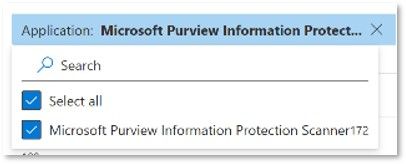
To distinguish between discovery findings in a setup that has both endpoint DLP and the Information Protection Scanner deployed, typically the "Application" filter in the activity explorer is used: It seems that recently the filter behavior changed and the list of applications the filter can use is built incorrectly. 'Microsoft Purview Information Protection Scanner' is no longer listed although documents with that property are present: The filter options are typically populated by the properties from documents within range and I have verified documents discovered by the MIP scanner exist: I am wondering if more people are seeing this and if a possible workaround is available.Solved106Views0likes2CommentsIssue with the Canadian Drivers License SIT
Did any face an issue with the Canadian Driver's License SIT in the DLP policy? We see a lot of false positives especially around BC province number, NB, PrinceEdward Island and Saskatchewan. These provinces has just digits which can flag any kind of digits. Even if we use some custom RegEx and reduced keyword list, it still flags a lot of false positives. We see this as more and more customers are not happy with it. Has anyone found a breakthrough or best solution for deploying the Canadian Driver's License DLP?99Views0likes2CommentsRelabeling files won't reflect the Label changes
I am running Microsoft Purview Scanner, where we scanned and applied the Default Label "Internal" to all the documents in the file share for "One Folder". After that has been applied successfully, we realized that some of the Access Controls in the Label called "Internal" need to be updated. So we enabled Access control permissions for this label to include the "Export" option. I thought changes made to a published label would reflect already labeled files. But it doesn't. Even though we opened and closed one file and didn't reflect my changes. Steps we tried: Re-ran scan with the option to re-label existing files (already labeled files) with the same label to see if it reflect new changes. But nothing. We reset the Scan service and restarted the server too. nothing worked. Do anyone know if a Label is applied already to files in file share and we update some of the settings for the same label, with the changes reflect properly? I know it reflects in cloud, but not sure why it can't reflect in file sharesSolved196Views0likes2Comments
Duplicate file detection
Hi Community, I need to scan multiple windows file servers using Microsoft Purview and one of the asks is to detect and identify duplicate files on those. Can someone please guide how that can be accomplished. What functionality needs to be used and how to go about duplicate detection? Note that this is primarily duplicate finding assignment for files as in office documents and pdfs. Thanks.139Views0likes1Comment
Microsoft Default Credit Card Number is not working effectively.
Hi All, I just observe that Microsoft default SIT for Credit Card is detecting more False Positives, it is detecting the 16 digit transaction numbers, tracking ID's, Receipt numbers and even Microsoft support ticket numbers also detecting as Credit Card Numbers. how can we finetune the Microsoft Default SIT to make sure it should detect only valid Credit Card Numbers.147Views0likes2Comments