Import
19 Topics
Decimal separator after CSV import
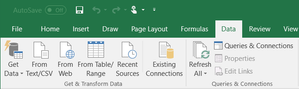
Hi, I need some help, please. I'm trying to import a csv file. The problem is that numbers are written with comma decimal separator, but my PC is working with dots as decimal separator. In the previous Excel versions, there was the possibility to convert them during the import wizard. Unfortunately, I'm not able to find the same option in the new import wizard (Power Query). Thanks for all your answers Luca164KViews0likes9CommentsHow to view and manage your Microsoft passwords on Linux/Chrome/ChromeOS (Without Edge or mobile)
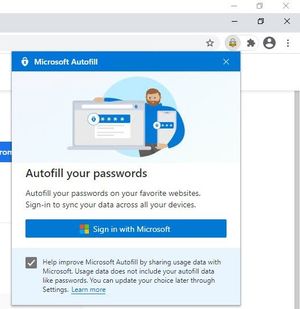
1. install Google Chrome (or other Chromium based browsers, including Edge itself) 2. install Microsoft Autofill extension 3. Sign into your Microsoft account in the extension 4. Access your Passwords safely and hassle-free * you do Not need to sign in to Google account for this. ** this works on Mac and Windows too, basically any environment where you can install this extension in. The extension also has Import feature, so you can import your passwords at once from a file and save them to your Microsoft account. Questions & answers about Microsoft Authenticator app - Azure AD | Microsoft Docs Q: How are my passwords protected by the Authenticator app? A: Authenticator app already provides a high level of security for multi-factor authentication and account management, and the same high security bar is also extended to managing your passwords. Strong authentication is needed by Authenticator app: Signing into Authenticator requires a second factor. This means that your passwords inside Authenticator app can't be accessed even if someone has your Microsoft account password. Autofill data is protected with biometrics and passcode: Before you can autofill password on an app or site, Authenticator requires biometric or device passcode. This ensures that even if someone else has access to your device, they cannot fill or see your password, as they’d be unable to provide the biometric or device PIN. Furthermore, a user cannot open the Passwords page unless they provide biometric or PIN, even if they turn off App Lock in app settings. Encrypted Passwords on the device: Passwords on device are encrypted, and encryption/decryption keys are never stored and always generated on-the-fly. Passwords are only decrypted when user wants to, that is, during autofill or when user wants to see the password, both of which require biometric or PIN. Cloud and network security: Your passwords on the cloud are encrypted and decrypted only when they reach your device. Passwords are synced over an SSL-protected HTTPS connection, which ensures no attacker can eavesdrop on sensitive data when it is being synced. We also ensure we check the sanity of data being synced over network using cryptographic hashed functions (specifically, hash-based message authentication code).10KViews2likes4Comments
Excel Import 32 bit vs 64 bit
I currently use the 32 bit excel, which I believe only allows use of 2gb or ram. This is extremely frustrating when working in large spreadsheets. I've requested from my IT department an upgrade to 64 bit. Their response is that our accounting system does not support the 64 bit. My question is how would a separate system be effected by the use of 64 bit vs 32 bit? I understand an add-in needing a certain excel version but would exporting reports from our accounting system to csv. or xls. be effected by 32 vs 64 bit excel? Wouldn't I be able to export a report to csv. then open in excel no matter the version?3.8KViews0likes1CommentLinux VM Import to Azure
Hi there i need to import an CentOS 6.9 Image to Azure. It is an Software Appliance we recieved from the vendor. I attached it to my Windows10 Hyper-V and convert the vhdx File in an VHD with fix size. After this i run the Commands in this Link to prepare the VM for Azure https://docs.microsoft.com/en-us/azure/virtual-machines/linux/create-upload-centos?toc=%2fazure%2fvirtual-machines%2flinux%2ftoc.json The i uploaded the VM an create a new VM. The VM starts. SSH seems to be not working. The connect but in the VM is gray. Over start and Diagnostic i see following Screen Do you have an idea what this means? What can i do to fix this? Which other ways i have to import an VM?3KViews0likes2CommentsEdge sync getting throttled after bookmark/favorites import
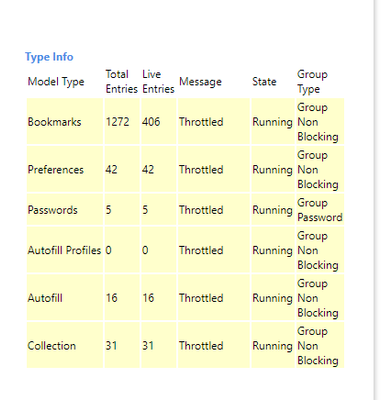
it's happening on Edge stable Version 81.0.416.58 (Official build) (64-bit) my other installed channel is Version 84.0.488.0 (Official build) canary (64-bit) this throttle creates duplicate favorites on all other Edge instances that are in sync almost instantly. but i have to wait 5-6 minutes (depending on the number of favorites) until sync gets back to the normal status and duplicates will then be removed on their own. can this be improved and sped up? i don't think every user knows to wait that long and might go on and modify their data while Edge is working in the background which could lead to lost favorites. Thanks2.1KViews2likes1CommentLesson Learned #25: Export/Import Azure SQL Database using Azure File Service?
First published on MSDN on Apr 03, 2017 In some situations, we need to import or export our Azure SQL Database using SQLPackage, but, unfortunately, either source and destination file we cannot specify a blob storage, in case that we want to save the file in this storage.1.9KViews1like0Comments