headings
3 Topics
How do I correct heading numbering?
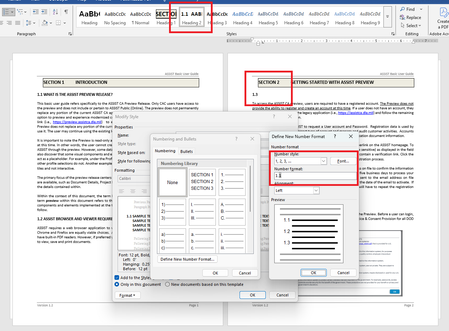
UPDATE: I couldn't remove this post, after I discovered the issue. Thanks! I need to update heading numbering within an old document. Custom headings were made (as pictured) but I need the heading levels 2 and 3 to include the parent heading number of each. When I attempt to update the level 2 heading for Section 2, it wants to continue with Section 1 (see pictured example). In the number format, I do not know how to tell Word to include the parent numbers? I included "1." thinking it was intelligent enough to know that was just a format designation of the parent heading, but I guess that isn't how. I realize I may be making some glaring mistakes, but just trying to get it right. So this is a learning moment. The caveat here is that I'm not creating the heading from scratch but rather, trying to update the existing document headings. I did follow some online suggestions but none of them addressed including the parent value in this scenario. Section 2 <Heading Level 1 text format> <-- Here I need the word "Section" to proceed the level 1 heading number 2.1 <Heading Level 2> <-- Here I need the level 2 heading to include the parent section level number 2.1.1 <Heading Level 3> <-- Here I need the level 3 heading to include level 1 and 2 numbers.Solved581Views0likes8Comments
Grey headings
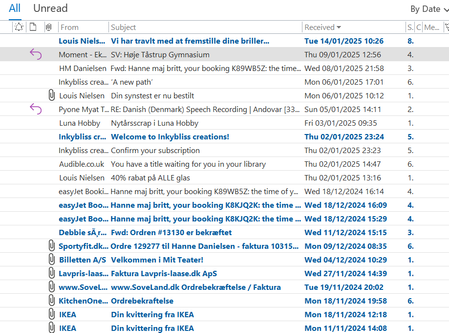
I have been referred to here, as a Microsoft Community Support Specialist was not able to help me. I often tidy up my inbox, which means I have few emails from one period, but many email from a longer period of time. This was not a problem with Windows 10 on my old PC, but my new PC has Windows 11, which means that I am forced to have grey headings coming across my inbox for each date interval (I prefer to have my emails filtered by date of arrival. My question is a very small simple thing: How do I remove these grey headings? I have surfed the internet, but there is no solution out there. How do I get my view to look like this (my view from my old pc with Windows 10). As you can see, there are no grey heading stribes going across several places. It is much calmer. More peaceful. I get nerves looking at the the stribes in Windows 11. I want to be able to choose for myself what the apearance of my inbox, sent, and subfolders should be. I notice that the Deleted emails folder does not have these grey headings. So it is possible. I thank you in advance.218Views0likes4CommentsHeadings Ignored For cross Reference Selection
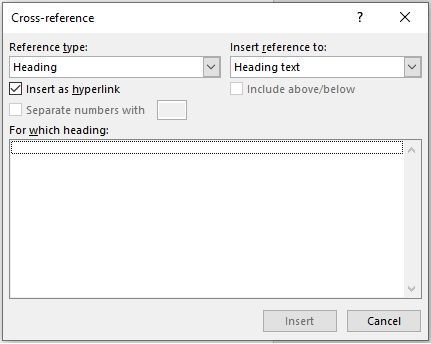
Running Word 2019 Office Professional. I'm trying to insert a cross reference from one part of my document to another using a heading type. I highlighted the "destination" text and under the HOME tab selected the Intense Emphasis style from the Styles section (as per help "Add a heading). I then went to where I wanted to insert the cross reference, and added the text I want to use to launch the cross reference. I then highlighted the "source" text and from the INSERT tab selected Cross Reference. When the cross reference interface opens there are no headings displayed in the "For Which heading" box. I have multiple numbered lists in my document that do show up if I change the reference type to numbered list.Solved7.1KViews0likes3Comments