graph api
392 Topics
physicalMemoryInBytes always returns 0
I followed the blog below, https://techcommunity.microsoft.com/t5/microsoft-intune/total-physical-memory-attribute-graph-location/m-p/2108126 Here is my API endpoint. https://graph.microsoft.com/beta/deviceManagement/manageddevices('1111-2222-3333-abc4-55aa55bb55')?$select=id,physicalMemoryInBytes Here is the response, {"@odata.context":"https://graph.microsoft.com/beta/$metadata#deviceManagement/managedDevices(id,physicalMemoryInBytes)/$entity","id":"1111-2222-3333-abc4-55aa55bb55","physicalMemoryInBytes":0} The expected response is 32GB (in bytes). Can someone please help?10KViews2likes7Comments
Unable to use TargetedManagedAppConfiguration end point (Broken)
Within Intune, Graph explorer and PowerShell commands the gateway fails to respond, it's been broken for a couple of months, i have opened multiple support tickets and tumbleweed. i cant get or create any App configuration or app protection policies PS error Get-MgDeviceAppManagementTargetedManagedAppConfiguration Get-MgDeviceAppManagementTargetedManagedAppConfiguration_List: Too many retries performed. More than 3 retries encountered while sending the request. (HTTP request failed with status code: GatewayTimeout. Intune Error { "error": { "code": "UnknownError", "message": "{\"Message\":\"{\\r\\n \\\"_version\\\": 3,\\r\\n \\\"Message\\\": \\\"An error has occurred - Operation ID (for customer support): 00000000-0000-0000-0000-000000000000 - Activity ID: 6bf99a96-6889-4b10-a52e-c31e099e9111 - Url: https://proxy.msub06.manage.microsoft.com/TrafficGateway/TrafficRoutingService/MAMAdmin/MAMAdminFEService/deviceAppManagement/targetedManagedAppConfigurations?api-version=5025-07-01&$count=true\\\",\\r\\n \\\"CustomApiErrorPhrase\\\": \\\"\\\",\\r\\n \\\"RetryAfter\\\": null,\\r\\n \\\"ErrorSourceService\\\": \\\"\\\",\\r\\n \\\"HttpHeaders\\\": \\\"{}\\\"\\r\\n}\"}", "innerError": { "date": "2025-12-23T12:42:49", "request-id": "b844d1f6-c583-485c-b33f-9a29d9b44a92", "client-request-id": "6bf99a96-6889-4b10-a52e-c31e099e9111" } } }69Views0likes1Comment
How to Retrieve Windows Edition (SKU) from managedDevices API
Hi everyone, I am working with the Microsoft Graph API endpoint /v1.0/deviceManagement/managedDevices to iterate through all devices in a tenant and collect operating system related information. For Windows devices, the operatingSystem field only returns "Windows". However, Windows has multiple editions such as Enterprise, Education, and Pro. For my use case, I need the specific Windows edition. Is it possible to retrieve this information using only the v1.0 endpoint, or is the beta endpoint /beta/deviceManagement/managedDevices/{managedDeviceId} required to get the SKU family? Thanks in advance for your help.31Views0likes0Comments
Resource not found while trying to access the available resource
I am attempting to automate CRUD operations on Microsoft Entra objects using the Microsoft Graph API. However, I am encountering a Resource not found error when accessing a resource programmatically, even though the same resource is accessible without issue when invoking the API endpoint via Postman.35Views0likes2Comments
Blocking users using edge add-ons store
Hi all, I am really struggling to find a way to stop users getting to this location: https://microsoftedge.microsoft.com/addons/microsoft-edge-extensions-home and adding addons. I have tried multiple intune policies like blocking the side bar: Any ideas?3KViews1like3Comments
Teams channel messages delta API returns HTTP 400 BadRequest
Hello, We are encountering an unexpected error when calling the Microsoft Graph API endpoint: /teams/{team-id}/channels/{channel-id}/messages/delta This happens consistently for a specific Teams channel, which prevent us from retrieving incremental message updates using the delta query. Request URL: https://graph.microsoft.com/v1.0/teams/{team-id}/channels/{channel-id}/messages/delta?$deltatoken=<redacted-deltatoken> Error Response: HTTP 400 { "error": { "code": "BadRequest", "innerError": { "client-request-id": "<redacted>", "date": "2025-10-07T06:32:56", "request-id": "<redacted>" }, "message": "UnknownError" } } Steps already tried (unsuccessful): Start a fresh delta query without the $deltatoken to obtain a new valid token Use the beta endpoint: https://graph.microsoft.com/beta/teams/{team-id}/channels/{channel-id}/message/delta Additional observation: If we add a filter condition such as ?$filter=lastModifiedDateTime gt <some-timestamp> to skip messages before a certain time, the query works normally. This suggests that there may be one or more problematic messages within a specific time range that cause the API to fail with BadRequest. Questions: Is this a known issue with the Teams channel messages delta API? Are there any recommended workarounds to avoid this error? Thank you.141Views0likes1Comment
403 Forbidden when sending mail with app-only token via Microsoft Graph
Hello, I am trying to send emails from my Outlook account using a registered enterprise application in Azure AD. We created an application registration in our tenant, assigned the relevant users, and granted admin consent for these Microsoft Graph application permissions: Mail.Send and Mail.ReadWrite and Mail.Send.Shared. I authenticate with application credentials (client_id, client_secret, tenant_id) and successfully retrieve an app-only access token using MSAL in Python: def get_access_token() -> str: load_dotenv() client_id = os.getenv("CLIENT_ID") client_secret = os.getenv("CLIENT_SECRET") tenant_id = os.getenv("TENANT_ID") authority = f"https://login.microsoftonline.com/{tenant_id}" scopes = ["https://graph.microsoft.com/.default"] # app-only token app = msal.ConfidentialClientApplication( client_id=client_id, client_credential=client_secret, authority=authority ) result = app.acquire_token_for_client(scopes=scopes) if "access_token" not in result: raise RuntimeError(f"Auth failed: {result.get('error_description') or result}") return result["access_token"] The token is retrieved successfully. However, when I try to send an email with: GRAPH_BASE = "https://graph.microsoft.com/v1.0" def send_email(access_token: str, from_user: str, to_address: str, subject: str, body_text: str, save_to_sent: bool = True) -> bool: """ Sends a plain-text email via POST /users/{from_user}/sendMail using an app-only token. Returns True on success; raises HTTPError on failure. """ payload = { "message": { "subject": subject, "body": {"contentType": "Text", "content": body_text}, "toRecipients": [{"emailAddress": {"address": to_address}}], }, "saveToSentItems": bool(save_to_sent), } r = requests.post( f"{GRAPH_BASE}/users/{from_user}/sendMail", headers={"Authorization": f"Bearer {access_token}"}, json=payload, timeout=20, ) r.raise_for_status() return True …I get this error: 403 Client Error: Forbidden for url: https://graph.microsoft.com/v1.0/users/{from_user}/sendMail File "C:\mail\src\mail.py", line 53, in send_email r.raise_for_status() ~~~~~~~~~~~~~~~~~~^^ File "C:\mail\src\mail.py", line 111, in <module> send_email(token, from_user, to, "Hello from Microsoft Graph", "Hello Human") ~~~~~~~~~~^^^^^^^^^^^^^^^^^^^^^^^^^^^^^^^^^^^^^^^^^^^^^^^^^^^^^^^^^^^^^^^^^^^ requests.exceptions.HTTPError: 403 Client Error: Forbidden for url: https://graph.microsoft.com/v1.0/users/{from_user}/sendMail where {from_user} is my actual mailbox address (e.g., email address removed for privacy reasons). Since the app has Mail.Send (Application) permission with admin consent, my understanding is that the app should be able to send mail on behalf of any user in the tenant using /users/{user}/sendMail. Is there another configuration step I am missing (e.g., Application Access Policy or mailbox-level Send As requirement)? Any guidance on why this 403 happens despite having Mail.Send application permissions with admin consent would be very helpful. Thank you!161Views0likes1CommentMS Graph Device OS Reporting
On the Intune android device view, the OS is listed as ‘Android (fully managed)’ or ‘Android (corporate-owned work profile)’. The MS Graph command get-mgdevicemanagement just has ‘Android’ for the OS attribute. Using MS Graph, does anyone know how or where to get the ‘Android (corporate-owned work profile)’ value that shows in the device view?89Views0likes1CommentIntune Assignment Checker - Get All Assigned Policies, Profiles and Applications
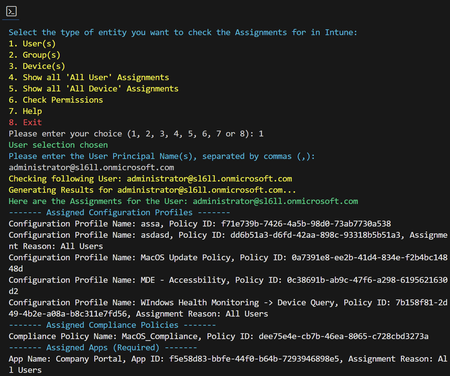
Hello everyone, I published a script that will provide a detailed overview of assigned Intune Configuration Profiles, Compliance Policies, and Applications for user, groups and devices. I have also added a option that will list all Assignments to "All users" and "All devices". Download and Setup Guide: https://intuneassignmentchecker.ugurkoc.de/ I hope that this little script will be helpful for you 🙂 Best regards Ugur6KViews5likes5Comments