governance
197 TopicsAnnouncing GA: Advanced Resource Sets in Microsoft Purview Unified Catalog
The Microsoft Purview product team is constantly listening to customer feedback about the data governance challenges that slow teams down. One of the most persistent pain points — understanding the true shape of large-scale data lakes where thousands of files represent a single logical dataset — has driven a highly requested capability. We are pleased to announce that Advanced Resource Sets are now generally available for all Microsoft Purview Unified Catalog customers. The Problem It Solves Anyone managing a modern data lake knows the clutter: a single partitioned dataset like a daily transaction log might manifest as hundreds or thousands of individual files in Azure Data Lake Storage or Amazon S3. Without intelligent grouping, each of those files appears as a separate asset in the catalog. The result is a flood of noise — a catalog that technically contains your data estate but makes it nearly impossible to reason about it at a logical level. Data stewards end up buried in meaningless entries. Analysts searching for "the transactions table" find thousands of file-level hits instead of one clean, actionable asset. Governance efforts stall because nobody can agree on what the estate looks like. Advanced Resource Sets directly address this by grouping those physically separate but logically related files into a single, representative catalog asset — giving your teams a clean, meaningful view of the data landscape. What Advanced Resource Sets Actually Do The standard resource set capability in Purview already groups files using naming pattern heuristics. Advanced Resource Sets go significantly further, and this is where it gets interesting. Custom pattern configuration allows data curators to define precisely how partitioned datasets should be grouped — whether that is by date partition, region, environment, or any other dimension embedded in your file naming conventions. You are no longer relying solely on out-of-the-box heuristics. Partition schema surfacing means Purview now extracts and displays the partition dimensions themselves as metadata on the resource set asset. Instead of knowing only that "a resource set called transactions exists," your teams can see "that resource set is partitioned by year, month, and region." That is the difference between a data inventory and a genuinely useful data catalog. Accurate asset counts ensure that your catalog's asset metrics reflect logical datasets rather than raw file counts — giving leadership and governance teams a truthful picture of the data estate's scale. Getting Started — Simpler Than You Might Expect Enabling Advanced Resource Sets requires no additional connectors or infrastructure changes. The feature is activated and configured directly within the Microsoft Purview Governance Portal. At a high level: Sign in with an account that has Data Curator role in the default domain. Open Account settings in Microsoft Purview. Use the toggle to enable or disable Advanced resource sets. Define custom pattern rules by going to Data Map -> Source Management -> Pattern Rules Trigger a rescan (or allow scheduled scans to run). Purview will re-evaluate existing assets and collapse file-level entries into properly grouped resource sets with partition schema metadata attached. What You Can Do With It Once configured, Advanced Resource Sets surface in the Unified Catalog alongside all other scanned assets — but now at the right level of abstraction for your data consumers and governance teams. Data discoverability improves immediately. Analysts searching the catalog find logical datasets, not file fragments. They can evaluate partition coverage, understand data freshness based on partition metadata, and make confident decisions about whether an asset meets their needs before requesting access. Governance accuracy follows naturally. Data owners can apply classifications, sensitivity labels, and glossary terms to a single representative asset rather than chasing down hundreds of file-level entries. Ready to enable Advanced Resource Sets in your environment? Head to the Microsoft Purview Portal, navigate to account settings. Full documentation is available at Microsoft Learn: Manage resource sets.Authorization and Identity Governance Inside AI Agents
Designing Authorization‑Aware AI Agents Enforcing Microsoft Entra ID RBAC in Copilot Studio As AI agents move from experimentation to enterprise execution, authorization becomes the defining line between innovation and risk. AI agents are rapidly evolving from experimental assistants into enterprise operators—retrieving user data, triggering workflows, and invoking protected APIs. While many early implementations rely on prompt‑level instructions to control access, regulated enterprise environments require authorization to be enforced by identity systems, not language models. This article presents a production‑ready, identity‑first architecture for building authorization‑aware AI agents using Copilot Studio, Power Automate, Microsoft Entra ID, and Microsoft Graph, ensuring every agent action executes strictly within the requesting user’s permissions. Why Prompt‑Level Security Is Not Enough Large Language Models interpret intent—they do not enforce policy. Even the most carefully written prompts cannot: Validate Microsoft Entra ID group or role membership Reliably distinguish delegated user identity from application identity Enforce deterministic access decisions Produce auditable authorization outcomes Relying on prompts for authorization introduces silent security failures, over‑privileged access, and compliance gaps—particularly in Financial Services, Healthcare, and other regulated industries. Authorization is not a reasoning problem. It is an identity enforcement problem. Common Authorization Anti‑Patterns in AI Agents The following patterns frequently appear in early AI agent implementations and should be avoided in enterprise environments: Hard‑coded role or group checks embedded in prompts Trusting group names passed as plain‑text parameters Using application permissions for user‑initiated actions Skipping verification of the user’s Entra ID identity Lacking an auditable authorization decision point These approaches may work in demos, but they do not survive security reviews, compliance audits, or real‑world misuse scenarios. Authorization‑Aware Agent Architecture In an authorization‑aware design, the agent never decides access. Authorization is enforced externally, by identity‑aware workflows that sit outside the language model’s reasoning boundary. High‑Level Flow The Copilot Studio agent receives a user request The agent passes the User Principal Name (UPN) and intended action A Power Automate flow validates permissions using Microsoft Entra ID via Microsoft Graph Only authorized requests are allowed to proceed Unauthorized requests fail fast with a deterministic outcome Authorization‑aware Copilot Studio architecture enforces Entra ID RBAC before executing any business action. The agent orchestrates intent. Identity systems enforce access. Enforcing Entra ID RBAC with Microsoft Graph Power Automate acts as the authorization enforcement layer: Resolve user identity from the supplied UPN Retrieve group or role memberships using Microsoft Graph Normalize and compare memberships against approved RBAC groups Explicitly deny execution when authorization fails This keeps authorization logic: Centralized Deterministic Auditable Independent of the AI model Reference Implementation: Power Automate RBAC Enforcement Flow The following import‑ready Power Automate cloud flow demonstrates a secure RBAC enforcement pattern for Copilot Studio agents. It validates Microsoft Entra ID group membership before allowing any business action. Scenario Trigger: User‑initiated agent action Identity model: Delegated user identity Input: userUPN, requestedAction Outcome: Authorized or denied based on Entra ID RBAC { "$schema": "https://schema.management.azure.com/providers/Microsoft.Logic/schemas/2016-06-01/workflowdefinition.json#", "contentVersion": "1.0.0.0", "triggers": { "Copilot_Request": { "type": "Request", "kind": "Http", "inputs": { "schema": { "type": "object", "properties": { "userUPN": { "type": "string" }, "requestedAction": { "type": "string" } }, "required": [ "userUPN" ] } } } }, "actions": { "Get_User_Groups": { "type": "Http", "inputs": { "method": "GET", "uri": "https://graph.microsoft.com/v1.0/users/@{triggerBody()?['userUPN']}/memberOf?$select=displayName", "authentication": { "type": "ManagedServiceIdentity" } } }, "Normalize_Group_Names": { "type": "Select", "inputs": { "from": "@body('Get_User_Groups')?['value']", "select": { "groupName": "@toLower(item()?['displayName'])" } }, "runAfter": { "Get_User_Groups": [ "Succeeded" ] } }, "Check_Authorization": { "type": "Condition", "expression": "@contains(body('Normalize_Group_Names'), 'ai-authorized-users')", "runAfter": { "Normalize_Group_Names": [ "Succeeded" ] }, "actions": { "Authorized_Action": { "type": "Compose", "inputs": "User authorized via Entra ID RBAC" } }, "else": { "actions": { "Access_Denied": { "type": "Terminate", "inputs": { "status": "Failed", "message": "Access denied. User not authorized via Entra ID RBAC." } } } } } } } This pattern enforces authorization outside the agent, aligns with Zero Trust principles, and creates a clear audit boundary suitable for enterprise and regulated environments. Flow Diagram: Agent Integrated with RBAC Authorization Flow and Sample Prompt Execution: Delegated vs Application Permissions Scenario Recommended Permission Model User‑initiated agent actions Delegated permissions Background or system automation Application permissions Using delegated permissions ensures agent execution remains strictly within the requesting user’s identity boundary. Auditing and Compliance Benefits Deterministic and explainable authorization decisions Centralized enforcement aligned with identity governance Clear audit trails for security and compliance reviews Readiness for SOC, ISO, PCI, and FSI assessments Enterprise Security Takeaways Authorization belongs in Microsoft Entra ID, not prompts AI agents must respect enterprise identity boundaries Copilot Studio + Power Automate + Microsoft Graph enable secure‑by‑design AI agents By treating AI agents as first‑class enterprise actors and enforcing authorization at the identity layer, organizations can scale AI adoption with confidence, trust, and compliance.Microsoft Purview Data Quality Thresholds: More Control, More Trust
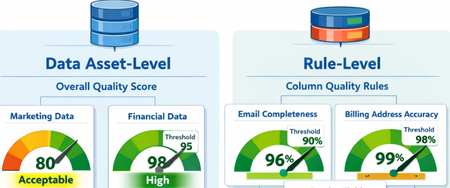
What Are Data Quality Thresholds? A data quality threshold defines the minimum acceptable score for a rule to pass. Instead of applying a single fixed standard across all data, organizations can now set expectations that align with business context and criticality. For example: An email column may require 99% completeness A product description column may only require 85% completeness Financial or regulatory data may require 100% accuracy With customizable thresholds, quality expectations become more meaningful and business-aligned. Why Does This Matter? Previously, using a single hardcoded threshold could lead to misleading quality scores. Critical data might appear “healthy” even when it didn’t meet business standards. With Data Quality Thresholds, you can: Define rule-level expectations Align quality scores with business risk Increase trust in DQ reporting Improve governance decision-making Data Asset-Level Quality Threshold Users can define data quality thresholds at the data asset level to measure how suitable a dataset is for specific business use cases. This allows organizations to quantify the overall health and fitness of a data asset before it is used in analytics, reporting, or data products. If the measured data quality score falls below the predefined threshold, the system can trigger notifications to the data asset owner or steward, prompting them to take corrective actions. It is important to note that not all data assets are equally critical. Therefore, thresholds should be context-driven and use-case specific. Example Scenario A marketing dataset used for campaign analysis may tolerate a lower quality threshold (e.g., 80%), since minor inconsistencies may not significantly impact insights. However, a financial reporting dataset used for regulatory filings may require a very high threshold (e.g., 98–100%), as even small errors can lead to compliance risks. Data Quality Rule-Level Threshold Thresholds can also be defined at the individual rule level, particularly for rules applied to specific columns. This provides more granular control and ensures that critical data elements are held to higher standards. Not all attributes have the same importance, so thresholds should reflect business criticality. Example Scenarios Email vs. Gender (Customer Contact Data) A completeness rule for a customer’s email address should have a higher threshold (e.g., 95–100%), since missing or invalid email addresses directly impact communication and engagement. In contrast, a gender attribute may have a lower threshold (e.g., 70–80%), as it is often less critical for most use cases. Billing Address vs. CRM Address A billing address is highly critical because it directly impacts: Invoice generation Tax calculations Timely delivery of invoices Therefore, the threshold for billing address quality should be very high (e.g., 98–100%). On the other hand, a CRM address used for general customer profiling may have a lower threshold, as occasional inaccuracies may not significantly affect business operations. The Impact By enabling flexible, context-aware scoring, Data Quality Thresholds help organizations move beyond generic quality checks and toward business-driven data quality management. Summary Data Quality Thresholds define the minimum acceptable score for data quality rules, allowing organizations to move beyond a one-size-fits-all approach and align quality expectations with business context and criticality. Instead of using fixed thresholds, organizations can set custom thresholds based on how important the data is. For example, financial data may require near-perfect accuracy, while less critical fields can tolerate lower thresholds. Thresholds can be applied at two levels: Data Asset Level: Measures the overall fitness of a dataset for a specific use case. Critical datasets (e.g., financial reporting) require higher thresholds than less critical ones (e.g., marketing analytics). Rule Level: Applies to individual columns or rules, ensuring that critical attributes (e.g., email, billing address) have stricter quality requirements than less important ones. This approach improves: Alignment with business risk and priorities Trust in data quality reporting Governance decision-making Focus on high-impact data issues Overall, data quality thresholds enable more meaningful, context-aware, and business-driven data quality management, helping organizations prioritize what matters most and build confidence in their data.Security as the core primitive - Securing AI agents and apps
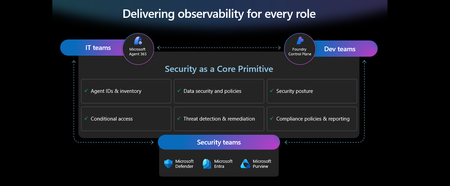
This week at Microsoft Ignite, we shared our vision for Microsoft security -- In the agentic era, security must be ambient and autonomous, like the AI it protects. It must be woven into and around everything we build—from silicon to OS, to agents, apps, data, platforms, and clouds—and throughout everything we do. In this blog, we are going to dive deeper into many of the new innovations we are introducing this week to secure AI agents and apps. As I spend time with our customers and partners, there are four consistent themes that have emerged as core security challenges to secure AI workloads. These are: preventing agent sprawl and access to resources, protecting against data oversharing and data leaks, defending against new AI threats and vulnerabilities, and adhering to evolving regulations. Addressing these challenges holistically requires a coordinated effort across IT, developers, and security leaders, not just within security teams and to enable this, we are introducing several new innovations: Microsoft Agent 365 for IT, Foundry Control Plane in Microsoft Foundry for developers, and the Security Dashboard for AI for security leaders. In addition, we are releasing several new purpose-built capabilities to protect and govern AI apps and agents across Microsoft Defender, Microsoft Entra, and Microsoft Purview. Observability at every layer of the stack To facilitate the organization-wide effort that it takes to secure and govern AI agents and apps – IT, developers, and security leaders need observability (security, management, and monitoring) at every level. IT teams need to enable the development and deployment of any agent in their environment. To ensure the responsible and secure deployment of agents into an organization, IT needs a unified agent registry, the ability to assign an identity to every agent, manage the agent’s access to data and resources, and manage the agent’s entire lifecycle. In addition, IT needs to be able to assign access to common productivity and collaboration tools, such as email and file storage, and be able to observe their entire agent estate for risks such as over-permissioned agents. Development teams need to build and test agents, apply security and compliance controls by default, and ensure AI models are evaluated for safety guardrails and security vulnerabilities. Post deployment, development teams must observe agents to ensure they are staying on task, accessing applications and data sources appropriately, and operating within their cost and performance expectations. Security & compliance teams must ensure overall security of their AI estate, including their AI infrastructure, platforms, data, apps, and agents. They need comprehensive visibility into all their security risks- including agent sprawl and resource access, data oversharing and leaks, AI threats and vulnerabilities, and complying with global regulations. They want to address these risks by extending their existing security investments that they are already invested in and familiar with, rather than using siloed or bolt-on tools. These teams can be most effective in delivering trustworthy AI to their organizations if security is natively integrated into the tools and platforms that they use every day, and if those tools and platforms share consistent security primitives such as agent identities from Entra; data security and compliance controls from Purview; and security posture, detections, and protections from Defender. With the new capabilities being released today, we are delivering observability at every layer of the AI stack, meeting IT, developers, and security teams where they are in the tools they already use to innovate with confidence. For IT Teams - Introducing Microsoft Agent 365, the control plane for agents, now in preview The best infrastructure for managing your agents is the one you already use to manage your users. With Agent 365, organizations can extend familiar tools and policies to confidently deploy and secure agents, without reinventing the wheel. By using the same trusted Microsoft 365 infrastructure, productivity apps, and protections, organizations can now apply consistent and familiar governance and security controls that are purpose-built to protect against agent-specific threats and risks. gement and governance of agents across organizations Microsoft Agent 365 delivers a unified agent Registry, Access Control, Visualization, Interoperability, and Security capabilities for your organization. These capabilities work together to help organizations manage agents and drive business value. The Registry powered by the Entra provides a complete and unified inventory of all the agents deployed and used in your organization including both Microsoft and third-party agents. Access Control allows you to limit the access privileges of your agents to only the resources that they need and protect their access to resources in real time. Visualization gives organizations the ability to see what matters most and gain insights through a unified dashboard, advanced analytics, and role-based reporting. Interop allows agents to access organizational data through Work IQ for added context, and to integrate with Microsoft 365 apps such as Outlook, Word, and Excel so they can create and collaborate alongside users. Security enables the proactive detection of vulnerabilities and misconfigurations, protects against common attacks such as prompt injections, prevents agents from processing or leaking sensitive data, and gives organizations the ability to audit agent interactions, assess compliance readiness and policy violations, and recommend controls for evolving regulatory requirements. Microsoft Agent 365 also includes the Agent 365 SDK, part of Microsoft Agent Framework, which empowers developers and ISVs to build agents on their own AI stack. The SDK enables agents to automatically inherit Microsoft's security and governance protections, such as identity controls, data security policies, and compliance capabilities, without the need for custom integration. For more details on Agent 365, read the blog here. For Developers - Introducing Microsoft Foundry Control Plane to observe, secure and manage agents, now in preview Developers are moving fast to bring agents into production, but operating them at scale introduces new challenges and responsibilities. Agents can access tools, take actions, and make decisions in real time, which means development teams must ensure that every agent behaves safely, securely, and consistently. Today, developers need to work across multiple disparate tools to get a holistic picture of the cybersecurity and safety risks that their agents may have. Once they understand the risk, they then need a unified and simplified way to monitor and manage their entire agent fleet and apply controls and guardrails as needed. Microsoft Foundry provides a unified platform for developers to build, evaluate and deploy AI apps and agents in a responsible way. Today we are excited to announce that Foundry Control Plane is available in preview. This enables developers to observe, secure, and manage their agent fleets with built-in security, and centralized governance controls. With this unified approach, developers can now identify risks and correlate disparate signals across their models, agents, and tools; enforce consistent policies and quality gates; and continuously monitor task adherence and runtime risks. Foundry Control Plane is deeply integrated with Microsoft’s security portfolio to provide a ‘secure by design’ foundation for developers. With Microsoft Entra, developers can ensure an agent identity (Agent ID) and access controls are built into every agent, mitigating the risk of unmanaged agents and over permissioned resources. With Microsoft Defender built in, developers gain contextualized alerts and posture recommendations for agents directly within the Foundry Control Plane. This integration proactively prevents configuration and access risks, while also defending agents from runtime threats in real time. Microsoft Purview’s native integration into Foundry Control Plane makes it easy to enable data security and compliance for every Foundry-built application or agent. This allows Purview to discover data security and compliance risks and apply policies to prevent user prompts and AI responses from safety and policy violations. In addition, agent interactions can be logged and searched for compliance and legal audits. This integration of the shared security capabilities, including identity and access, data security and compliance, and threat protection and posture ensures that security is not an afterthought; it’s embedded at every stage of the agent lifecycle, enabling you to start secure and stay secure. For more details, read the blog. For Security Teams - Introducing Security Dashboard for AI - unified risk visibility for CISOs and AI risk leaders, coming soon AI proliferation in the enterprise, combined with the emergence of AI governance committees and evolving AI regulations, leaves CISOs and AI risk leaders needing a clear view of their AI risks, such as data leaks, model vulnerabilities, misconfigurations, and unethical agent actions across their entire AI estate, spanning AI platforms, apps, and agents. 90% of security professionals, including CISOs, report that their responsibilities have expanded to include data governance and AI oversight within the past year. 1 At the same time, 86% of risk managers say disconnected data and systems lead to duplicated efforts and gaps in risk coverage. 2 To address these needs, we are excited to introduce the Security Dashboard for AI. This serves as a unified dashboard that aggregates posture and real-time risk signals from Microsoft Defender, Microsoft Entra, and Microsoft Purview. This unified dashboard allows CISOs and AI risk leaders to discover agents and AI apps, track AI posture and drift, and correlate risk signals to investigate and act across their entire AI ecosystem. For example, you can see your full AI inventory and get visibility into a quarantined agent, flagged for high data risk due to oversharing sensitive information in Purview. The dashboard then correlates that signal with identity insights from Entra and threat protection alerts from Defender to provide a complete picture of exposure. From there, you can delegate tasks to the appropriate teams to enforce policies and remediate issues quickly. With the Security Dashboard for AI, CISOs and risk leaders gain a clear, consolidated view of AI risks across agents, apps, and platforms—eliminating fragmented visibility, disconnected posture insights, and governance gaps as AI adoption scales. Best of all, there’s nothing new to buy. If you’re already using Microsoft security products to secure AI, you’re already a Security Dashboard for AI customer. Figure 5: Security Dashboard for AI provides CISOs and AI risk leaders with a unified view of their AI risk by bringing together their AI inventory, AI risk, and security recommendations to strengthen overall posture Together, these innovations deliver observability and security across IT, development, and security teams, powered by Microsoft’s shared security capabilities. With Microsoft Agent 365, IT teams can manage and secure agents alongside users. Foundry Control Plane gives developers unified governance and lifecycle controls for agent fleets. Security Dashboard for AI provides CISOs and AI risk leaders with a consolidated view of AI risks across platforms, apps, and agents. Added innovation to secure and govern your AI workloads In addition to the IT, developer, and security leader-focused innovations outlined above, we continue to accelerate our pace of innovation in Microsoft Entra, Microsoft Purview, and Microsoft Defender to address the most pressing needs for securing and governing your AI workloads. These needs are: Manage agent sprawl and resource access e.g. managing agent identity, access to resources, and permissions lifecycle at scale Prevent data oversharing and leaks e.g. protecting sensitive information shared in prompts, responses, and agent interactions Defend against shadow AI, new threats, and vulnerabilities e.g. managing unsanctioned applications, preventing prompt injection attacks, and detecting AI supply chain vulnerabilities Enable AI governance for regulatory compliance e.g. ensuring AI development, operations, and usage comply with evolving global regulations and frameworks Manage agent sprawl and resource access 76% of business leaders expect employees to manage agents within the next 2–3 years. 3 Widespread adoption of agents is driving the need for visibility and control, which includes the need for a unified registry, agent identities, lifecycle governance, and secure access to resources. Today, Microsoft Entra provides robust identity protection and secure access for applications and users. However, organizations lack a unified way to manage, govern, and protect agents in the same way they manage their users. Organizations need a purpose-built identity and access framework for agents. Introducing Microsoft Entra Agent ID, now in preview Microsoft Entra Agent ID offers enterprise-grade capabilities that enable organizations to prevent agent sprawl and protect agent identities and their access to resources. These new purpose-built capabilities enable organizations to: Register and manage agents: Get a complete inventory of the agent fleet and ensure all new agents are created with an identity built-in and are automatically protected by organization policies to accelerate adoption. Govern agent identities and lifecycle: Keep the agent fleet under control with lifecycle management and IT-defined guardrails for both agents and people who create and manage them. Protect agent access to resources: Reduce risk of breaches, block risky agents, and prevent agent access to malicious resources with conditional access and traffic inspection. Agents built in Microsoft Copilot Studio, Microsoft Foundry, and Security Copilot get an Entra Agent ID built-in at creation. Developers can also adopt Entra Agent ID for agents they build through Microsoft Agent Framework, Microsoft Agent 365 SDK, or Microsoft Entra Agent ID SDK. Read the Microsoft Entra blog to learn more. Prevent data oversharing and leaks Data security is more complex than ever. Information Security Media Group (ISMG) reports that 80% of leaders cite leakage of sensitive data as their top concern. 4 In addition to data security and compliance risks of generative AI (GenAI) apps, agents introduces new data risks such as unsupervised data access, highlighting the need to protect all types of corporate data, whether it is accessed by employees or agents. To mitigate these risks, we are introducing new Microsoft Purview data security and compliance capabilities for Microsoft 365 Copilot and for agents and AI apps built with Copilot Studio and Microsoft Foundry, providing unified protection, visibility, and control for users, AI Apps, and Agents. New Microsoft Purview controls safeguard Microsoft 365 Copilot with real-time protection and bulk remediation of oversharing risks Microsoft Purview and Microsoft 365 Copilot deliver a fully integrated solution for protecting sensitive data in AI workflows. Based on ongoing customer feedback, we’re introducing new capabilities to deliver real-time protection for sensitive data in M365 Copilot and accelerated remediation of oversharing risks: Data risk assessments: Previously, admins could monitor oversharing risks such as SharePoint sites with unprotected sensitive data. Now, they can perform item-level investigations and bulk remediation for overshared files in SharePoint and OneDrive to quickly reduce oversharing exposure. Data Loss Prevention (DLP) for M365 Copilot: DLP previously excluded files with sensitivity labels from Copilot processing. Now in preview, DLP also prevents prompts that include sensitive data from being processed in M365 Copilot, Copilot Chat, and Copilot agents, and prevents Copilot from using sensitive data in prompts for web grounding. Priority cleanup for M365 Copilot assets: Many organizations have org-wide policies to retain or delete data. Priority cleanup, now generally available, lets admins delete assets that are frequently processed by Copilot, such as meeting transcripts and recordings, on an independent schedule from the org-wide policies while maintaining regulatory compliance. On-demand classification for meeting transcripts: Purview can now detect sensitive information in meeting transcripts on-demand. This enables data security admins to apply DLP policies and enforce Priority cleanup based on the sensitive information detected. & bulk remediation Read the full Data Security blog to learn more. Introducing new Microsoft Purview data security capabilities for agents and apps built with Copilot Studio and Microsoft Foundry, now in preview Microsoft Purview now extends the same data security and compliance for users and Copilots to agents and apps. These new capabilities are: Enhanced Data Security Posture Management: A centralized DSPM dashboard that provides observability, risk assessment, and guided remediation across users, AI apps, and agents. Insider Risk Management (IRM) for Agents: Uniquely designed for agents, using dedicated behavioral analytics, Purview dynamically assigns risk levels to agents based on their risky handing of sensitive data and enables admins to apply conditional policies based on that risk level. Sensitive data protection with Azure AI Search: Azure AI Search enables fast, AI-driven retrieval across large document collections, essential for building AI Apps. When apps or agents use Azure AI Search to index or retrieve data, Purview sensitivity labels are preserved in the search index, ensuring that any sensitive information remains protected under the organization’s data security & compliance policies. For more information on preventing data oversharing and data leaks - Learn how Purview protects and governs agents in the Data Security and Compliance for Agents blog. Defend against shadow AI, new threats, and vulnerabilities AI workloads are subject to new AI-specific threats like prompt injections attacks, model poisoning, and data exfiltration of AI generated content. Although security admins and SOC analysts have similar tasks when securing agents, the attack methods and surfaces differ significantly. To help customers defend against these novel attacks, we are introducing new capabilities in Microsoft Defender that deliver end-to-end protection, from security posture management to runtime defense. Introducing Security Posture Management for agents, now in preview As organizations adopt AI agents to automate critical workflows, they become high-value targets and potential points of compromise, creating a critical need to ensure agents are hardened, compliant, and resilient by preventing misconfigurations and safeguarding against adversarial manipulation. Security Posture Management for agents in Microsoft Defender now provides an agent inventory for security teams across Microsoft Foundry and Copilot Studio agents. Here, analysts can assess the overall security posture of an agent, easily implement security recommendations, and identify vulnerabilities such as misconfigurations and excessive permissions, all aligned to the MITRE ATT&CK framework. Additionally, the new agent attack path analysis visualizes how an agent’s weak security posture can create broader organizational risk, so you can quickly limit exposure and prevent lateral movement. Introducing Threat Protection for agents, now in preview Attack techniques and attack surfaces for agents are fundamentally different from other assets in your environment. That’s why Defender is delivering purpose-built protections and detections to help defend against them. Defender is introducing runtime protection for Copilot Studio agents that automatically block prompt injection attacks in real time. In addition, we are announcing agent-specific threat detections for Copilot Studio and Microsoft Foundry agents coming soon. Defender automatically correlates these alerts with Microsoft’s industry-leading threat intelligence and cross-domain security signals to deliver richer, contextualized alerts and security incident views for the SOC analyst. Defender’s risk and threat signals are natively integrated into the new Microsoft Foundry Control Plane, giving development teams full observability and the ability to act directly from within their familiar environment. Finally, security analysts will be able to hunt across all agent telemetry in the Advanced Hunting experience in Defender, and the new Agent 365 SDK extends Defender’s visibility and hunting capabilities to third-party agents, starting with Genspark and Kasisto, giving security teams even more coverage across their AI landscape. To learn more about how you can harden the security posture of your agents and defend against threats, read the Microsoft Defender blog. Enable AI governance for regulatory compliance Global AI regulations like the EU AI Act and NIST AI RMF are evolving rapidly; yet, according to ISMG, 55% of leaders report lacking clarity on current and future AI regulatory requirements. 5 As enterprises adopt AI, they must ensure that their AI innovation aligns with global regulations and standards to avoid costly compliance gaps. Introducing new Microsoft Purview Compliance Manager capabilities to stay ahead of evolving AI regulations, now in preview Today, Purview Compliance Manager provides over 300 pre-built assessments for common industry, regional, and global standards and regulations. However, the pace of change for new AI regulations requires controls to be continuously re-evaluated and updated so that organizations can adapt to ongoing changes in regulations and stay compliant. To address this need, Compliance Manager now includes AI-powered regulatory templates. AI-powered regulatory templates enable real-time ingestion and analysis of global regulatory documents, allowing compliance teams to quickly adapt to changes as they happen. As regulations evolve, the updated regulatory documents can be uploaded to Compliance Manager, and the new requirements are automatically mapped to applicable recommended actions to implement controls across Microsoft Defender, Microsoft Entra, Microsoft Purview, Microsoft 365, and Microsoft Foundry. Automated actions by Compliance Manager further streamline governance, reduce manual workload, and strengthen regulatory accountability. Introducing expanded Microsoft Purview compliance capabilities for agents and AI apps now in preview Microsoft Purview now extends its compliance capabilities across agent-generated interactions, ensuring responsible use and regulatory alignment as AI becomes deeply embedded across business processes. New capabilities include expanded coverage for: Audit: Surface agent interactions, lifecycle events, and data usage with Purview Audit. Unified audit logs across user and agent activities, paired with traceability for every agent using an Entra Agent ID, support investigation, anomaly detection, and regulatory reporting. Communication Compliance: Detect prompts sent to agents and agent-generated responses containing inappropriate, unethical, or risky language, including attempts to manipulate agents into bypassing policies, generating risky content, or producing noncompliant outputs. When issues arise, data security admins get full context, including the prompt, the agent’s output, and relevant metadata, so they can investigate and take corrective action Data Lifecycle Management: Apply retention and deletion policies to agent-generated content and communication flows to automate lifecycle controls and reduce regulatory risk. Read about Microsoft Purview data security for agents to learn more. Finally, we are extending our data security, threat protection, and identity access capabilities to third-party apps and agents via the network. Advancing Microsoft Entra Internet Access Secure Web + AI Gateway - extend runtime protections to the network, now in preview Microsoft Entra Internet Access, part of the Microsoft Entra Suite, has new capabilities to secure access to and usage of GenAI at the network level, marking a transition from Secure Web Gateway to Secure Web and AI Gateway. Enterprises can accelerate GenAI adoption while maintaining compliance and reducing risk, empowering employees to experiment with new AI tools safely. The new capabilities include: Prompt injection protection which blocks malicious prompts in real time by extending Azure AI Prompt Shields to the network layer. Network file filtering which extends Microsoft Purview to inspect files in transit and prevents regulated or confidential data from being uploaded to unsanctioned AI services. Shadow AI Detection that provides visibility into unsanctioned AI applications through Cloud Application Analytics and Defender for Cloud Apps risk scoring, empowering security teams to monitor usage trends, apply Conditional Access, or block high-risk apps instantly. Unsanctioned MCP server blocking prevents access to MCP servers from unauthorized agents. With these controls, you can accelerate GenAI adoption while maintaining compliance and reducing risk, so employees can experiment with new AI tools safely. Read the Microsoft Entra blog to learn more. As AI transforms the enterprise, security must evolve to meet new challenges—spanning agent sprawl, data protection, emerging threats, and regulatory compliance. Our approach is to empower IT, developers, and security leaders with purpose-built innovations like Agent 365, Foundry Control Plane, and the Security Dashboard for AI. These solutions bring observability, governance, and protection to every layer of the AI stack, leveraging familiar tools and integrated controls across Microsoft Defender, Microsoft Entra, and Microsoft Purview. The future of security is ambient, autonomous, and deeply woven into the fabric of how we build, deploy, and govern AI systems. Explore additional resources Learn more about Security for AI solutions on our webpage Learn more about Microsoft Agent 365 Learn more about Microsoft Entra Agent ID Get started with Microsoft 365 Copilot Get started with Microsoft Copilot Studio Get started with Microsoft Foundry Get started with Microsoft Defender for Cloud Get started with Microsoft Entra Get started with Microsoft Purview Get started with Microsoft Purview Compliance Manager Sign up for a free Microsoft 365 E5 Security Trial and Microsoft Purview Trial 1 Bedrock Security, 2025 Data Security Confidence Index, published Mar 17, 2025. 2 AuditBoard & Ascend2, Connected Risk Report 2024; as cited by MIT Sloan Management Review, Spring 2025. 3 KPMG AI Quarterly Pulse Survey | Q3 2025. September 2025. n= 130 U.S.-based C-suite and business leaders representing organizations with annual revenue of $1 billion or more 4 First Annual Generative AI study: Business Rewards vs. Security Risks, , Q3 2023, ISMG, N=400 5 First Annual Generative AI study: Business Rewards vs. Security Risks, Q3 2023, ISMG, N=400
Building Secure, Enterprise Ready AI Agents with Purview SDK and Agent Framework
At Microsoft Ignite, we announced the public preview of Purview integration with the Agent Framework SDK—making it easier to build AI agents that are secure, compliant, and enterprise‑ready from day one. AI agents are quickly moving from demos to production. They reason over enterprise data, collaborate with other agents, and take real actions. As that happens, one thing becomes non‑negotiable: Governance has to be built in. That’s where Purview SDK comes in. Agentic AI Changes the Security Model Traditional apps expose risks at the UI or API layer. AI agents are different. Agents can: Process sensitive enterprise data in prompts and responses Collaborate with other agents across workflows Act autonomously on behalf of users Without built‑in controls, even a well‑designed agent can create compliance gaps. Purview SDK brings Microsoft’s enterprise data security and compliance directly into the agent runtime, so governance travels with the agent—not after it. What You Get with Purview SDK + Agent Framework This integration delivers a few key things developers and enterprises care about most: Inline Data Protection Evaluate prompts and responses against Data Loss Prevention (DLP) policies in real time. Content can be allowed or blocked automatically. Built‑In Governance Send AI interactions to Purview for audit, eDiscovery, communication compliance, and lifecycle management—without custom plumbing. Enterprise‑Ready by Design Ship agents that meet enterprise security expectations from the start, not as a follow‑up project. All of this is done natively through Agent Framework middleware, so governance feels like part of the platform—not an add‑on. How Enforcement Works (Quickly) When an agent runs: Prompts and responses flow through the Agent Framework pipeline Purview SDK evaluates content against configured policies A decision is returned: allow, redact, or block Governance signals are logged for audit and compliance This same model works for: User‑to‑agent interactions Agent‑to‑agent communication Multi‑agent workflows Try It: Add Purview SDK in Minutes Here’s a minimal Python example using Agent Framework: That’s it! From that point on: Prompts and responses are evaluated against Purview policies setup within the enterprise tenant Sensitive data can be automatically blocked Interactions are logged for governance and audit Designed for Real Agent Systems Most production AI apps aren’t single‑agent systems. Purview SDK supports: Agent‑level enforcement for fine‑grained control Workflow‑level enforcement across orchestration steps Agent‑to‑agent governance to protect data as agents collaborate This makes it a natural fit for enterprise‑scale, multi‑agent architectures. Get Started Today You can start experimenting right away: Try the Purview SDK with Agent Framework Follow the Microsoft Learn docs to configure Purview SDK with Agent Framework. Explore the GitHub samples See examples of policy‑enforced agents in Python and .NET. Secure AI, Without Slowing It Down AI agents are quickly becoming production systems—not experiments. By integrating Purview SDK directly into the Agent Framework, Microsoft is making governance a default capability, not a deployment blocker. Build intelligent agents. Protect sensitive data. Scale with confidence.Strengthening your Security Posture with Microsoft Security Store Innovations at RSAC 2026
Security teams are facing more threats, more complexity, and more pressure to act quickly - without increasing risk or operational overhead. What matters is being able to find the right capability, deploy it safely, and use it where security work already happens. Microsoft Security Store was built with that goal in mind. It provides a single, trusted place to discover, purchase, and deploy Microsoft and partner-built security agents and solutions that extend Microsoft Security - helping you improve protection across SOC, identity, and data protection workflows. Today, the Security Store includes 75+ security agents and 115+ solutions from Microsoft and trusted partners - each designed to integrate directly into Microsoft Security experiences and meet enterprise security requirements. At RSAC 2026, we’re announcing capabilities that make it easier to turn security intent into action- by improving how you discover agents, how quickly you can put them to use, and how effectively you can apply them across workflows to achieve your security outcomes. Meet the Next Generation of Security Agents Security agents are becoming part of day-to-day operations for many teams - helping automate investigations, enrich signals, and reduce manual effort across common security tasks. Since Security Store became generally available, Microsoft and our partners have continued to expand the set of agents that integrate directly with Microsoft Defender, Sentinel, Entra, Purview, Intune and Security Copilot. Some of the notable partner-built agents available through Security Store include: XBOW Continuous Penetration Testing Agent XBOW’s penetration testing agents perform pen-tests, analyzes findings, and correlates those findings with a customer’s Microsoft Defender detections. XBOW integrates offensive security directly into Microsoft Security workflows by streaming validated, exploitable AppSec findings into Microsoft Sentinel and enabling investigation through XBOW's Copilot agents in Microsoft Defender. With XBOW’s pen-testing agents, offensive security can run continuously to identify which vulnerabilities are actually exploitable, and how to improve posture and detections. Tanium Incident Scoping Agent The Tanium Incident Scoping Agent (In Preview) is bringing real-time endpoint intelligence directly into Microsoft Defender and Microsoft Security Copilot workflows. The agent automatically scopes incidents, identifies impacted devices, and surfaces actionable context in minutes-helping teams move faster from detection to containment. By combining Tanium’s real-time intelligence with Microsoft Security investigations, you can reduce manual effort, accelerate response, and maintain enterprise-grade governance and control. Zscaler In Microsoft Sentinel, the Zscaler ZIA–ZPA Correlation Agent correlates ZIA and ZPA activity for a given user to speed malsite/malware investigations. It highlights suspicious patterns and recommends ZIA/ZPA policy changes to reduce repeat exposure. These agents build on a growing ecosystem of Microsoft and partner capabilities designed to work together, allowing you to extend Microsoft Security with specialized expertise where it has the most impact. Discover and Deploy Agents and Solutions in the Flow of Security Work Security teams work best when they don’t have to switch tools to make decisions. That’s why Security Store is embedded directly into Microsoft Security experiences - so you can discover and evaluate trusted agents and solutions in context, while working in the tools you already use. When Security Store became generally available, we embedded it into Microsoft Defender, allowing SOC teams to discover and deploy trusted Microsoft and partner‑built agents and solutions in the middle of active investigations. Analysts can now automate response, enrich investigations, and resolve threats all within the Defender portal. At RSAC, we’re expanding this approach across identity and data security. Strengthening Identity Security with Security Store in Microsoft Entra Identity has become a primary attack surface - from fraud and automated abuse to privileged access misuse and posture gaps. Security Store is now embedded in Microsoft Entra, allowing identity and security teams to discover and deploy partner solutions and agents directly within identity workflows. For external and verified identity scenarios, Security Store includes partner solutions that integrate with Entra External ID and Entra Verified ID to help protect against fraud, DDoS attacks, and intelligent bot abuse. These solutions, built by partners such as IDEMIA, AU10TIX, TrueCredential, HUMAN Security, Akamai and Arkose Labs help strengthen trust while preserving seamless user experiences. For enterprise identity security, more than 15 agents available through the Entra Security Store provide visibility into privileged activity and identity risk, posture health and trends, and actionable recommendations to improve identity security and overall security score. These agents are built by partners such as glueckkanja, adaQuest, Ontinue, BlueVoyant, Invoke, and Performanta. This allows you to extend Entra with specialized identity security capabilities, without leaving the identity control plane. Extending Data Protection with Security Store in Microsoft Purview Protecting sensitive data requires consistent controls across where data lives and how it moves. Security Store is now embedded in Microsoft Purview, enabling teams responsible for data protection and compliance to discover partner solutions directly within Purview DLP workflows. Through this experience, you can extend Microsoft Purview DLP with partner data security solutions that help protect sensitive data across cloud applications, enterprise browsers, and networks. These include solutions from Microsoft Entra Global Secure Access and partners such as Netskope, Island, iBoss, and Palo Alto Networks. This experience will be available to customers later this month, as reflected on the M365 roadmap. By discovering solutions in context, teams can strengthen data protection without disrupting established compliance workflows. Across Defender, Entra, and Purview, purchases continue to be completed through the Security Store website, ensuring a consistent, secure, and governed transaction experience - while discovery and evaluation happen exactly where teams already work. Outcome-Driven Discovery, with Security Store Advisor As the number of agents and solutions in the Store grow, finding the right fit for your security scenario quickly becomes more important. That’s why we’re introducing the AI‑guided Security Store Advisor, now generally available. You can describe your goal in natural language - such as “investigate suspicious network activity” and receive recommendations aligned to that outcome. Advisor also includes side-by-side comparison views for agents and solutions, helping you review capabilities, integrated services, and deployment requirements more quickly and reduce evaluation time. Security Store Advisor is designed with Responsible AI principles in mind, including transparency and explainability. You can learn more about how Responsible AI is applied in this experience in the Security Store Advisor Responsible AI FAQ. Overall, this outcome‑driven approach reduces time to value, improves solution fit, and helps your team move faster from intent to action. Learning from the Security Community with Ratings and Reviews Security decisions are strongest when informed by real world use cases. This is why we are introducing Security Store ratings and reviews from security professionals who have deployed and used agents and solutions in production environments. These reviews focus on practical considerations such as integration quality, operational impact, and ease of use, helping you learn from peers facing similar security challenges. By sharing feedback, the security community helps raise the bar for quality and enables faster, more informed decisions, so teams can adopt agents and solutions with greater confidence and reduce time to value. Making agents easier to use post deployment Once you’ve deployed your agents, we’re introducing several new capabilities that make it easier to work with your agents in your daily workflows. These updates help you operationalize agents faster and apply automation where it delivers real value. Interactive chat with agents in Microsoft Defender lets SOC analysts ask questions to agents with specialized expertise, such as understanding impacted devices or understanding what vulnerabilities to prioritize directly in the Defender portal. By bringing a conversational experience with agents into the place where analysts do most of their investigation work, analysts can seamlessly work in collaboration with agents to improve security. Logic App triggers for agents enables security teams to include security agents in their automated, repeatable workflows. With this update, organizations can apply agentic automation to a wider variety of security tasks while integrating with their existing tools and workflows to perform tasks like incident triage and access reviews. Product combinations in Security Store make it easier to deploy complete security solutions from a single streamlined flow - whether that includes connectors, SaaS tools, or multiple agents that need to work together. Increasingly, partners are building agents that are adept at using your SaaS security tools and security data to provide intelligent recommendations - this feature helps you deploy them faster with ease. A Growing Ecosystem Focused on Security Outcomes As the Security Store ecosystem continues to expand, you gain access to a broader set of specialized agents and solutions that work together to help defend your environment - extending Microsoft Security with partner innovation in a governed and integrated way. At the same time, Security Store provides partners a clear path to deliver differentiated capabilities directly into Microsoft Security workflows, aligned to how customers evaluate, adopt, and use security solutions. Get Started Visit https://securitystore.microsoft.com/ to discover security agents and solutions that meet your needs and extend your Microsoft Security investments. If you’re a partner, visit https://securitystore.microsoft.com/partners to learn how to list your solution or agent and reach customers where security decisions are made. Where to find us at RSAC 2026? Security Reborn in the Era of AI workshop Get hands‑on guidance on building and deploying Security Copilot agents and publishing them to the Security Store. March 23 | 8:00 AM | The Palace Hotel Register: Security Reborn in the Era of AI | Microsoft Corporate Microsoft Security Store: An Inside Look Join us for a live theater session exploring what’s coming next for Security Store March 26 | 1:00 PM | Microsoft Security Booth #5744 | North Expo Hall Visit us at the Booth Experience Security Store firsthand - test the experience and connect with experts. Microsoft Booth #1843Security Dashboard for AI - Now Generally Available
AI proliferation in the enterprise, combined with the emergence of AI governance committees and evolving AI regulations, leaves CISOs and AI risk leaders needing a clear view of their AI risks, such as data leaks, model vulnerabilities, misconfigurations, and unethical agent actions across their entire AI estate, spanning AI platforms, apps, and agents. 53% of security professionals say their current AI risk management needs improvement, presenting an opportunity to better identify, assess and manage risk effectively. 1 At the same time, 86% of leaders prefer integrated platforms over fragmented tools, citing better visibility, fewer alerts and improved efficiency. 2 To address these needs, we are excited to announce the Security Dashboard for AI, previously announced at Microsoft Ignite, is now generally available. This unified dashboard aggregates posture and real-time risk signals from Microsoft Defender, Microsoft Entra, and Microsoft Purview - enabling users to see left-to-right across purpose-built security tools from within a single pane of glass. The dashboard equips CISOs and AI risk leaders with a governance tool to discover agents and AI apps, track AI posture and drift, and correlate risk signals to investigate and act across their entire AI ecosystem. Security teams can continue using the tools they trust while empowering security leaders to govern and collaborate effectively. Gain Unified AI Risk Visibility Consolidating risk signals from across purpose-built tools can simplify AI asset visibility and oversight, increase security teams’ efficiency, and reduce the opportunity for human error. The Security Dashboard for AI provides leaders with unified AI risk visibility by aggregating security, identity, and data risk across Defender, Entra, Purview into a single interactive dashboard experience. The Overview tab of the dashboard provides users with an AI risk scorecard, providing immediate visibility to where there may be risks for security teams to address. It also assesses an organization's implementation of Microsoft security for AI capabilities and provides recommendations for improving AI security posture. The dashboard also features an AI inventory with comprehensive views to support AI assets discovery, risk assessments, and remediation actions for broad coverage of AI agents, models, MCP servers, and applications. The dashboard provides coverage for all Microsoft AI solutions supported by Entra, Defender and Purview—including Microsoft 365 Copilot, Microsoft Copilot Studio agents, and Microsoft Foundry applications and agents—as well as third-party AI models, applications, and agents, such as Google Gemini, OpenAI ChatGPT, and MCP servers. This supports comprehensive visibility and control, regardless of where applications and agents are built. Prioritize Critical Risk with Security Copilots AI-Powered Insights Risk leaders must do more than just recognize existing risks—they also need to determine which ones pose the greatest threat to their business. The dashboard provides a consolidated view of AI-related security risks and leverages Security Copilot’s AI-powered insights to help find the most critical risks within an environment. For example, Security Copilot natural language interaction improves agent discovery and categorization, helping leaders identify unmanaged and shadow AI agents to enhance security posture. Furthermore, Security Copilot allows leaders to investigate AI risks and agent activities through prompt-based exploration, putting them in the driver’s seat for additional risk investigation. Drive Risk Mitigation By streamlining risk mitigation recommendations and automated task delegation, organizations can significantly improve the efficiency of their AI risk management processes. This approach can reduce the potential hidden AI risk and accelerate compliance efforts, helping to ensure that risk mitigation is timely and accurate. To address this, the Security Dashboard for AI evaluates how organizations put Microsoft’s AI security features into practice and offers tailored suggestions to strengthen AI security posture. It leverages Microsoft’s productivity tools for immediate action within the practitioner portal, making it easy for administrators to delegate recommendation tasks to designated users. With the Security Dashboard for AI, CISOs and risk leaders gain a clear, consolidated view of AI risks across agents, apps, and platforms—eliminating fragmented visibility, disconnected posture insights, and governance gaps as AI adoption scales. Best of all, the Security Dashboard for AI is included with eligible Microsoft security products customers already use. If an organization is already using Microsoft security products to secure AI, they are already a Security Dashboard for AI customer. Getting Started Existing Microsoft Security customers can start using Security Dashboard for AI today. It is included when a customer has the Microsoft Security products—Defender, Entra and Purview—with no additional licensing required. To begin using the Security Dashboard for AI, visit http://ai.security.microsoft.com or access the dashboard from the Defender, Entra or Purview portals. Learn more about the Security Dashboard for AI at Microsoft Security MS Learn. 1AuditBoard & Ascend2 Research. The Connected Risk Report: Uniting Teams and Insights to Drive Organizational Resilience. AuditBoard, October 2024. 2Microsoft. 2026 Data Security Index: Unifying Data Protection and AI Innovation. Microsoft Security, 2026New Microsoft Purview innovations for Fabric to safely accelerate your AI transformation
As organizations adopt AI, security and governance remain core primitives for safe AI transformation and acceleration. After all, data leaders are aware of the notion that: Your AI is only as good as your data. Organizations are skeptical about AI transformation due to concerns of sensitive data oversharing and poor data quality. In fact, 86% of organizations lack visibility into AI data flows, operating in darkness about what information employees share with AI systems [1]. Compounding on this challenge, about 67% of executives are uncomfortable using data for AI due to quality concerns [2]. The challenges of data oversharing and poor data quality requires organizations to solve these issues seamlessly for the safe usage of AI. Microsoft Purview offers a modern, unified approach to help organizations secure and govern data across their entire data estate, in particular best in class integrations with M365, Microsoft Fabric, and Azure data estates, streamlining oversight and reducing complexity across the estate. At FabCon Atlanta, we’re announcing new Microsoft Purview innovations for Fabric to help seamlessly secure and confidently activate your data for AI transformation. These updates span data security and data governance, granting Fabric users to both Discover risks and prevent data oversharing in Fabric Improve governance processes and data quality across their data estate 1. Discover risks and prevent data oversharing in Fabric As data volume increases with AI usage, Microsoft Purview secures your data with capabilities such as Information Protection, Data Loss Prevention (DLP), Insider Risk Management (IRM), and Data Security Posture Management (DSPM). These capabilities work together to secure data throughout its lifecycle and now specifically for your Fabric data estate. Here are a few new Purview innovations for your Fabric estate: Microsoft Purview DLP policies to prevent data leakage for Fabric Warehouse and KQL/SQL DBs Now generally available, Microsoft Purview DLP policies allow Fabric admins to prevent data oversharing in Fabric through policy tip triggering when sensitive data is detected in assets uploaded to Warehouses. Additionally, in preview, Purview DLP enables Fabric admins to restrict access to assets with sensitive data in KQL/SQL DBs and Fabric Warehouses to prevent data oversharing. This helps admins limit access to sensitive data detected in these data sources and data stores to just asset owners and allowed collaborators. These DLP innovations expand upon the depth and breadth of existing DLP policies to ensure sensitive data in Fabric is protected. Figure 1. DLP restrict access preventing data oversharing of customer information stored in a KQL database. Microsoft Purview Insider Risk Management (IRM) indicators for Lakehouse, IRM data theft quick policy for Fabric, and IRM pay-as-you-go usage report for Fabric Microsoft Purview Insider Risk Management is now generally available for Microsoft Fabric extending its risk-detection capabilities to Microsoft Fabric lakehouses (in addition to Power BI which is supported today) by offering ready-to-use risk indicators based on risky user activities in Fabric lakehouses, such as sharing data from a Fabric lakehouse with people outside the organization . Additionally, IRM data theft policy is now generally available for security admins to create a data theft policy to detect Fabric data exfiltration, such as exporting Power BI reports. Also, organizations now have visibility into how much they are billed with the IRM pay-as-you-go usage report for Fabric, providing customers with an easy-to-use dashboard to track their consumption and predictability on costs. Figure 2. IRM identifying risky user behavior when handling data in a Fabric Lakehouse. Figure 3. Security admins can create a data theft policy to detect Fabric data exfiltration. Figure 4. Security admins can check the pay-as-you-go usage (processing units) across different workloads and activities such as the downgrading of sensitivity labels of a lakehouse through the usage report. Microsoft Purview for all Fabric Copilots and Agents Microsoft Purview currently provides capabilities in preview for all Copilots and Agents in Fabric. Organizations can: Discover data risks such as sensitive data in user prompts and responses and receive recommended actions to reduce these risks. Detect and remediate oversharing risks with Data Risk Assessments on DSPM, that identify potentially overshared, unprotected, or sensitive Fabric assets, giving teams clear visibility into where data exposure exists and enabling targeted actions—like applying labels or policies—to reduce risk and ensure Fabric data is AI‑ready and governed by design. Identify risky AI usage with Microsoft Purview Insider Risk Management to investigate risky AI usage, such as an inadvertent user who has neglected security best practices and shared sensitive data in AI. Govern AI usage with Microsoft Purview Audit, Microsoft Purview eDiscovery, retention policies, and non-compliant usage detection. Figure 5. Purview DSPM provides admins with the ability to discover data risks such as a user’s attempt to obtain historical data within a data agent in the Data Science workload in Fabric. DSPM subsequently provides actions to solve this risk. Now that we’ve covered how Purview helps secure Fabric data and AI, the next focus is ensuring Fabric users can use that data responsibly. 2. Improve governance processes and data quality across their data estate Once an organization’s data is secured for AI, the next challenge is ensuring consumers can easily find and trust the data needed for AI. This is where the Purview Unified Catalog comes in, serving as the foundation for enterprise data governance. Estate-wide data discovery provides a holistic view of the data landscape, helping prevent valuable data from being underutilized. Built-in data quality tools enable teams to measure, monitor, and remediate issues such as incomplete records, inconsistencies, and redundancies, ensuring decisions and AI outcomes are based on trusted, reliable data. Purview provides additional governance capabilities for all data consumers and governance teams and supplement those who utilize the Fabric OneLake catalog. Here are a few new innovations within the Purview Unified Catalog: Publication workflows for data products and glossary terms Now generally available, data owners can leverage Workflows in the Purview Unified Catalog to manage how data products and glossary terms are published. Customizable workflows enable governance teams to work faster to create a well curated catalog, specifically by ensuring that data products and glossary terms are published and governed responsibly. Data consumers can request access to data products and be reassured that the data is held to a certain governance standard by governance teams. Figure 6. Customizing a Workflow for publishing a glossary term in your catalog. Data quality for ungoverned assets in the Unified Catalog, including Fabric data In the Unified Catalog, Data Quality for ungoverned data assets allows organizations to run data quality on data assets, including Fabric assets, without linking them to data products. This approach enables data quality stewards to run data quality at a faster speed and on greater scale, ensuring that their organizations can democratize high quality data for AI use cases. Figure 7. Running data quality on data assets without it being associated with a data product. Looking Forward As organizations accelerate their AI ambitions, data security and governance become essential. Microsoft Purview and Microsoft Fabric deliver an integrated and unified foundation that enables organizations to innovate with confidence, ensuring data is protected, governed, and trusted for responsible AI activation. We’re committed to helping you stay ahead of evolving challenges and opportunities as you unlock more value from your data. Explore these new capabilities and join us on the journey toward a more secure, governed, and AI‑ready data future. [1] 2025 AI Security Gap: 83% of Organizations Flying Blind [2] The Importance Of Data Quality: Metrics That Drive Business SuccessBulk enable Azure Arc Connected Machine Agent Automatic Upgrade (Tag Scoped) with Azure Cloud Shell
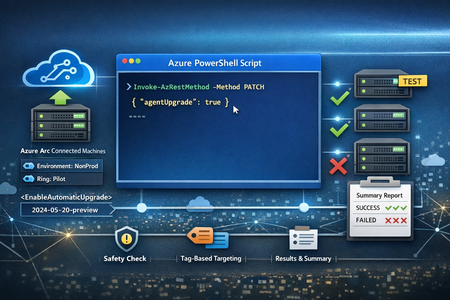
Overview Keeping the Azure Arc Connected Machine agent current is a foundational hygiene task for any hybrid server estate, especially when you’re operating at scale and onboarding hundreds (or thousands) of machines into Arc. The good news: Azure Arc supports an automatic agent upgrade (preview) capability that can be enabled per Arc machine by setting the agentUpgrade.enableAutomaticUpgrade property via Azure Resource Manager (ARM). Microsoft’s public guidance shows enabling this using a PATCH call (via Invoke-AzRestMethod) against the Arc machine resource with the 2024-05-20-preview API version. Manage and maintain the Azure Connected Machine agent - Azure Arc | Microsoft Learn In real environments, you rarely want to enable this across every Arc-enabled server in one shot. Instead, you typically: start with a pilot ring (e.g., Dev/Test or low‑risk servers), validate results, and then expand coverage gradually. The Script: Abhishek-Sharan/ExtensionManagement: Install & Manage Extensions The script implements exactly that approach by: prompting an explicit disclaimer acknowledgement (safety gate), selecting Arc machines by tag (a controlled blast-radius technique), enabling automatic upgrade using ARM PATCH through Invoke-AzRestMethod, producing a final summary report of success/failure per machine. This post walks through what the script does, why each section exists, and what to consider before using it in production. Why Tag‑Scoped Enablement? In many enterprise deployments, tags are the simplest way to define a “ring” of servers: Ring=Pilot Environment=NonProd Workload=LowRisk This script discovers resources of type Microsoft.HybridCompute machines in a given resource group and filters them by a tag/value pair. That makes it easy to: onboard machines first, apply tags as part of provisioning, then flip on agent auto-upgrade only for the right cohort. Script Details (Walkthrough) 1) Safety Gate: Disclaimer + Explicit User Consent This script prints a disclaimer block and requires the operator to type Y to proceed. If the user types anything else, the script exits. Why it matters: It prevents accidental execution (especially in shared shells or jump boxes). It reinforces that this is a potentially impactful change across multiple machines. 2) Configuration: Subscription, Resource Group, and Tag Scope The script sets the active Azure context: Set-AzContext -Subscription "YOUR SUBSCRIPTION" Then defines: $resourceGroup $tagName, $tagValue 3) Discovery: Find Azure Arc Machines with a Target Tag Discovery uses: Get-AzResource -ResourceType "Microsoft.HybridCompute/machines" filters by tag match on the returned resource object. This ensures you are only targeting Arc-enabled servers represented as Microsoft.HybridCompute machines resources. If no machines are found, the script exits cleanly, which avoids the “silent no-op” problem and helps operators quickly validate that scope selection is correct. 4) Update: Enable Automatic Upgrade via ARM PATCH For each machine, the script uses Invoke-AzRestMethod with: ResourceProviderName = "Microsoft.HybridCompute" ResourceType = "Machines" ApiVersion = "2024-05-20-preview" Method = "PATCH" payload: {"properties":{"agentUpgrade":{"enableAutomaticUpgrade":true}}} 5) Output: Per‑Machine Result + Final Summary Table The script records results into an array of PSCustomObject entries with: MachineName EnableAutomaticUpgrade Result (Success/Failed) Then prints a formatted table. This is useful for: quick operator confirmation, change records, attaching output to internal work items / change tickets. Conclusion This script is a solid operational accelerant for teams managing Arc-enabled servers at scale. It combines: safety (explicit disclaimer + opt-in), control (tag-based targeting), automation (bulk enabling via ARM PATCH), observability (clear per-server results and a final summary). If you’re trying to standardize operational hygiene across hundreds of Arc machines, tag-scoped enablement like this is one of the cleanest ways to start small, learn safely, and then scale.Microsoft Fabric Lakehouse sub-item metadata in Microsoft Purview
Working at the intersection of data security, engineering, and governance, the Microsoft Purview product team continually explores capabilities that reshape how organizations understand and manage their data estate. One such capability—the ability to scan and extract metadata from Microsoft Fabric Lakehouse—has generated genuine excitement and strong customer demand. We are pleased to announce the GA of Microsoft Fabric Lakehouse sub‑item metadata in Microsoft Purview. The Problem It Solves Anyone who has managed a growing data estate knows the pain: data sources and workspaces multiply, Lakehouse accumulate tables and files, and before long nobody has a clear, centralized picture of what data lives where, what it looks like, or how it flows. Data governance becomes a spreadsheet exercise. Audits become stressful. Trust in data erodes. Microsoft Purview directly addresses this by automatically scanning your Fabric tenant and bringing metadata into the Unified Catalog — without requiring your data teams to manually document anything. What Purview Actually Extracts Here is where it gets interesting from a product perspective. The integration distinguishes between two levels of metadata: Item-level metadata covers the top-level workspace artifacts — the Lakehouse, Warehouses etc. Each of these is treated as a single entity in Purview, inventoried automatically after a scan completes. Sub-item level metadata — and this is the exciting part — now extends into the Lakehouse itself. Purview can now scan tables (Delta format) and files within a Lakehouse, surfacing column-level detail, data types, and structural information directly in the Unified Catalog. For a data steward or data consumer, this is the difference between knowing "a Lakehouse called Sales Gold exists" and knowing "that Lakehouse contains a Delta table called fact orders with 14 columns including order date (date) and revenue (decimal)." That distinction matters enormously for data discoverability, data contracts, and onboarding new consumers onto your data products. Setting It Up — Simpler Than You Think Connecting Purview to your Fabric tenant in the same Microsoft Entra tenancy is refreshingly straightforward. At a high level, the steps are: Register your Fabric tenant as a data source in the Purview Data Map. Create a security group in Microsoft Entra ID, add your Purview Managed Identity (MSI) or service principal to it, and grant that group read-only Admin API access in the Fabric tenant admin portal. Enable the "Enhance admin APIs responses with detailed metadata" setting in the Fabric Admin portal. This is easy to miss but critical — without it, sub-item scanning won't function correctly. Configure and schedule your scan, scoping it to all workspaces or a targeted subset. Support for Managed Identity authentication is now available, which simplifies credential management for teams already invested in Azure's identity infrastructure. One practical note: if you are running multiple Fabric or Power BI scans simultaneously, you may encounter rate limiting. The recommended approach is to stagger scans across different time windows rather than running them in parallel. What You Can Do With It Once scanned, the metadata surfaces in Purview's Unified Catalog, where your teams can browse by source type, workspace, or Fabric experience, and search for specific assets by name, description, or other attributes. This makes it genuinely easy for data consumers to find and evaluate data before requesting access! From a governance standpoint, this unlocks several capabilities that matter to modern data teams: Data discoverability — analysts and data scientists can find Lakehouse tables in the catalog without relying on tribal knowledge or chasing down the engineer who built the pipeline six months ago. Are you ready to setup Microsoft Fabric scan in Microsoft Purview? Head over to the Microsoft Purview Portal and select Data Map. Learn more in the Register Microsoft Fabric in Microsoft Purview documentation.