github
364 TopicsAgents League: Meet the Winners
Agents League brought together developers from around the world to build AI agents using Microsoft's developer tools. With 100+ submissions across three tracks, choosing winners was genuinely difficult. Today, we're proud to announce the category champions. 🎨 Creative Apps Winner: CodeSonify View project CodeSonify turns source code into music. As a genuinely thoughtful system, its functions become ascending melodies, loops create rhythmic patterns, conditionals trigger chord changes, and bugs produce dissonant sounds. It supports 7 programming languages and 5 musical styles, with each language mapped to its own key signature and code complexity directly driving the tempo. What makes CodeSonify stand out is the depth of execution. CodeSonify team delivered three integrated experiences: a web app with real-time visualization and one-click MIDI export, an MCP server exposing 5 tools inside GitHub Copilot in VS Code Agent Mode, and a diff sonification engine that lets you hear a code review. A clean refactor sounds harmonious. A messy one sounds chaotic. The team even built the MIDI generator from scratch in pure TypeScript with zero external dependencies. Built entirely with GitHub Copilot assistance, this is one of those projects that makes you think about code differently. 🧠 Reasoning Agents Winner: CertPrep Multi-Agent System View project CertPrep Multi-Agent System team built a production-grade 8-agent system for personalized Microsoft certification exam preparation, supporting 9 exam families including AI-102, AZ-204, AZ-305, and more. Each agent has a distinct responsibility: profiling the learner, generating a week-by-week study schedule, curating learning paths, tracking readiness, running mock assessments, and issuing a GO / CONDITIONAL GO / NOT YET booking recommendation. The engineering behind the scene here is impressive. A 3-tier LLM fallback chain ensures the system runs reliably even without Azure credentials, with the full pipeline completing in under 1 second in mock mode. A 17-rule guardrail pipeline validates every agent boundary. Study time allocation uses the Largest Remainder algorithm to guarantee no domain is silently zeroed out. 342 automated tests back it all up. This is what thoughtful multi-agent architecture looks like in practice. 💼 Enterprise Agents Winner: Whatever AI Assistant (WAIA) View project WAIA is a production-ready multi-agent system for Microsoft 365 Copilot Chat and Microsoft Teams. A workflow agent routes queries to specialized HR, IT, or Fallback agents, transparently to the user, handling both RAG-pattern Q&A and action automation — including IT ticket submission via a SharePoint list. Technically, it's a showcase of what serious enterprise agent development looks like: a custom MCP server secured with OAuth Identity Passthrough, streaming responses via the OpenAI Responses API, Adaptive Cards for human-in-the-loop approval flows, a debug mode accessible directly from Teams or Copilot, and full OpenTelemetry integration visible in the Foundry portal. Franck also shipped end-to-end automated Bicep deployment so the solution can land in any Azure environment. It's polished, thoroughly documented, and built to be replicated. Thank you To every developer who submitted and shipped projects during Agents League: thank you 💜 Your creativity and innovation brought Agents League to life! 👉 Browse all submissions on GitHub
Now in Foundry: NVIDIA Nemotron-3-Super-120B-A12B, IBM Granite-4.0-1b-Speech, and Sarvam-105B
This week's Model Mondays edition highlights three models now available in Hugging Face collection on Microsoft Foundry: NVIDIA's Nemotron-3-Super-120B-A12B, a hybrid Latent Mixture-of-Experts (MOE) model with 12B active parameters and context handling up to 1 million tokens; IBM Granite's Granite-4.0-1b-Speech, a compact Automatic Speech Recognition (ASR) and Automatic Speech Translation (AST) model that achieves a 5.52% average Word Error Rate (WER) at 280× real-time speed with runtime keyword biasing for domain adaptation; and Sarvam's Sarvam-105B, a 105B Mixture-of-Experts (MoE) model with 10.3B active parameters optimized for complex reasoning and 22 Indian languages, with comparable agentic performance compared to other larger proprietary models on web search and task-planning benchmarks. Models of the week NVIDIA Nemotron-3-Super-120B-A12B Model Specs Parameters / size: 120B total with 12B active Context length: Up to 1M tokens Primary task: Text generation (reasoning, agentic workflows, long-context tasks, tool use, RAG) Why it's interesting (Spotlight) Hybrid Latent MoE architecture with selective attention: Nemotron-3-Super combines interleaved Mamba-2 state-space layers and sparse MoE layers with a select number of full attention layers—a design called Latent MoE. Tokens are routed into a smaller latent space for computation, which improves accuracy per parameter while keeping only 12B parameters active at inference time. Multi-Token Prediction (MTP) heads where the model simultaneously predicts multiple upcoming tokens during training enable native speculative decoding, reducing time-to-first-token on long outputs without a separate draft model. Configurable reasoning mode: The model supports toggling extended chain-of-thought reasoning on or off via the chat template flag enable_thinking. This lets developers suppress the reasoning trace for latency-sensitive tasks while keeping it available for high-stakes or multi-step agentic use cases without loading a separate model. Sustained 1M-token context reliability: On RULER, the standard long-context evaluation suite, Nemotron-3-Super achieves 91.75% at 1M tokens. This makes it practical for full-document retrieval-augmented generation (RAG), long-form code analysis, and extended agentic sessions without chunking or windowing strategies. Try it Use cases Best practices Ultra‑long document ingestion & consolidation (e.g., end‑to‑end review of massive specs, logs, or multi‑volume manuals without chunking) Use the native 1M‑token context to avoid windowing strategies; feed full corpora in one pass to reduce stitching errors. Prefer default decoding for general analysis (NVIDIA recommends temperature≈1.0, top_p≈0.95) before tuning; this aligns with the model’s training and MTP‑optimized generation path. Leverage MTP for throughput (multi‑token prediction improves output speed on long outputs), making single‑pass synthesis practical at scale. Latency‑sensitive chat & tool‑calling at scale (e.g., high‑volume enterprise assistants where response time matters) Toggle reasoning traces intentionally via the chat template (enable_thinking on/off): turn off for low‑latency interactions; on for harder prompts where accuracy benefits from explicit reasoning. Use model‑recommended sampling for tool calls (many guides tighten temperature for tool use) to improve determinism while keeping top_p near 0.95. Rely on the LatentMoE + MTP design to sustain high tokens/sec under load instead of adding a draft model for speculative decoding. IBM Granite-4.0-1b-Speech Model Specs Parameters / size: ~1B Context length: 128K tokens (LLM backbone; audio processed per utterance through the speech encoder) Primary task: Multilingual Automatic Speech Recognition (ASR) and bidirectional Automatic Speech Translation (AST) Why it's interesting (Spotlight) Compact ASR with speculative decoding at near-real-time speed: At roughly 1B parameters, Granite-4.0-1b-Speech achieves a 5.52% average WER across eight English benchmarks at 280× real-time speed (RTFx—the ratio of audio duration processed to wall-clock time) on the Open ASR Leaderboard. Runtime keyword biasing for domain adaptation without fine-tuning: Granite-4.0-1b-Speech accepts a runtime keyword list—proper nouns, brand names, technical terms, acronyms—that adjusts decoding probabilities toward those terms. This allows domain-specific vocabulary to be injected at inference time rather than requiring a fine-tuning run, practical for legal transcription, medical dictation, or financial meeting notes where terminology changes across clients. Bidirectional speech translation across 6 languages in one model: Beyond ASR, the model supports translation both to and from English for French, German, Spanish, Portuguese, and Japanese, plus English-to-Italian and English-to-Mandarin. A single deployed endpoint handles ASR and AST tasks without routing audio to separate models, reducing infrastructure surface area. Try it Test the model in the Hugging Face space before deploying in Foundry here: Sarvam’s Sarvam-105B Model Specs Parameters / size: 105B total with 10.3B active (Mixture of Experts, BF16) Context length: 128K tokens (with YaRN-based long-context extrapolation, scale factor 40) Primary task: Text generation (reasoning, coding, agentic tasks, Indian language understanding) Why it's interesting (Spotlight) Broad Indian language coverage at scale: Sarvam-105B supports English and 22 Indian languages—Hindi, Bengali, Tamil, Telugu, Marathi, Gujarati, Kannada, Malayalam, Punjabi, Odia, Assamese, Urdu, Sanskrit, Maithili, Dogri, Manipuri, Santali, Kashmiri, Nepali, Sindhi, Konkani, and Tibetan—the broadest open-model coverage for this language set at this parameter range. Training explicitly prioritized the Indian context, resulting in reported state-of-the-art performance across these languages for models of comparable size. Strong agentic and web-search performance: Sarvam-105B scores 49.5% on BrowseComp (web research benchmark with search tool access)—substantially above GLM-4.5-Air (21.3%) and Qwen3-Next-80B-A3B-Thinking (38.0%). It also achieves 68.3% average on τ² Bench (multi-domain task-planning benchmark), above GPT-OSS-120B (65.8%) and GLM-4.5-Air (53.2%). This reflects training emphasis on multi-step agentic workflows in addition to standard reasoning. Try it Use cases Best practices Agentic web research & technical troubleshooting (multi-step reasoning, planning, troubleshooting) Use longer context when needed: the model is designed for long-context workflows (up to 128K context with YaRN-based extrapolation noted). Start from the model’s baseline decoding settings (as shown in the model’s sample usage) and adjust for your task: temperature ~0.8, top_p ~0.95, repetition_penalty ~1.0, and set an explicit max_new_tokens (sample shows 2048). Suggestion (general, not stated verbatim in the sources): For agentic tasks, keep the prompt structured (goal → constraints → tools available → required output format), and ask for a short plan + final answer to reduce wandering. Multilingual (Indic) customer support & content generation (English + 22 Indian languages; native-script / romanized / code-mixed inputs) Be explicit about the language/script you want back (e.g., Hindi in Devanagari vs romanized Hinglish), since training emphasized Indian languages and code-mixed/romanized inputs. Provide in-language examples (a short “good response” example in the target language/script) to anchor tone and terminology. (Suggestion—general best practice; not stated verbatim in sources.) Use the model’s baseline generation settings first (sample decoding params) and then tighten creativity for support use cases (e.g., lower temperature) if you see variability. Getting started You can deploy open-source Hugging Face models directly in Microsoft Foundry by browsing the Hugging Face collection in the Foundry model catalog and deploying to managed endpoints in just a few clicks. Or start from the Hugging Face Hub and choose the "Deploy on Microsoft Foundry" option, which brings you straight into Foundry. Learn how to discover models and deploy them using Microsoft Foundry here: Follow along the Model Mondays series and access the GitHub to stay up to date on the latest Read Hugging Face on Azure docs Learn about one-click deployments from the Hugging Face Hub on Microsoft Foundry Explore models in Microsoft Foundry245Views0likes0CommentsDemystifying GitHub Copilot Security Controls: easing concerns for organizational adoption
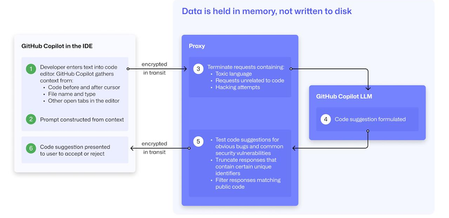
At a recent developer conference, I delivered a session on Legacy Code Rescue using GitHub Copilot App Modernization. Throughout the day, conversations with developers revealed a clear divide: some have fully embraced Agentic AI in their daily coding, while others remain cautious. Often, this hesitation isn't due to reluctance but stems from organizational concerns around security and regulatory compliance. Having witnessed similar patterns during past technology shifts, I understand how these barriers can slow adoption. In this blog, I'll demystify the most common security concerns about GitHub Copilot and explain how its built-in features address them, empowering organizations to confidently modernize their development workflows. GitHub Copilot Model Training A common question I received at the conference was whether GitHub uses your code as training data for GitHub Copilot. I always direct customers to the GitHub Copilot Trust Center for clarity, but the answer is straightforward: “No. GitHub uses neither Copilot Business nor Enterprise data to train the GitHub model.” Notice this restriction also applies to third-party models as well (e.g. Anthropic, Google). GitHub Copilot Intellectual Property indemnification policy A frequent concern I hear is, since GitHub Copilot’s underlying models are trained on sources that include public code, it might simply “copy and paste” code from those sources. Let’s clarify how this actually works: Does GitHub Copilot “copy/paste”? “The AI models that create Copilot’s suggestions may be trained on public code, but do not contain any code. When they generate a suggestion, they are not “copying and pasting” from any codebase.” To provide an additional layer of protection, GitHub Copilot includes a “duplicate detection filter”. This feature helps prevent suggestions that closely match public code from being surfaced. (Note: This duplicate detection currently does not apply to the Copilot coding agent.) More importantly, customers are protected by an Intellectual Property indemnification policy. This means that if you receive an unmodified suggestion from GitHub Copilot and face a copyright claim as a result, Microsoft will defend you in court. GitHub Copilot Data Retention Another frequent question I hear concerns GitHub Copilot’s data retention policies. For organizations on GitHub Copilot Business and Enterprise plans, retention practices depend on how and where the service is accessed from: Access through IDE for Chat and Code Completions: Prompts and Suggestions: Not retained. User Engagement Data: Kept for two years. Feedback Data: Stored for as long as needed for its intended purpose. Other GitHub Copilot access and use: Prompts and Suggestions: Retained for 28 days. User Engagement Data: Kept for two years. Feedback Data: Stored for as long as needed for its intended purpose. For Copilot Coding Agent, session logs are retained for the life of the account in order to provide the service. Excluding content from GitHub Copilot To prevent GitHub Copilot from indexing sensitive files, you can configure content exclusions at the repository or organization level. In VS Code, use the .copilotignore file to exclude files client-side. Note that files listed in .gitignore are not indexed by default but may still be referenced if open or explicitly referenced (unless they’re excluded through .copilotignore or content exclusions). The life cycle of a GitHub Copilot code suggestion Here are the key protections at each stage of the life cycle of a GitHub Copilot code suggestion: In the IDE: Content exclusions prevent files, folders, or patterns from being included. GitHub proxy (pre-model safety): Prompts go through a GitHub proxy hosted in Microsoft Azure for pre-inference checks: screening for toxic or inappropriate language, relevance, and hacking attempts/jailbreak-style prompts before reaching the model. Model response: With the public code filter enabled, some suggestions are suppressed. The vulnerability protection feature blocks insecure coding patterns like hardcoded credentials or SQL injections in real time. Disable access to GitHub Copilot Free Due to the varying policies associated with GitHub Copilot Free, it is crucial for organizations to ensure it is disabled both in the IDE and on GitHub.com. Since not all IDEs currently offer a built-in option to disable Copilot Free, the most reliable method to prevent both accidental and intentional access is to implement firewall rule changes, as outlined in the official documentation. Agent Mode Allow List Accidental file system deletion by Agentic AI assistants can happen. With GitHub Copilot agent mode, the "Terminal auto approve” setting in VS Code can be used to prevent this. This setting can be managed centrally using a VS Code policy. MCP registry Organizations often want to restrict access to allow only trusted MCP servers. GitHub now offers an MCP registry feature for this purpose. This feature isn’t available in all IDEs and clients yet, but it's being developed. Compliance Certifications The GitHub Copilot Trust Center page lists GitHub Copilot's broad compliance credentials, surpassing many competitors in financial, security, privacy, cloud, and industry coverage. SOC 1 Type 2: Assurance over internal controls for financial reporting. SOC 2 Type 2: In-depth report covering Security, Availability, Processing Integrity, Confidentiality, and Privacy over time. SOC 3: General-use version of SOC 2 with broad executive-level assurance. ISO/IEC 27001:2013: Certification for a formal Information Security Management System (ISMS), based on risk management controls. CSA STAR Level 2: Includes a third-party attestation combining ISO 27001 or SOC 2 with additional cloud control matrix (CCM) requirements. TISAX: Trusted Information Security Assessment Exchange, covering automotive-sector security standards. In summary, while the adoption of AI tools like GitHub Copilot in software development can raise important questions around security, privacy, and compliance, it’s clear that existing safeguards in place help address these concerns. By understanding the safeguards, configurable controls, and robust compliance certifications offered, organizations and developers alike can feel more confident in embracing GitHub Copilot to accelerate innovation while maintaining trust and peace of mind.Turning AI Insights into Marketplace-Ready Solutions
Want to accelerate your AI journey on Microsoft Marketplace? This blog distills key takeaways from recent Microsoft and partner webinars, giving you expert guidance on building production-ready AI apps and agents. Learn best practices for performance, deployment, and scaling—so your solutions reach more customers, faster. Don’t miss these insider insights—read the full article today: Building production‑ready AI apps and agents for Microsoft MarketplaceBuilding production‑ready AI apps and agents for Microsoft Marketplace
What developers can learn from Microsoft and partner AI webinars As software companies race to build AI‑powered applications and agents, success in Microsoft Marketplace requires more than a compelling idea. Customers expect solutions that are secure, scalable, governed, and built on trusted Azure services. A recent set of Microsoft and partner webinars offer practical guidance for developers who are building AI apps or agent‑based solutions with the intent to commercialize them through Microsoft Marketplace. Together, these sessions highlight how Microsoft is evolving the AI development lifecycle—from agentic DevOps and secure agent architectures to real‑world customer examples—helping software developers move from experimentation to enterprise‑ready solutions. From prototype to product: Agentic DevOps on Azure One of the biggest challenges Marketplace publishers face is turning an AI prototype into a reliable, supportable product. The “Transform Software Development with Agentic DevOps” webinar shows how Microsoft is embedding AI agents across the entire software development lifecycle using tools like GitHub Copilot and Azure services. Rather than focusing only on code generation, agentic DevOps introduces intelligent agents that assist with planning, implementation, testing, and operational insights. For Marketplace developers, this approach directly supports: Faster iteration while maintaining quality Improved code consistency and security posture Reduced technical debt as applications evolve These practices align closely with what enterprise buyers expect when evaluating Marketplace solutions: predictable delivery, maintainability, and long‑term support readiness. Building AI apps that scale on Azure: Microsoft and NVIDIA, better together Performance and scalability are critical for AI solutions sold through Marketplace. The “NVIDIA and Generative AI: Better Together – Building Your AI Apps” webinar focuses on how developers can build and deploy generative AI applications on Azure using optimized infrastructure and models such as PHI‑3, combined with NVIDIA acceleration. This content is especially relevant for Marketplace publishers because it addresses common customer concerns: Running AI models efficiently at scale Optimizing performance without custom infrastructure Deploying AI workloads using Azure‑native services By leveraging Azure AI services and NVIDIA‑optimized components, developers can deliver solutions that meet enterprise performance expectations while remaining aligned with Azure consumption models commonly used in Marketplace offers. Real‑world agentic AI in action: Lessons from Pantone The “Color Meets Code: Pantone’s Agentic AI Journey on Azure” webinar provides a concrete example of how a software company built an agentic AI experience using Azure services such as Azure AI Search, Microsoft Foundry, and Azure Cosmos DB. Pantone’s journey illustrates several principles that translate directly to Marketplace‑ready solutions: Using agentic architecture to deliver domain‑specific expertise Grounding AI responses with enterprise data using retrieval‑augmented generation Designing AI experiences that scale globally while maintaining consistency For Marketplace developers, this case study demonstrates how agent‑based applications can deliver differentiated value when built on Azure’s AI and data platforms—an important consideration when positioning an offer to enterprise buyers. Designing secure and governed AI agents on Azure Enterprise customers evaluating Marketplace solutions expect strong security and governance. The “Powerful and Secure Agents on Azure” webinar highlights how Microsoft is approaching secure AI agent design, emphasizing identity, access control, and operational oversight. This guidance is particularly relevant for Marketplace publishers building autonomous or semi‑autonomous agents, as it reinforces the importance of: Running agents within Azure’s security and compliance frameworks Applying governance to agent behavior and access Designing AI solutions that can operate safely in enterprise environments These considerations are essential for earning customer trust and supporting broader adoption through Microsoft Marketplace. What this means for Microsoft Marketplace publishing For software companies building AI apps and agents, these sessions reinforce a clear takeaway: enterprise-ready AI starts with how you build—and succeeds with how you publish. If you plan to distribute your solution through Microsoft Marketplace, now is the time to: Design for enterprise trust from day one Build agents on Azure using secure, governed architectures that meet customer expectations for security, compliance, and operational control. Move from prototype to production readiness Apply agentic DevOps practices to improve code quality, reliability, and maintainability—critical factors for customer adoption and long-term success in Marketplace. Differentiate with real-world AI value Ground your AI experiences in domain expertise and enterprise data to deliver outcomes customers can clearly understand, evaluate, and justify purchasing. Align with Azure-native services Solutions built on Azure AI, data, and infrastructure services are easier for customers to deploy, manage, and scale—strengthening your Marketplace positioning. By applying these patterns and best practices, you’re not just building innovative AI apps—you’re creating commercially viable, enterprise-grade solutions ready to be discovered, transacted, and scaled through Microsoft Marketplace. Explore the on-demand sessions to start turning your AI innovation into a Marketplace-ready offering. Transform Software Development with Agentic DevOps NVIDIA and Generative AI: Better Together – Building Your AI Apps Color Meets Code: Pantone’s Agentic AI Journey on Azure Powerful and Secure Agents on Azure157Views0likes0CommentsNow in Foundry: VibeVoice-ASR, MiniMax M2.5, Qwen3.5-9B
This week's Model Mondays edition features two models that have just arrived in Microsoft Foundry: Microsoft's VibeVoice-ASR, a unified speech-to-text model that handles 60-minute audio files in a single pass with built-in speaker diarisation and timestamps, and MiniMaxAI's MiniMax-M2.5, a frontier agentic model that leads on coding and tool-use benchmarks with performance comparable to the strongest proprietary models at a fraction of their cost; and Qwen's Qwen3.5-9B, the largest of the Qwen3.5 Small Series. All three represent a shift toward long-context, multi-step capability: VibeVoice-ASR processes up to an hour of continuous audio without chunking; MiniMax-M2.5 handles complex, multi-phase agentic tasks more efficiently than its predecessor—completing SWE-Bench Verified 37% faster than M2.1 with 20% fewer tool-use rounds; and Qwen3.5-9B brings multimodal reasoning on consumer hardware that outperforms much larger models. Models of the week VibeVoice-ASR Model Specs Parameters / size: ~8.3B Primary task: Automatic Speech Recognition with diarisation and timestamps Why it's interesting 60-minute single-pass with full speaker attribution: VibeVoice-ASR processes up to 60 minutes of continuous audio without chunk-based segmentation—yielding structured JSON output with start/end timestamps, speaker IDs, and transcribed content for each segment. This eliminates the speaker-tracking drift and semantic discontinuities that chunk-based pipelines introduce at segment boundaries. Joint ASR, diarisation, and timestamps in one model: Rather than running separate systems for transcription, speaker separation, and timing, VibeVoice-ASR produces all three outputs in a single forward pass. Users can also inject customized hot words—proper nouns, technical terms, or domain-specific phrases—to improve recognition accuracy on specialized content without fine-tuning. Multilingual with native code-switching: Supports 50+ languages with no explicit language configuration required and handles code-switching within and across utterances natively. This makes it suitable for multilingual meetings and international call center recordings without pre-routing audio by language. Benchmarks: On the Open ASR Leaderboard, VibeVoice-ASR achieves an average WER of 7.77% across 8 English datasets (RTFx 51.80), including 2.20% on LibriSpeech Clean and 2.57% on TED-LIUM. On the MLC-Challenge multi-speaker benchmark: DER 4.28%, cpWER 11.48%, tcpWER 13.02%. Try it Use case What to build Best practices Long-form, multi-speaker transcription for meetings + compliance A transcription service that ingests up to 60 minutes of audio per request and returns structured segments with speaker IDs + start/end timestamps + transcript text (ready for search, summaries, or compliance review). Keep audio un-chunked (single-pass) to preserve speaker coherence and avoid stitching drift; rely on the model’s joint ASR, diarisation, and timestamping so you don’t need separate diarisation/timestamp pipelines or postprocessing. Multilingual + domain-specific transcription (global support, technical reviews) A global transcription workflow for multilingual meetings or call center recordings that outputs “who/when/what,” and supports vocabulary injection for product names, acronyms, and technical terms. Provide customized hot words (names / technical terms) in the request to improve recognition on specialized content; don’t require explicit language configuration—VibeVoice-ASR supports 50+ languages and code-switching, so you can avoid pre-routing audio by language. Read more about the model and try out the playground Microsoft for Hugging Face Spaces to try the model for yourself. MiniMax-M2.5 Model Specs Parameters / size: ~229B (FP8, Mixture of Experts) Primary task: Text generation (agentic coding, tool use, search) Why it's interesting? Leading coding benchmark performance: Scores 80.2% on SWE-Bench Verified and 51.3% on Multi-SWE-Bench across 10+ programming languages (Go, C, C++, TypeScript, Rust, Python, Java, and others). In evaluations across different agent harnesses, M2.5 scores 79.7% on Droid and 76.1% on OpenCode—both ahead of Claude Opus 4.6 (78.9% and 75.9% respectively). The model was trained across 200,000+ real-world coding environments covering the full development lifecycle: system design, environment setup, feature iteration, code review, and testing. Expert-level search and tool use: M2.5 achieves industry-leading performance in BrowseComp, Wide Search, and Real-world Intelligent Search Evaluation (RISE), laying a solid foundation for autonomously handling complex tasks. Professional office work: Achieves a 59.0% average win rate against other mainstream models in financial modeling, Word, and PowerPoint tasks, evaluated via the GDPval-MM framework with pairwise comparison by senior domain professionals (finance, law, social sciences). M2.5 was co-developed with these professionals to incorporate domain-specific tacit knowledge—rather than general instruction-following—into the model's training. Try it Use case What to build Best practices Agentic software engineering Multi‑file code refactors, CI‑gated patch generation, long‑running coding agents working across large repositories Start prompts with a clear architecture or refactor goal. Let the model plan before editing files, keep tool calls sequential, and break large changes into staged tasks to maintain state and coherence across long workflows. Autonomous productivity agents Research assistants, web‑enabled task agents, document and spreadsheet generation workflows Be explicit about intent and expected output format. Decompose complex objectives into smaller steps (search → synthesize → generate), and leverage the model’s long‑context handling for multi‑step reasoning and document creation. With these use cases and best practices in mind, the next step is translating them into a clear, bounded prompt that gives the model a specific goal and the right tools to act. The example below shows how a product or engineering team might frame an automated code review and implementation task, so the model can reason through the work step by step and return results that map directly back to the original requirement: “You're building an automated code review and feature implementation system for a backend engineering team. Deploy MiniMax-M2.5 in Microsoft Foundry with access to your repository's file system tools and test runner. Given a GitHub issue describing a new API endpoint requirement, have the model first write a functional specification decomposing the requirement into sub-tasks, then implement the endpoint across the relevant service files, write unit tests with at least 85% coverage, and return a pull request summary explaining each code change and its relationship to the original requirement. Flag any implementation decisions that deviate from the patterns found in the existing codebase.” Qwen3.5-9B Model Specs Parameters / size: 9B Context length: 262,144 tokens natively; extensible to 1,010,000 tokens Primary task: Image-text-to-text (multimodal reasoning) Why it’s interesting High intelligence density at small sizes: Qwen 3.5 Small models show large reasoning gains relative to parameter count, with the 4B and 9B variants outperforming other sub‑10B models on public reasoning benchmarks. Long‑context by default: Support for up to 262K tokens enables long‑document analysis, codebase review, and multi‑turn workflows without chunking. Native multimodal architecture: Vision is built into the model architecture rather than added via adapters, allowing small models (0.8B, 2B) to handle image‑text tasks efficiently. Open and deployable: Apache‑2.0 licensed models designed for local, edge, or cloud deployment scenarios. Benchmarks AI Model & API Providers Analysis | Artificial Analysis Try it Use case When to use Best‑practice prompt pattern Long‑context reasoning Analyzing full PDFs, long research papers, or large code repositories where chunking would lose context Set a clear goal and scope. Ask the model to summarize key arguments, surface contradictions, or trace decisions across the entire document before producing an output. Lightweight multimodal document understanding OCR‑driven workflows using screenshots, scanned forms, or mixed image‑text inputs Ground the task in the artifact. Instruct the model to first describe what it sees, then extract structured information, then answer follow‑up questions. With these best practices in mind, Qwen 3.5-9B demonstrates how compact, multimodal models can handle complex reasoning tasks without chunking or manual orchestration. The prompt below shows how an operations analyst might use the model to analyze a full report end‑to‑end: "You are assisting an operations analyst. Review the attached PDF report and extracted tables. Identify the three largest cost drivers, explain how they changed quarter‑over‑quarter, and flag any anomalies that would require follow‑up. If information is missing, state what data would be needed." Getting started You can deploy open-source Hugging Face models directly in Microsoft Foundry by browsing the Hugging Face collection in the Foundry model catalog and deploying to managed endpoints in just a few clicks. You can also start from the Hugging Face Hub. First, select any supported model and then choose "Deploy on Microsoft Foundry", which brings you straight into Azure with secure, scalable inference already configured. Learn how to discover models and deploy them using Microsoft Foundry documentation. Follow along the Model Mondays series and access the GitHub to stay up to date on the latest Read Hugging Face on Azure docs Learn about one-click deployments from the Hugging Face Hub on Microsoft Foundry Explore models in Microsoft Foundry602Views0likes0CommentsFrom Prototype to Production: Building a Hosted Agent with AI Toolkit & Microsoft Foundry
From Prototype to Production: Building a Hosted Agent with AI Toolkit & Microsoft Foundry Agentic AI is no longer a future concept — it’s quickly becoming the backbone of intelligent, action-oriented applications. But while it’s easy to prototype an AI agent, taking it all the way to production requires much more than a clever prompt. In this blog post - and the accompanying video tutorial - we walk through the end-to-end journey of an AI engineer building, testing, and operationalizing a hosted AI agent using AI Toolkit in Visual Studio Code and Microsoft Foundry. The goal is to show not just how to build an agent, but how to do it in a way that’s scalable, testable, and production ready. The scenario: a retail agent for sales and inventory insights To make things concrete, the demo uses a fictional DIY and home‑improvement retailer called Zava. The objective is to build an AI agent that can assist the internal team in: Analyzing sales data (e.g. reason over a product catalog, identify top‑selling categories, etc.) Managing inventory (e.g. Detect products running low on stock, trigger restock actions, etc.) Chapter 1 (min 00:00 – 01:20): Model selection with GitHub Copilot and AI Toolkit The journey starts in Visual Studio Code, using GitHub Copilot together with the AI Toolkit. Instead of picking a model arbitrarily, we: Describe the business scenario in natural language Ask Copilot to perform a comparative analysis between two candidate models Define explicit evaluation criteria (reasoning quality, tool support, suitability for analytics) Copilot leverages AI Toolkit skills to explain why one model is a better fit than the other — turning model selection into a transparent, repeatable decision. To go deeper, we explore the AI Toolkit Model Catalog, which lets you: Browse hundreds of models Filter by hosting platform (GitHub, Microsoft Foundry, local) Filter by publisher (open‑source and proprietary) Once the right model is identified, we deploy it to Microsoft Foundry with a single click and validate it with test prompts. Chapter 2 (min 01:20 – 02:48): Rapid agent prototyping with Agent Builder UI With the model ready, it’s time to build the agent. Using the Agent Builder UI, we configure: The agent’s identity (name, role, responsibilities) Instructions that define tone, behavior, and scope The model the agent runs on The tools and data sources it can access For this scenario, we add: File search, grounded on uploaded sales logs and a product catalog Code interpreter, enabling the agent to compute metrics, generate charts, and write reports We can then test the agent in the right-side playground by asking business questions like: “What were the top three selling categories in 2025?” The response is not generic — it’s grounded in the retailer’s data, and you can inspect which tools and data were used to produce the answer. The Agent Builder also provides local evaluation and tracing functionalities. Chapter 3 (min 02:48 – 04:04): From UI prototype to hosted agent code UI-based prototyping is powerful, but real solutions often require custom logic. This is where we transition from prototype to production by using a built-in workflow to migrate from UI to a hosted agent template The result is a production-ready scaffold that includes: Agent code (built with Microsoft Agent Framework; you can choose between Python or C#) A YAML-based agent definition Container configuration files From here, we extend the agent with custom functions — for example, to create and manage restock orders. GitHub Copilot helps accelerate this step by adapting the template to the Zava business scenario. Chapter 4 (min 04:04 – 05:12): Local debugging and cloud deployment Before deploying, we test the agent locally: Ask it to identify products running out of stock Trigger a restock action using the custom function Debug the full tool‑calling flow end to end Once validated, we deploy the agent to Microsoft Foundry. By deploying the agent to the Cloud, we don’t just get compute power, but a whole set of built-in features to operationalize our solution and maintain it in production. Chapter 5 (min 05:12 – 08:04): Evaluation, safety, and monitoring in Foundry Production readiness doesn’t stop at deployment. In the Foundry portal, we explore: Evaluation runs, using both real and synthetic datasets LLM‑based judges that score responses across multiple metrics, with explanations Red teaming, where an adversarial agent probes for unsafe or undesired behavior Monitoring dashboards, tracking usage, latency, regressions, and cost across the agent fleet These capabilities make it possible to move from ad‑hoc testing to continuous quality and safety assessment. Why this workflow matters This end-to-end flow demonstrates a key idea: Agentic AI isn’t just about building agents — it’s about operating them responsibly at scale. By combining AI Toolkit in VS Code with Microsoft Foundry, you get: A smooth developer experience Clear separation between experimentation and production Built‑in evaluation, safety, and observability Resources Demo Sample: GitHub Repo Foundry tutorials: Inside Microsoft Foundry - YouTube
Introducing Phi-4-Reasoning-Vision to Microsoft Foundry
Vision reasoning models unlock a critical capability for developers: the ability to move beyond passive perception toward systems that can understand, reason over, and act on visual information. Instead of treating images, diagrams, documents, or UI screens as unstructured inputs, vision reasoning models enable developers to build applications that can interpret visual structure, connect it with textual context, and perform multi-step reasoning to reach actionable conclusions. Today, we are excited to announce Phi-4-Reasoning-Vision-15B is available in Microsoft Foundry and Hugging Face. This model brings high‑fidelity vision to the reasoning‑focused Phi‑4 family, extending small language models (SLMs) beyond perception into structured, multi‑step visual reasoning for agents, analytical tools, and scientific workflows. What’s new? The Phi model family has advanced toward combining efficient visual understanding with strong reasoning in small language models. Earlier Phi‑4 models demonstrated reliable perception and grounding across images and text, while later iterations introduced structured reasoning to improve performance on complex tasks. Phi‑4‑reasoning-vision-15B brings these threads together, pairing high‑resolution visual perception with selective, task‑aware reasoning. As a result, the model can reason deeply when needed while remaining fast and efficient for perception‑focused scenarios—making it well suited for interactive, real‑world applications. Key capabilities Reasoning behavior is explicitly enabled via prompting: Developers can explicitly enable or disable reasoning to balance latency and accuracy at runtime. Optimized for vision reasoning and can be used for: diagram-based math, document, chart, and table understanding, GUI interpretations and grounding for agent scenarios to interpret screens and actions, Computer-use agent scenarios, and General image chat and answering questions Benchmarks The following results summarize Phi-4-reasoning-vision-15B performance across a set of established multimodal reasoning, mathematics, and computer use benchmarks. The following benchmarks are the result of internal evaluations. Benchmark Phi-4-reasoning-vision-15B Phi-4-reasoning-vision-15B – force no think Phi-4-mm-instruct Kimi-VL-A3B-Instruct gemma-3-12b-it Qwen3-VL-8B-Instruct-4K Qwen3-VL-8B-Instruct-32K Qwen3-VL-32B-Instruct-4K Qwen3-VL-32B-Instruct-32K AI2D _TEST 84.8 84.7 68.6 84.6 80.4 82.7 83 84.8 85 ChartQA _TEST 83.3 76.5 23.5 87 39 83.1 83.2 84.3 84 HallusionBench 64.4 63.1 56 65.2 65.3 73.5 74.1 74.4 74.9 MathVerse _MINI 44.9 43.8 32.4 41.7 29.8 54.5 57.4 64.2 64.2 MathVision _MINI 36.2 34.2 20 28.3 31.9 45.7 50 54.3 60.5 MathVista _MINI 75.2 68.7 50.5 67.1 57.4 77.1 76.4 82.5 81.8 MMMU _VAL 54.3 52 42.3 52 50 60.7 64.6 68.6 70.6 MMStar 64.5 63.3 45.9 60 59.4 68.9 69.9 73.7 74.3 OCRBench 76 75.6 62.6 86.5 75.3 89.2 90 88.5 88.5 ScreenSpot _v2 88.2 88.3 28.5 89.8 3.5 91.5 91.5 93.7 93.9 Table 1: Accuracy comparisons relative to popular open-weight, non-thinking models Benchmark Phi-4-reasoning-vision-15B Phi-4-reasoning-vision-15B - force thinking Kimi-VL-A3B-Thinking gemma-3-12b-it Qwen3-VL-8B-Thinking-4K Qwen3-VL-8B-Thinking-40K Qwen3-VL-32B-Thiking-4K Qwen3-VL-32B-Thinking-40K AI2D_TEST 84.8 79.7 81.2 80.4 83.5 83.9 86.9 87.2 ChartQA _TEST 83.3 82.9 73.3 39 78 78.6 78.5 79.1 HallusionBench 64.4 63.9 70.6 65.3 71.6 73 76.4 76.6 MathVerse _MINI 44.9 53.1 61 29.8 67.3 73.3 78.3 78.2 MathVision _MINI 36.2 36.2 50.3 31.9 43.1 50.7 60.9 58.6 MathVista _MINI 75.2 74.1 78.6 57.4 77.7 79.5 83.9 83.8 MMMU _VAL 54.3 55 60.2 50 59.3 65.3 72 72.2 MMStar 64.5 63.9 69.6 59.4 69.3 72.3 75.5 75.7 OCRBench 76 73.7 79.9 75.3 81.2 82 83.7 85 ScreenSpot _v2 88.2 88.1 81.8 3.5 93.3 92.7 83.1 83.1 Table 2: Accuracy comparisons relative to popular open-weight, thinking models All results were obtained using a consistent evaluation setup and prompts across models; numbers are provided for comparison and analysis rather than as leaderboard claims. For more information regarding benchmarks and evaluations, please read the technical paper on the Microsoft Research hub. Suggested use cases and applications Phi‑4‑Reasoning-Vision-15B supports applications that require both high‑fidelity visual perception and structured inference. Two representative scenarios include scientific and mathematical reasoning over visual inputs, and computer‑using agents (CUAs) that operate directly on graphical user interfaces. In both cases, the model provides grounded visual understanding paired with controllable, low‑latency reasoning suitable for interactive systems. Computer use agents in retail scenarios For computer use agents, Phi‑4‑Reasoning-Vision-15B provides the perception and grounding layer required to understand and act within live ecommerce interfaces. For example, in an online shopping experience, the model interprets screen content—products, prices, filters, promotions, buttons, and cart state—and produces grounded observations that agentic models like Fara-7B can use to select actions. Its compact size and low latency inference make it well suited for CUA workflows and agentic applications. Visual reasoning for education Another practical use of visual reasoning models is education. A developer could build a K‑12 tutoring app with Phi‑4‑Reasoning‑Vision‑15B where students upload photos of worksheets, charts, or diagrams to get guided help—not answers. The model can understand the visual content, identify where the student went wrong, and explain the correct steps clearly. Over time, the app can adapt by serving new examples matched to the student’s learning level, turning visual problem‑solving into a personalized learning experience. Microsoft Responsible AI principles At Microsoft, our mission to empower people and organizations remains constant—especially in the age of AI, where the potential for human achievement is greater than ever. We recognize that trust is foundational to AI adoption, and earning that trust requires a commitment to transparency, safety, and accountability. As with other Phi models, Phi-4-Reasoning-Vision-15B was developed with safety as a core consideration throughout training and evaluation. The model was trained on a mixture of public safety datasets and internally generated examples designed to elicit behaviors the model should appropriately refuse, in alignment with Microsoft’s Responsible AI Principles. These safety focused training signals help the model recognize and decline requests that fall outside intended or acceptable use. Additional details on the model’s safety considerations, evaluation approach, and known limitations are provided in the accompanying technical blog and model card. Getting started Start using Phi‑4‑Reasoning-Vision-15B in Microsoft Foundry today. Microsoft Foundry provides a unified environment for model discovery, evaluation, and deployment, making it straightforward to move from initial experimentation to production use while applying appropriate safety and governance practices. Deploy the new model on Microsoft Foundry. Learn more about the Phi family on Foundry Labs and in the Phi Cookbook Connect to the Microsoft Developer Community on Discord Read the technical paper on Microsoft Research Read more use cases on the Educators Developer blog1.2KViews0likes0Comments