entra
27 TopicsHybrid joined devices - convert to entra Joined
how to convert/migrate +5.000 devices/laptops from Hybrid joined devices to Entra joined Only devices (the users are not in scope) - so this is all about the devices and to get this working within a existing infrastructure. Or can someone confirm there's no conversion path for hybrid joined devices to Entra join only?585Views1like1CommentPlatform SSO for macOS
Introduction As organizations accelerate their journey to passwordless authentication, Microsoft’s Platform SSO for macOS offers a seamless, secure, and user-friendly experience for device and application sign-in. Built on Apple’s SSO framework and tightly integrated with Microsoft Entra ID, Platform SSO empowers users to leverage modern authentication methods Touch ID, smart cards, and passkeys across their macOS devices, enterprise apps, and browsers. In this blog, we’ll walk through the essentials of Platform SSO, supported authentication methods, configuration steps, and best practices for deployment in enterprise environments. What is Platform SSO for macOS? Platform SSO is a Microsoft feature for macOS (13+) that leverages Apple’s SSO framework to enable single sign-on using Entra ID credentials. Users benefit from passwordless authentication, enhanced security, and a consistent experience whether logging into their device, enterprise applications, or web browsers. Key highlights: Passwordless sign-in: Use Touch ID (Secure Enclave), smart cards, or passwords for device and app authentication. Enterprise SSO plug-in: Activated for both application and browser-based sign-in, ensuring centralized identity management. No agent required: Utilizes built-in macOS platform capabilities for easy deployment and management. Authentication Methods Supported by Platform SSO Platform SSO supports three primary authentication methods on macOS: Feature Secure Enclave Smart Card Password Passwordless (phishing resistant) ✅ ✅ ❌ Touch ID supported for unlock ✅ ✅ ✅ Can be used as passkey ✅ ❌ ❌ Local Mac password synced with Entra ID ❌ ❌ ✅ Supported on macOS 14.x+ ✅ ✅ ✅ MFA mandatory for setup ✅ ✅ ❌ Secure Enclave: Recommended for most users, Secure Enclave uses hardware-bound cryptographic keys for app and web sign-ins, enabling passwordless and phishing-resistant MFA. After a reboot, users enter their local password once, then Touch ID can be used for subsequent unlocks. The device receives a hardware-backed Primary Refresh Token (PRT) for device-wide SSO. Smart Card: Ideal for high-security or compliance-driven environments, Smart Card authentication provides complete passwordless sign-in and unlock. After sign-in, the device receives a PRT and Workplace Join (WPJ) certificate for seamless SSO to Microsoft 365, Safari, and Entra-protected apps. Password: Users sign in with their Entra ID password, which syncs to the local account for SSO across apps. Intune password policies ensure alignment with Entra ID password rules, preventing sync or sign-in issues. How Platform SSO Works When a Mac device joins a Microsoft Entra ID tenant, it receives a hardware-bound WPJ certificate accessible only by the Microsoft Enterprise SSO plug-in. Apps and browsers require this certificate to access resources protected by Conditional Access policies. Platform SSO is configured using the Intune settings catalog and should ideally be assigned at device enrollment, but can also be applied to existing devices. Deployment Steps Device Enrollment in Intune: Organization-owned devices use Apple Business Manager or Apple Configurator; personally-owned devices enroll via Company Portal. Prerequisites: macOS 13+, Intune Company Portal app v5.2404.0+, supported browsers (Edge, Chrome with SSO extension, Safari), Intune RBAC permissions. Create Platform SSO Policy in Intune: Enable Platform SSO, select authentication method (Secure Enclave, Password, Smart Card), assign to user groups. Define Policies in Platform SSO Settings: Assign to users or groups with user affinity; avoid assigning to device groups to prevent Conditional Access issues. Enable MDM Push Certificate: Required for macOS enrollment in Intune. Deploy Company Portal App: Via Intune or manually from https://aka.ms/EnrollMyMac. Enroll Device and Validate Profiles: Sign in to Company Portal with Entra ID credentials and confirm device management profile. Customizing the macOS Login Experience Platform SSO allows administrators to push Login Window Text and Show Full Name settings from Intune, enabling a personalized and informative login experience for users. These settings help display the user’s full name and custom messages during sign-in, improving clarity and branding. Best Practices Assign Platform SSO policies during device enrollment for a seamless experience. Ensure password policies in Intune and Entra ID are aligned. Use Secure Enclave for most users; Smart Card for compliance scenarios. Regularly review group memberships and issuer assignments for certificate-based authentication. Document all scoped policies for compliance and troubleshooting. Conclusion Microsoft Platform SSO for macOS is a game-changer for organizations seeking secure, passwordless authentication across devices and applications. By leveraging Entra ID credentials, Touch ID, smart cards, and passkeys, IT teams can deliver a modern, seamless, and secure experience for users while maintaining compliance and reducing operational overhead. Ready to get started? Explore the official documentation and accelerate your passwordless journey today!
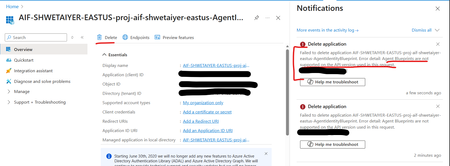
Unable to delete Foundry Agent identity Entra app in Azure
I'm trying to delete an Entra app in Azure created by Foundry Agent identity blueprint as its currently unused and is causing EntraID hygiene alerts. However getting an error mentioning that delete is not supported. Is there any other way to delete an unused Entra app for an agent identity blueprint? Error detail: Agent Blueprints are not supported on the API version used in this request.67Views0likes1CommentIntune Re-Enrollment Registry Key "MmpcEnrollmentFlag"
Hey there, In the last few weeks, we encountered issues with clients (Entra Hybrid Joined) losing their Intune connection after setting an incorrect group policy. Although the group policy change was quickly reverted, about 10 clients were removed from Intune. I attempted to re-enroll these clients using various methods (MEMC Co-management, GPO, Scheduled Task, and even using psexec to directly start auto-enrollment), but the enrollment process consistently failed with the following error under Microsoft-Windows-DeviceManagement-Enterprise-Diagnostics-Provider\Enrollment: Auto MDM Enroll: Device Credential (0x1), Failed (Bad request (400).) and/or following in CoManagementHandler.log Failed to get management URL with error 0x80070002 Eventually, I discovered a registry key that was not present on the working clients: Path: HKEY_LOCAL_MACHINE\SOFTWARE\Microsoft\Enrollments Value: MmpcEnrollmentFlag Data: 0x00000002 After deleting this key and restarting the enrollment, everything worked immediately. I am curious about how and why this registry key is created and what its function is. Looking forward to your input.Solved16KViews5likes3Comments
Which ExchangeServerApp is the right one? How to tell?
From running HCW multiple times w/ various exceptions, we have a number of separate ExchangeServerApp instances in Entra. How can I definitively tell which one (or more) is the correct instance? I can't find any of the UUIDs in the Entra entries anywhere in the Exchange Server configuration. I can't run the ConfigureHybridExchangeApplication script because (from the error it gives) it doesn't handle the multiple app identifiers. I submitted feedback but haven't heard back from the CSS-Exchange people. Any guidance appreciated.124Views0likes1Comment
Conditional Access and -Online Device registration error
So there was an Issue creating new discussions yesterday and I ended up with a discussion with Heading only. :) We're using the Get-WindowsAutopilotInfo.ps1 script with the -Online switch to register our Entra Joined Devices, and the process is being blocked by Conditional Access. The sign-in logs point to Microsoft Graph Command Line Tools (App ID: 14d82eec-204b-4c2f-b7e8-296a70dab67e) as the blocker. Microsoft Support suggested whitelisting several apps, but unfortunately, that hasn’t resolved the issue—likely because the device doesn’t have the compliant state during online registration. We’re currently evaluating whether a dedicated service account with scoped permissions for Autopilot enrollment might be a workaround. Would be great to hear if anyone else has found a reliable solution.253Views0likes2CommentsCampfire watch: Detect shadow AI & protect internet access
As employees rely more on AI tools and web-based services to get their work done, the internet has quickly become both the most-used app in your organization and its biggest security blind spot. Take a deep dive and learn how the Microsoft Entra Suite empowers you to see and control the web activity happening across your organization—without slowing down productivity or innovation. Learn how to detect shadow AI usage, dynamically enforce access policies, and stop threats before they spread. See demos of the new features that can help you control access to GenAI tools and protect your workforce from common web attack patterns. Speakers: Vincent Manna, Mohammad Zmaili, Laura Viarengo, & Martin Coetzer This session is part of the Microsoft Entra Suite Summer Camp.1.9KViews0likes3CommentsTrail tip: Secure access to any app—legacy to AI, no VPN needed
Whether you're accessing on-premises resources or leveraging internal AI-powered apps, relying on legacy systems puts secure access at risk. Don’t miss this change to learn how the Microsoft Entra Suite helps modernize your security strategy by replacing traditional VPNs with adaptive, identity-centric controls. Discover how the latest capabilities in the Microsoft Entra Suite enable seamless zero trust access to internal resources, whether their legacy apps or AI apps. We’ll also showcase how enriched signals—from on-premises identities to networks —enable precise, real-time policy enforcement. You’ll also learn how to extend identity as a real-time signal in your SOC. These hybrid detections help you detect risky behavior earlier, trigger risk-based conditional access, and respond faster across security information and event management (SIEM) and extended detection and response (XDR). Speakers: Abdi Saeedabadi, Marilee Turscak, Laura Viarengo, & Janice Ricketts This session is part of the Microsoft Entra Suite Summer Camp.1.7KViews0likes2CommentsCabin check-in: Ensure least privilege access
The average organization spends 110 minutes onboarding or provisioning resources for a single employee. With Microsoft Entra, you can reclaim that time—accelerating productivity from day one. When employees change roles, access needs to change with them—but too often, that process is manual, delayed, or incomplete. Explore how innovations in the Microsoft Entra Suite empower to automate access transitions with precision. See how identity-driven workflows can revoke outdated permissions and grant new ones based on dynamic role attributes—ensuring the right access is applied automatically, without re-onboarding. Speakers: Reid Schrodel, Anton Staykov, Laura Viarengo This session is part of the Microsoft Entra Suite Summer Camp.2.5KViews0likes5CommentsCamp kickoff: Unify access, maximize impact in the age of AI
Join us as we kick off the Summer Camp with a deep dive into the scenarios that the Microsoft Entra Suite will enable for your organization. Discover how bringing identity and network access together not only streamlines your Zero Trust architecture and reduces operational burdens but also drives measurable business outcomes. Our guest speakers, Forrester Analyst, Geoff Cairns and Senior Consultant at Forrester, Roger Nauth, will reveal exclusive findings from a commissioned Total Economic Impact™ study conducted by Forrester Consulting on behalf of Microsoft. We'll highlight how organizations are achieving significant cost savings, productivity boosts, and enhanced security by unifying access with the Microsoft Entra Suite. Speakers: Kaitlin Murphy, Forrester Analyst Geoff Cairns, Forrester Senior Consultant Roger Nauth, Laura Viarengo This session is part of the Microsoft Entra Suite Summer Camp.4.1KViews2likes12Comments