ews
9 TopicsMicrosoft Previews userConfiguration Graph API
A new userConfiguration API is available to retrieve data from Folder Associated Items (FAIs) in Exchange mailboxes. The new Graph API is part of the EWS migration project and is intended to allow application developers to migrate EWS code that updates FAIs with Graph equivalents. Most Microsoft 365 tenants will never use this API, but it’s nice to know how things work. https://office365itpros.com/2026/02/05/userconfiguration-api-beta/43Views0likes1CommentThe Final Countdown to Remove EWS from Exchange Online Begins
Microsoft announced the dates leading to the final retirement of Exchange Web Services from Exchange Online. If all goes well, the EWS retirement in the cloud will happen by May 2027. Challenges still exist. Microsoft must remove EWS from its own apps, including Outlook, and help tenants and ISVs make the leap to Graph APIs. Plans are in place and progress is being made, but will everyone be ready when Microsoft starts to remove EWS permanently from Exchange Online in April 2027? https://office365itpros.com/2026/02/06/ews-retirement-may-2027/88Views0likes0Comments
EWS Autodiscover Process in Hybrid with "internal" Exchange Servers
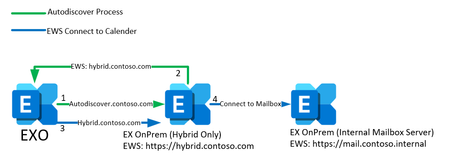
Hi everyone, i really need help about the EWS Autodiscover process in a specific hybrid Environment. Customer is starting to use Exchange Online. For Full Hybrid configuration there is a seperate new Exchange SE with a valid certificate, NAT for IP Ranges from M365 and public available URLs for Autodiscover,EWS,... There are internal Exchange Servers which are used only for internal access. Those are the servers with all mailboxes. All URLs are configured for internal use (mail.contoso.internal) Migration is working, access to own calender is working, mailfllow is working. But there are problems to access other users calender. If a user which is migrated to Exchange Online (or via Teams) try to access another calender which is onPrem, there is no access. So i tried to use connectivity analyzer for teams integration to find out whats the problem. Result: Autodiscover resolves, connects to Hybrid and gets EWS URL as answer. But it gets the internal EWS URL from the internal Exchange Servers, not from the public available URLs which are configured at the hybrid server. I visualised the two scenarios. Number1: Thats how i thought it would work Autodiscover to autodiscover.contoso.com Hybrid answers with EWS URL: hybrid.contoso.com Connect from EXO to hybrid EWS URL Proxy to Internal Exchange Number2 : Thats what really happens Autodiscover to autodiscover.contoso.com Hybrid relays request to internal Exchange (Mailbox Server) Server answers with internal EWS URL: mail.contoso.internal Connect from EXO to internal EWS URL (which is obviously not working) So as you can see, the autodiscover process asks the internal Exchange for its EWS URLs and not as i expected the hybrid server's URLs. I always thought, the hybrid server works as a sort of proxy for every external connection from EXO. But it seems that the hybrid just relays the autodiscover request to the server which holds the mailbox. And this servers in this scenario cannot change their EWS URLs to a public resolvable FQDN. So my question is: Is this correct? Does the process always works like this or did i do anything wrong in the configuration? I hope you understand my explanation. Thanks in advance!!!333Views1like5CommentsHow to Delete a Composing Email Attachment via Outlook Add-in?
Context: Server: Exchange Server 2019 on premise Client: OWA Category: Outlook Add-in Office JS API Set: Supported up to 1.5 only Problem Details: Delete an attachment added manually or through EWS API to an email item. Limitations: 1. Limitation of makeEWSRequestAsync() Office JS method: The makeEWSRequestAsync method in Office.js does not support the DeleteAttachment SOAP operation, which is required from outlook add in. -> Attempted Workaround - Using fetch with EWS SOAP Request: I tried invoking the DeleteAttachment operation via a fetch call to the EWS endpoint. However, EWS response states "requested web method is not allowed for this application". 2. OWA Limitation: As OWA in this environment only supports Office.js up to version 1.5, the modern attachment Office JS APIs and Graph APIs are not an option. Question: In an Exchange On-Premises scenario, how can I programmatically delete attachments via my add-in? Specifically, is there a recommended approach to obtain a valid token for EWS requests, or any supported alternative to perform DeleteAttachment? Any way to convert EWS attachment ID to Office JS attachment UUID? Additional Notes: I am aware that Exchange Online supports more modern APIs (Graph/REST), but my current deployment is strictly Exchange On-Premises. The add-in works well for reading attachments and other operations, except for deletion. Any guidance or recommendations would be highly appreciated! Thank you in advance.186Views0likes1CommentMicrosoft Signals the End for Exchange Web Services
On September 19, 2023 Microsoft announced their intention to retire the Exchange Web Services API on 1 October 2026. The suggested replacement is the Microsoft Graph API. Microsoft acknowledges that some gaps exist that they need to close before EWS retirement happens, but one big issue they didn’t discuss is what happens to the backup products that currently use EWS to backup Exchange Online. https://office365itpros.com/2023/09/20/exchange-web-services-retire/3.2KViews0likes0Comments
Teams uses EWS-API wrong which leads to wrong timezone in meetings
Hi, we do have an Exchange Hybrid Setup. On-Prem we do use OWA only. No Outlook-Client. When a user creates a Teams meeting (inside the Teams calendar) they sometimes use OWA when changing the meeting for comfort reasons (drag&drop). Here the problems begin. A little example: - User sets up meeting at 11:00 a.m. within the Teams calendar. - User changes meeting to 9:00 a.m. via OWA on the Exchange on-prem - Within in the organisation, everything is OK. But every External now has the appointment at 1:00 p.m. So somehow Exchange does a +2h (summertime maybe involved) to the orginal starting time of the meeting. But just for external participants. Inside the organisation everything is fine. Exchange always does the +2h based from the original meeting starttime. So moving the appointment to 3:00 p.m. will also lead to 1 p.m. for the External. Technically the .ics gets changed from "W. Europe Standard Time" to "UTC". If we change the meeting in the Teams calendar, everything is fine. If you create the meeting On-Prem and change it On-Prem or in the Teams calendar, everything is fine. It is just Online created meetings, changed On-Prem what causes the issue. I attached a screenshot of the .ics file. Right side shows the original meeting from Teams. Left side shows the changes of the meeting after leaving Exchange On-Prem. Does anybody have an idea where to look? Cheers Sebastian2.1KViews0likes3CommentsUpdating unattended EWS scripts using modern auth
Hi there, a lot of possibilities about phasing out legacy authentication have been discussed here. But I still have a lack of information or let's say I want to find the most comfortable and most secure possibility for my customers. https://docs.microsoft.com/en-us/powershell/exchange/app-only-auth-powershell-v2?view=exchange-ps But if your scripts contain EWS connections you have to initialize a different way of authentication. So I found the following option using MSAL, unfortunately this does not work in unattended mode. https://morgantechspace.com/2022/03/connect-ews-api-with-modern-authentication-using-powershell.html And then there is the possibility using the secure application model. https://docs.microsoft.com/en-us/powershell/partnercenter/multi-factor-auth?view=partnercenterps-3.0#secure-application-model I got this working now, the creation of the token for the first time has to be done interactively and the token only lasts for 90 days. I read the hint for securely saving the token to the Azure KeyVault, but how do I do this and how can I re-call this token? Is there even a better way of refreshing the token manually? Is this now the new go-to solution for unattended EWS scripts, or do you have a even better solution?4KViews0likes1Comment
Cannot Get EmailMessage Name to Display in Sent Emails Using EWS
Hi, I cannot set EmailMessage.Name to display a custom name in emails sent via Microsoft.Exchange.WebServices.Data 2.2 (assembly v15). Is it being overridden by Exchange, using the email account's Name? I've tried all possible ways, even the "display name<email-address>" format, nothing seems to work. Thanks. // Example var senderEmailAddress = new EmailAddress("myemail@blah.com") { Name = "My Name" }; // Or senderEmailAddress = new EmailAddress("My Name <myemail@blah.com>") // Or... etc. tried many diff. ways, nothing works. :( var message = new EmailMessage(exchangeService) { Sender = senderEmailAddress, Body = new MessageBody(BodyType.HTML, "test"), Subject = "test" }; message.SendAndSaveCopy(WellKnownFolderName.SentItems);936Views0likes0Comments
Exchange Web Services - Admin Account but without License
Hi, Is there a way to call the Exchange Web Services using an unlicensed Exchange Administrator account [unlicensedexchangeadmin@test.com] to list all public folders? Scenario: Listing Public Folders 1. Using the Exchange Admin Center with the unlicensed Exchange Administrator account, I can list the public folders. 2. Using the EWS.GetFolder with the same credentials, ErrorNonExistentMailbox was returned and no folders were listed. Thanks, Christle1.2KViews0likes2Comments