devops
408 TopicsAnnouncing general availability for the Azure SRE Agent
Today, we’re excited to announce the General Availability (GA) of Azure SRE Agent— your AI‑powered operations teammate that helps organizations improve uptime, reduce incident impact, and cut operational toil by accelerating diagnosis and automating response workflows.11KViews1like1CommentAnnouncing a flexible, predictable billing model for Azure SRE Agent
Billing for Azure SRE Agent will start on September 1, 2025. Announced at Microsoft Build 2025, Azure SRE Agent is a pre-built AI agent for root cause analysis, uptime improvement, and operational cost reduction. Learn more about the billing model and example scenarios.4.1KViews1like1CommentAnnouncing AWS with Azure SRE Agent: Cross-Cloud Investigation using the brand new AWS DevOps Agent
Overview Connect Azure SRE Agent to AWS services using the official AWS MCP server. Query AWS documentation, execute any of the 15,000+ AWS APIs, run operational workflows, and kick off incident investigations through AWS DevOps Agent, which is now generally available. The AWS MCP server connects Azure SRE Agent to AWS documentation, APIs, regional availability data, pre-built operational workflows (Agent SOPs), and AWS DevOps Agent for incident investigation. When connected, the proxy exposes 23 MCP tools organized into four categories: documentation and knowledge, API execution, guided workflows, and DevOps Agent operations. How it works The MCP Proxy for AWS runs as a local stdio process that SRE Agent spawns via uvx . The proxy handles AWS authentication using credentials you provide as environment variables. No separate infrastructure or container deployment is needed. In the portal, you use the generic MCP server (User provided connector) option with stdio transport. Key capabilities Area Capabilities Documentation Search all AWS docs, API references, and best practices; retrieve pages as markdown API execution Execute authenticated calls across 15,000+ AWS APIs with syntax validation and error handling Agent SOPs Pre-built multi-step workflows following AWS Well-Architected principles Regional info List all AWS regions, check service and feature availability by region Infrastructure Provision VPCs, databases, compute instances, storage, and networking resources Troubleshooting Analyze CloudWatch logs, CloudTrail events, permission issues, and application failures Cost management Set up billing alerts, analyze resource usage, and review cost data DevOps Agent Start AWS incident investigations, read root cause analyses, get remediation recommendations, and chat with AWS DevOps Agent Note: The AWS MCP Server is free to use. You pay only for the AWS resources consumed by API calls made through the server. All actions respect your existing IAM policies. Prerequisites Azure SRE Agent resource deployed in Azure AWS account with IAM credentials configured uv package manager installed on the SRE Agent host (used to run the MCP proxy via uvx ) IAM permissions: aws-mcp:InvokeMcp , aws-mcp:CallReadOnlyTool , and optionally aws-mcp:CallReadWriteTool Step 1: Create AWS access keys The AWS MCP server authenticates using AWS access keys (an Access Key ID and a Secret Access Key). These keys are tied to an IAM user in your AWS account. You create them in the AWS Management Console. Navigate to IAM in the AWS Console Sign in to the AWS Management Console In the top search bar, type IAM and select IAM from the results (Direct URL: https://console.aws.amazon.com/iam/ ) In the left sidebar, select Users (Direct URL: https://console.aws.amazon.com/iam/home#/users ) Create a dedicated IAM user Create a dedicated user for SRE Agent rather than reusing a personal account. This makes it easy to scope permissions and rotate keys independently. Select Create user Enter a descriptive user name (e.g., sre-agent-mcp ) Do not check "Provide user access to the AWS Management Console" (this user only needs programmatic access) Select Next Select Attach policies directly Select Create policy (opens in a new tab) and paste the following JSON in the JSON editor: { "Version": "2012-10-17", "Statement": [ { "Effect": "Allow", "Action": [ "aws-mcp:InvokeMcp", "aws-mcp:CallReadOnlyTool", "aws-mcp:CallReadWriteTool" ], "Resource": "*" } ] } Select Next, give the policy a name (e.g., SREAgentMCPAccess ), and select Create policy Back on the Create user tab, select the refresh button in the policy list, search for SREAgentMCPAccess , and check it Select Next > Create user Generate access keys After the user is created, generate the access keys that SRE Agent will use: From the Users list, select the user you just created (e.g., sre-agent-mcp ) Select the Security credentials tab Scroll down to the Access keys section Select Create access key For the use case, select Third-party service Check the confirmation checkbox and select Next Optionally add a description tag (e.g., Azure SRE Agent ) and select Create access key Copy both values immediately: Value Example format Where you'll use it Access Key ID <your-access-key-id> Connector environment variable AWS_ACCESS_KEY_ID Secret Access Key <your-secret-access-key> Connector environment variable AWS_SECRET_ACCESS_KEY Important: The Secret Access Key is shown only once on this screen. If you close the page without copying it, you must delete the key and create a new one. Select Download .csv file as a backup, then store the file securely and delete it after configuring the connector. Tip: For production use, also add service-specific IAM permissions for the AWS APIs you want SRE Agent to call. The MCP permissions above grant access to the MCP server itself, but individual API calls (e.g., ec2:DescribeInstances , logs:GetQueryResults ) require their own IAM actions. Start broad for testing, then scope down using the principle of least privilege. Required permissions summary Permission Description Required? aws-mcp:InvokeMcp Base access to the AWS MCP server Yes aws-mcp:CallReadOnlyTool Read operations (describe, list, get, search) Yes aws-mcp:CallReadWriteTool Write operations (create, update, delete resources) Optional Step 2: Add the MCP connector Connect the AWS MCP server to your SRE Agent using the portal. The proxy runs as a local stdio process that SRE Agent spawns via uvx . It handles SigV4 signing using the AWS credentials you provide as environment variables. Determine the AWS MCP endpoint for your region The AWS MCP server has regional endpoints. Choose the one matching your AWS resources: AWS Region MCP Endpoint URL us-east-1 (default) https://aws-mcp.us-east-1.api.aws/mcp us-west-2 https://aws-mcp.us-west-2.api.aws/mcp eu-west-1 https://aws-mcp.eu-west-1.api.aws/mcp Note: Without the --metadata AWS_REGION=<region> argument, operations default to us-east-1 . You can always override the region in your query. Using the Azure portal In Azure portal, navigate to your SRE Agent resource Select Builder > Connectors Select Add connector Select MCP server (User provided connector) and select Next Configure the connector with these values: Field Value Name aws-mcp Connection type stdio Command uvx Arguments mcp-proxy-for-aws@latest https://aws-mcp.us-east-1.api.aws/mcp --metadata AWS_REGION=us-west-2 Environment variables AWS_ACCESS_KEY_ID=<your-access-key-id> , AWS_SECRET_ACCESS_KEY=<your-secret-access-key> Select Next to review Select Add connector This is equivalent to the following MCP client configuration used by tools like Claude Desktop or Amazon Kiro CLI: { "mcpServers": { "aws-mcp": { "command": "uvx", "args": [ "mcp-proxy-for-aws@latest", "https://aws-mcp.us-east-1.api.aws/mcp", "--metadata", "AWS_REGION=us-west-2" ] } } } Important: Store the AWS_ACCESS_KEY_ID and AWS_SECRET_ACCESS_KEY securely. In the portal, environment variables for connectors are stored encrypted. For production deployments, consider using a dedicated IAM user with scoped-down permissions (see Step 1). Never commit credentials to source control. Tip: If your SRE Agent host already has AWS credentials configured (e.g., via aws configure or an instance profile), the proxy will pick them up automatically from the environment. In that case, you can omit the explicit AWS_ACCESS_KEY_ID and AWS_SECRET_ACCESS_KEY environment variables. Note: After adding the connector, the agent service initializes the MCP connection. This may take up to 30 seconds as uvx downloads the proxy package on first run (~89 dependencies). If the connector does not show Connected status after a minute, see the Troubleshooting section below. Step 3: Add an AWS skill Skills give agents domain knowledge and best practices for specific tool sets. Create an AWS skill so your agent knows how to troubleshoot AWS services, provision infrastructure, and follow operational workflows. Tip: Why skills over subagents? Skills inject domain knowledge into the main agent's context, so it can use AWS expertise without handing off to a separate agent. Conversation context stays intact and there's no handoff latency. Use a subagent when you need full isolation with its own system prompt and tool restrictions. Navigate to Builder > Skills Select Add skill Paste the following skill configuration: api_version: azuresre.ai/v1 kind: SkillConfiguration metadata: owner: your-team@contoso.com version: "1.0.0" spec: name: aws_infrastructure_operations display_name: AWS Infrastructure & Operations description: | AWS infrastructure and operations: EC2, EKS, Lambda, S3, RDS, CloudWatch, CloudTrail, IAM, VPC, and others. Also covers AWS DevOps Agent for incident investigation, root cause analysis, and remediation. Use for querying AWS resources, investigating issues, provisioning infrastructure, searching documentation, running AWS API calls via the AWS MCP server, and coordinating investigations between Azure SRE Agent and AWS DevOps Agent. instructions: | ## Overview The AWS MCP Server is a managed remote MCP server that gives AI assistants authenticated access to AWS services. It combines documentation access, authenticated API execution, and pre-built Agent SOPs in a single interface. **Authentication:** Handled automatically by the MCP Proxy for AWS, running as a local stdio process. All actions respect existing IAM policies configured in the connector environment variables. **Regional endpoints:** The MCP server has regional endpoints. The proxy is configured with a default region; you can override by specifying a region in your queries (e.g., "list my EC2 instances in eu-west-1"). ## Searching Documentation Use aws___search_documentation to find information across all AWS docs. ## Executing AWS API Calls Use aws___call_aws to execute authenticated AWS API calls. The tool handles SigV4 signing and provides syntax validation. ## Using Agent SOPs Use aws___retrieve_agent_sop to find and follow pre-built workflows. SOPs provide step-by-step guidance following AWS Well-Architected principles. ## Regional Operations Use aws___list_regions to see all available AWS regions and aws___get_regional_availability to check service support in specific regions. ## AWS DevOps Agent Integration The AWS MCP server includes tools for AWS DevOps Agent: - aws___list_agent_spaces / aws___create_agent_space: Manage AgentSpaces - aws___create_investigation: Start incident investigations (5-8 min async) - aws___get_task: Poll investigation status - aws___list_journal_records: Read root cause analysis - aws___list_recommendations / aws___get_recommendation: Get remediation steps - aws___start_evaluation: Run proactive infrastructure evaluations - aws___create_chat / aws___send_message: Chat with AWS DevOps Agent ## Troubleshooting | Issue | Solution | |-------|----------| | Access denied errors | Verify IAM policy includes aws-mcp:InvokeMcp and aws-mcp:CallReadOnlyTool | | API call fails | Check IAM policy includes the specific service action | | Wrong region results | Specify the region explicitly in your query | | Proxy connection error | Verify uvx is installed and the proxy can reach aws-mcp.region.api.aws | mcp_connectors: - aws-mcp Select Save Note: The mcp_connectors: - aws-mcp at the bottom links this skill to the connector you created in Step 2. The skill's instructions teach the agent how to use the 23 AWS MCP tools effectively. Step 4: Test the integration Open a new chat session with your SRE Agent and try these example prompts to verify the connection is working. Quick verification Start with this simple test to confirm the AWS MCP proxy is connected and authenticating correctly: What AWS regions are available? If the agent returns a list of regions, the connection is working. If you see authentication errors, go back and verify the IAM credentials and permissions from Step 1. Documentation and knowledge Search AWS documentation for EKS best practices for production clusters What AWS regions support Amazon Bedrock? Read the AWS documentation page about S3 bucket policies Infrastructure queries List all my running EC2 instances in us-east-1 Show me the details of my EKS cluster named "production-cluster" What Lambda functions are deployed in my account? CloudWatch and monitoring What CloudWatch alarms are currently in ALARM state? Show me the CPU utilization metrics for my RDS instance over the last 24 hours Search CloudWatch Logs for errors in the /aws/lambda/my-function log group Troubleshooting workflows My EC2 instance i-0abc123 is not reachable. Help me troubleshoot. My Lambda function is timing out. Walk me through the investigation. Find an Agent SOP for troubleshooting EKS pod scheduling failures Cross-cloud scenarios My Azure Function is failing when calling AWS S3. Check if there are any S3 service issues and review the bucket policy for "my-data-bucket". Compare the health of my AWS EKS cluster with my Azure AKS cluster. AWS DevOps Agent investigations List all available AWS DevOps Agent spaces in my account Create an AWS DevOps Agent investigation for the high error rate on my Lambda function "order-processor" in us-west-2 Start a chat with AWS DevOps Agent about my EKS cluster performance Cross-agent investigation (Azure SRE Agent + AWS DevOps Agent) My application is failing across both Azure and AWS. Start an AWS DevOps Agent investigation for the AWS side while you check Azure Monitor for errors on the Azure side. Then combine the findings into a unified root cause analysis. What's New: AWS DevOps Agent Integration The AWS MCP server now includes full integration with AWS DevOps Agent, which recently became generally available. This means Azure SRE Agent can start autonomous incident investigations on AWS infrastructure and get back root cause analyses and remediation recommendations — all within the same chat session. Available tools by category AgentSpace management Tool Description aws___list_agent_spaces Discover available AgentSpaces aws___get_agent_space Get AgentSpace details including ARN and configuration aws___create_agent_space Create a new AgentSpace for investigations Investigation lifecycle Tool Description aws___create_investigation Start an incident investigation (async, 5-8 min) aws___get_task Poll investigation task status aws___list_tasks List investigation tasks with filters aws___list_journal_records Read root cause analysis journal aws___list_executions List execution runs for a task aws___list_recommendations Get prioritized mitigation recommendations aws___get_recommendation Get full remediation specification Proactive evaluations Tool Description aws___start_evaluation Start an evaluation to find preventive recommendations aws___list_goals List evaluation goals and criteria Real-time chat Tool Description aws___create_chat Start a real-time chat session with AWS DevOps Agent aws___list_chats List recent chat sessions aws___send_message Send a message and get a streamed response Cross-Agent Investigation Workflow With the AWS MCP server connected, SRE Agent can run parallel investigations across both clouds. Here's how the cross-agent workflow works: Start an AWS investigation: Ask SRE Agent to create an AWS DevOps Agent investigation for the AWS-side symptoms Investigate Azure in parallel: While the AWS investigation runs (5-8 minutes), SRE Agent uses its native tools to check Azure Monitor, Log Analytics, and resource health Read AWS results: When the investigation completes, SRE Agent reads the journal records and recommendations Correlate findings: SRE Agent combines both sets of findings into a single root cause analysis with remediation steps for both clouds Common cross-cloud scenarios: Azure app calling AWS services: Investigate Azure Function errors that correlate with AWS API failures Hybrid deployments: Check AWS EKS clusters alongside Azure AKS clusters during multi-cloud outages Data pipeline issues: Trace data flow across Azure Event Hubs and AWS Kinesis or SQS Agent-to-agent investigation: Start an AWS DevOps Agent investigation for the AWS side while Azure SRE Agent checks Azure resources in parallel Architecture The integration uses a stdio proxy architecture. SRE Agent spawns the proxy as a child process, and the proxy forwards requests to the AWS MCP endpoint: Azure SRE Agent | | stdio (local process) v mcp-proxy-for-aws (spawned via uvx) | | Authenticated HTTPS requests v AWS MCP Server (aws-mcp.<region>.api.aws) | |--- Authenticated AWS API calls --> AWS Services | (EC2, S3, CloudWatch, EKS, Lambda, etc.) | '--- DevOps Agent API calls ------> AWS DevOps Agent |-- AgentSpaces (workspaces) |-- Investigations (async root cause analysis) |-- Recommendations (remediation specs) '-- Chat sessions (real-time interaction) Troubleshooting Authentication and connectivity issues Error Cause Solution 403 Forbidden IAM user lacks MCP permissions Add aws-mcp:InvokeMcp , aws-mcp:CallReadOnlyTool to the IAM policy 401 Unauthorized Invalid or expired AWS credentials Rotate access keys and update the connector environment variables Proxy fails to start uvx not installed or not on PATH Install uv on the SRE Agent host Connection timeout Proxy cannot reach the AWS MCP endpoint Verify outbound HTTPS (port 443) is allowed to aws-mcp.<region>.api.aws Connector added but tools not available MCP connections are initialized at agent startup Redeploy or restart the agent service from the Azure portal Slow first connection uvx downloads ~89 dependencies on first run Wait up to 30 seconds for the initial connection API and permission issues Error Cause Solution AccessDenied on API call IAM user lacks the service-specific permission Add the required IAM action (e.g., ec2:DescribeInstances ) to the user's policy CallReadWriteTool denied Write permission not granted Add aws-mcp:CallReadWriteTool to the IAM policy Wrong region data Proxy configured for a different region Update the AWS_REGION metadata in the connector arguments, or specify the region in your query API not found Newly released or unsupported API Use aws___suggest_aws_commands to find the correct API name Verify the connection Test that the proxy can authenticate by opening a new chat session and asking: What AWS regions are available? If the agent returns a list of regions, the connection is working. If you see authentication errors, verify the IAM credentials and permissions from Step 1. Re-authorize the integration If you encounter persistent authentication issues: Navigate to the IAM console Select the user created in Step 1 Navigate to Security credentials > Access keys Deactivate or delete the old access key Create a new access key Update the connector environment variables in the SRE Agent portal with the new credentials Related content AWS MCP Server documentation MCP Proxy for AWS on GitHub AWS MCP Server tools reference AWS DevOps Agent documentation AWS DevOps Agent GA announcement AWS IAM documentation977Views0likes0Comments
Building Multi-Agent Orchestration Using Microsoft Semantic Kernel: A Complete Step-by-Step Guide
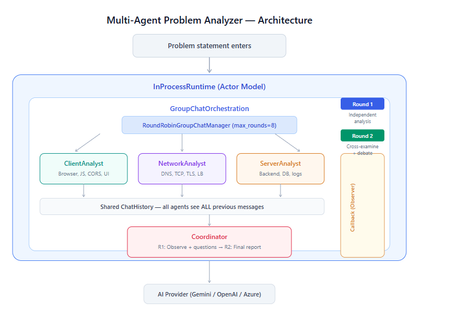
What You Will Build By the end of this guide, you will have a working multi-agent system where 4 specialist AI agents collaborate to diagnose production issues: ClientAnalyst — Analyzes browser, JavaScript, CORS, uploads, and UI symptoms NetworkAnalyst — Analyzes DNS, TCP/IP, TLS, load balancers, and firewalls ServerAnalyst — Analyzes backend logs, database, deployments, and resource limits Coordinator — Synthesizes all findings into a root cause report with a prioritized action plan These agents don't just run in sequence — they debate, cross-examine, and challenge each other's findings through a shared conversation, producing a diagnosis that's better than any single agent could achieve alone. Table of Contents Why Multi-Agent? The Problem with Single Agents Architecture Overview Understanding the Key SK Components The Actor Model — How InProcessRuntime Works Setting Up Your Development Environment Step-by-Step: Building the Multi-Agent Analyzer The Agent Interaction Flow — Round by Round Bugs I Found & Fixed — Lessons Learned Running with Different AI Providers What to Build Next 1. Why Multi-Agent? The Problem with Single Agents A single AI agent analyzing a production issue is like having one doctor diagnose everything — they'll catch issues in their specialty but miss cross-domain connections. Consider this problem: "Users report 504 Gateway Timeout errors when uploading files larger than 10MB. Started after Friday's deployment. Worse during peak hours." A single agent might say "it's a server timeout" and stop. But the real root cause often spans multiple layers: The client is sending chunked uploads with an incorrect Content-Length header (client-side bug) The load balancer has a 30-second timeout that's too short for large uploads (network config) The server recently deployed a new request body parser that's 3x slower (server-side regression) The combination only fails during peak hours because connection pool saturation amplifies the latency No single perspective catches this. You need specialists who analyze independently, then debate to find the cross-layer causal chain. That's what multi-agent orchestration gives you. The 5 Orchestration Patterns in SK Semantic Kernel provides 5 built-in patterns for agent collaboration: SEQUENTIAL: A → B → C → Done (pipeline — each builds on previous) CONCURRENT: ↗ A ↘ Task → B → Aggregate ↘ C ↗ (parallel — results merged) GROUP CHAT: A ↔ B ↔ C ↔ D ← We use this one (rounds, shared history, debate) HANDOFF: A → (stuck?) → B → (complex?) → Human (escalation with human-in-the-loop) MAGENTIC: LLM picks who speaks next dynamically (AI-driven speaker selection) We use GroupChatOrchestration with RoundRobinGroupChatManager because our problem requires agents to see each other's work, challenge assumptions, and build on each other's analysis across two rounds. 2. Architecture Overview Here's the complete architecture of what we're building: 3. Understanding the Key SK Components Before we write code, let's understand the 5 components we'll use and the design pattern each implements: ChatCompletionAgent — Strategy Pattern The agent definition. Each agent is a combination of: name — unique identifier (used in round-robin ordering) instructions — the persona and rules (this is the prompt engineering) service — which AI provider to call (Strategy Pattern — swap providers without changing agent logic) description — what other agents/tools understand about this agent agent = ChatCompletionAgent( name="ClientAnalyst", instructions="You are ONLY ClientAnalyst...", service=gemini_service, # ← Strategy: swap to OpenAI with zero changes description="Analyzes client-side issues", ) GroupChatOrchestration — Mediator Pattern The orchestration defines HOW agents interact. It's the Mediator — agents don't talk to each other directly. Instead, the orchestration manages a shared ChatHistory and routes messages through the Manager. RoundRobinGroupChatManager — Strategy Pattern The Manager decides WHO speaks next. RoundRobinGroupChatManager cycles through agents in a fixed order. SK also provides AutomaticGroupChatManager where the LLM decides who speaks next. max_rounds is the total number of messages per agent or cycle. With 4 agents and max_rounds=8, each agent speaks exactly twice. InProcessRuntime — Actor Model Abstraction The execution engine. Every agent becomes an "actor" with its own kind of mailbox (message queue). The runtime delivers messages between actors. Key properties: No shared state — agents communicate only through messages Sequential processing — each agent processes one message at a time Location transparency — same code works in-process today, distributed tomorrow agent_response_callback — Observer Pattern A function that fires after EVERY agent response. We use it to display each agent's output in real-time with emoji labels and round numbers. 4. The Actor Model — How InProcessRuntime Works The Actor Model is a concurrency pattern where each entity is an isolated "actor" with a private mailbox. Here's what happens inside InProcessRuntime when we run our demo: runtime.start() │ ├── Creates internal message loop (asyncio event loop) │ orchestration.invoke(task="504 timeout...", runtime=runtime) │ ├── Creates Actor[Orchestrator] → manages overall flow ├── Creates Actor[Manager] → RoundRobinGroupChatManager ├── Creates Actor[ClientAnalyst] → mailbox created, waiting ├── Creates Actor[NetworkAnalyst] → mailbox created, waiting ├── Creates Actor[ServerAnalyst] → mailbox created, waiting └── Creates Actor[Coordinator] → mailbox created, waiting Manager receives "start" message │ ├── Checks turn order: [Client, Network, Server, Coordinator] ├── Sends task to ClientAnalyst mailbox │ → ClientAnalyst processes: calls LLM → response │ → Response added to shared ChatHistory │ → callback fires (displayed in Notebook UI) │ → Sends "done" back to Manager │ ├── Manager updates: turn_index=1 ├── Sends to NetworkAnalyst mailbox │ → Same flow... │ ├── ... (ServerAnalyst, Coordinator for Round 1) │ ├── Manager checks: messages=4, max_rounds=8 → continue │ ├── Round 2: same cycle with cross-examination │ └── After message 8: Manager sends "complete" → OrchestrationResult resolves → result.get() returns final answer runtime.stop_when_idle() → All mailboxes empty → clean shutdown The Actor Model guarantees: No race conditions (each actor processes one message at a time) No deadlocks (no shared locks to contend for) No shared mutable state (agents communicate only via messages) 5. Setting Up Your Development Environment Prerequisites Python 3.11 or 3.12 (3.13+ may have compatibility issues with some SK connectors) Visual Studio Code with the Python and Jupyter extensions An API key from one of: Google AI Studio (free), OpenAI Step 1: Install Python Download from python.org. During installation, check "Add Python to PATH". Verify: python --version # Python 3.12.x Step 2: Install VS Code Extensions Open VS Code, go to Extensions (Ctrl+Shift+X), and install: Python (by Microsoft) — Python language support Jupyter (by Microsoft) — Notebook support Pylance (by Microsoft) — IntelliSense and type checking Step 3: Create Project Folder mkdir sk-multiagent-demo cd sk-multiagent-demo Open in VS Code: code . Step 4: Create Virtual Environment Open the VS Code terminal (Ctrl+`) and run: # Create virtual environment python -m venv sk-env # Activate it # Windows: sk-env\Scripts\activate # macOS/Linux: source sk-env/bin/activate You should see (sk-env) in your terminal prompt. Step 5: Install Semantic Kernel For Google Gemini (free tier — recommended for getting started): pip install semantic-kernel[google] python-dotenv ipykernel For OpenAI (paid API key): pip install semantic-kernel openai python-dotenv ipykernel For Azure AI Foundry (enterprise, Entra ID auth): pip install semantic-kernel azure-identity python-dotenv ipykernel Step 6: Register the Jupyter Kernel python -m ipykernel install --user --name=sk-env --display-name="Semantic Kernel (Python 3.12)" You can also select if this is already available from your environment from VSCode as below: Step 7: Get Your API Key Option A — Google Gemini (FREE, recommended for demo): Go to https://aistudio.google.com/apikey Click "Create API Key" Copy the key Free tier limits: 15 requests/minute, 1 million tokens/minute — more than enough for this demo. Option B — OpenAI: Go to https://platform.openai.com/api-keys Create a new key Copy the key Option C — Azure AI Foundry: Deploy a model in Azure AI Foundry portal Note the endpoint URL and deployment name If key-based auth is disabled, you'll need Entra ID with permissions Step 8: Create the .env File In your project root, create a file named .env: For Gemini: GOOGLE_AI_API_KEY=AIzaSy...your-key-here GOOGLE_AI_GEMINI_MODEL_ID=gemini-2.5-flash For OpenAI: OPENAI_API_KEY=sk-...your-key-here OPENAI_CHAT_MODEL_ID=gpt-4o For Azure AI Foundry: AZURE_OPENAI_ENDPOINT=https://your-resource.cognitiveservices.azure.com AZURE_OPENAI_CHAT_DEPLOYMENT_NAME=gpt-4o AZURE_OPENAI_API_KEY=your-key Step 9: Create the Notebook In VS Code: Click File > New File Save as multi_agent_analyzer.ipynb In the top-right of the notebook, click Select Kernel Choose Semantic Kernel (Python 3.12) (or your sk-env) Your environment is ready. Let's build. 6. Step-by-Step: Building the Multi-Agent Analyzer Cell 1: Verify Setup import semantic_kernel print(f"Semantic Kernel version: {semantic_kernel.__version__}") from semantic_kernel.agents import ( ChatCompletionAgent, GroupChatOrchestration, RoundRobinGroupChatManager, ) from semantic_kernel.agents.runtime import InProcessRuntime from semantic_kernel.contents import ChatMessageContent print("All imports successful") Cell 2: Load API Key and Create Service For Gemini: import os from dotenv import load_dotenv load_dotenv() from semantic_kernel.connectors.ai.google.google_ai import ( GoogleAIChatCompletion, GoogleAIChatPromptExecutionSettings, ) from semantic_kernel.contents import ChatHistory GEMINI_API_KEY = os.getenv("GOOGLE_AI_API_KEY") GEMINI_MODEL = os.getenv("GOOGLE_AI_GEMINI_MODEL_ID", "gemini-2.5-flash") service = GoogleAIChatCompletion( gemini_model_id=GEMINI_MODEL, api_key=GEMINI_API_KEY, ) print(f"Service created: Gemini {GEMINI_MODEL}") # Smoke test settings = GoogleAIChatPromptExecutionSettings() test_history = ChatHistory(system_message="You are a helpful assistant.") test_history.add_user_message("Say 'Connected!' and nothing else.") response = await service.get_chat_message_content( chat_history=test_history, settings=settings ) print(f"Model says: {response.content}") For OpenAI: import os from dotenv import load_dotenv load_dotenv() from semantic_kernel.connectors.ai.open_ai import ( OpenAIChatCompletion, OpenAIChatPromptExecutionSettings, ) from semantic_kernel.contents import ChatHistory service = OpenAIChatCompletion( ai_model_id=os.getenv("OPENAI_CHAT_MODEL_ID", "gpt-4o"), ) print(f"Service created: OpenAI {os.getenv('OPENAI_CHAT_MODEL_ID', 'gpt-4o')}") # Smoke test settings = OpenAIChatPromptExecutionSettings() test_history = ChatHistory(system_message="You are a helpful assistant.") test_history.add_user_message("Say 'Connected!' and nothing else.") response = await service.get_chat_message_content( chat_history=test_history, settings=settings ) print(f"Model says: {response.content}") Cell 3: Define All 4 Agents This is the most important cell — the prompt engineering that makes the demo work: from semantic_kernel.agents import ChatCompletionAgent # ═══════════════════════════════════════════════════ # AGENT 1: Client-Side Analyst # ═══════════════════════════════════════════════════ client_agent = ChatCompletionAgent( name="ClientAnalyst", description="Analyzes problems from the client-side: browser, JS, CORS, caching, UI symptoms", instructions="""You are ONLY **ClientAnalyst**. You must NEVER speak as NetworkAnalyst, ServerAnalyst, or Coordinator. Every word you write is from ClientAnalyst's perspective only. You are a senior front-end and client-side diagnostics expert. When given a problem statement, analyze it EXCLUSIVELY from the client side: 1. **Browser & Rendering**: DOM issues, JavaScript errors, CSS rendering, browser compatibility, memory leaks, console errors. 2. **Client-Side Caching**: Stale cache, service worker issues, local storage corruption. 3. **Network from Client View**: CORS errors, preflight failures, request timeouts, client-side retry storms, fetch/XHR configuration. 4. **Upload Handling**: File API usage, chunk upload implementation, progress tracking, FormData construction, content-type headers. 5. **UI/UX Symptoms**: What the user sees, error messages displayed, loading states. ROUND 1: Provide your independent analysis. Do NOT reference other agents. List your top 3 most likely causes with evidence. Every response MUST be at least 200 words. ROUND 2: You MUST: - Reference NetworkAnalyst and ServerAnalyst BY NAME - State specifically where you AGREE or DISAGREE with their findings - Answer the Coordinator's questions from your perspective - Add NEW cross-layer insights you see from the client perspective - Do NOT just say 'I agree' — provide substantive technical reasoning Be specific, evidence-based, and prioritize findings by likelihood.""", service=service, ) # ═══════════════════════════════════════════════════ # AGENT 2: Network Analyst # ═══════════════════════════════════════════════════ network_agent = ChatCompletionAgent( name="NetworkAnalyst", description="Analyzes problems from the network side: DNS, TCP, TLS, firewalls, load balancers, latency", instructions="""You are ONLY **NetworkAnalyst**. You must NEVER speak as ClientAnalyst, ServerAnalyst, or Coordinator. Every word you write is from NetworkAnalyst's perspective only. You are a senior network infrastructure diagnostics expert. When given a problem statement, analyze it EXCLUSIVELY from the network layer: 1. **DNS & Resolution**: DNS TTL, propagation delays, record misconfigurations. 2. **TCP/IP & Connections**: Connection pooling, keep-alive, TCP window scaling, connection resets, SYN floods. 3. **TLS/SSL**: Certificate issues, handshake failures, protocol version mismatches. 4. **Load Balancers & Proxies**: Sticky sessions, health checks, timeout configs, request body size limits, proxy buffering. 5. **Firewall & WAF**: Rule blocks, rate limiting, request inspection delays, geo-blocking, DDoS protection interference. ROUND 1: Provide your independent analysis. Do NOT reference other agents. List your top 3 most likely causes with evidence. Every response MUST be at least 200 words. ROUND 2: You MUST: - Reference ClientAnalyst and ServerAnalyst BY NAME - State specifically where you AGREE or DISAGREE with their findings - Answer the Coordinator's questions from your perspective - Add NEW cross-layer insights you see from the network perspective - Do NOT just say 'I am ready to proceed' — provide substantive technical analysis Be specific, evidence-based, and prioritize findings by likelihood.""", service=service, ) # ═══════════════════════════════════════════════════ # AGENT 3: Server-Side Analyst # ═══════════════════════════════════════════════════ server_agent = ChatCompletionAgent( name="ServerAnalyst", description="Analyzes problems from the server side: backend app, database, logs, resources, deployments", instructions="""You are ONLY **ServerAnalyst**. You must NEVER speak as ClientAnalyst, NetworkAnalyst, or Coordinator. Every word you write is from ServerAnalyst's perspective only. You are a senior backend and infrastructure diagnostics expert. When given a problem statement, analyze it EXCLUSIVELY from the server side: 1. **Application Server**: Error logs, exception traces, thread pool exhaustion, memory leaks, CPU spikes, garbage collection pauses. 2. **Database**: Slow queries, connection pool saturation, lock contention, deadlocks, replication lag, query plan changes. 3. **Deployment & Config**: Recent deployments, configuration changes, feature flags, environment variable mismatches, rollback candidates. 4. **Resource Limits**: File upload size limits, request body limits, disk space, temporary file cleanup, storage quotas. 5. **External Dependencies**: Upstream API timeouts, third-party service degradation, queue backlogs, cache (Redis/Memcached) issues. ROUND 1: Provide your independent analysis. Do NOT reference other agents. List your top 3 most likely causes with evidence. Every response MUST be at least 200 words. ROUND 2: You MUST: - Reference ClientAnalyst and NetworkAnalyst BY NAME - State specifically where you AGREE or DISAGREE with their findings - Answer the Coordinator's questions from your perspective - Add NEW cross-layer insights you see from the server perspective - Do NOT just say 'I agree' — provide substantive technical reasoning Be specific, evidence-based, and prioritize findings by likelihood.""", service=service, ) # ═══════════════════════════════════════════════════ # AGENT 4: Coordinator # ═══════════════════════════════════════════════════ coordinator_agent = ChatCompletionAgent( name="Coordinator", description="Synthesizes all specialist analyses into a final root cause report with prioritized action plan", instructions="""You are ONLY **Coordinator**. You must NEVER speak as ClientAnalyst, NetworkAnalyst, or ServerAnalyst. You synthesize — you do NOT do domain-specific analysis. You are the lead engineer who synthesizes the team's findings. ═══ ROUND 1 BEHAVIOR (your first turn, message 4) ═══ Keep this SHORT — maximum 300 words. - Note 2-3 KEY PATTERNS across the three analyses - Identify where specialists AGREE (high-confidence) - Identify where they CONTRADICT (needs resolution) - Ask 2-3 SPECIFIC QUESTIONS for Round 2 Round 1 MUST NOT: assign tasks, create action plans, write reports, or tell agents what to take lead on. Observation + questions ONLY. ═══ ROUND 2 BEHAVIOR (your final turn, message 8) ═══ Keep this FOCUSED — maximum 800 words. Produce a structured report: 1. **Root Cause** (1 paragraph): The #1 most likely cause with causal chain across layers. Reference specific findings from each specialist. 2. **Confidence** (short list): - HIGH: Areas where all 3 agreed - MEDIUM: Areas where 2 of 3 agreed - LOW: Disagreements needing investigation 3. **Action Plan** (numbered, max 6 items): For each: - What to do (specific) - Owner (Client/Network/Server team) - Time estimate 4. **Quick Wins vs Long-term** (2 short lists) Do NOT repeat what specialists already said verbatim. Synthesize, don't echo.""", service=service, ) # ═══════════════════════════════════════════════════ # All 4 agents — order = RoundRobin order # ═══════════════════════════════════════════════════ agents = [client_agent, network_agent, server_agent, coordinator_agent] print(f"{len(agents)} agents created:") for i, a in enumerate(agents, 1): print(f" {i}. {a.name}: {a.description[:60]}...") print(f"\nRoundRobin order: {' → '.join(a.name for a in agents)}") Cell 4: Run the Analysis from semantic_kernel.agents import GroupChatOrchestration, RoundRobinGroupChatManager from semantic_kernel.agents.runtime import InProcessRuntime from semantic_kernel.contents import ChatMessageContent from IPython.display import display, Markdown # ╔══════════════════════════════════════════════════════════╗ # ║ EDIT YOUR PROBLEM STATEMENT HERE ║ # ╚══════════════════════════════════════════════════════════╝ PROBLEM = """ Users are reporting intermittent 504 Gateway Timeout errors when trying to upload files larger than 10MB through our web application. The issue started after last Friday's deployment and seems worse during peak hours (2-5 PM EST). Some users also report that smaller file uploads work fine but the progress bar freezes at 85% for large files before timing out. """ # ════════════════════════════════════════════════════════════ agent_responses = [] def agent_response_callback(message: ChatMessageContent) -> None: name = message.name or "Unknown" content = message.content or "" agent_responses.append({"agent": name, "content": content}) emoji = { "ClientAnalyst": "🖥️", "NetworkAnalyst": "🌐", "ServerAnalyst": "⚙️", "Coordinator": "🎯" }.get(name, "🔹") round_num = (len(agent_responses) - 1) // len(agents) + 1 display(Markdown( f"---\n### {emoji} {name} (Message {len(agent_responses)}, Round {round_num})\n\n{content}" )) MAX_ROUNDS = 8 # 4 agents × 2 rounds = 8 messages exactly task = f"""## Problem Statement {PROBLEM.strip()} ## Discussion Rules You are in a GROUP DISCUSSION with 4 members. You can see ALL previous messages. There are exactly 2 rounds. ### ROUND 1 (Messages 1-4): Independent Analysis - ClientAnalyst, NetworkAnalyst, ServerAnalyst: Analyze from YOUR domain only. Give your top 3 most likely causes with evidence and reasoning. - Coordinator: Note patterns across the 3 analyses. Ask 2-3 specific questions. Do NOT assign tasks yet. ### ROUND 2 (Messages 5-8): Cross-Examination & Final Report - ClientAnalyst, NetworkAnalyst, ServerAnalyst: You MUST reference the OTHER specialists BY NAME. State where you agree, disagree, or have new insights. Answer the Coordinator's questions. Provide SUBSTANTIVE analysis. - Coordinator: Produce the FINAL structured report: root cause, confidence levels, prioritized action plan with owners and time estimates. IMPORTANT: Each agent speaks as THEMSELVES only. Never impersonate another agent.""" display(Markdown(f"## Problem Statement\n\n{PROBLEM.strip()}")) display(Markdown(f"---\n## Discussion Starting — {len(agents)} agents, {MAX_ROUNDS} rounds\n")) # Build and run orchestration = GroupChatOrchestration( members=agents, manager=RoundRobinGroupChatManager(max_rounds=MAX_ROUNDS), agent_response_callback=agent_response_callback, ) runtime = InProcessRuntime() runtime.start() result = await orchestration.invoke(task=task, runtime=runtime) final_result = await result.get(timeout=300) await runtime.stop_when_idle() display(Markdown(f"---\n## FINAL CONCLUSION\n\n{final_result}")) Cell 5: Statistics and Validation print("═" * 55) print(" ANALYSIS STATISTICS") print("═" * 55) emojis = {"ClientAnalyst": "🖥️", "NetworkAnalyst": "🌐", "ServerAnalyst": "⚙️", "Coordinator": "🎯"} agent_counts = {} agent_chars = {} for r in agent_responses: agent_counts[r["agent"]] = agent_counts.get(r["agent"], 0) + 1 agent_chars[r["agent"]] = agent_chars.get(r["agent"], 0) + len(r["content"]) for agent, count in agent_counts.items(): em = emojis.get(agent, "🔹") chars = agent_chars.get(agent, 0) avg = chars // count if count else 0 print(f" {em} {agent}: {count} msg(s), ~{chars:,} chars (avg {avg:,}/msg)") print(f"\n Total messages: {len(agent_responses)}") total_chars = sum(len(r['content']) for r in agent_responses) print(f" Total analysis: ~{total_chars:,} characters") # Validation print(f"\n Validation:") import re identity_issues = [] for r in agent_responses: other_agents = [a.name for a in agents if a.name != r["agent"]] for other in other_agents: pattern = rf'(?i)as {re.escape(other)}[,:]?\s+I\b' if re.search(pattern, r["content"][:300]): identity_issues.append(f"{r['agent']} impersonated {other}") if identity_issues: print(f" Identity confusion: {identity_issues}") else: print(f" No identity confusion detected") thin = [r for r in agent_responses if len(r["content"].strip()) < 100] if thin: for t in thin: print(f" Thin response from {t['agent']}") else: print(f" All responses are substantive") Cell 6: Save Report from datetime import datetime timestamp = datetime.now().strftime("%Y%m%d_%H%M%S") filename = f"analysis_report_{timestamp}.md" with open(filename, "w", encoding="utf-8") as f: f.write(f"# Problem Analysis Report\n\n") f.write(f"**Generated:** {datetime.now().strftime('%Y-%m-%d %H:%M:%S')}\n") f.write(f"**Agents:** {', '.join(a.name for a in agents)}\n") f.write(f"**Rounds:** {MAX_ROUNDS}\n\n---\n\n") f.write(f"## Problem Statement\n\n{PROBLEM.strip()}\n\n---\n\n") for i, r in enumerate(agent_responses, 1): em = emojis.get(r['agent'], '🔹') round_num = (i - 1) // len(agents) + 1 f.write(f"### {em} {r['agent']} (Message {i}, Round {round_num})\n\n") f.write(f"{r['content']}\n\n---\n\n") f.write(f"## Final Conclusion\n\n{final_result}\n") print(f"Report saved to: {filename}") 7. The Agent Interaction Flow — Round by Round Here's what actually happens during the 8-message orchestration: Round 1: Independent Analysis (Messages 1-4) Msg Agent What They See What They Do 1 ClientAnalyst Problem statement only Analyzes from client perspective: upload chunking, progress bar freezing at 85%, CORS, content-type headers 2 NetworkAnalyst Problem + ClientAnalyst's analysis Gives INDEPENDENT analysis despite seeing msg 1: load balancer timeouts, proxy body size limits, TCP window scaling 3 ServerAnalyst Problem + msgs 1-2 Gives INDEPENDENT analysis: recent deployment regression, request body parser, thread pool exhaustion, disk space 4 Coordinator Problem + msgs 1-3 Observes patterns: "All three mention timeout configuration. ClientAnalyst and NetworkAnalyst both point to body size. Question: Was the deployment a backend-only change or did it include infra?" Round 2: Cross-Examination (Messages 5-8) Msg Agent What They Do 5 ClientAnalyst "I agree with NetworkAnalyst that the load balancer timeout is likely a factor — the 85% freeze point matches the 30-second LB timeout for a 10MB upload on our average upload speed. However, I disagree with ServerAnalyst about thread pool exhaustion because the UI shows a clean 504, not a connection reset." 6 NetworkAnalyst "ServerAnalyst's point about the recent deployment is critical — if the new request parser is 3x slower, that would push uploads past the LB timeout. I can confirm the LB has a 30s idle timeout. The fix is both: increase LB timeout AND optimize the parser." 7 ServerAnalyst "Responding to Coordinator's question: The deployment was backend-only — a new multipart parser using streaming instead of buffered reads. ClientAnalyst is correct that the 504 is from the LB, not the app. The app itself returns 200 after 45 seconds, but the LB kills the connection at 30." 8 Coordinator Produces final structured report with root cause: "The backend deployment introduced a slower multipart parser (45s vs 15s for 10MB). The load balancer's 30s timeout kills the connection at ~85% progress. Fix: immediate — increase LB timeout to 120s. Short-term — optimize parser. Long-term — implement chunked uploads with progress resumption." Notice: The Round 2 analysis is dramatically better than Round 1. Agents reference each other by name, build on each other's findings, and the Coordinator can synthesize a cross-layer causal chain that no single agent could have produced. I made a small adjustment to the issue with Azure Web Apps. Please find the details below from testing carried out using Google Gemini: 8. Bugs I Found & Fixed — Lessons Learned Building this demo taught me several important lessons about multi-agent systems: Bug 1: Agents Speaking Only Once Symptom: Only 4 messages instead of 8. Root cause: The agents list was missing the Coordinator. It was defined in a separate cell and wasn't included in the members list. Fix: All 4 agents must be in the same list passed to GroupChatOrchestration. Bug 2: NetworkAnalyst Says "I'm Ready to Proceed" Symptom: NetworkAnalyst's Round 2 response was just "I'm ready to proceed with the analysis" — no actual content. Root cause: The Coordinator's Round 1 message was assigning tasks ("NetworkAnalyst, please check the load balancer config"), and the agent was acknowledging the assignment instead of analyzing. Fix: Added explicit constraint to Coordinator: "Round 1 MUST NOT assign tasks — observation + questions ONLY." Bug 3: ServerAnalyst Says "As NetworkAnalyst, I..." Symptom: ServerAnalyst's response started with "As NetworkAnalyst, I believe..." Root cause: LLM identity bleeding. When agents share ChatHistory, the LLM sometimes loses track of which agent it's currently playing. This is especially common with Gemini. Fix: Identity anchoring at the very top of every agent's instructions: "You are ONLY ServerAnalyst. You must NEVER speak as ClientAnalyst, NetworkAnalyst, or Coordinator." Bug 4: Gemini Gives Thin/Empty Responses Symptom: Some agents responded with just one sentence or "I concur." Root cause: Gemini 2.5 Flash is more concise than GPT-4o by default. Without explicit length requirements, it takes shortcuts. Fix: Added "Every response MUST be at least 200 words" and "Answer the Coordinator's questions" to every specialist's instructions. Bug 5: Coordinator's Report is 18K Characters Symptom: The Coordinator's Round 2 response was absurdly long — repeating everything every specialist said. Fix: Added word limits: "Round 1 max 300 words, Round 2 max 800 words" and "Synthesize, don't echo." Bug 6: MAX_ROUNDS Math Symptom: With MAX_ROUNDS=9, ClientAnalyst spoke a 3rd time after the Coordinator's final report — breaking the clean 2-round structure. Fix: MAX_ROUNDS must equal (number of agents × number of rounds). For 4 agents × 2 rounds = 8. 9. Running with Different AI Providers The beauty of SK's Strategy Pattern is that you change ONE LINE to switch providers. Everything else — agents, orchestration, callbacks, validation — stays identical. Gemini setup: from semantic_kernel.connectors.ai.google.google_ai import GoogleAIChatCompletion service = GoogleAIChatCompletion( gemini_model_id="gemini-2.5-flash", api_key=os.getenv("GOOGLE_AI_API_KEY"), ) OpenAI Setup from semantic_kernel.connectors.ai.open_ai import OpenAIChatCompletion service = OpenAIChatCompletion( ai_model_id="gpt-4o", api_key=os.getenv("OPEN_AI_API_KEY"), ) 10. What to Build Next Add Plugins to Agents Give agents real tools — not just LLM reasoning - looks exciting right ;) class NetworkDiagnosticPlugin: (description="Pings a host and returns latency") def ping(self, host: str) -> str: result = subprocess.run(["ping", "-c", "3", host], capture_output=True, text=True) return result.stdout class LogSearchPlugin: (description="Searches server logs for error patterns") def search_logs(self, pattern: str, hours: int = 1) -> str: # Query your log aggregator (Splunk, ELK, Azure Monitor) return query_logs(pattern, hours) Add Filters for Governance Intercept every agent call for PII redaction and audit logging: .filter(filter_type=FilterTypes.FUNCTION_INVOCATION) async def audit_filter(context, next): print(f"[AUDIT] {context.function.name} called by agent") await next(context) print(f"[AUDIT] {context.function.name} returned") Try Different Orchestration Patterns Replace GroupChat with Sequential for a pipeline approach: # Instead of debate, each agent builds on the previous orchestration = SequentialOrchestration( members=[client_agent, network_agent, server_agent, coordinator_agent] ) Or Concurrent for parallel analysis: # All specialists analyze simultaneously, Coordinator aggregates orchestration = ConcurrentOrchestration( members=[client_agent, network_agent, server_agent] ) Deploy to Azure Move from InProcessRuntime to Azure Container Apps for production scaling. The agent code doesn't change — only the runtime. Summary The key insight from building this demo: multi-agent systems produce better results than single agents not because each agent is smarter, but because the debate structure forces cross-domain thinking that a single prompt can never achieve. The Coordinator's final report consistently identifies causal chains that span client, network, and server layers — exactly the kind of insight that production incident response teams need. Semantic Kernel makes this possible with clean separation of concerns: agents define WHAT to analyze, orchestration defines HOW they interact, the manager defines WHO speaks when, the runtime handles WHERE it executes, and callbacks let you OBSERVE everything. Each piece is independently swappable — that's the power of SK from Microsoft. Resources: GitHub: github.com/microsoft/semantic-kernel Docs: learn.microsoft.com/semantic-kernel Orchestration Patterns: learn.microsoft.com/semantic-kernel/frameworks/agent/agent-orchestration Discord: aka.ms/sk/discord Disclaimer: The sample scripts provided in this article are provided AS IS without warranty of any kind. The author is not responsible for any issues, damages, or problems that may arise from using these scripts. Users should thoroughly test any implementation in their environment before deploying to production. Azure services and APIs may change over time, which could affect the functionality of the provided scripts. Always refer to the latest Azure documentation for the most up-to-date information. Thanks for reading this blog! I hope you found it helpful and informative for building AI agents with SK (Semantic Kernel) 😀85Views3likes0CommentsBuilding the agentic future together at JDConf 2026
JDConf 2026 is just weeks away, and I’m excited to welcome Java developers, architects, and engineering leaders from around the world for two days of learning and connection. Now in its sixth year, JDConf has become a place where the Java community compares notes on their real-world production experience: patterns, tooling, and hard-earned lessons you can take back to your team, while we keep moving the Java systems that run businesses and services forward in the AI era. This year’s program lines up with a shift many of us are seeing first-hand: delivery is getting more intelligent, more automated, and more tightly coupled to the systems and data we already own. Agentic approaches are moving from demos to backlog items, and that raises practical questions: what’s the right architecture, where do you draw trust boundaries, how do you keep secrets safe, and how do you ship without trading reliability for novelty? JDConf is for and by the people who build and manage the mission-critical apps powering organizations worldwide. Across three regional livestreams, you’ll hear from open source and enterprise practitioners who are making the same tradeoffs you are—velocity vs. safety, modernization vs. continuity, experimentation vs. operational excellence. Expect sessions that go beyond “what” and get into “how”: design choices, integration patterns, migration steps, and the guardrails that make AI features safe to run in production. You’ll find several practical themes for shipping Java in the AI era: connecting agents to enterprise systems with clear governance; frameworks and runtimes adapting to AI-native workloads; and how testing and delivery pipelines evolve as automation gets more capable. To make this more concrete, a sampling of sessions would include topics like Secrets of Agentic Memory Management (patterns for short- and long-term memory and safe retrieval), Modernizing a Java App with GitHub Copilot (end-to-end upgrade and migration with AI-powered technologies), and Docker Sandboxes for AI Agents (guardrails for running agent workflows without risking your filesystem or secrets). The goal is to help you adopt what’s new while hardening your long lived codebases. JDConf is built for community learning—free to attend, accessible worldwide, and designed for an interactive live experience in three time zones. You’ll not only get 23 practitioner-led sessions with production-ready guidance but also free on-demand access after the event to re-watch with your whole team. Pro tip: join live and get more value by discussing practical implications and ideas with your peers in the chat. This is where the “how” details and tradeoffs become clearer. JDConf 2026 Keynote Building the Agentic Future Together Rod Johnson, Embabel | Bruno Borges, Microsoft | Ayan Gupta, Microsoft The JDConf 2026 keynote features Rod Johnson, creator of the Spring Framework and founder of Embabel, joined by Bruno Borges and Ayan Gupta to explore where the Java ecosystem is headed in the agentic era. Expect a practitioner-level discussion on how frameworks like Spring continue to evolve, how MCP is changing the way agents interact with enterprise systems, and what Java developers should be paying attention to right now. Register. Attend. Earn. Register for JDConf 2026 to earn Microsoft Rewards points, which you can use for gift cards, sweepstakes entries, and more. Earn 1,000 points simply by signing up. When you register for any regional JDConf 2026 event with your Microsoft account, you'll automatically receive these points. Get 5,000 additional points for attending live (limited to the first 300 attendees per stream). On the day of your regional event, check in through the Reactor page or your email confirmation link to qualify. Disclaimer: Points are added to your Microsoft account within 60 days after the event. Must register with a Microsoft account email. Up to 10,000 developers eligible. Points will be applied upon registration and attendance and will not be counted multiple times for registering or attending at different events. Terms | Privacy JDConf 2026 Regional Live Streams Americas – April 8, 8:30 AM – 12:30 PM PDT (UTC -7) Bruno Borges hosts the Americas stream, discussing practical agentic Java topics like memory management, multi-agent system design, LLM integration, modernization with AI, and dependency security. Experts from Redis, IBM, Hammerspace, HeroDevs, AI Collective, Tekskills, and Microsoft share their insights. Register for Americas → Asia-Pacific – April 9, 10:00 AM – 2:00 PM SGT (UTC +8) Brian Benz and Ayan Gupta co-host the APAC stream, highlighting Java frameworks and practices for agentic delivery. Topics include Spring AI, multi-agent orchestration, spec-driven development, scalable DevOps, and legacy modernization, with speakers from Broadcom, Alibaba, CERN, MHP (A Porsche Company), and Microsoft. Register for Asia-Pacific → Europe, Middle East and Africa – April 9, 9:00 AM – 12:30 PM GMT (UTC +0) The EMEA stream, hosted by Sandra Ahlgrimm, will address the implementation of agentic Java in production environments. Topics include self-improving systems utilizing Spring AI, Docker sandboxes for agent workflow management, Retrieval-Augmented Generation (RAG) pipelines, modernization initiatives from a national tax authority, and AI-driven CI/CD enhancements. Presentations will feature experts from Broadcom, Docker, Elastic, Azul Systems, IBM, Team Rockstars IT, and Microsoft. Register for EMEA → Make It Interactive: Join Live Come prepared with an actual challenge you’re facing, whether you’re modernizing a legacy application, connecting agents to internal APIs, or refining CI/CD processes. Test your strategies by participating in live chats and Q&As with presenters and fellow professionals. If you’re attending with your team, schedule a debrief after the live stream to discuss how to quickly use key takeaways and insights in your pilots and projects. Learning Resources Java and AI for Beginners Video Series: Practical, episode-based walkthroughs on MCP, GenAI integration, and building AI-powered apps from scratch. Modernize Java Apps Guide: Step-by-step guide using GitHub Copilot agent mode for legacy Java project upgrades, automated fixes, and cloud-ready migrations. AI Agents for Java Webinar: Embedding AI Agent capabilities into Java applications using Microsoft Foundry, from project setup to production deployment. Java Practitioner’s Guide: Learning plan for deploying, managing, and optimizing Java applications on Azure using modern cloud-native approaches. Register Now JDConf 2026 is a free global event for Java teams. Join live to ask questions, connect, and gain practical patterns. All 23 sessions will be available on-demand. Register now to earn Microsoft Rewards points for attending. Register at JDConf.com152Views0likes0CommentsUnit Testing Helm Charts with Terratest: A Pattern Guide for Type-Safe Validation
Helm charts are the de facto standard for packaging Kubernetes applications. But here's a question worth asking: how do you know your chart actually produces the manifests you expect, across every environment, before it reaches a cluster? If you're like most teams, the answer is some combination of helm template eyeball checks, catching issues in staging, or hoping for the best. That's slow, error-prone, and doesn't scale. In this post, we'll walk through a better way: a render-and-assert approach to unit testing Helm charts using Terratest and Go. The result? Type-safe, automated tests that run locally in seconds with no cluster required. The Problem Let's start with why this matters. Helm charts are templates that produce YAML, and templates have logic: conditionals, loops, value overrides per environment. That logic can break silently: A values-prod.yaml override points to the wrong container registry A security context gets removed during a refactor and nobody notices An ingress host is correct in dev but wrong in production HPA scaling bounds are accidentally swapped between environments Label selectors drift out of alignment with pod templates, causing orphaned ReplicaSets These aren't hypothetical scenarios. They're real bugs that slip through helm lint and code review because those tools don't understand what your chart should produce. They only check whether the YAML is syntactically valid. These bugs surface at deploy time, or worse, in production. So how do we catch them earlier? The Approach: Render and Assert The idea is straightforward. Instead of deploying to a cluster to see if things work, we render the chart locally and validate the output programmatically. Here's the three-step model: Render: Terratest calls helm template with your base values.yaml + an environment-specific values-<env>.yaml override Unmarshal: The rendered YAML is deserialized into real Kubernetes API structs (appsV1.Deployment, coreV1.ConfigMap, networkingV1.Ingress, etc.) Assert: Testify assertions validate every field that matters, including names, labels, security context, probes, resource limits, ingress routing, and more No cluster. No mocks. No flaky integration tests. Just fast, deterministic validation of your chart's output. Here's what that looks like in practice: // Arrange options := &helm.Options{ ValuesFiles: s.valuesFiles, } output := helm.RenderTemplate(s.T(), options, s.chartPath, s.releaseName, s.templates) // Act var deployment appsV1.Deployment helm.UnmarshalK8SYaml(s.T(), output, &deployment) // Assert: security context is hardened secCtx := deployment.Spec.Template.Spec.Containers[0].SecurityContext require.Equal(s.T(), int64(1000), *secCtx.RunAsUser) require.True(s.T(), *secCtx.RunAsNonRoot) require.True(s.T(), *secCtx.ReadOnlyRootFilesystem) require.False(s.T(), *secCtx.AllowPrivilegeEscalation) Notice something important here: because you're working with real Go structs, the compiler catches schema errors. If you typo a field path like secCtx.RunAsUsr, the code won't compile. With YAML-based assertion tools, that same typo would fail silently at runtime. This type safety is a big deal when you're validating complex resources like Deployments. What to Test: 16 Patterns Across 6 Categories That covers the how. But what should you actually assert? Through applying this approach across multiple charts, we've identified 16 test patterns that consistently catch real bugs. They fall into six categories: Category What Gets Validated Identity & Labels Resource names, 5 standard Helm/K8s labels, selector alignment Configuration Environment-specific configmap data, env var injection Container Image registry per env, ports, resource requests/limits Security Non-root user, read-only FS, dropped capabilities, AppArmor, seccomp, SA token automount Reliability Startup/liveness/readiness probes, volume mounts Networking & Scaling Ingress hosts/TLS per env, service port wiring, HPA bounds per env You don't need all 16 on day one. Start with resource name and label validation, since those apply to every resource and catch the most common _helpers.tpl bugs. Then add security and environment-specific patterns as your coverage grows. Now, let's look at how to structure these tests to handle the trickiest part: multiple environments. Multi-Environment Testing One of the most common Helm chart bugs is environment drift, where values that are correct in dev are wrong in production. A single test suite that only validates one set of values will miss these entirely. The solution is to maintain separate test suites per environment: tests/unit/my-chart/ ├── dev/ ← Asserts against values.yaml + values-dev.yaml ├── test/ ← Asserts against values.yaml + values-test.yaml └── prod/ ← Asserts against values.yaml + values-prod.yaml Each environment's tests assert the merged result of values.yaml + values-<env>.yaml. So when your values-prod.yaml overrides the container registry to prod.azurecr.io, the prod tests verify exactly that, while the dev tests verify dev.azurecr.io. This structure catches a class of bugs that no other approach does: "it works in dev" issues where an environment-specific override has a typo, a missing field, or an outdated value. But environment-specific configuration isn't the only thing worth testing per commit. Let's talk about security. Security as Code Security controls in Kubernetes manifests are notoriously easy to weaken by accident. Someone refactors a deployment template, removes a securityContext block they think is unused, and suddenly your containers are running as root in production. No linter catches this. No code reviewer is going to diff every field of a rendered manifest. With this approach, you encode your security posture directly into your test suite. Every deployment test should validate: Container runs as non-root (UID 1000) Root filesystem is read-only All Linux capabilities are dropped Privilege escalation is blocked AppArmor profile is set to runtime/default Seccomp profile is set to RuntimeDefault Service account token automount is disabled If someone removes a security control during a refactor, the test fails immediately, not after a security review weeks later. Security becomes a CI gate, not a review checklist. With patterns and environments covered, the next question is: how do you wire this into your CI/CD pipeline? CI/CD Integration with Azure DevOps These tests integrate naturally into Azure DevOps pipelines. Since they're just Go tests that call helm template under the hood, all you need is a Helm CLI and a Go runtime on your build agent. A typical multi-stage pipeline looks like: stages: - stage: Build # Package the Helm chart - stage: Dev # Lint + test against values-dev.yaml - stage: Test # Lint + test against values-test.yaml - stage: Production # Lint + test against values-prod.yaml Each stage uses a shared template that installs Helm and Go, extracts the packaged chart, runs helm lint, and executes the Go tests with gotestsum. Environment gates ensure production tests pass before deployment proceeds. Here's the key part of a reusable test template: - script: | export PATH=$PATH:/usr/local/go/bin:$(go env GOPATH)/bin go install gotest.tools/gotestsum@latest cd $(Pipeline.Workspace)/helm.artifact/tests/unit gotestsum --format testname --junitfile $(Agent.TempDirectory)/test-results.xml \ -- ./${{ parameters.helmTestPath }}/... -count=1 -timeout 50m displayName: 'Test helm chart' env: HELM_RELEASE_NAME: ${{ parameters.helmReleaseName }} HELM_VALUES_FILE_OVERRIDE: ${{ parameters.helmValuesFileOverride }} - task: PublishTestResults@2 displayName: 'Publish test results' inputs: testResultsFormat: 'JUnit' testResultsFiles: '$(Agent.TempDirectory)/test-results.xml' condition: always() The PublishTestResults@2 task makes pass/fail results visible on the build's Tests tab, showing individual test names, durations, and failure details. The condition: always() ensures results are published even when tests fail, so you always have visibility. At this point you might be wondering: why Go and Terratest? Why not a simpler YAML-based tool? Why Terratest + Go Instead of helm-unittest? helm-unittest is a popular YAML-based alternative, and it's a fair question. Both tools are valid. Here's why we landed on Terratest: Terratest + Go helm-unittest (YAML) Type safety Renders into real K8s API structs; compiler catches schema errors String matching on raw YAML; typos in field paths fail silently Language features Loops, conditionals, shared setup, table-driven tests Limited to YAML assertion DSL Debugging Standard Go debugger, stack traces YAML diff output only Ecosystem alignment Same language as Terraform tests, one testing stack Separate tool, YAML-only The type safety argument is the strongest. When you unmarshal into appsV1.Deployment, the Go compiler guarantees your assertions reference real fields. With helm-unittest, a YAML path like spec.template.spec.containers[0].securityContest (note the typo) would silently pass because it matches nothing, rather than failing loudly. That said, if your team has no Go experience and needs the lowest adoption barrier, helm-unittest is a reasonable starting point. For teams already using Go or Terraform, Terratest is the stronger long-term choice. Getting Started Ready to try this? Here's a minimal project structure to get you going: your-repo/ ├── charts/ │ └── your-chart/ │ ├── Chart.yaml │ ├── values.yaml │ ├── values-dev.yaml │ ├── values-test.yaml │ ├── values-prod.yaml │ └── templates/ ├── tests/ │ └── unit/ │ ├── go.mod │ └── your-chart/ │ ├── dev/ │ ├── test/ │ └── prod/ └── Makefile Prerequisites: Go 1.22+, Helm 3.14+ You'll need three Go module dependencies: github.com/gruntwork-io/terratest v0.46.16 github.com/stretchr/testify v1.8.4 k8s.io/api v0.28.4 Initialize your test module, write your first test using the patterns above, and run: cd tests/unit HELM_RELEASE_NAME=your-chart \ HELM_VALUES_FILE_OVERRIDE=values-dev.yaml \ go test -v ./your-chart/dev/... -timeout 30m Start with a ConfigMap test. It's the simplest resource type and lets you validate the full render-unmarshal-assert flow before tackling Deployments. Once that passes, work your way through the pattern categories, adding security and environment-specific assertions as you go. Wrapping Up Unit testing Helm charts with Terratest gives you something that helm lint and manual review can't: Type-safe validation: The compiler catches schema errors, not production Environment-specific coverage: Each environment's values are tested independently Security as code: Security controls are verified on every commit, not in periodic reviews Fast feedback: Tests run in seconds with no cluster required CI/CD integration: JUnit results published natively to Azure DevOps The patterns we've covered here are the ones that have caught the most real bugs for us. Start small with resource names and labels, and expand from there. The investment is modest, and the first time a test catches a broken values-prod.yaml override before it reaches production, it'll pay for itself. We'd Love Your Feedback We'd love to hear how this approach works for your team: Which patterns were most useful for your charts? What resource types or patterns are missing? How did the adoption experience go? Drop a comment below. Happy to dig into any of these topics further!201Views0likes0CommentsStep-by-Step: Deploy the Architecture Review Agent Using AZD AI CLI
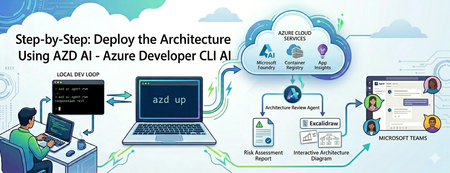
Building an AI agent is easy; operating it is an infrastructure trap. Discover how to use the azd ai CLI extension to streamline your workflow. From local testing to deploying a live Microsoft Foundry hosted agent and publishing it to Microsoft Teams—learn how to do it all without writing complex deployment scripts or needing admin permissions.274Views0likes0CommentsThe Agent that investigates itself
Azure SRE Agent handles tens of thousands of incident investigations each week for internal Microsoft services and external teams running it for their own systems. Last month, one of those incidents was about the agent itself. Our KV cache hit rate alert started firing. Cached token percentage was dropping across the fleet. We didn't open dashboards. We simply asked the agent. It spawned parallel subagents, searched logs, read through its own source code, and produced the analysis. First finding: Claude Haiku at 0% cache hits. The agent checked the input distribution and found that the average call was ~180 tokens, well below Anthropic’s 4,096-token minimum for Haiku prompt caching. Structurally, these requests could never be cached. They were false positives. The real regression was in Claude Opus: cache hit rate fell from ~70% to ~48% over a week. The agent correlated the drop against the deployment history and traced it to a single PR that restructured prompt ordering, breaking the common prefix that caching relies on. It submitted two fixes: one to exclude all uncacheable requests from the alert, and the other to restore prefix stability in the prompt pipeline. That investigation is how we develop now. We rarely start with dashboards or manual log queries. We start by asking the agent. Three months earlier, it could not have done any of this. The breakthrough was not building better playbooks. It was harness engineering: enabling the agent to discover context as the investigation unfolded. This post is about the architecture decisions that made it possible. Where we started In our last post, Context Engineering for Reliable AI Agents: Lessons from Building Azure SRE Agent, we described how moving to a single generalist agent unlocked more complex investigations. The resolution rates were climbing, and for many internal teams, the agent could now autonomously investigate and mitigate roughly 50% of incidents. We were moving in the right direction. But the scores weren't uniform, and when we dug into why, the pattern was uncomfortable. The high-performing scenarios shared a trait: they'd been built with heavy human scaffolding. They relied on custom response plans for specific incident types, hand-built subagents for known failure modes, and pre-written log queries exposed as opaque tools. We weren’t measuring the agent’s reasoning – we were measuring how much engineering had gone into the scenario beforehand. On anything new, the agent had nowhere to start. We found these gaps through manual review. Every week, engineers read through lower-scored investigation threads and pushed fixes: tighten a prompt, fix a tool schema, add a guardrail. Each fix was real. But we could only review fifty threads a week. The agent was handling ten thousand. We were debugging at human speed. The gap between those two numbers was where our blind spots lived. We needed an agent powerful enough to take this toil off us. An agent which could investigate itself. Dogfooding wasn't a philosophy - it was the only way to scale. The Inversion: Three bets The problem we faced was structural - and the KV cache investigation shows it clearly. The cache rate drop was visible in telemetry, but the cause was not. The agent had to correlate telemetry with deployment history, inspect the relevant code, and reason over the diff that broke prefix stability. We kept hitting the same gap in different forms: logs pointing in multiple directions, failure modes in uninstrumented paths, regressions that only made sense at the commit level. Telemetry showed symptoms, but not what actually changed. We'd been building the agent to reason over telemetry. We needed it to reason over the system itself. The instinct when agents fail is to restrict them: pre-write the queries, pre-fetch the context, pre-curate the tools. It feels like control. In practice, it creates a ceiling. The agent can only handle what engineers anticipated in advance. The answer is an agent that can discover what it needs as the investigation unfolds. In the KV cache incident, each step, from metric anomaly to deployment history to a specific diff, followed from what the previous step revealed. It was not a pre-scripted path. Navigating towards the right context with progressive discovery is key to creating deep agents which can handle novel scenarios. Three architectural decisions made this possible – and each one compounded on the last. Bet 1: The Filesystem as the Agent's World Our first bet was to give the agent a filesystem as its workspace instead of a custom API layer. Everything it reasons over – source code, runbooks, query schemas, past investigation notes – is exposed as files. It interacts with that world using read_file, grep, find, and shell. No SearchCodebase API. No RetrieveMemory endpoint. This is an old Unix idea: reduce heterogeneous resources to a single interface. Coding agents already work this way. It turns out the same pattern works for an SRE agent. Frontier models are trained on developer workflows: navigating repositories, grepping logs, patching files, running commands. The filesystem is not an abstraction layered on top of that prior. It matches it. When we materialized the agent’s world as a repo-like workspace, our human "Intent Met" score - whether the agent's investigation addressed the actual root cause as judged by the on-call engineer - rose from 45% to 75% on novel incidents. But interface design is only half the story. The other half is what you put inside it. Code Repositories: the highest-leverage context Teams had prewritten log queries because they did not trust the agent to generate correct ones. That distrust was justified. Models hallucinate table names, guess column schemas, and write queries against the wrong cluster. But the answer was not tighter restriction. It was better grounding. The repo is the schema. Everything else is derived from it. When the agent reads the code that produces the logs, query construction stops being guesswork. It knows the exact exceptions thrown, and the conditions under which each path executes. Stack traces start making sense, and logs become legible. But beyond query grounding, code access unlocked three new capabilities that telemetry alone could not provide: Ground truth over documentation. Docs drift and dashboards show symptoms. The code is what the service actually does. In practice, most investigations only made sense when logs were read alongside implementation. Point-in-time investigation. The agent checks out the exact commit at incident time, not current HEAD, so it can correlate the failure against the actual diffs. That's what cracked the KV cache investigation: a PR broke prefix stability, and the diff was the only place this was visible. Without commit history, you can't distinguish a code regression from external factors. Reasoning even where telemetry is absent. Some code paths are not well instrumented. The agent can still trace logic through source and explain behavior even when logs do not exist. This is especially valuable in novel failure modes – the ones most likely to be missed precisely because no one thought to instrument them. Memory as a filesystem, not a vector store Our first memory system used RAG over past session learnings. It had a circular dependency: a limited agent learned from limited sessions and produced limited knowledge. Garbage in, garbage out. But the deeper problem was retrieval. In SRE Context, embedding similarity is a weak proxy for relevance. “KV cache regression” and “prompt prefix instability” may be distant in embedding space yet still describe the same causal chain. We tried re-ranking, query expansion, and hybrid search. None fixed the core mismatch between semantic similarity and diagnostic relevance. We replaced RAG with structured Markdown files that the agent reads and writes through its standard tool interface. The model names each file semantically: overview.md for a service summary, team.md for ownership and escalation paths, logs.md for cluster access and query patterns, debugging.md for failure modes and prior learnings. Each carry just enough context to orient the agent, with links to deeper files when needed. The key design choice was to let the model navigate memory, not retrieve it through query matching. The agent starts from a structured entry point and follows the evidence toward what matters. RAG assumes you know the right query before you know what you need. File traversal lets relevance emerge as context accumulates. This removed chunking, overlap tuning, and re-ranking entirely. It also proved more accurate, because frontier models are better at following context than embeddings are at guessing relevance. As a side benefit, memory state can be snapshotted periodically. One problem remains unsolved: staleness. When two sessions write conflicting patterns to debugging.md, the model must reconcile them. When a service changes behavior, old entries can become misleading. We rely on timestamps and explicit deprecation notes, but we do not have a systemic solution yet. This is an active area of work, and anyone building memory at scale will run into it. The sandbox as epistemic boundary The filesystem also defines what the agent can see. If something is not in the sandbox, the agent cannot reason about it. We treat that as a feature, not a limitation. Security boundaries and epistemic boundaries are enforced by the same mechanism. Inside that boundary, the agent has full execution: arbitrary bash, python, jq, and package installs through pip or apt. That scope unlocks capabilities we never would have built as custom tools. It opens PRs with gh cli, like the prompt-ordering fix from KV cache incident. It pushes Grafana dashboards, like a cache-hit-rate dashboard we now track by model. It installs domain-specific CLI tools mid-investigation when needed. No bespoke integration required, just a shell. The recurring lesson was simple: a generally capable agent in the right execution environment outperforms a specialized agent with bespoke tooling. Custom tools accumulate maintenance costs. Shell commands compose for free. Bet 2: Context Layering Code access tells the agent what a service does. It does not tell the agent what it can access, which resources its tools are scoped to, or where an investigation should begin. This gap surfaced immediately. Users would ask "which team do you handle incidents for?" and the agent had no answer. Tools alone are not enough. An integration also needs ambient context so the model knows what exists, how it is configured, and when to use it. We fixed this with context hooks: structured context injected at prompt construction time to orient the agent before it takes action. Connectors - what can I access? A manifest of wired systems such as Log Analytics, Outlook, and Grafana, along with their configuration. Repositories - what does this system do? Serialized repo trees, plus files like AGENTS.md, Copilot.md, and CLAUDE.md with team-specific instructions. Knowledge map - what have I learned before? A two-tier memory index with a top-level file linking to deeper scenario-specific files, so the model can drill down only when needed. Azure resource topology - where do things live? A serialized map of relationships across subscriptions, resource groups, and regions, so investigations start in the right scope. Together, these context hooks turn a cold start into an informed one. That matters because a bad early choice does not just waste tokens. It sends the investigation down the wrong trajectory. A capable agent still needs to know what exists, what matters, and where to start. Bet 3: Frugal Context Management Layered context creates a new problem: budget. Serialized repo trees, resource topology, connector manifests, and a memory index fill context fast. Once the agent starts reading source files and logs, complex incidents hit context limits. We needed our context usage to be deliberately frugal. Tool result compression via the filesystem Large tool outputs are expensive because they consume context before the agent has extracted any value from them. In many cases, only a small slice or a derived summary of that output is actually useful. Our framework exposes these results as files to the agent. The agent can then use tools like grep, jq, or python to process them outside the model interface, so that only the final result enters context. The filesystem isn't just a capability abstraction - it's also a budget management primitive. Context Pruning and Auto Compact Long investigations accumulate dead weight. As hypotheses narrow, earlier context becomes noise. We handle this with two compaction strategies. Context Pruning runs mid-session. When context usage crosses a threshold, we trim or drop stale tool calls and outputs - keeping the window focused on what still matters. Auto-Compact kicks in when a session approaches its context limit. The framework summarizes findings and working hypotheses, then resumes from that summary. From the user's perspective, there's no visible limit. Long investigations just work. Parallel subagents The KV cache investigation required reasoning along two independent hypotheses: whether the alert definition was sound, and whether cache behavior had actually regressed. The agent spawned parallel subagents for each task, each operating in its own context window. Once both finished, it merged their conclusions. This pattern generalizes to any task with independent components. It speeds up the search, keeps intermediate work from consuming the main context window, and prevents one hypothesis from biasing another. The Feedback loop These architectural bets have enabled us to close the original scaling gap. Instead of debugging the agent at human speed, we could finally start using it to fix itself. As an example, we were hitting various LLM errors: timeouts, 429s (too many requests), failures in the middle of response streaming, 400s from code bugs that produced malformed payloads. These paper cuts would cause investigations to stall midway and some conversations broke entirely. So, we set up a daily monitoring task for these failures. The agent searches for the last 24 hours of errors, clusters the top hitters, traces each to its root cause in the codebase, and submits a PR. We review it manually before merging. Over two weeks, the errors were reduced by more than 80%. Over the last month, we have successfully used our agent across a wide range of scenarios: Analyzed our user churn rate and built dashboards we now review weekly. Correlated which builds needed the most hotfixes, surfacing flaky areas of the codebase. Ran security analysis and found vulnerabilities in the read path. Helped fill out parts of its own Responsible AI review, with strict human review. Handles customer-reported issues and LiveSite alerts end to end. Whenever it gets stuck, we talk to it and teach it, ask it to update its memory, and it doesn't fail that class of problem again. The title of this post is literal. The agent investigating itself is not a metaphor. It is a real workflow, driven by scheduled tasks, incident triggers, and direct conversations with users. What We Learned We spent months building scaffolding to compensate for what the agent could not do. The breakthrough was removing it. Every prewritten query was a place we told the model not to think. Every curated tool was a decision made on its behalf. Every pre-fetched context was a guess about what would matter before we understood the problem. The inversion was simple but hard to accept: stop pre-computing the answer space. Give the model a structured starting point, a filesystem it knows how to navigate, context hooks that tell it what it can access, and budget management that keeps it sharp through long investigations. The agent that investigates itself is both the proof and the product of this approach. It finds its own bugs, traces them to root causes in its own code, and submits its own fixes. Not because we designed it to. Because we designed it to reason over systems, and it happens to be one. We are still learning. Staleness is unsolved, budget tuning remains largely empirical, and we regularly discover assumptions baked into context that quietly constrain the agent. But we have crossed a new threshold: from an agent that follows your playbook to one that writes the next one. Thanks to visagarwal for co-authoring this post.12KViews6likes0CommentsA Practical Path Forward for Heroku Customers with Azure
On February 6, 2026, Heroku announced it is moving to a sustaining engineering model focused on stability, security, reliability, and ongoing support. Many customers are now reassessing how their application platforms will support today’s workloads and future innovation. Microsoft is committed to helping customers migrate and modernize applications from platforms like Heroku to Azure.196Views0likes0CommentsProactive Health Monitoring and Auto-Communication Now Available for Azure Container Registry
Today, we're introducing Azure Container Registry's (ACR) latest service health enhancement: automated auto-communication through Azure Service Health alerts. When ACR detects degradation in critical operations—authentication, image push, and pull—your teams are now proactively notified through Azure Service Health, delivering better transparency and faster communication without waiting for manual incident reporting. For platform teams, SRE organizations, and enterprises with strict SLA requirements, this means container registry health events are now communicated automatically and integrated into your existing incident management and observability workflows. Background: Why Registry Availability Matters Container registries sit at the heart of modern software delivery. Every CI/CD pipeline build, every Kubernetes pod startup, and every production deployment depends on the ability to authenticate, push artifacts, and pull images reliably. When a registry experiences degradation—even briefly—the downstream impact can cascade quickly: failed pipelines, delayed deployments, and application startup failures across multiple clusters and environments. Until now, ACR customers discovered service issues primarily through two paths: monitoring their own workloads for symptoms (failed pulls, auth errors), or checking the Azure Status page reactively. Neither approach gives your team the head start needed to coordinate an effective response before impact is felt. Auto-Communication Through Azure Service Health Alerts ACR now provides faster communication when: Degradation is detected in your region Automated remediation is in progress Engineering teams have been engaged and are actively mitigating These notifications arrive through Azure Service Health, the same platform your teams already use to track planned maintenance and health advisories across all your Azure resources. You receive timely visibility into registry health events—with rich context including tracking IDs, affected regions, impacted resources, and mitigation timelines—without needing to open a support request or continuously monitor dashboards. Who Benefits This capability delivers value across every team that depends on container registry availability: Enterprise platform teams managing centralized registries for large organizations will receive early warning before CI/CD pipelines begin failing across hundreds of development teams. SRE organizations can integrate ACR health signals into their existing incident management workflows—via webhook integration with PagerDuty, Opsgenie, ServiceNow, and similar tools—rather than relying on synthetic monitoring or customer reports. Teams with strict SLA requirements can now correlate production incidents with documented ACR service events, supporting post-incident reviews and customer communication. All ACR customers gain a level of registry observability that previously required custom monitoring infrastructure to approximate. A Part of ACR's Broader Observability Strategy Automated Service Health auto-communication is one component of ACR's ongoing investment in service health and observability. Combined with Azure Monitor metrics, diagnostic logs and events, Service Health alerts give your teams a layered observability posture: Signal What It Tells You Service Health alerts ACR-wide service events in your regions, with official mitigation status Azure Monitor metrics Registry-level request rates, success rates, and storage utilization. This will be available soon Diagnostic logs Repository and operation-level audit trail What's next: We are working on exposing additional ACR metrics through Azure Monitor, giving you deeper visibility into registry operations—such as authentication, pull and push API requests, and error breakdowns—directly in the Azure portal. This will enable self-service diagnostics, allowing your teams to investigate and troubleshoot registry issues independently without opening a support request. Getting Started To configure Service Health alerts for ACR, navigate to Service Health in the Azure portal, create an alert rule filtering on Container Registry, and attach an action group with your preferred notification channels (email, SMS, webhook). Alerts can also be created programmatically via ARM templates or Bicep for infrastructure-as-code workflows. For the full step-by-step setup guide—including recommended alert configurations for production-critical, maintenance awareness, and comprehensive monitoring scenarios—see Configure Service Health alerts for Azure Container Registry.341Views0likes0Comments