Defender
56 TopicsMulti-tenant endpoint security policies distribution is now in Public Preview
We’re excited to announce a key milestone in Defender’s multi-tenant management journey—Microsoft Defender for Endpoint security policies can now be distributed across multiple tenants from the Defender multi-tenant portal. This capability empowers security teams to manage policies at scale, ensuring consistency and saving valuable time. What is content distribution? Content distribution is a powerful Defender feature that enables scalable management of content across tenants. With this capability, you can create content distribution profiles in the multi-tenant portal that allow you to seamlessly replicate existing content—such as custom detection rules and now, endpoint security policies—from a source tenant to designated target tenants. Once distributed, the content runs on the target tenant, enabling centralized control with localized execution. How it works Security policies are now a selectable content type when creating a distribution profile. Simply choose existing policies from your home tenant and add them to the distribution profile. You can also decide which Microsoft Entra group(s) will be applied as scope. Policy targeting will be based on the Entra device groups that exist in every tenant, and you select the relevant groups for each tenant. Upon completion, policies are automatically distributed to the selected tenants and are applied on the targeted machines. Distributed policies also appear in a hierarchical view, with the original policy serving as the parent. You can find the policies that were distributed from the tenant under the original policy. This appears on the endpoint security policies page within multi-tenant management. The last distribution status for the original policy reflects the overall status of its distributed copies, and the tenants and tenant groups sections indicate the recipients of the policy. At any time, you can update the policies, tenants, scope or any other settings, and sync to apply these changes. This new capability enables consistency (maintaining uniform security posture across tenants), efficiency (eliminating manual duplication and reducing operational overhead), and scalability (easily expanding coverage as the tenant landscape grows). FAQ What pre-requisites are required? Access to more than one tenant with Microsoft Defender for Endpoint, with delegated access via Azure B2B or GDAP (CSP Partners only), using the multi-tenant management capability. A subscription to Microsoft 365 E5 or Office E5. What permissions are needed to distribute MDE security policies? To access endpoint security policies, users require the security administrator role in each relevant tenant. To distribute content using multi-tenant management content distribution, the Security settings (manage) or Security Data Basic (read) permission is required. Both roles are assigned to the Security Administrator and Security Reader Microsoft Entra built-in roles by default. Can I update or expand distribution profiles later? Yes. You can add more content, include additional tenants, or modify scopes as needed. Learn more For more information, see Content distribution in multitenant management. To get started, navigate to the Content distribution page. To learn more about Microsoft Defender's endpoint protection, check out our website and video. To learn more about Microsoft Security solutions, visit our website. Bookmark the Security blog to keep up with our expert coverage on security matters. Follow us on LinkedIn (Microsoft Security) and X (@MSFTSecurity) for the latest news and updates on cybersecurity.SAP Applications and Microsoft Defender for Linux
The typical audience for this blog is SAP Basis administrators and consultants. Enterprise Security is a specialist role and the activities described in this blog should be planned in conjunction with the Security Administrators. The objective of this blog is to provide a basic understanding of MDE on Linux and how to operate, check and troubleshoot problems on SAP VMs running MDE. This blog is focusing on two subcomponents: Next-generation protection (AntiVirus) and Endpoint detection and response (EDR). Next-generation protection is an AntiVirus (AV) product similar to AV solutions for Windows environments. Endpoint detection and response (EDR) detects and can block suspicious activity and system calls.MDM Security Baseline vs Intune Profile
Hi all, I am testing currently the 2 profiles in the Security Baselines in default configuration. As they are now checked against the endpoint there is one Error in the Per-settings status: Type of system scan to perform Problem is now - I cannot see anything configured in the MDM Security Baseline for May 2019 the setting itself in the Intune profile is configured. Any idea? Best regards Miguel6.3KViews2likes5CommentsEnd of Windows 10 Support: What Defender Customers Need to Know
As of today, October 14, 2025, Microsoft is officially ending support for Windows 10. This means that Windows 10 devices will no longer receive security or feature updates, nor technical support from Microsoft. While these devices will continue to operate, the lack of regular security updates increases vulnerability to cyber threats, including malware and viruses. Applications running on Windows 10 may also lose support as the platform stops receiving updates. Will Defender continue to protect Windows 10 devices? Defender supports a range of legacy systems, including Windows 10. (See here for a full list of supported operating systems.) Microsoft Defender will continue to provide detection and protection capabilities to the extent possible on Windows 10 and other legacy systems. Keep in mind that security solutions on legacy systems are inherently less secure and may not be able to receive all new features, so please review the next section for important actions you can take. For Windows 10 customers without Defender, Microsoft will continue to provide security intelligence updates for the built-in Microsoft Defender Antivirus protection through October 2028. Of course, Defender Antivirus alone isn't a comprehensive risk mitigation posture without Microsoft Defender detection and response deployed across your digital estate. What should customers do to protect their Windows 10 devices? Upgrade to Windows 11: Moving to Windows 11 is strongly recommended for PCs eligible to upgrade. Windows 11 delivers the latest security features, improved performance, and ongoing support at no additional cost. This is the best way to ensure your endpoints remain protected and compliant. Devices running Windows 10 will be more vulnerable, even with ongoing security intelligence updates (SIUs). Extended security update (ESU) program: If upgrading isn’t immediately possible, Microsoft offers an ESU program for Windows 10. The ESU program provides critical and important security updates but does not include new Windows features or technical support. Enterprise customers can purchase ESU for up to three years or receive it at no additional cost with a Windows 365 subscription. Cloud and virtual environments: Windows 10 devices accessing Windows 11 Cloud PCs via Windows 365 or Virtual Machines are entitled to ESU at no extra cost, with automatic updates. Consumer customers have options to enroll for one year of ESU, including free enrollment methods in certain regions. For further guidance, check out the posts below or connect with your Microsoft account team. End of support for Windows 10, Windows 8.1, and Windows 7 | Microsoft Windows How to prepare for Windows 10 end of support by moving to Windows 11 today | Windows Experience Blog Extended Security Updates (ESU) program for Windows 10 | Microsoft Learn To learn more about Microsoft Security solutions, visit our website. Bookmark the Security blog to keep up with our expert coverage on security matters. Also, follow us on LinkedIn (Microsoft Security) and X (@MSFTSecurity) for the latest news and updates on cybersecurity.URL Detonation Reputation - How do you like it?
I personally have found this detection technology to be a huge pain in the buttocks. To me, this feature doesn't really look at specific threats or risks, it just says "You cannot do anything that involves this domain name". And with that analogy, "involves" translates to any of the following: Domain is in the subject or body One of the included recipient addresses to which the message is addressed uses the domain. One of the recipients who show in the body of the email due to it being a conversation/thread, uses that domain in their address. An attachment includes that domain within its text (PDF, Word, Excel, TXT, all personally observed by me). These things get blocked as "High confidence phish". To me, they are not that whatsoever, until the message itself is doing some of the "phish" verb. This feels like an overstep on the verdict and I'd prefer they come up with a new name for the detection type, as well as a new drop down box for us to choose between MoveToJunk or Quarantine. Most times I've observed this feature "saving" clients, it's a pain in the butt for the client. I will point out the one improvement I've seen since I started belly-aching over this - it is that Microsoft now puts the bad URL/domain from within the attachments, into the list of URLs in the email entity page within M365 Defender portal. So there is at least that there now, which adds the improvement of not having to go through MS Support to find out what is the supposed bad-rep URL. Would like to know if anyone else finds this feature as a pain for the most part, and hear any other suggestions, or just confirmations about my suggestion (new category of detection so we don't have to treat these things like (HC)phish).Solved49KViews2likes31CommentsDefender Antivirus (AV) Passive Mode
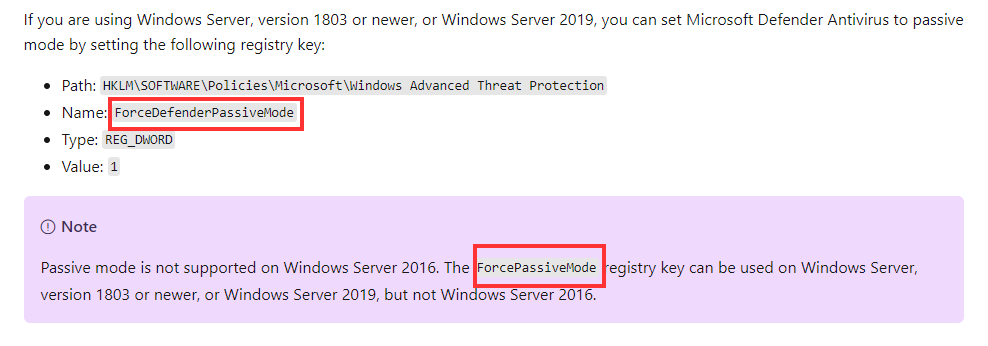
Hi, While researching how to set Defender AV to passive mode I stumbled upon two registry keys: ForceDefenderPassiveMode https://docs.microsoft.com/en-us/microsoft-365/security/defender-endpoint/microsoft-defender-antivirus-compatibility?view=o365-worldwide#microsoft-defender-antivirus-and-non-microsoft-antivirusantimalware-solutions https://docs.microsoft.com/en-us/microsoft-365/security/defender-endpoint/microsoft-defender-antivirus-on-windows-server?view=o365-worldwide#set-microsoft-defender-antivirus-to-passive-mode-using-a-registry-key ForcePassiveMode https://docs.microsoft.com/en-us/microsoft-365/security/defender-endpoint/switch-to-microsoft-defender-onboard?view=o365-worldwide#set-microsoft-defender-antivirus-on-windows-server-to-passive-mode-manually https://docs.microsoft.com/en-us/microsoft-365/security/defender-endpoint/switch-to-microsoft-defender-setup?view=o365-worldwide#set-microsoft-defender-antivirus-to-passive-mode-on-windows-server Does either of you know which one is the correct one? Thanks, AndreSolved25KViews2likes3Comments
Migrating workstations and servers to Defender
Hi all, My organisation is moving its AV to defender for endpoint. I've not administered defender in a corporate environment before so would was hoping to get some advice/help? We have already begun onboarding our laptops, vdis and workstations and are looking to onboard a couple fileservers too. Our devices are not currently managed via Intune, so it's a case of setting up the policies in the security portal which hasn't been too bad so far.. However, I wanted to know- -do we need seperate licences for the file servers? -how can I split the policies between user devices and servers? I don't see a way to define granular policies per device? And of course, I don't want to set the same user policies on the servers. Thanks! Tej1.1KViews2likes1Comment
Using the Microsoft Defender for Endpoint Files API to Validate Malware Hashes
Introduction Security advisories frequently include file hashes (SHA-1 or SHA-256) as indicators of compromise (IoCs). Microsoft Defender for Endpoint (MDE) exposes a Files API that lets SecOps quickly look up Microsoft’s verdict and metadata for a given hash. This enables rapid assessment—whether a file is classified as Malicious, Suspicious, Clean, or Unknown—and helps analysts decide the next response action without needing to download or execute the sample. What is the Files API in MDE and why is it used in Security Operations? The Files API is part of the Defender for Endpoint REST APIs that returns a file profile by hash identifier. Analysts use it to: • Validate whether Microsoft has a global verdict for a hash named in an advisory. • Retrieve telemetry such as global prevalence and first/last observed times to gauge risk and spread. • Pivot to related alerts and devices when needed. This lookup shortens triage time and avoids unnecessary handling of potentially dangerous samples. Prerequisites To call the Files API using application (client credentials) context, you need: A Microsoft Entra ID App Registration (Web app / service). API permissions on the WindowsDefenderATP resource (Microsoft Defender for Endpoint). Minimum: File.Read.All (Application). Admin consent granted for the permissions. Network access to the MDE API endpoint (region-based base URL) and the Microsoft identity platform (OAuth 2.0). Tip: For interactive testing, you can also use the API Explorer in the Microsoft Defender portal under Partners & APIs, which runs requests under your user context and RBAC scope. How to use the Files API via PowerShell 1) Acquire an OAuth token from the Microsoft identity platform using your app’s client ID and secret with the .default scope for the Defender API. 2) Send an HTTP GET request to the Files endpoint with the hash (SHA-1 or SHA-256) as the identifier. 3) Inspect the JSON response field "fileClassification" and other metadata (globalPrevalence, first/last observed). 4) Use the verdict to decide next actions (e.g., create an Indicator to block, hunt in Advanced Hunting, or open related alerts). Actual Script ===== STEP 1: Get OAuth Token (MDE v1) ===== $tenantId = "xxxxxxxxxxxxxxxxxxxxxxxxxxxxxx" $appId = "xxxxxxxxxxxxxxxxxxxxxxxxxxx" $appSecret = "xxxxxxxxxxxxxxxxxxxxxxxxxxx" # update with your tenant and app values $tokenUri = "https://login.microsoftonline.com/$tenantId/oauth2/v2.0/token" $body = @{ client_id = $appId scope = "https://api.securitycenter.microsoft.com/.default" client_secret = $appSecret grant_type = "client_credentials" } $tokenResponse = Invoke-RestMethod -Uri $tokenUri -Method Post -Body $body -ContentType "application/x-www-form-urlencoded" $token = $tokenResponse.access_token # ===== STEP 2: Call MDE v1 Files API ===== $hash = "97bf5e1a903a978b2281496e0a897688e9d8e6f981238cf91e39bae20390defe" # Replace with your actual hash values. $uri = "https://api.securitycenter.microsoft.com/api/v1.0/files/$hash" try { $response = Invoke-RestMethod -Uri $uri -Headers @{ Authorization = "Bearer $token" Accept = "application/json" } -Method Get } catch { Write-Error "API call failed: $($_.Exception.Message)" if ($_.ErrorDetails.Message) { Write-Host $_.ErrorDetails.Message } return } switch ($response.fileClassification) { "Malicious" { Write-Host "MDE recognises this hash as MALICIOUS. Threat Name: $($response.threatName)" -ForegroundColor Red } "Suspicious" { Write-Host "MDE recognises this hash as SUSPICIOUS." -ForegroundColor Yellow } "Clean" { Write-Host "MDE recognises this hash as CLEAN." -ForegroundColor Green } default { Write-Host "MDE does NOT have a signature for this hash (Unknown)." -ForegroundColor Gray } } $response | ConvertTo-Json -Depth 5 Script Explanation Token acquisition: Uses OAuth 2.0 client credentials flow to obtain an access token; scope targets Defender for Endpoint API. Endpoint call: Builds a GET request to the Files endpoint with the hash identifier. Error handling: Catches HTTP errors and prints server-provided details if available. Verdict mapping: Reads the fileClassification field and prints a color-coded verdict (Malicious, Suspicious, Clean, Unknown). Response output: Prints the full JSON for deeper analysis and logging. Recommended Inputs The Files endpoint accepts SHA-1 or SHA-256 identifiers; ensure you pass the correct hash type. Consider using certificate credentials or managed identity instead of client secrets for production automation. Sample Output API Explorer - Other Option to query File API The Microsoft Defender for Endpoint API Explorer is a tool that helps you explore various Defender for Endpoint APIs interactively. The API Explorer makes it easy to construct and do API queries, test, and send requests for any available Defender for Endpoint API endpoint. Use the API Explorer to take actions or find data that might not yet be available through the user interface. The tool is useful during app development. It allows you to perform API queries that respect your user access settings, reducing the need to generate access tokens. You can also use the tool to explore the gallery of sample queries, copy result code samples, and generate debug information. With the API Explorer, you can: Run requests for any method and see responses in real-time. Quickly browse through the API samples and learn what parameters they support. Make API calls with ease; no need to authenticate beyond the management portal signin. Access API Explorer From the left navigation menu, select Partners & APIs > API Explorer. Supported APIs API Explorer supports all the APIs offered by Defender for Endpoint. The list of supported APIs is available in the APIs documentation. Get started with the API Explorer In the left pane, there's a list of sample requests that you can use. Follow the links and click Run query. Some of the samples may require specifying a parameter in the URL, for example, {File Hash}. Permissions Required You need to log in with an account that has appropriate RBAC roles in Microsoft Defender for Endpoint. API Explorer enforces the same role-based access control (RBAC) as the portal: Security Administrator or Global Administrator for high-privilege actions (e.g., offboarding a device, submitting indicators). Lower roles (e.g., Security Reader) can only run read-only queries like Get file information or Get alerts. No additional API permissions or app registration are needed because requests run under your user context. Conclusion The MDE Files API gives SecOps an immediate way to validate hashes from advisories and threat feeds, reducing time-to-triage and enabling consistent response. When a hash is classified as Malicious or Suspicious, teams can move directly to containment (e.g., creating an Indicator to block). When it is Clean or Unknown, analysts can pivot to hunting, sandboxing, or further intelligence before acting. Integrating this lookup into runbooks helps security operations quickly and safely respond to emerging threats. References Get file information API: https://learn.microsoft.com/en-us/defender-endpoint/api/get-file-information Supported MDE APIs (Endpoint URI & versioning): https://learn.microsoft.com/en-us/defender-endpoint/api/exposed-apis-list Access the Microsoft Defender for Endpoint APIs (intro & app context): https://learn.microsoft.com/en-us/defender-endpoint/api/apis-intro Create an app to access MDE without a user (app registration & permissions): https://learn.microsoft.com/en-us/defender-endpoint/api/exposed-apis-create-app-webapp API Explorer: https://learn.microsoft.com/en-us/defender-endpoint/api/api-explorer