Data Lake
26 TopicsControl Azure Data Lake costs using Log Analytics to create service alerts
Azure Data Lake customers use the Data Lake Store and Data Lake Analytics to store and run complex analytics on massive amounts of data. However, it is challenging to manage costs, keep up-to-date with activity in the accounts, and proactively know when usage thresholds are nearing certain limits. Using Log Analytics and Azure Data Lake we can address these challenges and know when the costs are increasing or when certain activities take place. In this post, you will learn how to use Log Analytics with your Data Lake accounts to create alerts that can notify you of Data Lake activity events and when certain usage thresholds are reached. It is easy to get started! Read more about it in the Azure blog.2.8KViews0likes0CommentsUsing Azure Analysis Services with Azure Data Lake Storage
Support for Azure Data Lake Store (ADLS) is now available in Azure Analysis Services and in SQL Server Data Tools (SSDT). Now you can augment your big data analytics workloads with rich interactive analysis for selected data subsets at the speed of thought! Business users can consume Azure Analysis Services models in Microsoft Power BI, Microsoft Office Excel, and Microsoft SQL Server Reporting Services. Azure Data Lake Analytics (ADLA) can be used to run U-SQL batch jobs directly against the source data, such as to generate targeted output files that Azure Analysis Services can import with less overhead. Azure Data Lake Analytics (ADLA) can process massive volumes of data extremely quickly. Exporting approximately 2.8 billion rows of TPC-DS store sales data (~500 GB) into a CSV file took less than 7 minutes and importing the full 1 TB set of source data into Azure Analysis Services by using the Azure Data Lake connector took less than 6 hours. These results highlight Azure Data Lake as an attractive big-data backend for Azure Analysis Services. Read about it in the Azure blog.2.2KViews0likes0CommentsRun Hortonworks clusters and easily access Azure Data Lake
Enterprise customers love Hortonworks for running Apache Hive, Apache Spark and other Apache Hadoop workloads. They also love the value that Azure Data Lake Store (ADLS) provides, like high throughput access to cloud data of any size, sharing easily and securely with its true hierarchical file system, Posix ACLs, along with Role-based Access Control (RBAC), and encryption-at-rest. Azure HDInsight managed workloads – which offers built-in integration with and access to ADLS – vastly simplifies the management of enterprise clusters for many enterprises. Customers have a choice, and some Hortonworks customers choose to customize and manage their own clusters deployed directly on Azure cloud infrastructure, and those deployments need direct access ADLS. Read about it in the Azure blog.1.4KViews0likes0CommentsMicrosoft Azure Data Lake Storage in Storage Explorer – public preview
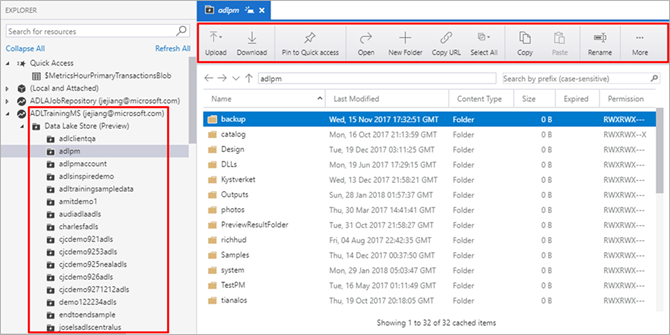
Providing a rich GUI for Azure Data Lake Storage resources management has been a top customer ask for a long time, we are thrilled to announce the public preview for supporting Azure Data Lake Storage (ADLS) in the Azure Storage Explorer (ASE). With the release of ADLS resources in ASE, you can freely navigate ADLS resources, you can upload and download folders and files, you can copy and paste files across folders or ADLS accounts and you can easily perform CRUD operations for your folders and files. Azure Storage Explorer not only offers a traditional desktop explorer GUI for dragging, uploading, downloading, copying and moving your ADLS folders and files, but also provides a unified developer experiences of displaying file properties, viewing folder statistics and adding quick access. With this extension you are now able to browse ADLS resources along-side existing experiences for Azure Blobs, tables, files, queues and Cosmos DB in ASE. Read about it in the Azure blog.1.4KViews0likes0CommentsAzure Data Lake tools integrates with VSCode Data Lake Explorer and Azure Account
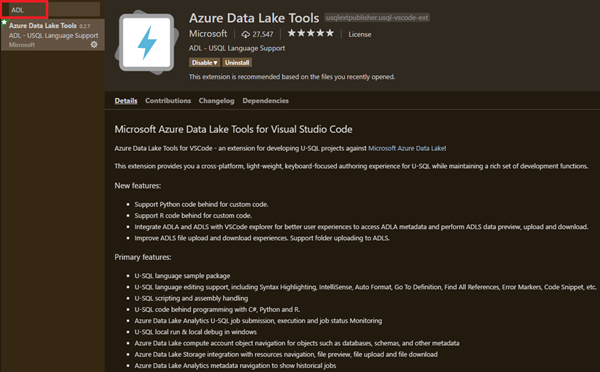
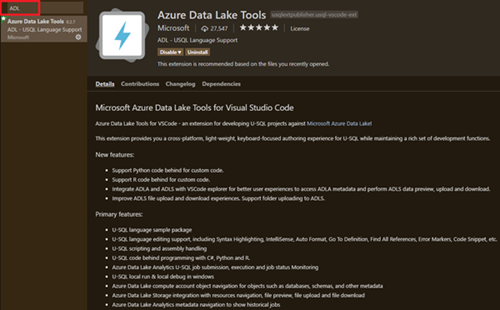
If you are a data scientist and want to explore the data and understand what is being saved and what the hierarchy of the folder is, please try Data Lake Explorer in VSCode ADL Tools. If you are a developer and look for easier navigation inside the ADLS, please use Data Lake Explorer in VSCode ADL Tools. The VSCode Data Lake Explorer enhances your Azure login experiences, empowers you to manage your ADLA metadata in a tree like hierarchical way and enables easier file exploration for ADLS resources under your Azure subscriptions. You can also preview, delete, download, and upload files through contextual menu. With the integration of VSCode explorer, you can choose your preferred way to manage your U-SQL databases and your ADLS storage accounts in addition to the existing ADLA and ADLS commands. If you have difficulties to login to Azure and look for simpler sign-in processes, the Azure Data Lake Tools integration with VSCode Azure account enables auto sign in and greatly enhance the integration with Azure experiences. If you are an Azure multi-tenant user, the integration with Azure account unblocks you and empowers you to navigate your Azure subscription resources across tenants. Read about it in the Azure blog.1.2KViews0likes0CommentsUsing Microsoft Sentinel MCP Server with GitHub Copilot for AI-Powered Threat Hunting
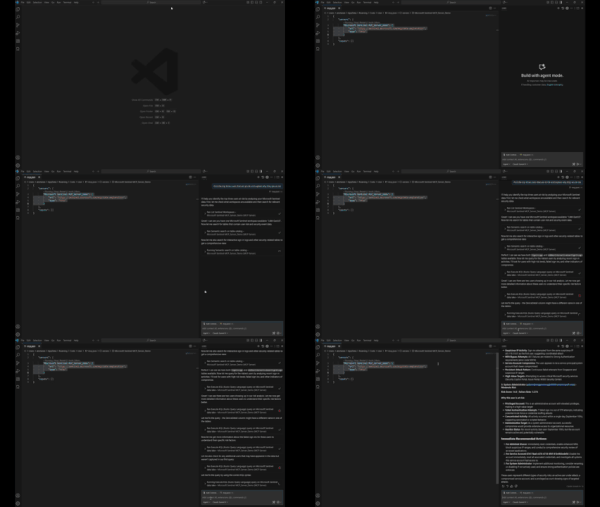
Introduction This post walks through how to get started with the Microsoft Sentinel MCP Server and showcases a hands-on demo integrating with Visual Studio Code and GitHub Copilot. Using the MCP server, you can run natural language queries against Microsoft Sentinel’s security data lake, enabling faster investigations and simplified threat hunting using tools you already know. This blog includes a real-world prompt you can use in your own environment and highlights the power of AI-assisted security workflows. What is the Microsoft Sentinel MCP Server? The Model Context Protocol (MCP) allows AI models to access structured security data in a standard, context-aware way. The Sentinel MCP server connects to your Microsoft Sentinel data lake and enables tools like GitHub Copilot or Security Copilot to: Search security data using natural language Summarize findings and explain risks Build intelligent agents for security operations Prerequisites Make sure you have the following in place: Onboarded to Microsoft Sentinel Data Lake Assigned the Security Reader role Installed: Visual Studio Code GitHub Copilot extension (Optional) Security Copilot plugin if building agents Setting Up MCP Server in VS Code Step 1: Add the MCP Server In VS Code, press Ctrl + Shift + P Search for: MCP: Add Server Choose HTTP or Server-Sent Events Enter one of the following MCP endpoints: Use Case Endpoint Data Exploration https://sentinel.microsoft.com/mcp/data-exploration Agent Creation https://sentinel.microsoft.com/mcp/security-copilot-agent-creation Give the server a friendly name (e.g., Sentinel MCP Server) Choose whether to apply it to all workspaces or just the current one When prompted, Allow authentication using an account with Security Reader access Verify the Connection Open Chat: View > Chat or Ctrl + Alt + I Switch to Agent Mode Click the Configure Tools icon to ensure MCP tools are active Using GitHub Copilot + Sentinel MCP Once connected, you can use natural language prompts to pull insights from your Sentinel data lake without writing any KQL. Demo Prompt: 🔍 “Find the top three users that are at risk and explain why they are at risk.” This prompt is designed to: Identify the highest-risk users in your environment Explain the reasoning behind each user's risk status Help prioritize investigation and response efforts You can enter this prompt in either: VS Code Chat window (Agent Mode) Copilot inline prompt area Expected Behavior The MCP server will: Query multiple Microsoft Sentinel sources (Identity Protection, Defender for Identity, Sign-in logs) Correlate risk events (e.g., risky sign-ins, alerts, anomalies) Return a structured response with top users and risk explanation Sample Output from My Tenant Results Found: User 1: 233 risk score - 53 failed attempts from suspicious IPs User 2: 100% failure rate indicating service account compromise User 3: Admin account under targeted brute force attack This demo shows how the integration of Microsoft Sentinel MCP Server with GitHub Copilot and VS Code transforms complex security investigations into simple, conversational workflows. By leveraging natural language and AI-driven context, we can surface high-risk users, understand the underlying threats, and take action — all within a familiar development environment, and without writing a single line of KQL. More details here: What is Microsoft Sentinel’s support for MCP? (preview) - Microsoft Security | Microsoft Learn Get started with Microsoft Sentinel MCP server - Microsoft Security | Microsoft Learn Data exploration tool collection in Microsoft Sentinel MCP server - Microsoft Security | Microsoft LearnAnnouncing Public Preview of HDInsight HBase on Azure Data Lake Store
On November 21, Microsoft announced the general availability of Azure Data Lake Store. Azure Data Lake Store is a hyperscale cloud storage for big data analytics built to the open Hadoop File System (HDFS) standard. Azure Data Lake Store provides enterprise grade security, including SSL and encryption at rest by default along with role based access control. Today we are excited to announce the public preview of HDInsight HBase on Azure Data Lake Store. Customers can harness the power of a columnar NoSQL distributed database with the proven performance and infinite scalability of Azure Data Lake Store. Azure Data Lake Store has no limits to capacity so customers will never need to worry about the limitations of their storage system. Furthermore, customers can store all their data and do all their analytics in one single storage account. Read about it on the Azure blog.1.1KViews0likes0CommentsAzure Data Lake Tools for VSCode supports Azure blob storage integration
We are pleased to announce the integration of VSCode explorer with Azure blob storage. If you are a data scientist and want to explore the data in your Azure blob storage, please try the Data Lake Explorer blob storage integration. If you are a developer and want to access and manage your Azure blob storage files, please try the Data Lake Explorer blob storage integration. The Data Lake Explorer allows you easily navigate to your blob storage, access and manage your blob container, folder and files. Read about it in the Azure blog.1.1KViews0likes0Comments
Not able to execute "az dls fs upload xxx" through java code
I am trying to execute " az dls fs upload --account XXX--source-path "/local/xyz.txt" --destination-path "/temp/folder/" " through java code using Process p=Runtime.getRuntime().exec(command) ; But its not copy file to datalake. Please help me to figure out this. or is there any other way to do this.1.1KViews0likes0CommentsCloudera now supports Azure Data Lake Store
With the release of Cloudera Enterprise Data Hub 5.11, you can now run Spark, Hive, and MapReduce workloads in a Cloudera cluster on Azure Data Lake Store (ADLS). Running on ADLS has the following benefits: Grow or shrink a cluster independent of the size of the data. Data persists independently as you spin up or tear down a cluster. Other clusters and compute engines, such as Azure Data Lake Analytics or Azure SQL Data Warehouse, can execute workload on the same data. Enable role-based access controls integrated with Azure Active Directory and authorize users and groups with fine-grained POSIX-based ACLs. Cloud HDFS with performance optimized for analytics workload, supporting reading and writing hundreds of terabytes of data concurrently. No limits on account size or individual file size. Data is encrypted at rest by default using service-managed or customer-managed keys in Azure Key Vault, and is encrypted with SSL while in transit. High data durability at lower cost as data replication is managed by Data Lake Store and exposed from HDFS compatible interface rather than having to replicate data both in HDFS and at the cloud storage infrastructure level. Read about it on the Azure blog.1KViews0likes0Comments