conditional access
169 Topics
MFA catch-22 during onboarding due to registration policy
Hi, We are experiencing a catch-22 scenario during user onboarding related to MFA. New users are required to install the Microsoft Authenticator app via our Company Portal. However, they are prompted to complete MFA registration before they can access or download anything from the Company Portal. Since they do not yet have the Authenticator app installed, they are effectively blocked from completing the MFA setup. From our investigation, it appears that the Multi-Factor Authentication registration policy is enforcing MFA registration for new users. In our scenario, this creates a circular dependency. We have attempted to exclude our office network from MFA using Conditional Access, but this does not resolve the issue because the MFA registration policy is triggered before Conditional Access policies are evaluated. Our questions: Is there a recommended way to handle MFA onboarding in this type of scenario? Can Conditional Access policies be used instead of the MFA registration policy for initial MFA enrollment?188Views0likes4Comments
Free Webinar: Microsoft Entra ID Break-Glass Accounts Done Right (Live Demo + Q&A)
Hi everyone, I’m hosting a free community webinar focused on one of the most common (and painful) Entra ID issues: tenant lockouts caused by break-glass account misconfiguration. This session is practical and demo-driven, and I’ll cover real-world scenarios I’ve seen involving Conditional Access and emergency access design. What we’ll cover Why every tenant should have at least two break-glass accounts Common misconfigurations that lead to lockouts Conditional Access exclusions: what works and what fails Recommended hardening approach (without blocking emergency access) Monitoring + alerting best practices Live demo + Q&A Who it’s for Microsoft 365 admins Entra ID / Conditional Access admins Security engineers MSP engineers The recording will be shared with registrants after the session. Registration link: https://teams.microsoft.com/l/meetup-join/19%3ameeting_MjkwYzExNzItMzY4OC00NThmLTg2ZDYtM2ExMTRiNWYwMGZl%40thread.v2/0?context=%7b%22Tid%22%3a%224bb6dd74-2dd1-459b-b867-f51781e1e7ed%22%2c%22Oid%22%3a%2251c6a848-6393-44f9-bac5-21855d5c7c3d%22%7d Thanks! Jaspreet Singh37Views0likes0Comments
Orphaned TPM-bound Entra Workplace Join device — no tenant access, backend deletion required
I have a personal Windows device that remains stuck in a TPM-protected Workplace Join to a former Microsoft Entra ID tenant. I no longer have tenant access and am not an admin. Local remediation completed: - dsregcmd /leave executed as SYSTEM - All MS-Organization / AAD certificates removed - Device still reports WorkplaceJoined : YES Azure Support ticket creation fails with: AADSTS160021 – interaction_required Application requested a user session which does not exist. Tenant inaccessible / user not present in tenant. This is an orphaned Entra ID device object. Requesting guidance or escalation for backend deletion. Tenant ID: 99f9b903-8447-4711-a2df-c5bd1ad1adf7 Device ID: f47987f4-a20b-4c34-a5f7-40ab0f593c6c32Views0likes0Comments
Entra Enterprise apps and App registrations - Global Secure Access - Conditional Access Block
I am working on a rollout for Global Secure Access and ran into an issue with Entra Enterprise apps setup in the tenant. With Global Secure Access I have a Conditional Access Policy set to Block access to All Resources excluding some resources like Intune and Defender tap required for mobile setup. When I added an administrator account which had done some Enterprise application setup and authorization for various third-party applications, those third-party applications stopped working with failed logins indicating token access issues. Upon review I found the majority of applications to be using client secret authentication with this administrator account as the authorizer. My limited knowledge of Enterprise apps leads me to believe this client secret is an application password that the third-party uses to keep generating tokens based on the authorizing account. My questions surrounding this setup and further understanding are mainly in relation to how Enterprise apps and app registrations authenticate, as well as user authentication directly. 1. How does the token authorization work? Does the application just use the client secret to authenticate as the user who authorized it to generate an access token? Why does MFA requirements and changing passwords not affect this but specific Block policy does? 2. What are best practices in relation to authorizing third-party applications? My thoughts are a dedicated account to authorize applications when needed. 3. How will this work with applications regular users use? Say a user has a digital notebook that syncs with their OneNote or a calendar app that syncs calendars between Outlook and their website. Do these applications also use client secrets with the user's token and will break when added to the GSA setup I have? Is the only way around this to authorize with an admin account for token issuance? Thank you for your time reading this and any insight you may have for any of the questions or ideas mentioned.110Views0likes1Comment
Fido passkeys blocked by policy
Hi all I'm helping out a customer with deploying physical passkeys and I'm running into a weird error. I've activated the sign in method and selected the two AAGuids for the Authenticator app and I've added the right AAGuid for the brand and model of passkey we are using. We can select the authentication method and enroll the security correctly but when trying to sign in using it we get the error as displayed in the attached picture. When checking the sign in logs i get this error message FIDO sign-in is disabled via policy and the error code is: 135016 I've not been able to track down any policy that would be blocking passkeys. anyone got any ideas?2.8KViews0likes7CommentsGrant Just-in-Time Admin Access with Microsoft Entra PIM
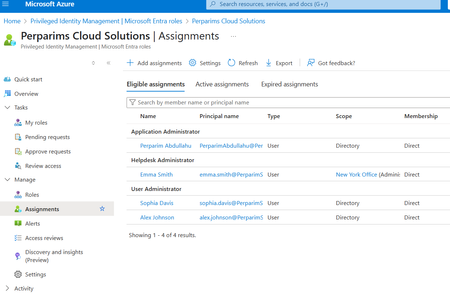
In my lab, I worked with Microsoft Entra Privileged Identity Management (PIM) to grant Just-in-Time admin access. Instead of permanent assignments, users become eligible for roles and must activate them only when needed. Steps I tested: - Configured roles as eligible rather than permanent - Required MFA and approval for role activation - Verified access automatically expired after the time window This approach reduces standing privileges and aligns with Zero Trust by securing privileged access. Curious — does your org still keep permanent Global Admins, or have you moved to JIT with PIM?121Views0likes1CommentGlobal Secure Access - Conditional Access Require GSA - Android Blocked
Hello all, I am currently working on deploying Global Secure Access client with Microsoft Forward Traffic profile and a conditional access policy to block access to M365 services unless connected through the GSA client. I have this working as I want it for Windows and mobile devices in a tenant we use for development. However, when I set this up at our live tenant, I cannot get the Android device to work. My setup is a Personally Owned Work Profile with the Defender app deployed and configured to enable GSA. I can connect to Global Secure Access and it does show some traffic tunneling to Microsoft. However, when I go to login to another app like Outlook, it blocks the sign-in. This is not the case for an iPhone I have personally enrolled and my Entra Joined laptop. Upon investigation of any differences between our development tenant (working fully) and our tenant (Android not working) I found that in the GSA section under Services, there is an extra service called “Microsoft Entra Channel Access”. This service does not show up when I am logged in our developer tenant. Even on the same phone by removing work profiles and signing in to both tenants, our live tenant shows the new channel, and the developer tenant does not have it. I did some log review with the advanced diagnostics feature and the app and noted a few things I am lead to believe that the issue is with this new Entra Channel that has been deployed to our live tenant and not to our dev tenant yet. When I go to sign-in to the Outlook application in the work profile for the developer tenant, I can see the authentication traffic being tunneled through the Microsoft 365 profile. (login.live.com, login.microsoftonline.com, and aadcdn.msftauth.net). However, in our production tenant when doing the same test I do not see those destinations being tunneled at all. I do see the traffic being collected in the “Hostname” section, but is not being tunneled. Another interesting point with this is that on an iPhone I am testing; I do see the authentication destinations being tunneled through the Entra Channel. Here are the screenshots of my findings. https://imgur.com/a/82r3HQC I have an open Microsoft support case and hoping to get the attention of a Microsoft employee or MVP who may be able to get this in front of the Entra product team to see if this is a bug.116Views0likes0Comments
Block all 365 apps except Outlook via CA
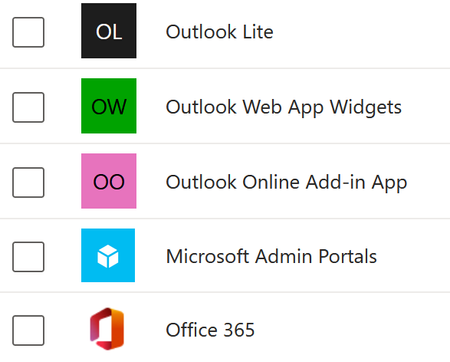
Trying to block 365 for a subset of users, except email. The old app-based CA rules made this easy. The new 'resource' based setup... I'm not even sure if it's possible. CoPilot just keeps telling me to use the old version of CA, because it hasn't clued into Microsoft's downgrade cycle. If I try to filter by resource attribute, I'm told I don't have permission to do so. I'm the global admin. Here's what searching for Outlook gives me and Exchange Advice? We ARE intune licensed, but i'm not sure App Protection Policies will help here. The intention is to block BYOD from accessing anything but Outlook / Exchange. That is, Mobile devices that aren't (whatever param I decide on)507Views0likes4CommentsSecurity Best Practices for Bookings Page's Mailbox Objects in Entra ID
Hi, are there any recommendations / best practices for hardening the user objects that are created in Entra ID when I create a new Microsoft Bookings page? Unlike regular shared mailboxes, the sign-in is enabled by default, I can simply reset the password, sign in via Outlook Web and see the Microsoft Bookings calendar. Bad actors could brute force this sign-in, register the MFA authentication method of their choice and gather data of the customers that used my public bookings page. What is the recommeded way to handle these objects in Entra ID? Conditional Access settings? Azure Monitoring alerts for sign-ins? Defender alerts for when an inbox rule is created? Kind regards, YaseminSolved936Views0likes4CommentsEntra Verified ID: CAP Preview Feature to require Face Check
During one of the MS demo video, I saw a preview feature for Conditional Access Policy to require "Face Check". I have now enabled Entra Verified ID and also switched on Face Check. When I create a new CAP, I do not see the "Require Face Check" option under the Grant. How can I request to have this feature released to my tenant? Thanks!238Views0likes2Comments