bing
45 Topics
Bug when clicking on desktop icons with Bing Wallpaper
Hi, For at least two to three weeks now, I've been experiencing a bug that occurs when Bing Wallpaper is active. When it's active, I can't double-click or drag the icons displayed in the top half of my screen. Is anyone else experiencing the same problem as me? Thanks119Views0likes0Comments
Rank Math IndexNow Returns Success but Bing Doesn't Reflect URL Submissions
Hi everyone, I'm using the Rank Math SEO plugin to automatically submit new and updated URLs to Bing through IndexNow. My website is: https://bloxvalues.net/ Rank Math reports that the IndexNow requests are being sent successfully, and the API key has been generated correctly. However, I don't see the submitted URLs appearing in Bing Webmaster Tools, and recently updated pages don't seem to be processed any faster. I've confirmed that: - IndexNow is enabled in Rank Math. - The API key is accessible. - My site is verified in Bing Webmaster Tools. - The URLs are publicly accessible. Has anyone experienced a similar issue with Rank Math's built-in IndexNow integration? Is there a delay before submissions appear in Bing Webmaster Tools, or is there another way to verify that Bing has successfully processed the submitted URLs? Any suggestions would be appreciated. Thanks!401Views0likes2Comments
400 Robux reward disappeared after my redemption was declined – anyone else?
Hi everyone, I’m really confused and frustrated right now. I spent about 5 months earning 6,750 Microsoft Rewards points and redeemed them for the 400 Robux digital code on March 2, 2026. The order was marked as “Declined,” and my points were returned. However, after that, the 400 Robux option completely disappeared from my rewards dashboard. Now only the 800 and 1000 Robux options are available. I earned all my points fairly and followed the program rules. The 400 Robux reward was available at the time I redeemed it, so I don’t understand why it was declined and then removed. Has this happened to anyone else? Does this usually mean it’s out of stock? Does it come back? Is there any way support can manually allow redemption? I’m just trying to redeem what I worked toward. Any advice would really help.4.4KViews1like6CommentsReconsideration request for selfmanager.ai - migration and indexing issues
Hello Bing Support, I am requesting a reconsideration of the domain selfmanager.ai following a domain migration from self-manager.net. Although pages are crawled and appear indexed in Site Explorer, the site is not being served in search results and impressions are effectively zero. Actions taken before this appeal: Implemented 301 redirects from old domain to selfmanager.ai Ensured all canonical tags point to selfmanager.ai Removed any noindex directives and confirmed no X-Robots-Tag headers Submitted sitemap and used IndexNow to push updates Verified Bingbot access in server logs; pages return 200 for crawls Performed content quality audit and improved thin or duplicate pages Site is indexed and receiving impressions on Google Please review whether a manual action, domain canonicalization issue, or quality filter is suppressing serving for this domain. I can provide server logs, sitemap, example URLs, and screenshots on request. Thank you for your assistance, Marian212Views0likes0Comments
Legal question on Bing Wallpapers
Is it legal to use Bing Wallpaper on Linux, using tools available there, like Gnome plugin "Bing Wallpaper" and such? Would it be legal for Ubuntu to add it directly in the distro (not images, those are obviously copyrighted by Getty et al, just the tool that downloads it daily) ? I tried to figure this from terms of use, but it is really hard to understand what is actually allowed.448Views1like2Comments
Error Redeeming Reward due to Change in Price
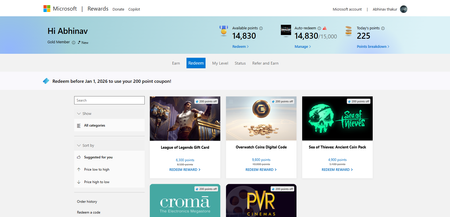
I wanted to buy "Roblox Digital Card—1000 Robux" which is for 16050 points but i had set my goal before its price was changed, earlier the price was 15000 points and with a 200 discount its price had reduced to 14800 points, but when i tried to redeem it says "Sorry you do not have enough points" On clicking manage On clicking redeem reward465Views0likes1Comment
Bing Webmaster Content Removal Tool not working; Raising support ticket also does not work
I have pages that were deleted by the website owner that contained personal information, yet the removed personal information still appears in Bing search results. I tried to remove them using the content removal tool, but it claims: "The URL you submitted still works on the web and isn’t a broken link. You can only request an outdated cache removal for this page. Please enter a word that appears in the cached version of the page but no longer appears on the web page." When I enter any word that appears in the cached version, including unique personal information, I get the message: "The entered text does not appear in the Bing cached version of the page. Please enter a word that appears in the cached version of the page but no longer appears on the web page." When you click on the offending Bing search result, it redirects to the website's home page, but the page showing in the personal information is gone. I tried raising a support ticket, but whenever I go to submit the "Create support ticket" does absolutely nothing. How can I get these outdated search results that contain my personal data off of Bing?474Views0likes0CommentsMicrosoft Bing AI not Generating Images I search For
why am i getting a crossed out camera icon on every bing ai picture i search for? So I'll enter in a prompt, it will generate, I'll see the thumbnails for the 1,2,3, or 4 images created, but when I click on one it just generates a grey icon with the camera crossed out. It also happens to images on the bing ai front page too. Like the sample photos that show you other people's creations or whatever. For some reason images in collections still generate fine, stuff I've previously saved. I've tried everything, deleting cookies, caches, every option under internet history has been deleted, when I create new accounts the same things happens. I've downloaded the bing app, used bing on chrome, nothing is working. Tried using different phones so it's definitely not a phone issue.305Views0likes0Comments
Not Indexing
WebStemp was connected to Microsoft Bing. I had uploaded my site and it was getting traffic, even a good amount of clicks compared to its first month performance. Then suddenly Bing started deleting my URLs. After that, even though my URLs were still shown as indexed, my articles stopped appearing in Microsoft Bing and I lost all my traffic. Now my site constantly shows as 'Processing 5.' Why am I getting this error and how can it be fixed? trioner.com111Views0likes0Comments