bug report
3 Topics
Windows 11 25H2 – Update KB506881 causes unexpected reboots (no BSOD, silent restart)
Hey everyone, just wanted to report a serious issue I encountered with Windows 11 25H2 related to the update KB506881. After installing KB506881 my PC randomly rebooted without warning — no BSOD, no crash report, no error on screen. Only the event log showed “unexpected shutdown / Kernel-Power (Event ID 41)”. Removing the update completely solved the issue. Since uninstalling it, my system has been 100% stable with zero unexpected restarts. Reproducibility: Install KB506881 → system performs unexpected shutdowns / reboots Uninstall KB506881 → issue disappears immediately System details: Windows 11 25H2 (Build: 26200) AMD Ryzen 7800X3D (but issue seems unrelated to hardware) No BSOD / no memory dump / no bugcheck created Reliability Monitor only shows “Unexpected Shutdown” What I already did: Removed KB506881 manually → issue gone Blocked the update using PowerShell + scheduled task (hourly) to prevent Windows from reinstalling it Logs: Event Viewer → Windows Logs → System Shows: Kernel-Power 41 (unexpected shutdown) immediately after KB506881 installation. Has anyone else experienced unexpected reboots after KB506881? If yes, please comment so Microsoft can see how widespread this is. I also reported it via Microsoft Feedback Hub. Thanks!4.8KViews3likes13CommentsWindows 11 UAC pop-up window not correctly shown
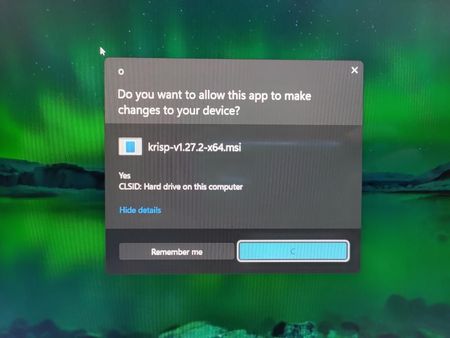
The "Would you like to allow this app to make changes to your computer?" screen (UAC pop-up window) is not showing correctly on Windows 11. I tried to uninstall an app, and when this message popped up, it showed responses and text that was not correct or the same as Windows 10. It displayed like this: (Picture 1) The title of the window is "O", instead of the usual "User Account Control". (See Picture 1 Below) It then displays the usual question you would expect from this screen. (See Picture 1 Below) It then shows the name of the application, which maybe should or maybe shouldn't be displayed like that. You would usually expect a more user-friendly name, such as the application's name or "[Application Name] Uninstaller", with the application's icon. It doesn't show either of these. It shows the default for an app with no icon and shows the application's .msi file name. (See Picture 1 Below) Underneath this, it randomly shows the word "Yes". (See Picture 1 Below) It then underneath says "CLSID", instead of "File origin", and then the rest of that line that you would usually expect. (See Picture 1 Below) It then says "Hide details" where you would usually expect "Show more details", as this is shown BEFORE any details are shown. (See Picture 1 Below) It then displays 2 buttons "Remember Me" and "C", instead of the usual "Yes" and "No". (See Picture 1 Below) Upon clicking the "Hide details" button, it then shows the information you would probably expect, except that the publisher is "Uninstall". (See Picture 2 Below) The "Hide details" button also changes to a button that says "Segoe UI". Segoe UI is a font family. (See Picture 2 Below) (Picture 2) Hope this is fixed soon.2.9KViews0likes2Comments
Windows 11 cannot display second in taskbar
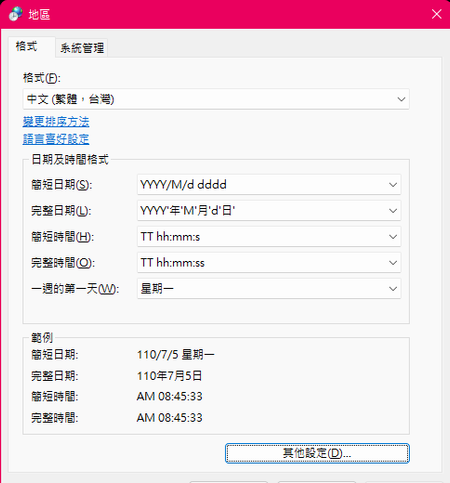
I have consulted the information on this page and it has not been resolved. website:https://answers.microsoft.com/en-us/windows/forum/all/how-to-get-the-windows-10-clock-to-show-seconds/816c489c-2e93-45ce-ad56-9b9b9b93013f Restarting did not improve the problem.4.9KViews0likes1Comment