BI & Data Analysis
2461 Topics
How to create a multi-tiered percentage-based bar chart?
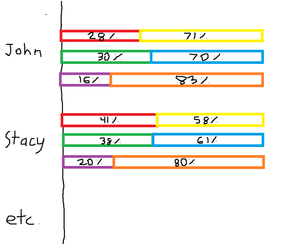
Hello, I would like to create a multi-tiered percentage-based bar chart based on the data found below (test data evidently). Column B and C add up to 100%, Column D and E add up to 100%, and lastly column F and G add up to 100%. I would like each set of variables to equate to 100% on the graph, as the source data is percentage based anyways, but all be organized in their own separate row on the graph underneath the employee name. I have included a diagram drawn in MS paint to portray the desired output (with an accompanying legend). Thanks in advance! Employee Name Number of Sales Made % Number of Sales Made from Other Competitors % Number of Calls Made % Number of Calls Made from Other Competitors % Number of Individual Employees % (always is 1) Number of competitor employees % John 28.57% 71.43% 30.00% 70.00% 16.67% 83.33% Stacy 41.67% 58.33% 38.71% 61.29% 20.00% 80.00% Richard 47.06% 52.94% 47.06% 52.94% 14.29% 85.71% Andy 42.31% 57.69% 40.48% 59.52% 10.00% 90.00%133Views0likes5Comments
Calculate overlapping hours
Hello, I need to report how many hours a staff member supervised one or more volunteers. For a very simplified example, Volunteer Name Date Start Time End Time Supervisor Fred 1/1/26 1:00pm 3:00pm Lucy Ethel 1/1/26 2:30pm 4:30pm Lucy Here 4 volunteer hours were served, but because there was a 30 minute overlap, Lucy only supervised for 3.5 hours. Is there a way to get Excel to calculate that? To say: look at all the entries with matching date and matching supervisor, and add up non-overlapping time. I'm not expecting this to be possible, but I thought I'd ask. Thanks!Solved408Views1like14Comments
Moving a column of text data into 3 columns of data?
I have a column of text data cells 1,2,3,4,5,6,7,8,9 and longer. I want to create 3 column of data to graph and manipulate Cell in Columns. 1,2,3 3,4,5 5,6,7 8,9,10 and longer. So i need to create 3 columns of data from 1 column of data. I am using Mac Excel 16 and I can not make this happen. I have tried all sorts of solutions. Help? Thank you,127Views0likes4Comments
Couldn't refresh data types (stocks) - sorry, our server is temporarily having problems.
Not sure if this is a coincidence as the date turned to 2026 but the stockhistory function server is not refreshing the data. Anyone else seeing this issue? My 365 license is still good so don't think it's a license issue. This is the message in Excel - Couldn't refresh data types - sorry, our server is temporarily having problems. We're working to fix it. Tried all suggested fixes (reboot, clear cache, log out/in) Anyone else?64Views0likes1Comment
STOCK HISTORY HELP
I love the stock history spreadsheet. It is amazing for stock analysis at the beginning and end of each day. My question, to all of you smart folks out there is, is it possible to automate the process and save the desired result to another sheet. For instance, on my stock history sheet, cell C2 is where you type the stock ticker symbol. Then all the cells containing the math and parameters light up like Christmas trees. Certain stocks light up certain cells green and in turn, I make money that day based off of those values. What I am looking for is automation or a bot that enters the tickers (all stock tickers-there are over 5000 of them) in cell C2, runs the math, and then only saves the tickers that have green lights in the specific cell F5 when it gets the desired value. So, if a ticker is typed in C2 and that stock meets the parameters of all my math and cell F5 turns green, then I would like this "bot" or automation to save that (and each) ticker to another sheet. I just don't have the time to type and run over 5000 stock tickers every day. I obviously am in over my head and probably need a lot of help but you have to admit, it is a good idea. I just want to know if this can be done? Can anybody point me in the right direction? My daughter's college tuition depends on it. Thanks everybody!!!Solved1.7KViews0likes5Comments
Calculating hours using pivot table
Hi, I'm making a personell planning sheet and I want to calculate the sum of hours teachers give lessons. I have 2 tables and my data is formatted like this (simplified) Lesson name Hours Teacher 1 Teacher 2 Lesson 1 2 Paul Lesson 2 3 Pete Lesson 3 2 Paul Pete Teacher name Max working hours Paul 10 Pete 15 Now I want to create an overview of how many hours each teacher is teaching using a pivot table. This is easy when there is just one Teachter collumn but I need to calculate the sum using both teacher collumns... I need to overview to be something like this: Paul -> Lesson 1 + Lesson 3 = 4 hours Pete -> Lesson 2 + lessen 3 = 5 hours Then the next step is to use a metric or KPI to calculate if each teacher is exceeding their max working hours... Can anybody hlelp me with these problems? Thanks!125Views0likes2CommentsDifferent functions for each column in a subtotal
ive got a sheet where i want to subtotal using different functions in different columns. i will always have different data every time i want this to execute, so cant hardwire the row range, also each group (based on date) will have different number of rows. Eg, on change of date, sum column B, count column C, max column D. I hope i explained the problem adequately.139Views0likes4CommentsCalculate hours using pivot table
Hi, Im making a personell planning sheet and I want to calculute the hours each teacher is teaching using a pivot table. My data is formatted in 2 tables like this (simplified): Lesson Hours Teacher 1 Teacher 2 Lesson 1 2 Paul Lesson 2 3 Pete Lesson 3 2 Paul Pete Teacher Max working hours Paul 10 Pete 15 Now its easy to create an overview of how many hours each teacher is teaching with one teacher collumn. But it need to calculate the hours based on 2 collumns like this: Paul -> Lesson 1 + Lesson 3 = 4 hours Pete -> Lesson 2 + Lesson 3 = 5 hours Then the next step is to use a metric or KPI to calculate if the teacher is exceeding their max working hours. I hope someone can help me out with this... Thanks!73Views0likes1CommentChart linking with Name Manager
so it's known chart behave different than other items, i linked it to a box that indirect the limit of which it should take values from a column, like i used this code to do it: =OFFSET('Study '!$F$25,1,0,'Study '!$BD$26), but this fails when i want it to take starting and ending limit with offset command, it just re input values, like if i want beginning to be 100 and ending to be 300 it reads first 100 and then reread them plus the extra 200 so i have 400 values. is it possible to make it so from column F it starts taking values from lets say box BC and the ending limit to be from BD? i tried looking it up and figuring it but you know how it goes with charts78Views0likes2Comments