autodiscover
5 Topics
EWS Autodiscover Process in Hybrid with "internal" Exchange Servers
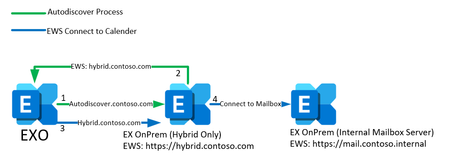
Hi everyone, i really need help about the EWS Autodiscover process in a specific hybrid Environment. Customer is starting to use Exchange Online. For Full Hybrid configuration there is a seperate new Exchange SE with a valid certificate, NAT for IP Ranges from M365 and public available URLs for Autodiscover,EWS,... There are internal Exchange Servers which are used only for internal access. Those are the servers with all mailboxes. All URLs are configured for internal use (mail.contoso.internal) Migration is working, access to own calender is working, mailfllow is working. But there are problems to access other users calender. If a user which is migrated to Exchange Online (or via Teams) try to access another calender which is onPrem, there is no access. So i tried to use connectivity analyzer for teams integration to find out whats the problem. Result: Autodiscover resolves, connects to Hybrid and gets EWS URL as answer. But it gets the internal EWS URL from the internal Exchange Servers, not from the public available URLs which are configured at the hybrid server. I visualised the two scenarios. Number1: Thats how i thought it would work Autodiscover to autodiscover.contoso.com Hybrid answers with EWS URL: hybrid.contoso.com Connect from EXO to hybrid EWS URL Proxy to Internal Exchange Number2 : Thats what really happens Autodiscover to autodiscover.contoso.com Hybrid relays request to internal Exchange (Mailbox Server) Server answers with internal EWS URL: mail.contoso.internal Connect from EXO to internal EWS URL (which is obviously not working) So as you can see, the autodiscover process asks the internal Exchange for its EWS URLs and not as i expected the hybrid server's URLs. I always thought, the hybrid server works as a sort of proxy for every external connection from EXO. But it seems that the hybrid just relays the autodiscover request to the server which holds the mailbox. And this servers in this scenario cannot change their EWS URLs to a public resolvable FQDN. So my question is: Is this correct? Does the process always works like this or did i do anything wrong in the configuration? I hope you understand my explanation. Thanks in advance!!!416Views1like5Comments
New problem adding mailboxes with personalized domain to Outlook with Microsoft 365 Family ?
Hi all Having a big problem with this recently and need your help to understand if Microsoft has made a general change with Office 365 Family accounts with personalized domains, or if it is just my individual problem. I've been running Outlook on my PC with a Office 365 Family account and personalized / custom domain @NotMyRealDomain.EMAIL using namesilo.com for DNS for 1.5 years. Everything worked fine, although in my online (outlook.live.com) web-based mailbox under Settings->Premium-->Personalized Email Address, it has always said "We couldn't connect the domain NotMyRealDomain.EMAIL to Outlook. Cancel setup and try again." But as I said everything worked so I didn't mess with this. (Now if I press "cancel setup" it warns me that this will disconnect my personalized domain and I wont be able to restore it due to MS discontinuing support for personalized domains in the Office Family plan. So I'm definitely not pressing that button.) The problem is that my Outlook profile is corrupted (I think) and to debug the problem I need to create a new profile. But I cant. When I try to create a new profile, it fails to add my mailbox using Autodiscover. I enter my email address RON@NotMyRealDomain.EMAIL and my password, it tries to setup outlook and eventually fails. Manual setup also fails. In some cases it complains the username RON@NotMyRealDomain.EMAIL is incorrect, in other cases it says it cannot contact the server. At the same time, I have no problems using this email address using the web-client. This worked 3-4 months ago, and nothing changed except I updated my version of Office. So I suspect that Microsoft changed something with how Outlook recognizes and/or configures mailboxes. Can somebody who runs outlooks with a Family 365 account with a personalized domain (ideally not on godaddy) please try to create a new additional profile to see if you have the same issue? If it works OK for you and if you are not running the latest version of Outlook (Outlook for Microsoft 365 Version 2404 Build 16.0.17531.20128 MSO 64-bit, the latest Current Channel version) can you try updating your Office to see if that causes the problem? If indeed MS changed something it could be bad news... thanks for your help!890Views0likes7CommentsExchange 2019 and Outlook 2016 and above
Dear Community, I have Exchange 2019 CU 12 running on Windows Server 2022. The problem that we are facing is with Outlook 2016 and above clients that fail when configuring their email profile for the first time. We do not have the problem with Outlook 2013 clients, ware Autodiscover works without problem. The Outlook 2016 and above prompt for username and password, however, no matter how often I provide the right credentials, I'm prompted again and again. Strangely, Outlook 2013 does not have this problem. When I right click on Outlook with CTRL and run Test Email AutoConfiguration on Outlook 2013 no problem, all URL are correct, when I run against existing Outlook 2016 client I am prompted for credentials. Can anyone explain why Outlook 2016 and above have Autodiscover issues and Outlook 2013 does not? Thank you b.lSolved717Views0likes3Comments
Exchange Online - Autodiscover XML response not returning Outlook settings
Hi everyone, We are currently involved in a support case for one of our users that is unable to access her e-mail account when using Outlook desktop version, webmail is working as expected. The mailbox is located in Exchange Online, but the AD account is synced from local AD with a Hybrid Configuration for Exchange 2016. The DNS autodiscover.domain.com for the affected user is pointing to the OnPremises Exchange URI since we still have some mailboxes that have not been migrated, but since we use M365 apps Outlook it should try to contact Exchange Online autodiscover first anyway. Usually when we run into this, it is because the user is not licensed for M365 apps or does not have the requried Exchange Online license, but this user has both Exchange Online Plan 2 and M365 Enterprise Apps. The licensing is done using group based licensing in Azure AD. We have also checked that MAPI (everything except smtp auth) is enabled on her account in the M365 admin portal. If i run the Outlook Connectivity test in the testconnectivity microsoft site, we only get a <Type>Web</Type> response in the XML. (usually you get EXCH, EXPR, EXHTTP etc) My understanding is that this indicates an classification/license problem in Exchange Online for the user, but the support case has been transfered to the "Outlook desktop app" team which are insisting that we must collect Outlook logs to troubleshoot further since OWA is working. The case is already over a month old, and i dont feel like starting from scratch again. I would love a second opinion on my interpretation that this is a Exchange Online issue, and not related to Outlook desktop app before i attempt to escalate the case.3.1KViews0likes6Comments
Autodiscover misbehaviour
Hi, I'm trying to set up autodiscover mechanism for all users of my hosting service. To do so - I've managed to create a dedicated XML document, which is accessible through http/https protocol at mydomain.myhost.tld/autodiscover/autodiscover.xml, just as it is described in docs: https://docs.microsoft.com/en-us/previous-versions/office/office-2010/cc511507(v=office.14)?redirectedfrom=MSDN#overview The issue is that the outlook client (tried both 2016 and 2019) refuses to gather response information - let's say - for 9 times of 10, as it would be wrong somehow, even there are access logs of my apache webserver, showing proper responses (code 200). Furthermore - outlook also provides a tool to test if the autodiscover configuration is proper on specified domain (Test Email AutoConfiguration in tray) and that kind of test is always being passed (the difference here is that on the first scenario requests are coming from some MS network and the Test Email AutoConfiguration always comes from the local machine). Is there any reasonable explanation for such behaviour? I'm not really convinced if my question matches exactly this hub, but I hope it does. Any help would be really appreciated.846Views0likes0Comments