apps
254 Topics
Entra Enterprise apps and App registrations - Global Secure Access - Conditional Access Block
I am working on a rollout for Global Secure Access and ran into an issue with Entra Enterprise apps setup in the tenant. With Global Secure Access I have a Conditional Access Policy set to Block access to All Resources excluding some resources like Intune and Defender tap required for mobile setup. When I added an administrator account which had done some Enterprise application setup and authorization for various third-party applications, those third-party applications stopped working with failed logins indicating token access issues. Upon review I found the majority of applications to be using client secret authentication with this administrator account as the authorizer. My limited knowledge of Enterprise apps leads me to believe this client secret is an application password that the third-party uses to keep generating tokens based on the authorizing account. My questions surrounding this setup and further understanding are mainly in relation to how Enterprise apps and app registrations authenticate, as well as user authentication directly. 1. How does the token authorization work? Does the application just use the client secret to authenticate as the user who authorized it to generate an access token? Why does MFA requirements and changing passwords not affect this but specific Block policy does? 2. What are best practices in relation to authorizing third-party applications? My thoughts are a dedicated account to authorize applications when needed. 3. How will this work with applications regular users use? Say a user has a digital notebook that syncs with their OneNote or a calendar app that syncs calendars between Outlook and their website. Do these applications also use client secrets with the user's token and will break when added to the GSA setup I have? Is the only way around this to authorize with an admin account for token issuance? Thank you for your time reading this and any insight you may have for any of the questions or ideas mentioned.116Views0likes1Comment
External (guest) users can't access my registered application
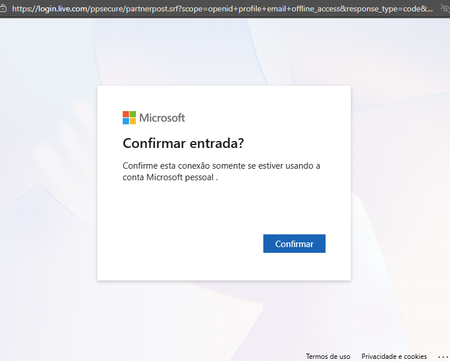
We have a FileMaker application registered with Entra ID, using OAuth, for internal and external (guests) users in my organization. Since January 19th, external users have been encountering a different authentication process, which results in a 404 error (see images below). No changes were made to the Entra ID or the application configurations before this change in behaviour. It seems that logging in to a personal account results in an incorrect token for the redirect URL, which does not happen when logging in with organizational accounts.540Views1like1Comment
AADSTS50105 error message is unreadable for end users — UX improvement suggestion
1. What’s wrong with the current error message a. It’s written for administrators, not users The message exposes: Internal system names (AADSTS50105) GUIDs (aaaabbbb-cccc-dddd-eeee-ffff01234567) Identity provider jargon (“direct member of a group with access”) None of this helps the person who sees the error decide what to do next. b. The actual problem is buried in a wall of text The real issue is simply: You don’t have permission to access this app. Instead, the message forces users to: Read a long paragraph Decode domain-specific language Guess which part matters Cognitively, this is high effort for low payoff. c. “Contact your administrator” is vague and unhelpful Users ask: Which administrator? IT? Security? App owner? Their manager? What should they say? Without context, users either: Ignore the error Forward screenshots randomly Open the wrong support ticket d. Error codes without guidance increase support load AADSTS50105 may be meaningful internally, but: Users don’t know whether to Google it Support teams receive unclear tickets (“it doesn’t work”) This paradoxically raises support cost instead of lowering it. 2. What a better error message should do A good error message answers four questions in order: What happened? Why did it happen (in plain language)? What can the user do next? Who specifically can help? And it does so in under 30 seconds of reading time. 3. Example of a much better error message You don’t have access to [APPLICATION] Your account (email address removed for privacy reasons) isn’t currently authorized to use [APPLICATION]. This usually means: You haven’t been added to the required security group, or Access hasn’t been requested or approved yet. What to do next If you believe you should have access, contact IT Service Desk or your [APPLICATION] owner and request access. Helpful details to include in your request Application name: [APPLICATION] Your email: email address removed for privacy reasons Error reference: Access not assigned (Error ID: AADSTS50105 — for IT use) 4. Optional but high-impact improvement: Add a “Request Access” button or link One-click takes users to: ServiceNow / Jira / internal form Auto-populates app name and user email Administrators configure support link when configuring the application46Views0likes0Comments
How to view all employees in Microsoft Places?
Now that the Favorites feature has been removed and Microsoft Places only shows frequently used people from Microsoft 365 apps, is there a way to see all employees of the company (65 people) in one overview? I’m looking for a way to search this list and ideally sort it alphabetically or by department. Is this functionality planned to return, or is there an alternative way to achieve this today?165Views1like0CommentsRequest to enable preview feature - Face Check with CAP
Dear Microsoft, I am on a business premium plan for my home test tenant. I cannot raise ticket nor do I have an account manager. I know this is in private preview. I would like my tenant to be enabled to test this new Verified ID feature to have "Face Check" in CAP as one of the Grant conditions. tenant id: bc85b508-0107-4472-a49c-fc8cefd4f0d7 Thank you.58Views0likes0CommentsAI Agents in Free Copilot Chat.
Hi all! When Agents were first introduced into Copilot Chat for free, you used to be able to upload 20 knowledge resources. Now this has been cut back to 4 web URLS only, and each of these can only be 2 forward slashes deep - we are really struggling on using agents successfully. Based in the UK, all of the Department for Education content is more than // deep in their web. We can't upload docs from the PDF's and most other juicy web content is much deeper in the domains than 2 x // I would love to hear from other Copilot Chat Agent users in how you are working with the barriers of the free version in your setting. Paid licenses are just not an option on UK school budgets sadly. Thanks all!112Views1like0Comments