app
541 Topics
Integrated - PowerApps Customized Form - not working
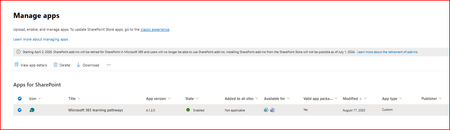
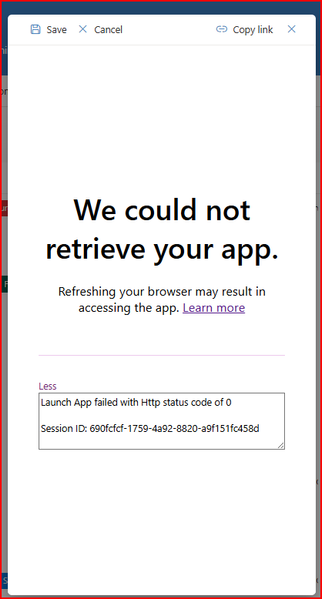
Hi, The Power App customised form is not being retrieved. When the user selects the 'Add new item' button a customised form should open, but getting this pop up. Does anyone know if there are any issues with SharePoint Online and this will hopefully resolve itself or any other potential solution as to why this is occurring. It was working yesterday87Views0likes4Comments
Unable to filter embedded list
OMG- could they f up sharepoint any more. It used to be such a powerful tool. It is harder than ever now. So- embed a lits in a page with a list part. I am showing controls and on default view-no search. there is now also NO FILTER PART so i go to github patterns and practices to download. Butttttt, I can't upload because while I am global admin, I am not sharepoint admin and cannot change my permissions. Create second admin account with all permissions. Tr to update my normal account permissions, and it says "you do not have permission to save." SO- do you know any other way to get a search of a list on a page? And - any thoughts on my permissions hell?28Views0likes0Comments
Add items Permission level
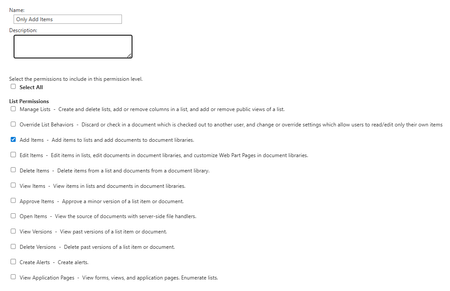
Hi, I'd like to know a way to set permissions on a list so that users in the SharePoint site - Members group can't see existing items in the list that don't have unique permissions assigned. They can only add new items in this list. Once an item is created, a workflow would be triggered that would add a unique permission only for that item. The problem is that when creating a Permission Level with only the ability to add items, the user loses access to the custom item creation form.198Views0likes3CommentsBest Practice guide for stretched HA farm?
Hi, Im planning a SharePoint Subscription farm over 2 data centers. Should be pretty simple. Farm will consist of: dc 1: 1 spfe, 1 spapp, 1 sql dc 2: 1 spfe, 1 spapp, 1 sql Sql servers will be AlwaysOn. Im not sure how to set up the sp servers. Is there a preferred way to set it up, with how to? Our domains have 10gb connections so should be more than sufficient for stretched and HA. Can CA site be hosted from multiple servers? How are IPs/DNS/certs handled? What else do I need to get my head around? Thanks. Swan43Views0likes0Comments 165Views0likes1Comment
React SPFx web part becomes invisible on random page refresh – Need help diagnosing issue
Hello Everyone, I am facing a random rendering issue with a React SPFx web part (HelloWorld2) on SharePoint Online. The web part becomes invisible on page refresh, and I need help diagnosing the cause. Setup Steps 1. Solution Source Code Here is my source code and steps followed for deployment: https://github.com/JagtapY17/DemoProjects/blob/main/SPOnlineWP.zip Download and extract the SPFx solution Open the solution directory in the command prompt Run the following commands: npm install gulp bundle --ship gulp package-solution --ship Retrieve the generated .sppkg file from: sharepoint/solution/sp-online-wp.sppkg 2. SharePoint Online Deployment Steps performed in SharePoint Online: Created a new Community Site (Department template) Uploaded the .sppkg package into the App Catalog Added the app to the site (Site Contents → Add an app) Added the HelloWorld2 web part to the homepage (placed at the top) Added 8–9 other web parts below it on the page Issue / Question After adding the web part: The HelloWorld2 web part renders inconsistently on page refresh Out of 10 refreshes, 6–7 times the web part does not render at all Other web parts load fine every time No browser console errors appear It seems the web part gets skipped randomly during the page render pipeline I request community members to: Check the provided solution package Review the HelloWorld2 web part code Suggest the possible cause of this intermittent non-rendering issue Any insights or debugging suggestions will be greatly appreciated. Thank you! DemoProjects/SPOnlineWP.zip at main · JagtapY17/DemoProjects Projects for Testing . Contribute to JagtapY17/DemoProjects development by creating an account on GitHub.50Views0likes0CommentsBest way to build a dynamic data driven navigation, that can be restricted based on security roles
Hi All, I'm in the process of designing a power app and would like to use the tab control or gallery for the menu. Looking for advice on how best to wrap authorization around the navigation for example to check if a logged in user belongs to a role they can see only specific menu item or disable a link button etc.. Any advice would be appreciated Thanks in Advance235Views0likes3CommentsSharePoint online document library - document properties not getting update values in word document
Hi All, We have created an application in SharePoint online. This application creates Word documents in which SharePoint list fields are merged. When creating a new item in SharePoint, the Word document shows the correct date values: 1. Create new item in SharePoint. Dates are 1/9/2025 and 2/9/2025 2. Opening the related word document shows This is correct behavior 3. Change any field through 'Edit properties'. Still the dates are 1 and 2/9/2025 4. If I open the Word document now I see that the dates have a value of 1 day less then the provided date. The category is updated correct. 5. When downloading the document the correct values are shown 6. Also when opening the document through View in browser > Edit document > Open in desktop, I see the correct values Question is: 1. Why don't we see the correct values when the Word document is directly opened in the browser? 2. Is there a possibility to open the Word document always in the Client (desktop) itself instead of directly on the browser? We already tried changing the below Advanced library settings (changed it in Open in Browser/use the server default), but this didn't gave the correct solution.153Views0likes1CommentSharePoint List calculated column formula using a Lookup column reference
Given: A SharePoint List (SPL) called Contractors with the following columns: ContractorID // Display name of the default ID column ContractorName Another SPL called Reports with the following columns: ReportID // Display name of the default ID column ReportNumber // Calculated column Contractor_ID // Lookup column referring to the ContractorID column of the Contractors SPL The calculated column, ReportNumber, would have a formula similar to: = [ReportID] & "-" & Contractor_ID Question: Does SharePoint Lists support the use of a Lookup column in the formula of a calculated column? If so, I need help on the proper syntax for the formula. (The formula above is not working) Thanks in Advance86KViews1like9Comments