agentic ai
17 TopicsAI Is the Headline — but Readiness Is the Real Story for MSPs
AI is everywhere right now. Customers are asking about Copilot. They’re curious about automation. They want faster, smarter ways to work. And on the surface, it all feels exciting—and urgent. But when you spend time with MSPs, a different story often emerges. Behind the AI curiosity are environments that aren’t quite ready. Devices are managed inconsistently. Identity hygiene varies by tenant. Security baselines drift over time. And for MSPs, holding all of this together manually—customer by customer—simply doesn’t scale. That gap between AI ambition and operational reality is becoming one of the most important conversations MSPs can have today. Why AI Success Still Comes Down to the Basics AI doesn’t fail because of a lack of innovation. It fails because the fundamentals aren’t in place. Without secure identities, compliant devices, and consistent policies, AI initiatives struggle to move beyond pilots—or worse, introduce new risk. That’s why so many Copilot conversations eventually circle back to the same question: Are we actually ready for this? This is where MSPs play a defining role. Not as AI hype merchants, but as partners who help customers build the foundation that makes AI practical, secure, and sustainable. At the center of that foundation sits Microsoft Intune. Microsoft Intune: Essential, but How Do You Scale? Microsoft Intune is already included in Microsoft 365 Business Premium. Many customers own it. Many MSPs support it. Yet adoption and consistency remain uneven. The challenge isn’t Intune itself—it’s the operational model. Managing Intune tenant by tenant, navigating multiple portals, and maintaining consistency across customers creates friction for MSPs. It’s time‑consuming, error‑prone, and difficult to turn into a repeatable service. And yet, Intune is critical. It’s the control plane for users, devices, access, and security—everything AI depends on to work safely at scale. Without Intune done right, AI readiness remains theoretical. Why the Partnership Matters: Microsoft Intune and AvePoint Elements This is why our partnership with Microsoft matters so much. Microsoft Intune provides the foundation. AvePoint Elements makes it scalable for MSPs. AvePoint Elements acts as the MSP operating layer on top of Intune—helping partners standardize, automate, and manage Intune across multiple customer tenants from a single platform. For MSPs, that translates into something very tangible: Less manual effort and portal hopping Consistent Intune baselines across customers Automated user and device lifecycle management Reduced drift, better efficiency, and healthier margins Instead of Intune being “work you absorb,” it becomes something you can package, repeat, and build a business around. From One‑Time Setup to Ongoing Value What we’re seeing with leading MSPs is a mindset shift. Intune is no longer treated as a one‑off deployment. It becomes a managed service—part of a broader story around security, governance, and AI readiness. That might mean standardized Intune onboarding, continuous device and identity hygiene, or positioning Copilot readiness as an ongoing engagement rather than a project. The outcome is powerful and familiar to MSPs who’ve made this transition before: Predictable recurring revenue Operational scale without linear headcount growth Stronger customer trust A clear path from security to AI enablement The Moment for MSPs Customers don’t just want access to AI. They want confidence that it’s being deployed responsibly. MSPs who can provide that confidence—by grounding AI adoption in strong Intune foundations—will stand out in the next phase of the market. That’s exactly what the partnership between Microsoft Intune and AvePoint Elements is designed to enable. A Note for MSP Partners If you’re an MSP thinking about how to: Scale Microsoft Intune delivery Reduce operational friction And turn AI readiness into a repeatable service This is a conversation worth leaning into now. Because in the age of AI, the partners who win won’t just deploy new tools—they’ll make them work in the real world. Join us for “From Copilot to Catalyst: How MSPs Turn AI Readiness Into Recurring Revenue” and explore how Microsoft Intune and AvePoint Elements work better together—helping you turn AI readiness into real, sustainable growth.155Views0likes0CommentsMicrosoft at NVIDIA GTC 2026: Powering the AI Ecosystem
This year, the Microsoft presence at GTC highlights a simple but powerful idea: AI transformation does not happen alone. It happens through ecosystems. Through a curated series of partner demonstrations and industry conversations, we will showcase how organizations are designing, building, and scaling AI solutions on Microsoft Azure accelerated by NVIDIA. The result is a connected story about how enterprise AI becomes production-ready and delivers measurable business value.406Views0likes0CommentsMicrosoft Partners: Accelerate Your AI Journey at AgentCon 2026 (Free Community Event)
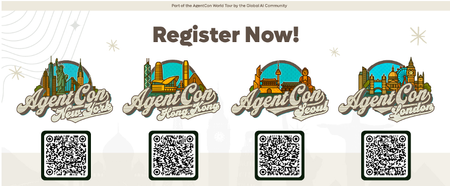
Recently, a customer asked me a question many Microsoft partners are hearing right now: “We have Copilot — how do we actually use AI to change the way we work?” That question captures where we are in the AI journey today. Organizations have moved past curiosity. Now they’re looking for trusted partners who can turn AI into real business outcomes. That’s why events like AgentCon 2026 matter. A free, community-led event built by practicioners AgentCon is not a traditional conference. It’s a free, community-driven global event organized by the Global AI Community together with Microsoft partners and ecosystem leaders. Simply put: it’s for the community, by the community. Across cities worldwide, developers, consultants, architects, and Microsoft partners come together to share practical experiences building with AI agents, Copilot, and the Microsoft platform. The focus isn’t theory — it’s implementation: What worked What didn’t What partners can apply immediately with customers This peer learning model reflects how many of us actually grow in the Microsoft ecosystem: by learning from other partners solving real problems. Why this matters for Microsoft partners The opportunity for partners is evolving quickly. Customers aren’t just asking about AI tools — they’re asking how to redesign processes, automate work, and unlock productivity using AI-powered solutions. The Microsoft AI Cloud Partner Program emphasizes partner skilling and helping customers realize value from AI investments. Community events like AgentCon accelerate that learning by bringing partners together to exchange proven approaches and practical insights. When partners upskill faster, customers succeed faster. Why attend AgentCon is designed to help partners move from AI awareness to AI delivery. As an attendee, you can expect: Practical sessions and demos from practitioners Real-world AI and agent scenarios Direct conversations with builders and peers New collaboration and co-sell opportunities You’ll leave with ideas and approaches you can bring directly into customer engagements. Why speak AgentCon thrives because partners share openly with one another. If you’ve implemented Copilot, explored AI agents, or learned lessons from customer deployments, your experience can help others accelerate their journey. Speaking at AgentCon allows you to: Share your expertise with the global partner community Build credibility within the Microsoft ecosystem Create new partnerships and opportunities Contribute to collective partner success You don’t need a perfect story — just an honest one others can learn from. Join the global AgentCon community AgentCon 2026 events takes place around the world including these upcoming events: March 9 - New York: https://aka.ms/AgentconNYC2026 April 11 - Hong Kong: https://aka.ms/AgentconHongKong2026 April 16 - Seoul: https://aka.ms/agentconLondon2026 April 22 - London: https://aka.ms/agentconSeoul2026 Each event is locally organized, community-led, and free to attend. Help shape the next phase of AI adoption AI transformation is happening now — and Microsoft partners play a critical role in guiding customers forward. AgentCon is an opportunity to learn together, share experiences, and strengthen the partner ecosystem driving AI innovation. 👉 Register or apply to speak: https://aka.ms/agentcon2026 We hope you’ll join us — and be part of the community helping customers turn AI potential into real impact.287Views0likes0CommentsLearn to maximize your productivity at the proMX Project Operations + AI Summit 2026
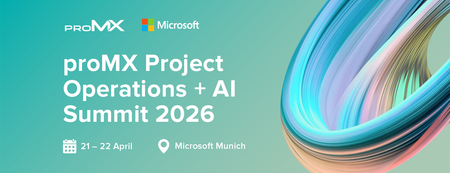
As organizations accelerate AI adoption across business applications, mastering how Microsoft Dynamics 365 solutions, Copilot, and agents work together is becoming a strategic priority. Fortunately, businesses no longer need to rely on speculation — they can gain practical insights with fellow industry professionals during a unique two-day event: On April 21-22, 2026, Microsoft and proMX will jointly host the fourth edition of proMX Project Operations Summit at the Microsoft office in Munich, but this time with an AI edge. The summit brings together Dynamics 365 customers and Microsoft and proMX experts to explore how AI is reshaping project delivery, resource management, and operational decision‑making across industries. On day one, participants will discover how Dynamics 365 Project Operations, Copilot, Project Online, proMX 365 PPM, and Contact Center can strategically transform business processes and drive organizational growth. On day two, they can explore the technical side of these solutions. Secure your spot! What to expect from the summit Expert-led, actionable insights Join interactive sessions led by Microsoft and proMX experts to learn practical AI and Dynamics 365 skills you can use right away. Inspiring keynotes Gain future-focused perspectives on Dynamics 365, Copilot, and AI to prepare your organization for what’s next. In between our special guests we have Microsoft's Rupa Mantravadi, Chief Product Officer, Dynamics 365 Project Operations, Rob Nehrbas, Head of AI Business Solutions, Archana Prasad, Worldwide FastTrack Leader for Project Operations, and Mathias Klaas, Partner Development Manager. Hands-on AI workshops Take part in workshops where Sebastian Sieber, Global Technology Director (proMX) and Microsoft MVP will show the newest AI features in Dynamics 365, giving you real-world experience with innovative tools. Connect with industry leaders Engage with experts through Q&A sessions, round tables, and personalized Connect Meetings for tailored guidance on your business needs. Real customer success stories Hear case studies from proMX customers who are already using Dynamics 365 solutions and learn proven strategies for successful digital transformation. Who should attend? This summit is tailored for business and IT decision-makers that are using Dynamics 365 solutions and want to drive more business impact with AI, but also for those who might be planning to move away from other project management solutions such as Project Online and need practical guidance grounded in real-life implementations. Date: Apr 21 & 22, 2026 | 2 -Days event Location: Microsoft Munich, Walter-Gropius Straße 5, Munich, Bavaria, DE, 80807 Ready to maximize your productivity? Register here.147Views1like0CommentsIntegrating Microsoft Foundry with OpenClaw: Step by Step Model Configuration
Step 1: Deploying Models on Microsoft Foundry Let us kick things off in the Azure portal. To get our OpenClaw agent thinking like a genius, we need to deploy our models in Microsoft Foundry. For this guide, we are going to focus on deploying gpt-5.2-codex on Microsoft Foundry with OpenClaw. Navigate to your AI Hub, head over to the model catalog, choose the model you wish to use with OpenClaw and hit deploy. Once your deployment is successful, head to the endpoints section. Important: Grab your Endpoint URL and your API Keys right now and save them in a secure note. We will need these exact values to connect OpenClaw in a few minutes. Step 2: Installing and Initializing OpenClaw Next up, we need to get OpenClaw running on your machine. Open up your terminal and run the official installation script: curl -fsSL https://openclaw.ai/install.sh | bash The wizard will walk you through a few prompts. Here is exactly how to answer them to link up with our Azure setup: First Page (Model Selection): Choose "Skip for now". Second Page (Provider): Select azure-openai-responses. Model Selection: Select gpt-5.2-codex , For now only the models listed (hosted on Microsoft Foundry) in the picture below are available to be used with OpenClaw. Follow the rest of the standard prompts to finish the initial setup. Step 3: Editing the OpenClaw Configuration File Now for the fun part. We need to manually configure OpenClaw to talk to Microsoft Foundry. Open your configuration file located at ~/.openclaw/openclaw.json in your favorite text editor. Replace the contents of the models and agents sections with the following code block: { "models": { "providers": { "azure-openai-responses": { "baseUrl": "https://<YOUR_RESOURCE_NAME>.openai.azure.com/openai/v1", "apiKey": "<YOUR_AZURE_OPENAI_API_KEY>", "api": "openai-responses", "authHeader": false, "headers": { "api-key": "<YOUR_AZURE_OPENAI_API_KEY>" }, "models": [ { "id": "gpt-5.2-codex", "name": "GPT-5.2-Codex (Azure)", "reasoning": true, "input": ["text", "image"], "cost": { "input": 0, "output": 0, "cacheRead": 0, "cacheWrite": 0 }, "contextWindow": 400000, "maxTokens": 16384, "compat": { "supportsStore": false } }, { "id": "gpt-5.2", "name": "GPT-5.2 (Azure)", "reasoning": false, "input": ["text", "image"], "cost": { "input": 0, "output": 0, "cacheRead": 0, "cacheWrite": 0 }, "contextWindow": 272000, "maxTokens": 16384, "compat": { "supportsStore": false } } ] } } }, "agents": { "defaults": { "model": { "primary": "azure-openai-responses/gpt-5.2-codex" }, "models": { "azure-openai-responses/gpt-5.2-codex": {} }, "workspace": "/home/<USERNAME>/.openclaw/workspace", "compaction": { "mode": "safeguard" }, "maxConcurrent": 4, "subagents": { "maxConcurrent": 8 } } } } You will notice a few placeholders in that JSON. Here is exactly what you need to swap out: Placeholder Variable What It Is Where to Find It <YOUR_RESOURCE_NAME> The unique name of your Azure OpenAI resource. Found in your Azure Portal under the Azure OpenAI resource overview. <YOUR_AZURE_OPENAI_API_KEY> The secret key required to authenticate your requests. Found in Microsoft Foundry under your project endpoints or Azure Portal keys section. <USERNAME> Your local computer's user profile name. Open your terminal and type whoami to find this. Step 4: Restart the Gateway After saving the configuration file, you must restart the OpenClaw gateway for the new Foundry settings to take effect. Run this simple command: openclaw gateway restart Configuration Notes & Deep Dive If you are curious about why we configured the JSON that way, here is a quick breakdown of the technical details. Authentication Differences Azure OpenAI uses the api-key HTTP header for authentication. This is entirely different from the standard OpenAI Authorization: Bearer header. Our configuration file addresses this in two ways: Setting "authHeader": false completely disables the default Bearer header. Adding "headers": { "api-key": "<key>" } forces OpenClaw to send the API key via Azure's native header format. Important Note: Your API key must appear in both the apiKey field AND the headers.api-key field within the JSON for this to work correctly. The Base URL Azure OpenAI's v1-compatible endpoint follows this specific format: https://<your_resource_name>.openai.azure.com/openai/v1 The beautiful thing about this v1 endpoint is that it is largely compatible with the standard OpenAI API and does not require you to manually pass an api-version query parameter. Model Compatibility Settings "compat": { "supportsStore": false } disables the store parameter since Azure OpenAI does not currently support it. "reasoning": true enables the thinking mode for GPT-5.2-Codex. This supports low, medium, high, and xhigh levels. "reasoning": false is set for GPT-5.2 because it is a standard, non-reasoning model. Model Specifications & Cost Tracking If you want OpenClaw to accurately track your token usage costs, you can update the cost fields from 0 to the current Azure pricing. Here are the specs and costs for the models we just deployed: Model Specifications Model Context Window Max Output Tokens Image Input Reasoning gpt-5.2-codex 400,000 tokens 16,384 tokens Yes Yes gpt-5.2 272,000 tokens 16,384 tokens Yes No Current Cost (Adjust in JSON) Model Input (per 1M tokens) Output (per 1M tokens) Cached Input (per 1M tokens) gpt-5.2-codex $1.75 $14.00 $0.175 gpt-5.2 $2.00 $8.00 $0.50 Conclusion: And there you have it! You have successfully bridged the gap between the enterprise-grade infrastructure of Microsoft Foundry and the local autonomy of OpenClaw. By following these steps, you are not just running a chatbot; you are running a sophisticated agent capable of reasoning, coding, and executing tasks with the full power of GPT-5.2-codex behind it. The combination of Azure's reliability and OpenClaw's flexibility opens up a world of possibilities. Whether you are building an automated devops assistant, a research agent, or just exploring the bleeding edge of AI, you now have a robust foundation to build upon. Now it is time to let your agent loose on some real tasks. Go forth, experiment with different system prompts, and see what you can build. If you run into any interesting edge cases or come up with a unique configuration, let me know in the comments below. Happy coding!6.4KViews1like2CommentsCreating a Fun Multi-Agent Content Strategy System with Microsoft Agent Framework
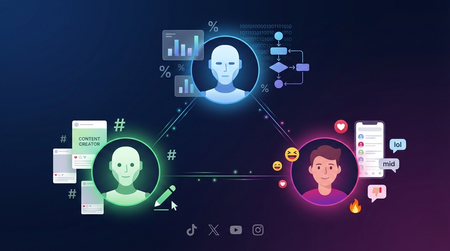
This tutorial walks you through building a multi-agent content strategy system using Microsoft's AutoGen framework. Three specialised AI agents — a Content Creator, an Algorithm Simulator, and an Audience Persona — collaborate to help gaming content creators pressure-test their social media posts before publishing. Using live Google Trends data and platform-specific scoring rubrics for TikTok, Twitter/X, YouTube, and Instagram, the system generates content, predicts how each platform's algorithm would distribute it, and simulates authentic audience reactions. The tutorial covers core multi-agent patterns including role specialisation, structured evaluation, iterative feedback loops, and resilient tool integration — all running on GitHub Models' free tier.470Views0likes0CommentsAdvanced Function Calling and Multi-Agent Systems with Small Language Models in Foundry Local
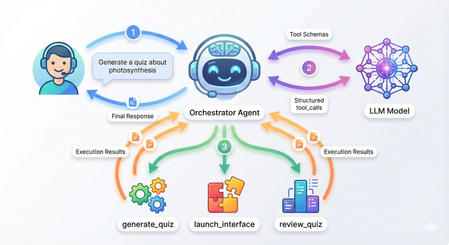
Advanced Function Calling and Multi-Agent Systems with Small Language Models in Foundry Local In our previous exploration of function calling with Small Language Models, we demonstrated how to enable local SLMs to interact with external tools using a text-parsing approach with regex patterns. While that method worked, it required manual extraction of function calls from the model's output; functional but fragile. Today, I'm excited to show you something far more powerful: Foundry Local now supports native OpenAI-compatible function calling with select models. This update transforms how we build agentic AI systems locally, making it remarkably straightforward to create sophisticated multi-agent architectures that rival cloud-based solutions. What once required careful prompt engineering and brittle parsing now works seamlessly through standardized API calls. We'll build a complete multi-agent quiz application that demonstrates both the elegance of modern function calling and the power of coordinated agent systems. The full source code is available in this GitHub repository, but rather than walking through every line of code, we'll focus on how the pieces work together and what you'll see when you run it. What's New: Native Function Calling in Foundry Local As we explored in our guide to running Phi-4 locally with Foundry Local, we ran powerful language models on our local machine. The latest version now support native function calling for models specifically trained with this capability. The key difference is architectural. In our weather assistant example, we manually parsed JSON strings from the model's text output using regex patterns and frankly speaking, meticulously testing and tweaking the system prompt for the umpteenth time 🙄. Now, when you provide tool definitions to supported models, they return structured tool_calls objects that you can directly execute. Currently, this native function calling capability is available for the Qwen 2.5 family of models in Foundry Local. For this tutorial, we're using the 7B variant, which strikes a great balance between capability and resource requirements. Quick Setup Getting started requires just a few steps. First, ensure you have Foundry Local installed. On Windows, use winget install Microsoft.FoundryLocal , and on macOS, use bash brew install microsoft/foundrylocal/foundrylocal You'll need version 0.8.117 or later. Install the Python dependencies in the requirements file, then start your model. The first run will download approximately 4GB: foundry model run qwen2.5-7b-instruct-cuda-gpu If you don't have a compatible GPU, use the CPU version instead, or you can specify any other Qwen 2.5 variant that suits your hardware. I have set a DEFAULT_MODEL_ALIAS variable you can modify to use different models in utils/foundry_client.py file. Keep this terminal window open. The model needs to stay running while you develop and test your application. Understanding the Architecture Before we dive into running the application, let's understand what we're building. Our quiz system follows a multi-agent architecture where specialized agents handle distinct responsibilities, coordinated by a central orchestrator. The flow works like this: when you ask the system to generate a quiz about photosynthesis, the orchestrator agent receives your message, understands your intent, and decides which tool to invoke. It doesn't try to generate the quiz itself, instead, it calls a tool that creates a specialist QuizGeneratorAgent focused solely on producing well-structured quiz questions. Then there's another agent, reviewAgent, that reviews the quiz with you. The project structure reflects this architecture: quiz_app/ ├── agents/ # Base agent + specialist agents ├── tools/ # Tool functions the orchestrator can call ├── utils/ # Foundry client connection ├── data/ ├── quizzes/ # Generated quiz JSON files │── responses/ # User response JSON files └── main.py # Application entry point The orchestrator coordinates three main tools: generate_new_quiz, launch_quiz_interface, and review_quiz_interface. Each tool either creates a specialist agent or launches an interactive interface (Gradio), handling the complexity so the orchestrator can focus on routing and coordination. How Native Function Calling Works When you initialize the orchestrator agent in main.py, you provide two things: tool schemas that describe your functions to the model, and a mapping of function names to actual Python functions. The schemas follow the OpenAI function calling specification, describing each tool's purpose, parameters, and when it should be used. Here's what happens when you send a message to the orchestrator: The agent calls the model with your message and the tool schemas. If the model determines a tool is needed, it returns a structured tool_calls attribute containing the function name and arguments as a proper object—not as text to be parsed. Your code executes the tool, creates a message with "role": "tool" containing the result, and sends everything back to the model. The model can then either call another tool or provide its final response. The critical insight is that the model itself controls this flow through a while loop in the base agent. Each iteration represents the model examining the current state, deciding whether it needs more information, and either proceeding with another tool call or providing its final answer. You're not manually orchestrating when tools get called; the model makes those decisions based on the conversation context. Seeing It In Action Let's walk through a complete session to see how these pieces work together. When you run python main.py, you'll see the application connect to Foundry Local and display a welcome banner: Now type a request like "Generate a 5 question quiz about photosynthesis." Watch what happens in your console: The orchestrator recognized your intent, selected the generate_new_quiz tool, and extracted the topic and number of questions from your natural language request. Behind the scenes, this tool instantiated a QuizGeneratorAgent with a focused system prompt designed specifically for creating quiz JSON. The agent used a low temperature setting to ensure consistent formatting and generated questions that were saved to the data/quizzes folder. This demonstrates the first layer of the multi-agent architecture: the orchestrator doesn't generate quizzes itself. It recognizes that this task requires specialized knowledge about quiz structure and delegates to an agent built specifically for that purpose. Now request to take the quiz by typing "Take the quiz." The orchestrator calls a different tool and Gradio server is launched. Click the link to open in a browser window displaying your quiz questions. This tool demonstrates how function calling can trigger complex interactions—it reads the quiz JSON, dynamically builds a user interface with radio buttons for each question, and handles the submission flow. After you answer the questions and click submit, the interface saves your responses to the data/responses folder and closes the Gradio server. The orchestrator reports completion: The system now has two JSON files: one containing the quiz questions with correct answers, and another containing your responses. This separation of concerns is important—the quiz generation phase doesn't need to know about response collection, and the response collection doesn't need to know how quizzes are created. Each component has a single, well-defined responsibility. Now request a review. The orchestrator calls the third tool: A new chat interface opens, and here's where the multi-agent architecture really shines. The ReviewAgent is instantiated with full context about both the quiz questions and your answers. Its system prompt includes a formatted view of each question, the correct answer, your answer, and whether you got it right. This means when the interface opens, you immediately see personalized feedback: The Multi-Agent Pattern Multi-agent architectures solve complex problems by coordinating specialized agents rather than building monolithic systems. This pattern is particularly powerful for local SLMs. A coordinator agent routes tasks to specialists, each optimized for narrow domains with focused system prompts and specific temperature settings. You can use a 1.7B model for structured data generation, a 7B model for conversations, and a 4B model for reasoning, all orchestrated by a lightweight coordinator. This is more efficient than requiring one massive model for everything. Foundry Local's native function calling makes this straightforward. The coordinator reliably invokes tools that instantiate specialists, with structured responses flowing back through proper tool messages. The model manages the coordination loop—deciding when it needs another specialist, when it has enough information, and when to provide a final answer. In our quiz application, the orchestrator routes user requests but never tries to be an expert in quiz generation, interface design, or tutoring. The QuizGeneratorAgent focuses solely on creating well-structured quiz JSON using constrained prompts and low temperature. The ReviewAgent handles open-ended educational dialogue with embedded quiz context and higher temperature for natural conversation. The tools abstract away file management, interface launching, and agent instantiation, the orchestrator just knows "this tool launches quizzes" without needing implementation details. This pattern scales effortlessly. If you wanted to add a new capability like study guides or flashcards, you could just easily create a new tool or specialists. The orchestrator gains these capabilities automatically by having the tool schemas you have defined without modifying core logic. This same pattern powers production systems with dozens of specialists handling retrieval, reasoning, execution, and monitoring, each excelling in its domain while the coordinator ensures seamless collaboration. Why This Matters The transition from text-parsing to native function calling enables a fundamentally different approach to building AI applications. With text parsing, you're constantly fighting against the unpredictability of natural language output. A model might decide to explain why it's calling a function before outputting the JSON, or it might format the JSON slightly differently than your regex expects, or it might wrap it in markdown code fences. Native function calling eliminates this entire class of problems. The model is trained to output tool calls as structured data, separate from its conversational responses. The multi-agent aspect builds on this foundation. Because function calling is reliable, you can confidently delegate to specialist agents knowing they'll integrate smoothly with the orchestrator. You can chain tool calls—the orchestrator might generate a quiz, then immediately launch the interface to take it, based on a single user request like "Create and give me a quiz about machine learning." The model handles this orchestration intelligently because the tool results flow back as structured data it can reason about. Running everything locally through Foundry Local adds another dimension of value and I am genuinely excited about this (hopefully, the phi models get this functionality soon). You can experiment freely, iterate quickly, and deploy solutions that run entirely on your infrastructure. For educational applications like our quiz system, this means students can interact with the AI tutor as much as they need without cost concerns. Getting Started With Your Own Multi-Agent System The complete code for this quiz application is available in the GitHub repository, and I encourage you to clone it and experiment. Try modifying the tool schemas to see how the orchestrator's behavior changes. Add a new specialist agent for a different task. Adjust the system prompts to see how agent personalities and capabilities shift. Think about the problems you're trying to solve. Could they benefit from having different specialists handling different aspects? A customer service system might have agents for order lookup, refund processing, and product recommendations. A research assistant might have agents for web search, document summarization, and citation formatting. A coding assistant might have agents for code generation, testing, and documentation. Start small, perhaps with two or three specialist agents for a specific domain. Watch how the orchestrator learns to route between them based on the tool descriptions you provide. You'll quickly see opportunities to add more specialists, refine the existing ones, and build increasingly sophisticated systems that leverage the unique strengths of each agent while presenting a unified, intelligent interface to your users. In the next entry, we will be deploying our quizz app which will mark the end of our journey in Foundry and SLMs these past few weeks. I hope you are as excited as I am! Thanks for reading.397Views0likes0CommentsDon’t miss Building Agents with Microsoft Foundry and Microsoft Foundry Agent Service!
Our dynamic four-part webinar series, Agentic AI + Copilot Partner Skilling Accelerator, empowers you to harness the Microsoft AI ecosystem to unlock new revenue streams and enhance customer success. Across the four sessions, Microsoft partners can expect to learn how to apply AI tools in no-code, low-code, and pro-code scenarios to build intelligent chat and workflow solutions, extend and customize capabilities, and create advanced, custom AI functionality. Don't miss the final session in the series, Building Agents with Microsoft Foundry and Microsoft Foundry Agent Service, where you'll learn how to design and deploy intelligent agents with Microsoft Foundry and Microsoft Foundry Agent Service, including multi-agent architectures and key protocols such as A2A and MCP. The live virtual event is scheduled for December 15, 2025. Register today to reserve your spot! Be sure to follow this Partner news blog for all partner related announcements by clicking follow above!302Views0likes0CommentsBuild Enterprise-Ready AI Agents with the New Azure Postgres LangChain + LangGraph Connector
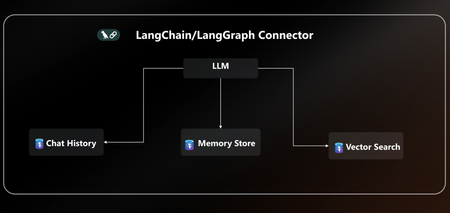
AI agents are only as powerful as the data layer behind them. That’s why we’re excited to announce native LangChain + LangGraph connector for Azure Database for PostgreSQL. With this release, Postgres becomes your single source of truth for AI agents, handling knowledge retrieval, chat history, and long-term memory all in one place. This new connector is packed with everything you need to build secure, scalable and enterprise-ready AI agents on Azure without the complexity. With EntraID authentication, DiskANN acceleration, vector store, and a dedicated agent store, you can go from prototype to production on Azure faster than ever. You can quickly get started with the LangChain + LangGraph connector today pip install langchain-azure-postgresql In this post, we’ll cover: How Azure Postgres connector for LangGraph can serve as the single persistence + retrieval layer for an AI agent New first-class connector for LangChain +LangGraph A practical example to help you get started Azure PostgreSQL as the single persistence + retrieval layer for an AI agent When building AI agents today, developers face a fragmented stack: Vector storage and search require a library, service or separate database. Chat history & short-term memory need yet another data source. Long-term memory often means bolting on yet another system. This sprawl leads to complex integrations, higher costs, and weaker security, making it hard to scale AI agents reliably. The Solution The new Azure Postgres connector for LangChain + LangGraph transforms your Azure Postgres database to the single persistence + retrieval layer for AI agents. Instead of working on a fragmented stack, developers can now: Run embeddings + semantic search with built-in DiskANN acceleration in the same database that powers their application logic. Persist chat history and short-term memory and keep agent conversations grounded via seamless context retrieval from data stored in Postgres. Capture, retrieve, and evolve knowledge over time with a built-in long-term memory without bolting on external systems. All in one database, simplified, secure, and enterprise ready. Postgres becomes the persistent and retrieval data layer for your AI agent. Built for Enterprise Readiness: LangChain + LangGraph Connector This release unlocks several new capabilities that make it easy to build robust, production-ready agents: Auth with EntraID: Enterprise-grade identity to securely connect LangChain + LangGraph workflows to Azure Database for PostgreSQL within a centrally managed security perimeter based on identity. DiskANN & Extensions: First-class support for faster vector search using pgvector combined with DiskANN indexing, enabling support for high-dimensional vectors and cost-efficient search. Additionally, helper functions ensure your favorite extensions are installed. Native Vector Store: Store and query embeddings, enabling semantic search and Retrieval-Augmented Generation (RAG) scenarios. Dedicated Agent Store: Persist agent state, memory, and chat history with structured access patterns, perfect for multi-turn conversations and long-term context. Together, these features give developers a turnkey persistence solution for building reliable AI agents without stitching together multiple storage systems. Using LangGraph on Azure Database for PostgreSQL Using LangGraph with Azure Database for PostgreSQL is easy. Enable the vector & pg_diskann Extension: Allowlist the vector and pg_diskann extension within your server configuration. Import LangChain + LangGraph connector pip install langchain-azure-postgresql pip install -qU langchain-openai pip install -qU azure-identity Login to Azure, to your Entra ID Run az login in your terminal, where you will also run the LangGraph code. az login To get started, you need to set up a production-ready vector store for your agent in a few lines of code. # 1. Auth: Securely connect to Azure Postgres connection_pool = AzurePGConnectionPool(azure_conn_info=ConnectionInfo(host=os.environ["PGHOST"])) #2. Create embeddings embeddings = AzureOpenAIEmbeddings(model="text-embedding-3-small") # 3. Initialize a vector store in Postgres with DiskANN vector_store = AzurePGVectorStore(connection=connection, embedding=embeddings) Use LangGraph to build a sample agent. Here’s a practical example that combines vector search and checkpointer inside Postgres: #4 Define the tool for data retrieval. def get_data_from_vector_store(query: str) -> str: """Get data from the vector store.""" results = vector_store.similarity_search(query) return results #5 Define the agent, checkpointer and memory store. with connection_pool.getconn() as conn: agent = create_react_agent( model=model, tools=[get_data_from_vector_store], checkpointer=PostgresSaver(conn) ) #6 Run the agent and print results config = {"configurable": {"thread_id": "1", "user_id": "1"}} response = agent.invoke( {"messages": [{"role": "user", "content": "What does my database say about cats? Make sure you address me with my name"}]}, config ) for msg in response["messages"][-2:]: msg.pretty_print() With just a few lines of code, you can: Uses the vector store backed by Postgres Enable DiskANN for semantic search Use checkpointers for short-term conversation history Learn More This is just the beginning. With native LangChain + LangGraph support in Azure PostgreSQL, developers can now rely on a single, secure, high-performance data layer for building the next generation of AI agents. 👉 Ready to start? All the code are available in the Azure Postgres Agents Demo GitHub repository. See how easy it is to bring your AI agent to life on Azure. 👉 Check out the docs for more details on the LangChain + LangGraph connector.4.1KViews3likes0CommentsWhy should One learn AI ?
One should learn because, Microsoft is deep in the AI race right now — investing heavily, pushing into new product categories, expanding infrastructure, and building tools for both developers and end-users. Here’s a detailed snapshot of where Microsoft is on AI in late-2025, highlighting what they’ve achieved, what they’re working on, what challenges they face, and what it means for users/organizations 1.AI is Now the Core of Microsoft’s Strategy Microsoft isn’t treating AI as an add-on — it’s embedded into everything: Windows Copilot: AI built directly into the OS. Microsoft 365 Copilot: Automates Office apps like Word, Excel, Outlook, and Teams. Azure AI Services: Enterprise-grade infrastructure to build, deploy, and scale AI securely. GitHub Copilot & Azure DevOps: AI-driven development and deployment. Learning AI in Microsoft’s stack means you’re aligning with their long-term direction — it’s where every Microsoft product is headed. 2.Unified Ecosystem for Building & Deploying AI When you learn Microsoft AI, you get exposure to a connected environment that simplifies the AI lifecycle: Stage Microsoft Tools/Platforms Data Ingestion Azure Data Factory, Synapse, Fabric Model Training Azure Machine Learning, Custom Models, Azure AI Foundry Orchestration Azure AI Studio, Logic Apps, Power Automate Deployment Azure Kubernetes Service (AKS), Azure Functions Integration Power Platform, Copilot Studio, Microsoft Graph API You can move from “idea -prototype - enterprise-scale app” without leaving the Microsoft ecosystem. 3.Enterprise-Grade Security & Compliance Microsoft has the most trusted AI compliance posture among hyperscalers: 1000+ security and compliance certifications Responsible AI framework (human oversight, privacy, transparency) Seamless Azure AD / Entra ID integration for secure access If you work with enterprise or gov customers, this is critical — they already rely on Microsoft’s compliance backbone. 4.Massive Career & Business Demand According to recent LinkedIn and IDC reports: 80% of Fortune 500 companies use Azure AI services. “AI + Microsoft Cloud” roles (like AI Engineer, M365 Copilot Admin, Azure AI Specialist) are growing 3x faster than traditional cloud roles. Microsoft certifications (e.g., AI-102, DP-100, AI-900) are among the top-requested by employers. Learning Microsoft AI directly translates to employability and consulting value. 5.Democratized AI — Even for Non-Coders Not everyone needs to be a data scientist: Copilot Studio (Power Platform) → Build custom copilots using natural language. Azure AI Foundry → Build intelligent agents visually. Fabric AI Integration → Analyze data and auto-generate insights in Power BI. Microsoft’s goal is to make AI “as easy as Excel” — so business users can innovate too. 6.Future-Proof Skillset Microsoft is working closely with OpenAI and others to lead in: Agentic AI (autonomous reasoning agents) Multimodal AI (text, image, voice) Edge + Cloud AI (Windows + Azure hybrid AI) Responsible AI governance tools By learning Microsoft AI now, you’re future-proofing yourself for this next generation of AI-native applications.13Views1like1Comment