access
1867 Topics
Access Northwind Dev Ed - Error GetRandomPkValue
Just downloaded the newest MS Access and selected a new Northwind Dev Ed as the first DB to create. It fails to open due to an error in the code as it searched for a non existing function GetRandomPkValue... The purpose of the missing function is to return a random primary key value by passing in the variables for a query name and a field name and then it should return a "random" numerical ID from those possible based upon the passed in variables... My question is, Is the new Northwind Dev designed to fail on purpose or did I manage to download a corrupted incomplete version or???184Views0likes4CommentsAccess bug fixes — Versions 2511 through 2601
Version 2511 (Build 19426) Bug Name Issue Fixed Query Design view showed incorrect joins after selecting SQL text When using the Monaco SQL editor with a query containing multiple joins, selecting text in SQL view with Ctrl+A and then switching back to Design View could trigger a spurious alert and cause one of the joins to appear removed in the design grid. The underlying SQL wasn't actually affected, but the Design view displayed incorrect join information. This is corrected so that switching between SQL view and Design view preserves all joins accurately. Version 2512 (Build 19530) Bug Name Issue Fixed Datasheet forms with nested subforms showing errors after system changes When using datasheet forms containing nested subforms on systems where a system change occurs — such as disconnecting and reconnecting a Remote Desktop session — Access could display a GDI error. This happened because collapsed sublists held references to system brushes that were destroyed during the system change. This is fixed so that all sublists properly handle system resource changes. F4 key did not open the Properties pane in the Query SQL editor When the Monaco SQL editor was enabled, pressing F4 in the Query editor's SQL view didn't properly open the Properties pane. Instead, the pane would either flash briefly or appear incorrectly positioned in the top-left corner of the screen. The F4 shortcut now correctly opens the Properties pane in SQL view. Pressing F5 in the Query SQL editor cleared all SQL text When using the Monaco SQL editor in the Query designer, pressing F5 (Run) could clear all the SQL text from the editor. This is fixed so that running a query with F5 no longer affects the SQL text in the editor. Text not visible when renaming items in the Navigation Pane in dark themes When using the Black (or other dark) Office theme, renaming an object in the Navigation pane resulted in text that was nearly invisible due to insufficient contrast. The rename text box now uses appropriate colors that provide sufficient contrast in all themes. Advanced Filter/Sort opened a standalone query window instead of a filter window When opening a table in Datasheet view and selecting Sort & Filter > Advanced > Advanced Filter/Sort from the ribbon, Access incorrectly opened a full standalone query design window instead of the expected limited filter query window. The filter query window includes a Toggle Filter button to apply the query as a filter. This is corrected, so the command opens the proper filter window. Refreshing an Access ODBC connection in Excel returned an error When refreshing an ODBC connection to an Access database from Excel, users could receive the error "Operation is not supported for this type of object." This is resolved so that Access ODBC connections refresh successfully. Please continue to let us know if this is helpful and share any feedback you have.131Views3likes0CommentsPrimer: How to Use RBAC for Applications to Control App Use of the Mail.Send Permission
The temptation to use the Mail.Send application permission in scripts can lead PowerShell developers into trouble because the permission allows access to all mailboxes, including sensitive executive and financial mailboxes. Fortunately, RBAC for Applications allows tenants to control the access that apps have to mailboxes and other Exchange content. All explained here with an example script to test RBAC of Applications. https://office365itpros.com/2026/02/17/mail-send-rbac-for-applications/48Views2likes4Comments
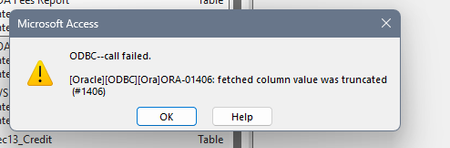
ODBC call failed. ORA-01406
Trying to link to tables on our server which has never been an issue. ODBC connection is fine, using Driver Oracle in OraClient 11g_home 1. Selecting Data Source ODBC Database and selecting Link to the data source by creating a linked table. At this point it asks for a password which is typical, next it would normally bring up the list of tables in the Oracle database to link to. Instead I get the error which states "fetched column value was truncated", once I hit OK to clear the error the usual window appears where I would see all the available tables to link to but no tables are listed, it's blank.103Views0likes3Comments 63Views0likes2Comments
Microsoft Access and Outlook
Hi there, I have just updated my laptop (with a view for a faster laptop!) However, Access was working fine and now i can't send emails from access through outlook like before. I get a message to say a program is trying to send an email message on your behalf. I'm not sure how to get rid of this warning! Please help.... Thank you in advance146Views0likes5Comments
I can't access Microsoft Feedback Portal: account bug
I changed my Microsoft email a year ago, and it updated everywhere other than the Feedback Portal. As a result, I get an error when I try to login, or do anything on the page. Microsoft account support's suggestion was to login to the Feedback Portal which is insane given I'm having issues accessing it. How can I get this issue resolved? I've got three separate support tickets now and they keep asking me to wait 24 hours to get the issue resolved. Can someone from the Feedback Portal team please contact me to resolve this? This is what Microsoft Support have said: "understand your frustration, and yes—this is an account‑related issue because the Feedback Portal is still tied to your old alias, which causes login conflicts and forces you out. Your Microsoft account itself signs in correctly, but the Feedback Portal is pulling outdated identity data that you cannot update on your own. Since you cannot access the Portal to submit feedback, directing you back there is not a workable solution. What you need is for Support to escalate this to the internal Identity/Feedback Platform engineering team so they can manually correct the outdated alias mapping on the backend. In this situation, the Feedback Portal and Tech Community teams are the ones who manage and maintain that specific platform. Because the issue appears on the Feedback Portal side—even though your Microsoft account is working normally—only their dedicated team can make the necessary corrections on their end. That’s why we are guiding you to connect with them through the links provided: https://techcommunity.microsoft.com/ or https://feedbackportal.microsoft.com/feedback. They will be able to review the portal‑specific account data and assist you further. I understand why this is frustrating. Since you’re unable to stay signed in to the Feedback Portal, I completely see why posting there isn’t possible for you. However, I do need to be transparent: I’m not able to escalate this issue directly to the Feedback Portal team, as they don’t provide internal escalation channels for us and only accept requests through their own platform."49Views0likes0Comments
In form or report design view, cannot paste objects
Hello all. I have used MS Access for over 20 years as a user (not developer). I like to design forms and reports from scratch (not using wizards), and it is handy to copy and paste objects in design mode. This includes controls, labels, lines, buttons, etc. For example, in a tabular transaction-type report, I can copy already-formatted controls from the detail to the report or group footer and just edit each to be a sum. For the last several months, I can click Copy on the bar (or ctrl +c), but the paste icon does not light up and ctrl + v does not work. Sometimes if I wait long enough (like several minutes later), the paste function becomes enabled. It takes me substantially longer now to add new objects from the Report Design bar and reformat them to match the existing report or form. I don't know if this is an Access issue or a clipboard issue. I am able to copy and paste large volumes of data with no problem at all. I am thinking about re-installing my Office 365 (which includes Access). Has anyone else had this problem, and is there a solution? The version I have is Access for Microsoft 365 MSO (Version 2503, Build 16.0.18623 20076 64-bit)1.1KViews2likes18Comments
Office v2508 feature update (new vbe7.dll) breaks library compatibility with LTSC VL versions
Since the Jan 2026 updates, some `accde` or `mde` libraries built with the semi-annual enterprise channel (v2508, Build 19127.20484) can no longer be used with the volume-licensed version of Office LTSC (tested with the Jan 2026 release of Office 2024 LTSC VL, v2408, Build 17932.20638). The reason for this seems obvious: The v2508 feature update contains an updated vbe7.dll. Apparently, this change is backwards-compatible (code compiled with the old dll will run with the new dll) but not completely forwards-compatible (code compiled with the new dll might not run with the old dll, even if the new RegExp class is not used). That's a problem for us. We can't just tell our customers to upgrade, because those with an Office 2024 LTSC volume license already use the latest version available to them. Does Microsoft consider this a bug or "by design"? If the latter, what is Microsoft's recommendation for software vendors who want to build software that runs on all currently-supported versions of Access? We currently plan to work around this issue by installing v2502 of the semi-annual enterprise channel on our "build VMs" (32 and 64 bit) and use those to build our software. (Reverting dev machines to an old Office version is not an option for obvious security reasons.) Repro On a PC with v2508 or newer: 1. Create a new mylibrary.accdb with a module with the following code: Public Function GetColorCode() As Long GetColorCode = vbRed End Function 2. File/Save as/Create accde. 3. Copy mylibrary.accde to a PC with v2507 or older (for example, with the current version of Office 2024 LTSC volume license). On a PC with v2507 or older: 4. Create a new database. 5. Create/Module/Tools/References 6. Add a reference to mylibrary.accde 7. Add the following code to the module: Sub Test() Debug.Print GetColorCode() End Sub 8. Debug/Compile Expected result: The database compiles. Actual result: "Compile error: Can't find project or library". The "references" window opens automatically and highlights "mylibrary". Notes We are not library developers, but we are still impacted by this issue, since the software we ship consists of a (modifiable) startup mdb referencing an (unmodifiable) mde containing the business logic. If you want to try to reproduce this issue but don't have a volume license of Office 2024 LTSC lying around (we certainly don't), you can install a trial version with the Office Deployment Tool and the following configuration file: <Configuration> <Add OfficeClientEdition="64" Channel="PerpetualVL2024"> <Product ID="ProPlus2024Volume"> <Language ID="en-us" /> </Product> </Add> </Configuration>257Views0likes5Comments
Access Distribution Package
I am sure this has been asked before but her is my design... 1) I have built an Access database application the distribution tool has the ability to display a folder picker that asks the admin for the <root> (NAS< Fileserver, etc.) copy the Backend or database files to that selected <root> create a Workstation Install tool file copy completed relink frontend to backend file system create a shortcut link on the workstation desktop This is a very simplified description, but I believe that it is not an unusual request. thanks for all your assistance in advance. SquireDude106Views0likes2Comments