ai
1231 TopicsAI Agent Race Finland 2026 – finalistit on julkistettu!
Vuoden 2026 AI Agent Race Finland - finalistit ovat: CGI – Helsingin kaupungin ohjeapuri Helsingin kaupunki rakensi “Ohjeapuri”-AI‑agentin, joka muuttaa viralliset ohjeet nopeasti luonnollisella kielellä saataviksi vastauksiksi 40 000 työntekijälle. Ratkaisu nopeuttaa päätöksentekoa, parantaa palvelun laatua ja varmistaa toiminnan yhdenmukaisuuden ja sääntelyn noudattamisen. Agentti on toteutettu Azure OpenAI:n ja Azure AI Searchin avulla ja skaalattu organisaation päivittäiseen käyttöön. Efima – HKFoods Kuluttajapalvelun agentti Ratkaisu luokittelee kuluttajapalveluun saapuvat viestit, rikastaa niistä taustatiedot CRM‑järjestelmään ja luo valmiin vastausehdotuksen asiakaspalvelijalle. Tämä nopeuttaa asiakaspalvelua ja vapauttaa asiantuntijoiden aikaa vaativampiin tehtäviin. Tekoäly on integroitu nykyjärjestelmään ja käyttöönotto on tehty hallitusti käyttäjiä tukien. Elisa – TEBEAI Agentti automatisoi tarjouspyyntöasiakirjojen käsittelyn tunnistamalla olennaiset tuotetiedot ja yhdistämällä ne tuotevalikoimaan. Se tuottaa rikastetun Excel‑aineiston tarjousprosessin tueksi ja sisältää myös chat‑agentin tuotetietokyselyihin. Tavoitteena on nopeuttaa tarjousprosessia ja vähentää manuaalista työtä. Fellowmind – Fellowmind x Avant Tecno AI agents Ratkaisu automatisoi tilausten ja toimittajien vahvistusten käsittelyn Dynamics 365 ‑ympäristössä. AI‑agentit lukevat ja käsittelevät tilauksia automaattisesti, mikä on nopeuttanut prosesseja jopa 80 %. Samalla vapautuu asiantuntijoiden aikaa ja luodaan skaalautuva pohja jatkuvalle AI‑kehitykselle. Locoda – Tampereen Tilapalvelut: Autonominen työnohjaus palvelupyynnöstä laskutukseen Agentit priorisoivat työt, allokoivat resurssit ja optimoivat aikataulut automaattisesti. Prosessi etenee palvelupyynnöstä laskutukseen ilman manuaalista koordinointia, ja poikkeamat ohjataan ihmisille. Lopputuloksena toiminta tehostuu ja työn laatu sekä laskutuskelpoisuus paranevat. Finalistit on valittu kokonaisarvion perusteella, jossa painotettiin erityisesti seuraavia asioita: Vaikuttavuus asiakkaalle Agentin käyttöönotto ja käyttöaste Ratkaisun selkeys Toistettavuus ja skaalautuvuus Tarinan selkeys ja opittavuus Kilpailun voittaja julkistetaan 28.4.2026 Microsoft AI Tour - tapahtuman "Yhdessä kohti älykkäämpiä ratkaisuja" -lavalla. Lämpimät onnittelut kaikille finalisteille – ja kiitos kaikille kumppaneille upeista nominoinneista ja aktiivisesta osallistumisesta kilpailuun!642Views0likes0CommentsImprove your Microsoft Marketplace listing performance with AI-powered, personalized recommendations
Discover how to strengthen your Microsoft Marketplace listing and increase discoverability with new AI-powered optimization capabilities available in App Advisor. This article explores how software development companies can receive fast, personalized recommendations that help improve clarity, strengthen value propositions, and align listings with Microsoft Marketplace best practices. In today’s competitive Marketplace environment, listing quality plays a critical role in whether customers discover, engage with, and ultimately choose your solution. The new listing optimization experience provides immediate, actionable feedback across key areas such as value proposition, solution description, and overall presentation—helping teams identify gaps and make improvements with confidence. Learn how this capability works, what it evaluates, and how your organization can use it to continuously refine your listing and drive better outcomes. Read the full article to explore how you can move from guesswork to data-driven optimization in Microsoft Marketplace. Read more: Get personalized, fast recommendations for your Marketplace listing to boost your discoverabilityStop Experimenting, Start Building: AI Apps & Agents Dev Days Has You Covered
The AI landscape has shifted. The question is no longer “Can we build AI applications?” it’s “Can we build AI applications that actually work in production?” Demos are easy. Reliable, scalable, resilient AI systems that handle real-world complexity? That’s where most teams struggle. If you’re an AI developer, software engineer, or solution architect who’s ready to move beyond prototypes and into production-grade AI, there’s a series built specifically for you. What Is AI Apps & Agents Dev Days? AI Apps & Agents Dev Days is a monthly technical series from Microsoft Reactor, delivered in partnership with Microsoft and NVIDIA. You can explore the full series at https://developer.microsoft.com/en-us/reactor/series/s-1590/ This isn’t a slide deck marathon. The series tagline says it best: “It’s not about slides, it’s about building.” Each session tackles real-world challenges, shares patterns that actually work, and digs into what’s next in AI-driven app and agent design. You bring your curiosity, your code, and your questions. You leave with something you can ship. The sessions are led by experienced engineers and advocates from both Microsoft and NVIDIA, people like Pamela Fox, Bruno Capuano, Anthony Shaw, Gwyneth Peña-Siguenza, and solutions architects from NVIDIA’s Cloud AI team. These aren’t theorists; they’re practitioners who build and ship the tools you use every day. What You’ll Learn The series covers the full spectrum of building AI applications and agent-based systems. Here are the key themes: Building AI Applications with Azure, GitHub, and Modern Tooling Sessions walk through how to wire up AI capabilities using Azure services, GitHub workflows, and the latest SDKs. The focus is always on code-first learning, you’ll see real implementations, not abstract architecture diagrams. Designing and Orchestrating AI Agents Agent development is one of the series’ strongest threads. Sessions cover how to build agents that orchestrate long-running workflows, persist state automatically, recover from failures, and pause for human-in-the-loop input, without losing progress. For example, the session “AI Agents That Don’t Break Under Pressure” demonstrates building durable, production-ready AI agents using the Microsoft Agent Framework, running on Azure Container Apps with NVIDIA serverless GPUs. Scaling LLM Inference and Deploying to Production Moving from a working prototype to a production deployment means grappling with inference performance, GPU infrastructure, and cost management. The series covers how to leverage NVIDIA GPU infrastructure alongside Azure services to scale inference effectively, including patterns for serverless GPU compute. Real-World Architecture Patterns Expect sessions on container-based deployments, distributed agent systems, and enterprise-grade architectures. You’ll learn how to use services like Azure Container Apps to host resilient AI workloads, how Foundry IQ fits into agent architectures as a trusted knowledge source, and how to make architectural decisions that balance performance, cost, and scalability. Why This Matters for Your Day Job There’s a critical gap between what most AI tutorials teach and what production systems actually require. This series bridges that gap: Production-ready patterns, not demos. Every session focuses on code and architecture you can take directly into your projects. You’ll learn patterns for state persistence, failure recovery, and durable execution — the things that break at 2 AM. Enterprise applicability. The scenarios covered — travel planning agents, multi-step workflows, GPU-accelerated inference — map directly to enterprise use cases. Whether you’re building internal tooling or customer-facing AI features, the patterns transfer. Honest trade-off discussions. The speakers don’t shy away from the hard questions: When do you need serverless GPUs versus dedicated compute? How do you handle agent failures gracefully? What does it actually cost to run these systems at scale? Watch On-Demand, Build at Your Own Pace Every session is available on-demand. You can watch, pause, and build along at your own pace, no need to rearrange your schedule. The full playlist is available at This is particularly valuable for technical content. Pause a session while you replicate the architecture in your own environment. Rewind when you need to catch a configuration detail. Build alongside the presenters rather than just watching passively. What You’ll Walk Away Wit After working through the series, you’ll have: Practical agent development skills — how to design, orchestrate, and deploy AI agents that handle real-world complexity, including state management, failure recovery, and human-in-the-loop patterns Production architecture patterns — battle-tested approaches for deploying AI workloads on Azure Container Apps, leveraging NVIDIA GPU infrastructure, and building resilient distributed systems Infrastructure decision-making confidence — a clearer understanding of when to use serverless GPUs, how to optimise inference costs, and how to choose the right compute strategy for your workload Working code and reference implementations — the sessions are built around live coding and sample applications (like the Travel Planner agent demo), giving you starting points you can adapt immediately A framework for continuous learning — with new sessions each month, you’ll stay current as the AI platform evolves and new capabilities emerge Start Building The AI applications that will matter most aren’t the ones with the flashiest demos — they’re the ones that work reliably, scale gracefully, and solve real problems. That’s exactly what this series helps you build. Whether you’re designing your first AI agent system or hardening an existing one for production, the AI Apps & Agents Dev Days sessions give you the patterns, tools, and practical knowledge to move forward with confidence. Explore the series at https://developer.microsoft.com/en-us/reactor/series/s-1590/ and start watching the on-demand sessions at the link above. The best time to level up your AI engineering skills was yesterday. The second-best time is right now and these sessions make it easy to start.
MC1269241 - Can't turn off antropic for agentmode
Hi, I’m trying to figure out how to turn off the new feature where Anthropic is enabled by default for everyone in the EU for agent mode in excel and powerpoint, as described in the Message Center news in the title. It is not possible to press Save when you have unchecked the setting unless you also consent to the terms of use, it is greyed out. Since we want the feature turned off, we do not want to agree to any terms of use. Has anyone found a solution? This seems to be misconfigured.10Views0likes0CommentsHow to choose the right Marketplace offer type for your AI app or agent
Selecting the right Microsoft Marketplace offer type is one of the most important—and often most complex—decisions when bringing AI apps and agents to market. In this latest Marketplace blog article, you’ll learn how different offer types align to AI delivery models and why this choice directly impacts architecture, security boundaries, customer experience, and monetization strategy. The article breaks down key considerations across SaaS, Azure Managed Applications, containers, and virtual machines, helping software development companies understand how to balance control, scalability, and operational ownership. It also highlights how offer type decisions influence where AI workloads run, how data is managed, and how customers deploy and interact with your solution. If you’re building or publishing AI solutions in Microsoft Marketplace, this guidance will help you make informed decisions early—before development, security, and go-to-market plans are locked in. Read the full article: Marketplace Offer Types for AI Apps and agents: SaaS vs Managed App vs ContainersGPT Capability in Understanding Coordinates: How GPT-5.4 Transforms Spatial Precision
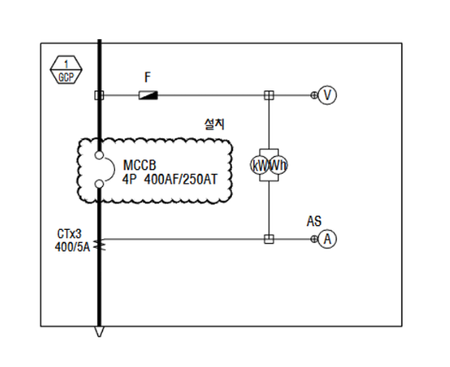
Why I Ran This Experiment This work started not as a benchmarking exercise, but as a practical problem: I needed to automatically extract panel regions from PDF-format electrical Single-Line Diagram (SLD) drawings using OpenAI models . All experiments were conducted using OpenAI models in Microsoft Foundry- Microsoft's unified platform for building generative AI applications. The downstream goal was a pipeline that combines GPT model with Azure Document Intelligence to generate Bills of Materials (BOMs) — a project I wrote about separately in Extracting BOMs from Electrical Drawings with AI: Azure OpenAI GPT-5 + Azure Document Intelligence Pipeline. Before building that pipeline, I needed a clear-eyed answer to a deceptively simple question: how well can GPT actually understand and return pixel-level coordinates from an image? If the model can't reliably locate a panel bounding box, the rest of the pipeline doesn't matter. When I first ran these tests against GPT-5.2, the results were mixed — good enough to be promising, but inconsistent enough to leave clear room for improvement. I tried many workarounds: feeding image dimensions explicitly, overlaying coordinate grids, enabling extended reasoning, and building iterative self-correction loops. Each helped, but required deliberate engineering effort. Then GPT-5.4 was released. Re-running the same benchmark revealed that most of those workarounds were no longer necessary. Context: All experiments use a fixed CAD-style test image (847 × 783 px) with a known ground-truth bounding box at [135, 165, 687, 619] . Accuracy is measured by Intersection over Union (IoU) — a score of 1.0 is a perfect match. Every test was run 5 times and averaged. for all coordinate experiments. The Experiment Design I designed experiments across two axes: prompt strategy (how spatial information is presented to the model) and reasoning mode (standard vs. extended reasoning). Each combination was tested across both GPT-5.2 and GPT-5.4, producing 4 conditions per test. GPT-5.2 and GPT-5.4 were each tested under two reasoning modes (None vs. High), resulting in four conditions in total. Single-Shot Strategies (Tests 1–5) These tests have no iterative validation loop — the model gets one prompt and returns its answer. Each test was run 5 times and the results averaged, so the scores reflect consistency, not a single lucky attempt. The differences between tests lie in how spatial information is framed in the prompt. Test 1 is a simple sanity check: can the model understand percentage-based coordinates at all? The model receives the clean image (no overlay) and is asked: "return the pixel coordinate at 30% width, 50% height." The expected answer is (254, 392). GPT-5.2 gets the X coordinate roughly right (~254–260), but the Y coordinate scatters wildly — predictions range from 260 to 322, consistently 100+ pixels above the correct position. GPT-5.4 returns (254, 392) on every single run, essentially pixel-perfect. Even on this simple sanity check, the gap is stark: GPT-5.4 is pixel-perfect from the start, while GPT-5.2 shows a clear Y-axis bias. But a single-point test doesn't tell us how well the models handle real spatial tasks. The next question: can they detect a full bounding box? Tests 2–5: Bounding Box Detection with Increasing Prompt Richness Tests 2–5 move to the real task: detecting a bounding box drawn on the image. Each test sends a different version of the same base image, with progressively richer spatial context in the prompt: Feedback Loop Strategies (Tests 6A–7B) These tests add an iterative validation loop: the model's predicted bounding box is overlaid on the image and sent back for self-correction — up to 5 iterations (early stop at IoU ≥ 0.99). All feedback tests share the same two-phase structure: an init step (first prediction) and a validation loop (iterative correction). All feedback tests use the same two images (init + validation overlay), but differ in prompt strategy and color assignment. Image-wise, they fall into two groups: Group A — Orange GT (Tests 6A, 6C, 7A) Group B — Color Bias / Blue GT (Tests 6B, 6D, 7B) Figure 4b — Feedback loop input images. Group B (bottom): colors swapped to test color-role priors. What differs between tests in the same group: The images are identical, but the prompt changes. 6A/6B use holistic comparison ("compare and correct"). 6C/6D additionally send the full history of past predictions as multi-image input. 7A/7B ask for per-edge directional judgments ("move left/right/up/down/none" for each edge independently). Results 1. Model version is the single biggest factor Across every test, GPT-5.4 dramatically outperforms GPT-5.2. The gap is not incremental — it's the difference between a bounding box that roughly overlaps the target and one that is essentially pixel-perfect. GPT-5.4 achieved an IoU of 0.99 or above on its very first attempt on tests where GPT-5.2 had only scored between 0.76 and 0.88. GPT-5.4 (green bars) consistently hits ≥0.99 regardless of prompt strategy or reasoning mode. GPT-5.2 (blue bars) ranges from 0.76 to 0.92. 2. GPT-5.2 is inconsistent; GPT-5.4 locks in Raw averages only tell half the story. GPT-5.2 is unpredictable: on the exact same test with the exact same prompt and image, results fluctuate wildly between runs. The standard deviation on Test 2 is ±0.084 — meaning a single run could land anywhere from 0.66 to 0.88. GPT-5.4 stays within ±0.003. The scatter plots below make this viscerally clear. Each dot is one API call — notice how GPT-5.2 dots spray across the IoU range while GPT-5.4 dots stack on top of each other: Wide scatter on simpler prompts (Test 2: 0.66–0.88); reasoning mode (orange) provides a lift that shrinks with richer prompts (Δmean shown below each panel). Production implication: With GPT-5.2, you couldn't rely on a single inference call — building a reliable pipeline would require multiple calls and majority voting, multiplying latency and cost. With GPT-5.4, a single call is sufficient. 3. Reasoning mode reduced variance for GPT-5.2; GPT-5.4 didn't need it For GPT-5.2, enabling extended reasoning ( reasoning: high ) provided a meaningful boost — especially when the prompt was sparse. On Test 2 (bare image, no spatial context), reasoning added +0.076 IoU and visibly tightened the spread of results across runs. As prompts got richer, the benefit shrank: with a grid overlay (Test 4), reasoning added only +0.007. In other words, reasoning mode acted as a compensating mechanism — filling in the gaps when the prompt alone didn't provide enough spatial scaffolding. For GPT-5.4, reasoning mode offered no additional benefit on this class of task. The base model already achieves 0.99+ IoU, so there was simply no room for improvement. In a few cases the reasoning runs showed marginal regressions (−0.005 to −0.015), likely within noise. The takeaway isn't that reasoning mode is harmful in general, but rather that a spatial-coordinate task at this complexity level doesn't require it when the underlying model already has strong coordinate understanding. Figure 7 — Effect of reasoning mode: GPT-5.2 gains +0.04–0.08 from reasoning (blue bars), largest on sparse prompts. GPT-5.4 shows no meaningful gain (green bars near zero). 4. Richer prompts close the gap (but only for GPT-5.2) For GPT-5.2, providing more spatial context in the prompt made a big difference: from 0.765 (Test 2, no info) to 0.910 (Test 4, grid overlay) — a +0.145 IoU gain just from adding visual reference rulers to the image. Telling the model the image dimensions (Test 3) was a "free win" that cost nothing. For GPT-5.4, all prompt variants produce essentially the same result (0.989–0.997). The model already understands spatial coordinates well enough that extra scaffolding adds no value. ided. GPT-5.4 is flat at ≥0.99 regardless. If you're still on GPT-5.2: Always inject image dimensions into the prompt (free). Use grid overlays for the biggest single-shot gain (+0.145 IoU). With GPT-5.4, none of this is needed. 5. Validation loops: essential for GPT-5.2, Option for GPT-5.4 The feedback loop tests (6A–7B) showed that iterative self-correction genuinely helped GPT-5.2 improve from its initial prediction. For example, in Test 7A (directional feedback), GPT-5.2 improved from an init IoU of 0.926 to a best of 0.969 over 5 iterations. For GPT-5.4, every single run hit IoU ≥ 0.99 on iteration 1 and early-stopped immediately. There was nothing left to correct. The validation loop infrastructure — overlay rendering, multi-turn prompting, iteration logic — becomes dead code you can remove from your pipeline. GPT-5.4 (green) starts at ≥0.99 and early-stops at iteration 1. 6. Prompt instruction matters: holistic vs directional feedback Comparing 6A/6B (holistic: "compare the two boxes and correct") with 7A/7B (directional: "for each edge, decide which direction to move"), the directional approach consistently reached higher best IoU for GPT-5.2. The per-edge structured output forced the model to reason about each boundary independently rather than making a holistic guess. Separately, the color bias tests (6B, 7B — GT drawn in blue instead of orange) revealed that swapping GT/prediction colors drops the initial accuracy significantly. In 6A (orange GT) the init IoU was 0.937, but in 6B (blue GT) it dropped to 0.850. This suggests GPT models have learned color-role priors — orange is "expected" as the ground truth color. However, the validation loop largely recovers this gap: after 5 iterations, 6A and 6B converge to similar best IoU (~0.96). The directional variants (7A, 7B) show the same pattern but converge faster. Left: initial accuracy drops when GT is drawn in blue. Right: after the validation loop, the gap closes. Directional feedback (7A/7B) shows the same pattern. For GPT-5.4: Color bias has no measurable effect. All variants (6A/6B/7A/7B) hit 0.994–0.998 IoU on iteration 1 regardless of color assignment. Summary: What Changed from GPT-5.2 to GPT-5.4 The story of this benchmark is really about engineering workarounds that became unnecessary. Here's what we built for GPT-5.2 and whether you still need it: Grid overlays & image dimensions in prompt — Gave +0.05–0.15 IoU for GPT-5.2. Not needed for GPT-5.4 (already ≥0.99 without it). Extended reasoning mode — Gave +0.04–0.08 IoU for GPT-5.2. No benefit for GPT-5.4 on this task (already at ceiling without it). Validation loops (iterative self-correction) — Improved GPT-5.2 by +0.02–0.10 IoU over 5 iterations. Unnecessary for GPT-5.4 (early-stops at iteration 1). Multiple runs & voting — Required for GPT-5.2 due to ±0.08 variance. Not needed for GPT-5.4 (±0.003 variance, single call sufficient). Color convention management — GPT-5.2 showed color bias (−0.09 IoU when colors swapped). No effect on GPT-5.4. GPT-5.4 doesn't just perform better — it makes entire categories of pipeline engineering unnecessary. For clean, CAD-style images like the ones tested here, GPT-5.4 dramatically reduces prompt engineering overhead: grid overlays, image dimension injection, reasoning mode, and validation loops — all of which required deliberate effort with GPT-5.2 — are no longer necessary. This translates directly to simpler pipelines, lower latency, and lower cost. That said, for more complex scenarios — multiple overlapping panels, cluttered backgrounds, or ambiguous region boundaries — iterative validation loops could still prove valuable, and we plan to explore this in future work. This benchmark started as a sanity check and turned into a clear signal: GPT-5.4 represents a genuine leap in spatial coordinate understanding, not just a marginal iteration. The gap between 0.765 and 0.997 IoU on an identical task is the difference between a prototype experiment and a production-ready component. Try It Yourself Ready to explore GPT-5.4's spatial precision capabilities? Here are ways to get started: Sample notebooks for bounding box extraction test : github Read the companion post: Extracting BOMs from Electrical Drawings with AI: Azure OpenAI GPT-5 + Azure Document Intelligence — See how this benchmark informed a production pipeline243Views3likes0CommentsAutomate Prior Authorization with AI Agents - Now Available as a Foundry Template
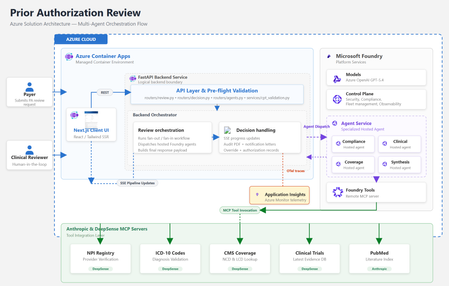
By Amit Mukherjee · Principal Solutions Engineer, Microsoft Health & Life Sciences Lindsey Craft-Goins · Technology Leader - Cloud & AI Platforms, Health & Life Sciences Joel Borellis · Director Solutions Engineering - Cloud & AI Platforms, Health & Life Sciences Prior authorization (PA) is one of the most expensive bottlenecks in U.S. healthcare. Physicians complete an average of 39 PA requests per week, spending roughly 13 hours of physician-and-staff time on PA-related work (AMA 2024 Prior Authorization Physician Survey). Turnaround averages 5–14 business days, and PA alone accounts for an estimated $35 billion in annual administrative spending (Sahni et al., Health Affairs Scholar, 2024). The regulatory clock is now ticking. CMS-0057-F mandates electronic PA with 72-hour urgent response starting in 2026. Forty-nine states plus DC already have PA laws on the books, and at least half of all U.S. state legislatures introduced new PA reform bills this year, including laws specifically targeting AI use in PA decisions (KFF Health News, April 2026). Today we’re making the Prior Authorization Multi-Agent Solution Accelerator available as a Microsoft Foundry template. Health plan payers can deploy a working, four-agent PA review pipeline to Azure using the Azure Developer CLI (“azd”) with a single command in supported environments, then customize it to their policies, workflows, and EHR environment. Try it now: Find the template in the Foundry template gallery, or clone directly from github.com/microsoft/Prior-Authorization-Multi-Agent-Solution-Accelerator What the template delivers The accelerator deploys four specialist Foundry hosted agents (Compliance, Clinical Reviewer, Coverage, and Synthesis), each independently containerized and managed by Foundry. In internal testing with synthetic demo cases, the pipeline reduced review workflow, from beginning to completion in under 5 minutes per case. Agent Role Key capability Compliance Documentation check 10-item checklist with blocking/non-blocking flags Clinical Reviewer Clinical evidence ICD-10 validation, PubMed + ClinicalTrials.gov search Coverage Policy matching CMS NCD/LCD lookup, per-criterion MET/NOT_MET mapping Synthesis Decision rubric 3-gate APPROVE/PEND with weighted confidence scoring Compliance and Clinical run in parallel. Coverage runs after clinical findings are ready. Synthesis evaluates all three outputs through a three-gate rubric. The result is a structured recommendation with per-criterion confidence scores and a full audit trail, not a black-box answer. Solution architecture The accelerator runs entirely on Azure. The frontend and backend deploy as Azure Container Apps. The four specialist agents are hosted by Microsoft Foundry. Real-time healthcare data flows through third-party MCP servers. Figure 1: Azure solution architecture How the pipeline works The four agents execute in a structured parallel-then-sequential pipeline. Compliance and Clinical run simultaneously in Phase 1. Coverage runs after clinical findings are ready. The Synthesis agent applies a three-gate decision rubric over all prior outputs. Figure 2: Agentic architecture, hosted agent pipeline Compliance and Clinical run in parallel via asyncio.gather, since neither depends on the other. Coverage runs sequentially after Clinical because it needs the structured clinical profile for criterion mapping. Synthesis evaluates all three outputs through a three-gate rubric (Provider, Codes, Medical Necessity) with weighted confidence scoring: 40% coverage criteria + 30% clinical extraction + 20% compliance + 10% policy match. The total pipeline time is bound by the slowest parallel agent plus the sequential agents, not the sum. In internal testing with synthetic demo cases, this architecture indicated materially reduced processing time compared to sequential manual workflows. Under the hood For the architect in the room, here are four design decisions worth knowing about: Foundry hosted agents: Each agent is independently containerized, versioned, and managed by Foundry’s runtime. The FastAPI backend is a pure HTTP dispatcher. All reasoning happens inside the agent containers, and there are no code changes between local (Docker Compose) and production (Foundry); the environment variable is the only switch. Structured output: Every agent uses MAF’s response_format enforcement to produce typed Pydantic schemas at the token level. No JSON parsing, no malformed fences, no free-form text. The orchestrator receives typed Python objects; the frontend receives a stable API contract. Keyless security: DefaultAzureCredential throughout, so no API keys are stored anywhere. Managed Identity handles production; azd tokens handle local development. Role assignments are provisioned automatically by Bicep at deploy time. Observability: All agents emit OpenTelemetry traces to Azure Application Insights. The Foundry portal shows per-agent spans correlated by case ID. End-to-end latency, per-agent contribution, and error rates are visible from day one with no additional configuration. For the full architecture documentation, agent specifications, Pydantic schemas, and extension guides, see the GitHub repository. Why this matters now Human-in-the-loop by design The system runs in LENIENT mode by default: it produces only APPROVE or PEND and is not designed to produce automated DENY outcomes in its default configuration. Every recommendation requires a clinician to Accept or Override with documented rationale before the decision is finalized. Override records flow to the audit PDF, notification letters, and downstream systems. This directly addresses the emerging wave of state legislation governing AI use in PA decisions. Domain experts own the rules Agent behavior is defined in markdown skill files, not Python code. When CMS updates a coverage determination or a plan changes its commercial policy, a clinician or compliance officer edits a text file and redeploys. No engineering PR required. Real-time healthcare data via MCP Agents connect to five MCP servers for real-time data: ICD-10 codes, NPI Registry, CMS Coverage policies, PubMed, and ClinicalTrials.gov. This incorporates real‑time clinical reference data sources to inform agent recommendations. Third-party MCP servers are included for demonstration with synthetic data only. Their inclusion does not constitute an endorsement by Microsoft. See the GitHub repository for production migration guidance. Audit-ready from day one Every case generates an 8-section audit justification PDF with per-criterion evidence, data source attribution, timestamps, and confidence breakdowns. Clinician overrides are recorded in Section 9. Notification letters (approval and pend) are generated automatically. These artifacts are designed to support CMS-0057-F documentation requirements. Deploy in under 15 minutes From the Foundry template gallery or from the command line: git clone https://github.com/microsoft/Prior-Authorization-Multi-Agent-Solution-Accelerator cd Prior-Authorization-Multi-Agent-Solution-Accelerator azd up That single command provisions Foundry, Azure Container Registry, Container Apps, builds all Docker images, registers the four agents, and runs health checks. The demo is live with a synthetic sample case as soon as deployment completes. What’s included What you customize 4 Foundry hosted agents Payer-specific coverage policies FastAPI orchestrator + Next.js frontend EHR/FHIR integration for clinical notes 5 MCP healthcare data connections Self-hosted MCP servers for production PHI Audit PDF + notification letter generation Authentication (Microsoft Entra ID) Full Bicep infrastructure-as-code Persistent storage (Cosmos DB / PostgreSQL) OpenTelemetry + App Insights observability Additional agents (Pharmacy, Financial) Built on Microsoft Foundry + Foundry hosted agents · Microsoft Agent Framework (MAF) · Azure OpenAI gpt-5.4 · Azure Container Apps · Azure Developer CLI + Bicep · OpenTelemetry + Azure Application Insights · DefaultAzureCredential (keyless, no secrets) Full architecture documentation, agent specifications, and extension guides are in the GitHub repository. Get started Foundry template gallery: Search “AI-Powered Prior Authorization for Healthcare” in the Foundry template section GitHub: github.com/microsoft/Prior-Authorization-Multi-Agent-Solution-Accelerator Disclaimers Not a medical device. This solution accelerator is not a medical device, is not FDA-cleared, and is not intended for autonomous clinical decision-making. All AI recommendations require qualified clinical review before any authorization decision is finalized. Not production-ready software. This is an open-source reference architecture (MIT License), not a supported Microsoft product. Customers are solely responsible for testing, validation, regulatory compliance, security hardening, and production deployment. Performance figures are illustrative. Metrics cited (including processing time reductions) are based on internal testing with synthetic demo data. Actual results will vary based on case complexity, infrastructure, and configuration. Third-party services included for demonstration only; not endorsed by Microsoft. Customers should evaluate providers against their compliance and data residency requirements. The demo uses synthetic data only. Customers deploying real patient data are responsible for HIPAA compliance and establishing appropriate Business Associate Agreements. This accelerator is intended to help customers align documentation workflows with CMS‑0057‑F requirements but has not been independently validated or certified for regulatory compliance.627Views0likes0CommentsNew Microsoft Certified: Azure Databricks Data Engineer Associate Certification
As a data engineer, you understand that AI performance depends directly on the quality of its data. If the data isn’t clean, well-managed, and accessible at scale, even the most sophisticated AI models won’t perform as expected. Introducing the Microsoft Certified: Azure Databricks Data Engineer Associate Certification, designed to prove that you have the skills required to build and operate reliable data systems by using Azure Databricks. To earn the Certification, you need to pass Exam DP-750: Implementing Data Engineering Solutions Using Azure Databricks, currently in beta. Is this Certification right for you? This Certification offers you the opportunity to prove your skills and validate your expertise in the following areas: Core technical skills Ingesting, transforming, and modeling data using SQL and Python Building production data pipelines on Azure Databricks Implementing software development lifecycle (SDLC) practices with Git-based workflows Integrating Azure Databricks with key Microsoft services, such as Azure Storage, Azure Data Factory, Azure Monitor, Azure Key Vault, and Microsoft Entra ID Governance and security Securing and governing data with Unity Catalog and Microsoft Purview Applying workspace, cluster, and data-level security best practices Performance and reliability Optimizing compute, caching, partitioning, and Delta Lake design patterns Troubleshooting and resolving issues with jobs and pipelines Managing workloads across development, staging, and production For engineers already familiar with Azure Databricks, this Certification bridges the gap between general Azure Databricks skills and the Azure‑specific architecture, security, and operational patterns that employers increasingly expect. Ready to prove your skills? The first 300 candidates can save 80% Take advantage of the discounted beta exam offer. The first 300 people who take Exam DP-750 (beta) on or before April 2, 2026, can get 80% off. To receive the discount, when you register for the exam and are prompted for payment, use code DP750Deltona. This is not a private access code. The seats are offered on a first-come, first-served basis. As noted, you must take the exam on or before April 2, 2026. Please note that this discount is not available in Turkey, Pakistan, India, or China. How to prepare Get ready to take Exam DP-750 (beta): Review the Exam DP-750 (beta) exam page for details. The Exam DP-750 study guide explores key topics covered in the exam. Work through the Plan on Microsoft Learn: Get Exam‑Ready for DP‑750: Azure Databricks Data Engineer Associate Certification. Need other preparation ideas? Check out Just How Does One Prepare for Beta Exams? You can take Certification exams online, from your home or office. Learn what to expect in Online proctored exams: What to expect and how to prepare. Interested in unlocking more Azure Databricks expertise? Grow your skills and take the next step by exploring Databricks credentials and show what you can do with Azure Databricks. Ready to get started? Remember, only the first 300 candidates can get 80% Exam DP-750 (beta) with code DP750Deltona on or before April 2, 2026. Beta exam rescoring begins when the exam goes live, with final results released approximately 10 days later. For more details, read Creating high-quality exams: The path from beta to live. Stay tuned for general availability of this Certification in early May 2026. Get involved: Help shape future Microsoft Credentials Join our Microsoft Worldwide Learning SME Group for Credentials on LinkedIn for beta exam alerts and opportunities to help shape future Microsoft learning and assessments. Additional information For more cloud and AI Certification updates, read our recent blog post, The AI job boom is here. Are you ready to showcase your skills? Explore Microsoft Credentials on AI Skills Navigator.25KViews4likes23CommentsIntegrate Marketplace commerce signals to enforce entitlements in AI apps
How fulfillment and entitlement models differ by Microsoft Marketplace offer type AI apps and agents increasingly operate with runtime autonomy, dynamic capability exposure, and on‑demand access to tools and resources. That flexibility creates a new challenge for software companies: enforcing commercial entitlements (what a customer is allowed to access or use at runtime) correctly after a customer purchase through Microsoft Marketplace. Marketplace is the system of record for commercial truth, but enforcement always lives in your application, agent, or deployed resources. This post explains how Marketplace fulfillment and entitlement models differ by offer type—and what that means when you’re designing AI apps and agents that must respond correctly to subscription state, plan changes, and cancellations. You can always get a curated step-by-step guidance through building, publishing and selling apps for Marketplace through App Advisor. This post is part of a series on building and publishing well-architected AI apps and agents in Microsoft Marketplace. The series focuses on AI apps and agents that are architected, hosted, and operated on Azure, with guidance aligned to building and selling solutions through Microsoft Marketplace. Why AI apps and agents must integrate with Marketplace commerce signals Microsoft Marketplace is the commercial system of record for: Tracking purchase and subscription state Managing plan selection and plan changes Signaling cancellation and suspension AI apps and agents, by contrast, operate in environments where decisions are made continuously at runtime. They expose capabilities dynamically, invoke tools conditionally, and often operate without a human in the loop. That mismatch makes static enforcement insufficient, including: UI‑only checks Configuration‑time gating Prompt‑based constraints Marketplace communicates commercial truth, but it does not enforce value. That responsibility always belongs to the publisher’s application, agent, or deployed resources. Correct integration starts with understanding what Marketplace provides—and what your software must implement. What Marketplace provides—and what publishers must implement Before diving into APIs or offer types, it’s important to separate responsibilities clearly. Marketplace provides authoritative commercial signals, including: Subscription existence and current state Plan and entitlement context Licensing or usage boundaries associated with the offer Marketplace does not: Enforce your business logic Control runtime behavior Automatically limit feature or resource access Publishers are responsible for translating Marketplace signals into: Application behavior Agent capabilities Resource access boundaries That enforcement must be deterministic, auditable, and aligned with what the customer actually purchased. How those signals surface—through APIs, deployment constructs, licensing context, or metering—depends entirely on the fulfillment and entitlement model of the offer. How fulfillment and entitlement models differ by offer type Microsoft Marketplace supports multiple offer and fulfillment models, including: SaaS subscriptions Azure Managed Applications Container offers Virtual machine offers Other specialized Marketplace offer types Each model determines: How a customer receives value Where commercial signals appear Which integration mechanisms apply Where entitlement enforcement must occur Some offers rely on Marketplace APIs. Others rely on deployment‑time enforcement, resource scoping, or usage constraints. There is no single integration pattern that applies to every offer. Understanding this distinction is essential before designing entitlement enforcement for AI apps and agents. Marketplace integration responsibilities by offer type This section is the technical anchor of the post. Marketplace APIs are not universal; they apply differently depending on the offer model. SaaS offers SaaS offers integrate directly with Microsoft Marketplace through the SaaS Fulfillment APIs. These APIs are used to: Activate subscriptions Track plan changes Enforce suspension and cancellation In this model, Marketplace communicates subscription lifecycle events, but it does not enforce access. The publisher must: Map Marketplace subscriptions to internal tenants Maintain a durable subscription record Enforce entitlements at runtime For AI apps and agents, that enforcement typically happens in orchestration logic or tool‑invocation boundaries—not in the UI or prompts. SaaS Fulfillment APIs are the primary mechanism for receiving commercial truth, but the application remains responsible for acting on it. Container offers Container offers deliver value as container images and associated artifacts, such as Helm charts. In this model, the publisher is shipping a deployable artifact—not an application endpoint or API managed by Marketplace. Marketplace provides: Entitlement to deploy the container image Optional usage‑based billing and metering Ability to deploy to an existing AKS cluster or to a publisher configure one Enforcement occurs at: Deployment time, by controlling access to images Runtime usage, through configuration and limits Metered dimensions, when usage‑based billing applies For AI workloads packaged as containers, entitlement enforcement is typically embedded in the runtime configuration, resource limits, or metering logic—not in Marketplace APIs. Virtual machine offers Virtual machine offers are fulfilled through VM image deployment. In this model: Fulfillment is based on VM deployment Licensing and usage are enforced through the VM lifecycle Subscription state is less event‑driven but still contractually binding While there is no SaaS‑style fulfillment callback, publishers must still ensure that deployed workloads align with the purchased offer. For AI solutions delivered via VM images, enforcement is tied to licensing, configuration, and operational controls inside the VM. Azure Managed Applications For Azure Managed Applications, fulfillment is enforced through the Azure Resource Manager (ARM) deployment lifecycle. In this model: A Marketplace purchase establishes deployment rights Resources are deployed into a managed resource group Operational boundaries are defined by ARM and Azure role assignments Publishers enforce value through: Deployment behavior Resource configuration Lifecycle management and updates For AI solutions delivered as managed applications, entitlement enforcement is tied to what is deployed and how it is operated—not to an external subscription API. Marketplace establishes the contract, and Azure enforces access through infrastructure boundaries. Other offer types Other Marketplace offer types follow similar patterns, with varying degrees of API involvement and deployment‑time enforcement. The key principle holds: Marketplace establishes commercial rights, but enforcement is always implemented by the publisher, using the mechanisms appropriate to the offer model. Designing entitlement enforcement into AI apps and agents Entitlements must be enforced outside the model. Large language models should never be responsible for deciding what a customer is allowed to do. Effective enforcement belongs in: The interaction layer The orchestration layer Tool invocation boundaries Avoid: UI‑only enforcement Prompt‑based entitlement logic Soft limits without auditability AI agents should request capabilities from deterministic services that already understand subscription state and plan entitlements. This ensures enforcement is consistent, testable, and resilient. Handling plan changes, upgrades, and feature tiers Plan changes are common in Microsoft Marketplace. AI capability must align continuously with: The active subscription tier Purchased dimensions or limits Common examples include: Agent autonomy limits Tool or connector access Rate limits Data scope Feature gating must be deterministic and testable. When a plan changes, your application or agent should respond predictably—without manual intervention or redeployment. Failure, retry, and reconciliation patterns Marketplace events are not guaranteed to be: Ordered Delivered once Immediately available AI apps must handle: Duplicate events Missed callbacks Temporary Marketplace or network failures Reconciliation processes protect customers, publishers, and Marketplace trust. Periodic verification of subscription state ensures that runtime enforcement remains aligned with commercial reality. How Marketplace API integration affects readiness and review Marketplace reviewers look for: Clear enforcement of subscription state Clean suspension and revocation paths Strong integration leads to: Faster certification Fewer conditional approvals Lower support burden after launch Correct enforcement is not just a technical requirement—it’s a Marketplace readiness signal. What’s next in the journey Once entitlement enforcement is solid, the next layer of operational maturity includes: Usage‑based billing and metering architecture Performance, caching, and cost optimization Observability and operational health for AI apps and agents Key resources See curated, step-by-step guidance to help you build, publish, or sell your app or agent (no matter where you start) in App Advisor Quick-Start Development Toolkit can connect you with code templates for AI solution patterns Microsoft AI Envisioning Day Events How to build and publish AI apps and agents for Microsoft Marketplace Get over $126K USD in benefits and technical consultations to help you replicate and publish your app with ISV Success73Views3likes0CommentsIntroducing OpenAI's GPT-image-2 in Microsoft Foundry
Take a small design team running a global social campaign. They have the creative vision to produce localized imagery for every market, but not the resources to reshoot, reformat, or outsource that scale. Every asset needs to fit a different platform, a different dimension, a different cultural context, and they all need to ship at the same time. This is where flexible image generation comes in handy. OpenAI's GPT-image-2 is now generally available and rolling out today to Microsoft Foundry, introducing a step change in image generation. Developers and designers now get more control over image output, so a small team can execute with the reach and flexibility of a much larger one. What is new in GPT-image-2? GPT-image-2 brings real world intelligence, multilingual understanding, improved instruction following, increased resolution support, and an intelligent routing layer giving developers the tools to scale image generation for production workflows. Real world intelligence GPT-image-2 has a knowledge cut off of December 2025, meaning that it is able to give you more contextually relevant and accurate outputs. The model also comes with enhanced thinking capabilities that allow it to search the web, check its own outputs, and create multiple images from just one prompt. These enhancements shift image generation models away from being simple tools and runs them into creative sidekicks. Multilingual understanding GPT-image-2 includes increased language support across Japanese, Korean, Chinese, Hindi, and Bengali, as well as new thinking capabilities. This means the model can create images and render text that feels localized. Increased resolution support GPT-image-2 introduces 4K resolution support, giving developers the ability to generate rich, detailed, and photorealistic images at custom dimensions. Resolution guidelines to keep in mind: Constraint Detail Total pixel budget Maximum pixels in final image cannot exceed 8,294,400 Minimum pixels in final image cannot be less than 655,360 Requests exceeding this are automatically resized to fit. Resolutions 4K, 1024x1024, 1536x1024, and 1024x1536 Dimension alignment Each dimension must be a multiple of 16 Note: If your requested resolution exceeds the pixel budget, the service will automatically resize it down. Intelligent routing layer GPT-image-2 also includes an expanded routing layer with two distinct modes, allowing the service to intelligently select the right generation configuration for a request without requiring an explicitly set size value. Mode 1 — Legacy size selection In Mode 1, the routing layer selects one of the three legacy size tiers to use for generation: Size tier Description smimage Small image output image Standard image output xlimage Large image output This mode is useful for teams already familiar with the legacy size tiers who want to benefit from automatic selection without making any manual changes. Mode 2 — Token size bucket selection In Mode 2, the routing layer selects from six token size buckets — 16, 24, 36, 48, 64, 96 — which map roughly to the legacy size tiers: Token bucket Approximate legacy size 16, 24 smimage 36, 48 image 64, 96 xlimage This approach can allow for more flexibility in the number of tokens generated, which in turn helps to better optimize output quality and efficiency for a given prompt. See it in action GPT-image-2 shows improved image fidelity across visual styles, generating more detailed and refined images. But, don’t just take our word for it, let's see the model in action with a few prompts and edits. Here is the example we used: Prompt: Interior of an empty subway car (no people). Wide-angle view looking down the aisle. Clean, modern subway car with seats, poles, route map strip, and ad frames above the windows. Realistic lighting with a slight cool fluorescent tone, realistic materials (metal poles, vinyl seats, textured floor). As you can see, when using the same base prompt, the image quality and realism improved with each model. Now let’s take a look at adding incremental changes to the same image: Prompt: Populate the ad frames with a cohesive ad campaign for “Zava Flower Delivery” and use an array of flower types. And our subway is now full of ads for the new ZAVA flower delivery service. Let's ask for another small change: Prompt: In all Zava Flower Delivery advertisements, change the flowers shown to roses (red and pink roses). And in three simple prompts, we've created a mockup of a flower delivery ad. From marketing material to website creation to UX design, GPT-image-2 now allows developers to deliver production-grade assets for real business use cases. Image generation across industries These new capabilities open the door to richer, more production-ready image generation workflows across a range of enterprise scenarios: Retail & e-commerce: Generate product imagery at exact platform-required dimensions, from square thumbnails to wide banners, without post-processing. Marketing: Produce crisp, rich in color campaign visuals and social assets localized to different markets. Media & entertainment: Generate storyboard panels and scene at resolutions suited to production pipelines. Education & training: Create visual learning aids and course materials formatted to exact display requirements across devices. UI/UX design: Accelerate mockup and prototype workflows by generating interface assets at the precise dimensions your design system requires. Trust and safety At Microsoft, our mission to empower people and organizations remains constant. As part of this commitment, models made available through Foundry undergo internal reviews and are deployed with safeguards designed to support responsible use at scale. Learn more about responsible AI at Microsoft. For GPT-image-2, Microsoft applied an in-depth safety approach that addresses disallowed content and misuse while maintaining human oversight. The deployment combines OpenAI’s image generation safety mitigations with Azure AI Content Safety, including filters and classifiers for sensitive content. Pricing Model Offer type Pricing - Image Pricing - Text GPT-image-2 Standard Global Input Tokens: $8 Cached Input Tokens: $2 Output Tokens: $30 Input Tokens: $5 Cached Input Tokens: $1.25 Output Tokens: $10 Note: All prices are per 1M token. Getting started Whether you’re building a personalized retail experience, automating visual content pipelines or accelerating design workflows. GPT-image-2 gives your team the resolution control and intelligent routing to generate images that fit your exact needs. Try the GPT-image-2 in Microsoft Foundry today! Deploy the model in Microsoft Foundry Experiment with the model in the Image playground Read the documentation to learn more8.5KViews3likes2Comments