21h2
3 Topics
Update bootloader in Win10 Iot Ent LTSC (21H2) applied images?
The product I work on uses Windows 10 IoT Enterprise LTSC (21H2). I am trying to update the bootloader in the extracted and applied images to the version signed in 2023, to work around the issue with the default bootloader signatures expiring in 2026 (see KB5012170). KB5012170 updates the bootloader on an installed system. I can apply this hotfix to an installed device, and the bootloader on the hidden partition indeed gets updated. However, if I sysprep and extract the image from this machine, and apply it to a new machine, after using bcdboot to set the boot image, the new machine ends up with the old expiring bootloader installed. It seems KB5012170 only updates the "live" version of the bootloader on the hidden partition. It does not update the bootloader that ends up in the extracted image? Updating to Windows 10 IoT 22H2 or Windows 11 IoT is not an option for us for now. I do not want to have to require users to always install KB5012170 every time they install our product moving forward. I would like newly created images of our product to contain the updated bootloader by default. But I cannot find a way to do this. KB5012170 seems to be the only way to get the updated bootloader for our edition of Windows. Is there another way to get the updated bootloader I am missing? Is there a tool or trick that I am missing that would allow us to update the bootloader in the extracted, applied image without requiring a subsequent install of KB5012170?252Views0likes2Comments
Is WMI reached EOL for Windows 10 21H2 version of IoT Enterprise LTSC ?
Heard that, the Windows Management Instrumentation Command-line (WMIC) reached End of Life (EOL). I mainly wanted to know and get key information on these queries - We are using Windows 10 OS 21H2 IoT Enterprise LTSC version (build 19044) on on of our product and building application on top of that Windows 10 OS 21H2 uses WMI component. So, is EOL WMI affect this Windows 10 21H2 LTSC Enterprise as well ? - If so, is there any official information available WMIC reached EOL for "Windows 10 - 21H2 IoT Enterprise LTSC" as well and should be replaced with powershell. Because "Windows 10 - 21H2 IoT Enterprise LTSC" has end of support / service till Jan 13th 2032. So, does WMI EOL really imacts this version of Windwso 10 - 21H2 IoT Enterprise LTSC ? nikita Windows10LTSC1.4KViews1like4Comments
Windows 11 UAC pop-up window not correctly shown
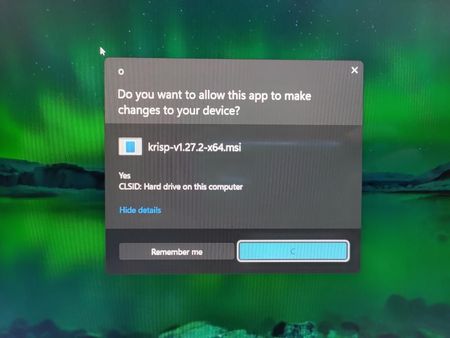
The "Would you like to allow this app to make changes to your computer?" screen (UAC pop-up window) is not showing correctly on Windows 11. I tried to uninstall an app, and when this message popped up, it showed responses and text that was not correct or the same as Windows 10. It displayed like this: (Picture 1) The title of the window is "O", instead of the usual "User Account Control". (See Picture 1 Below) It then displays the usual question you would expect from this screen. (See Picture 1 Below) It then shows the name of the application, which maybe should or maybe shouldn't be displayed like that. You would usually expect a more user-friendly name, such as the application's name or "[Application Name] Uninstaller", with the application's icon. It doesn't show either of these. It shows the default for an app with no icon and shows the application's .msi file name. (See Picture 1 Below) Underneath this, it randomly shows the word "Yes". (See Picture 1 Below) It then underneath says "CLSID", instead of "File origin", and then the rest of that line that you would usually expect. (See Picture 1 Below) It then says "Hide details" where you would usually expect "Show more details", as this is shown BEFORE any details are shown. (See Picture 1 Below) It then displays 2 buttons "Remember Me" and "C", instead of the usual "Yes" and "No". (See Picture 1 Below) Upon clicking the "Hide details" button, it then shows the information you would probably expect, except that the publisher is "Uninstall". (See Picture 2 Below) The "Hide details" button also changes to a button that says "Segoe UI". Segoe UI is a font family. (See Picture 2 Below) (Picture 2) Hope this is fixed soon.3.1KViews0likes2Comments