2016
648 Topics
Recycle Bin and Site Content Hidden for Site Members and Site Visitors
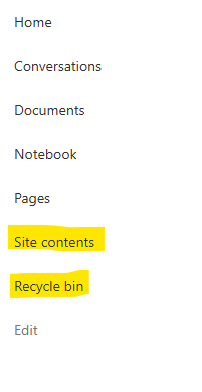
I posted this before but made a mistake with my write up, so I am reposting. I have a requirement that the Recycle bin and Site Contents should be be hidden from the Site Members and Site Visitors. Please how can I achieve this because the Server Infrastructure activation is not working for me. Any workarounds? Please help254Views0likes1CommentDynamic Mandatory Fields
In a SharePoint library, I have folders which are = a. Admin b. Events c. Furniture and Moves d. Janitorial and Maintenance e. Parking and Transportation f. Shipping and Receiving g. Supplies and Equipment h. Waste and Recycling I have Meta data across the library whose data type are all choices and are: a. Document Type = Contract, Financial, planning b. Building = Gym, Garage, Heating c. Asset Category = Office, Playground d. Fiscal Year = FY23, FY24, FY25, FY26, FY27 e. Vendor = Maple Leaf, Canadian Tire, Home Depot f. Status = Active, Pending, Not Active g. Retention Label = 3 years, 5 years h. Service Type = Admin, Events, Furniture and Moves, Janitorial and Maintenance, Parking and Transportation, Shipping and Receiving, Supplies and Equipment, Waste and Recycling Service Type and Retention Label are mandatory fields, with the Rule below for all the files in the various folders: IF Folder Name = Admin, then Service Type = Admin and Retention Label = 5 years; the mandatory fields should be Document Type, Status and Fiscal Year IF Folder Name = Events, then Service Type = Events and Retention Label = 3 years; the mandatory fields should be Document Type, Status and Fiscal Year, Building and Vendor IF Folder Name = Furniture and Moves, then Service Type = Furniture and Moves and Retention Label = 3 years; the mandatory fields should be Document Type, Status and Building IF Folder Name = Janitorial and Maintenance, then Service Type = Janitorial and Maintenance and Retention Label = 3 years; the mandatory fields should be Document Type, Status and Fiscal Year IF Folder Name = Parking and Transportation, then Service Type = Parking and Transportation and Retention Label = 3 years; the mandatory fields should be Document Type, Status and Fiscal Year IF Folder Name = Shipping and Receiving, then Service Type = Shipping and Receiving and Retention Label = 3 years; the mandatory fields should be Document Type, Status IF Folder Name = Supplies and Equipment, then Service Type = Supplies and Equipment and Retention Label = 3 years; the mandatory fields should be Document Type, Status and Fiscal Year IF Folder Name = Waste and Recycling, then Service Type = Waste and Recycling and Retention Label = 3 years; the mandatory fields should be Document Type, Status and Vendor I have used Column Default Value Settings for SharePoint to display Auto-Display the Service Type and Retention Label, but I cannot seem to perform the conditional mandatory fields using Validations setting for the other requirements. Please help369Views0likes1Comment
Sharepoint 2016 certificat expiration
Hello, We are running a SharePoint 2016 farm composed of: 2 Database Servers 1 App Server 1 Search Server 1 Web Front-End Server 1 Office Online Server After checking the environment, I noticed that only the Web Front-End server is using the certificate that will expire in June. The App Server is using an old expired certificate, the Search Server is configured only with HTTP, and the Office Online Server is using a different certificate. Is there any documented procedure describing the steps required to renew the expired certificates in a SharePoint 2016 farm and on which server we should install the new certificat ? We are using Microsoft CA for certificate management.147Views0likes2Comments
Sharepoint Listas Columna Autonumerada
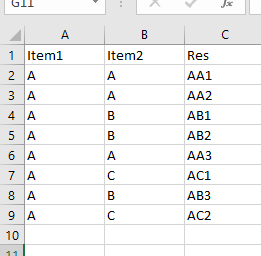
Buenas a todos. Necesitaria crear una lista en la cual exista una columna que concatene la primer letra de 2 columnas anteriores y realice una numeración consecutiva. Les dejo una imagen de como sería esta numeracion necesaria. Es decir que necesitaria un indice por cada combinacion de letras Supongo debo usar alguna formula. Alguien me podrá ayudar? Saludos Diego4.2KViews0likes2Comments
Automating SharePoint Site Status Reporting with PowerShell
Introduction Migrating Microsoft 365 workloads is a critical step during organizational transitions such as mergers or de‑mergers. SharePoint site collections often contain business‑critical data, and ensuring visibility into their readiness is essential for a smooth migration. To address this, I developed a PowerShell script that automatically generates a SharePoint Site Status Report, categorizing sites into Active, Read‑Only, and Offline. This report provides administrators and migration engineers with actionable insights to plan and execute migrations confidently. Why This Matters Visibility: Quickly assess site readiness across all web applications. Governance: Ensure compliance and proper access controls. Efficiency: Automate reporting to reduce manual effort. Risk Mitigation: Identify offline or read‑only sites before migration. How It Works The script leverages the SharePoint Management Shell and runs under the Farm Account with elevated permissions. It performs the following steps: Loads SharePoint cmdlets. Iterates through all web applications. Categorizes sites into Active, Read‑Only, and Offline. Compiles results into a structured CSV/Excel/HTML report. Sends the report via email to stakeholders. Key PowerShell Cmdlets Add-PSSnapin Microsoft.SharePoint.PowerShell Get-SPWebApplication Get-SPSite -WebApplication -Limit All $site.ReadOnly / $site.Status Export-Csv Send-MailMessage Parameters to Replace Before running the script, update these placeholders: SMTP Server → mail.company.com → replace with your mail server Sender Address ($from) → email address removed for privacy reasons → replace with reporting account Recipient Address ($to) → email address removed for privacy reasons → replace with stakeholder distribution list Email Subject ($subject) → "SharePoint Site Status Report" → customize for clarity Report File Path ($csvPath) → C:\Reports\SharePoint_SiteStatusReport.csv → replace with desired location Web Application URLs → ensure correct farm references Execution Context → must run under Farm Account Conclusion This automated reporting solution provides clarity, governance, and efficiency during SharePoint migrations. By categorizing sites and delivering structured reports, administrators can prioritize tasks, mitigate risks, and ensure a seamless transition to Microsoft 365. Code: #Adding Snapin for SharePoint #Add-PSSnapin Microsoft.SharePoint.Powershell -ErrorAction SilentlyContinue $TodayDate =Get-Date Write-Host $TodayDate $FileName = "C:\Results_Active_WebSites.txt" if (Test-Path $FileName) { Remove-Item $FileName } $FileName = "C:\Results_NoAccess_WebSites.txt" if (Test-Path $FileName) { Remove-Item $FileName } $FileName = "C:\Results_Readonly_WebSites.txt" if (Test-Path $FileName) { Remove-Item $FileName } $FileName = "C:\Results_Active_WebSites.txt" if (Test-Path $FileName) { Remove-Item $FileName } $FileName = "C:\Results_Readonly_WebSites.txt" if (Test-Path $FileName) { Remove-Item $FileName } $FileName = "C:\Results_NoAccess_WebSites.txt" if (Test-Path $FileName) { Remove-Item $FileName } $FileName = "C:\Results_Active_WebSites.txt" if (Test-Path $FileName) { Remove-Item $FileName } $FileName = "C:\Results_Readonly_WebSites.txt" if (Test-Path $FileName) { Remove-Item $FileName } $FileName = "C:\Results_NoAccess_WebSites.txt" if (Test-Path $FileName) { Remove-Item $FileName } $FileName = "C:\Results_Active_WebSites.txt" if (Test-Path $FileName) { Remove-Item $FileName } $FileName = "C:\Results_Readonly_WebSites.txt" if (Test-Path $FileName) { Remove-Item $FileName } $FileName = "C:\Results_NoAccess_WebSites.txt" if (Test-Path $FileName) { Remove-Item $FileName } ##My Connect # $FileName = "C:\Results_Active_WebSites.txt" if (Test-Path $FileName) { Remove-Item $FileName } # $FileName = "C:\Results_Readonly_WebSites.txt" if (Test-Path $FileName) { Remove-Item $FileName } # $FileName = "C:\Results_NoAccess_WebSites.txt" if (Test-Path $FileName) { Remove-Item $FileName } # # WebSites $FileName = "C:\Results_Active_WebSites.txt" if (Test-Path $FileName) { Remove-Item $FileName } # $FileName = "C:\Results_Readonly_WebSites.txt" if (Test-Path $FileName) { Remove-Item $FileName } # $FileName = "C:\Results_NoAccess_WebSites.txt" if (Test-Path $FileName) { Remove-Item $FileName } # ##Websites # $FileName = "C:\Results_Active_WebSites.txt" if (Test-Path $FileName) { Remove-Item $FileName } # $FileName = "C:\Results_Readonly_WebSites.txt" if (Test-Path $FileName) { Remove-Item $FileName } # $FileName = "C:\Results_NoAccess_WebSites.txt" if (Test-Path $FileName) { Remove-Item $FileName } # ## Websites # $FileName = "C:\Results_Active_WebSites.txt" if (Test-Path $FileName) { Remove-Item $FileName } # $FileName = "C:\Results_Readonly_WebSites.txt" if (Test-Path $FileName) { Remove-Item $FileName } # $FileName = "C:\Results_NoAccess_WebSites.txt" if (Test-Path $FileName) { Remove-Item $FileName } # ##FGC-SalesShareWebSites # $FileName = "C:\Results_Active_WebSites.txt" if (Test-Path $FileName) { Remove-Item $FileName } # $FileName = "C:\Results_Readonly_WebSites.txt" if (Test-Path $FileName) { Remove-Item $FileName } # $FileName = "C:\Results_NoAccess_WebSites.txt" if (Test-Path $FileName) { Remove-Item $FileName } ##WebSites # $FileName = "C:\Results_Active_WebSites.txt" if (Test-Path $FileName) { Remove-Item $FileName } # $FileName = "C:\Results_Readonly_WebSites.txt" if (Test-Path $FileName) { Remove-Item $FileName } # $FileName = "C:\Results_NoAccess_WebSites.txt" if (Test-Path $FileName) { Remove-Item $FileName } ##WebSites # $FileName = "C:\Results_Active_WebSites.txt" if (Test-Path $FileName) { Remove-Item $FileName } # $FileName = "C:\Results_Readonly_WebSites.txt" if (Test-Path $FileName) { Remove-Item $FileName } # $FileName = "C:\Results_NoAccess_WebSites.txt" if (Test-Path $FileName) { Remove-Item $FileName } ##WebSites # $FileName = "C:\Results_Active_WebSites.txt" if (Test-Path $FileName) { Remove-Item $FileName } # $FileName = "C:\Results_Readonly_WebSites.txt" if (Test-Path $FileName) { Remove-Item $FileName } # $FileName = "C:\Results_NoAccess_WebSites.txt" if (Test-Path $FileName) { Remove-Item $FileName } Add-PSSnapin Microsoft.SharePoint.Powershell [string[]]$WebapplicationList = "" Foreach($Webapp in $WebapplicationList) { Write-Host $Webapp $displaywebappname=Get-SPWebApplication $webapp $webappname=$displaywebappname.name Write-Host $webappname $Sites = Get-SPWebApplication $webapp | Get-SPSite -limit all | foreach { if ($_.ReadOnly -eq $false -and $_.ReadLocked -eq $false -and $_.WriteLocked -eq $false) { $Result =”Site is Active” $save2= "Results_Active_${webappname}.txt" #Write-Host $save2 $saveCSVactive="Results_Active_${webappname}.csv" $_.RootWeb.Title +”`t” + $_.URL + “`t” + $Result | Out-File $save2 -append #$_.RootWeb.Title +”`t” + $_.URL + “`t” + $Result | Out-File $saveCSVactive -Append } elseif ($_.ReadOnly -eq $true -and $_.ReadLocked -eq $false -and $_.WriteLocked -eq $true) { $Result = “Site is Read-Only” $save1= "Results_Readonly_${webappname}.txt" $_.RootWeb.Title +”`t” + $_.URL + “`t” + $Result | Out-File $save1 -Append } elseif ($_.ReadOnly -eq $null -and $_.ReadLocked -eq $null -and $_.WriteLocked -eq $null) { $Result=”Site status is No Access” $save3= "Results_NoAccess_${webappname}.txt" #$_.RootWeb.Title +”`t” + $_.URL + “`t” + $Result | Out-File $save3 -Append $_.URL +”`t” + $_.RootWeb.Title + “`t” + $Result | Out-File $save3 -Append } } } $TodayDate =Get-Date Write-Host $TodayDate sleep -Seconds 100 #Active Sites WebSites $ActiveSites_Websites= Get-Content -Path "C:\Results_Active_WebSites.txt" | Measure-Object Write-Host "Websites Active sites" $ActiveSites_Websites.count $Websites_ActiveSitescount = $ActiveSites_Websites.count #Read-only Sites WebSites $ReadonlySites_Websites=Get-Content -Path "C:\Results_Readonly_WebSites.txt" | Measure-Object Write-Host "Websites Read-only Sites" $ReadonlySites_Websites.count $Websites_Readonlysitescount=$ReadonlySites_Websites.count #No-Access Sites WebSites $NoaccessSies_Websites= Get-Content -Path "C:\Results_NoAccess_WebSites.txt" | Measure-Object Write-Host "Websites No-Access Sites" $NoaccessSies_Websites.count $Websites_NoAccessSitesCount=$NoaccessSies_Websites.count #Active Sites WebSites $ActiveSites_WebSites= Get-Content -Path "C:\Results_Active_WebSites.txt" | Measure-Object Write-Host "WebSites Active sites" $ActiveSites_WebSites.count $WebSites_ActiveSitescount = $ActiveSites_WebSites.count #Read-only Sites WebSites #$Readonlysite_WebSites =Get-Content -Path C:\Results_Readonly_Websites.txt | Measure-Object #If($Readonlysite_WebSites -eq $null) #{ #$WebSites_Readonlysitecount ="0" #} #else{ $Readonlysite_WebSites =Get-Content -Path "C:\Results_Readonly_WebSites.txt" | Measure-Object Write-Host "WebSites Readonly Sites" $Readonlysite_WebSites.count $WebSites_ReadonlySitesCount= $Readonlysite_WebSites.count # Write-Host $WebSites_ReadonlySitesCount #} #WebSites - No Access Sites #$NoAccessSites_WebSites= Get-Content -Path "C:\Results_NoAccess_Websites.txt" $NoAccessSites_WebSites= Get-Content -Path "C:\Results_NoAccess_WebSites.txt" | Measure-Object Write-Host "WebSites NoAccess Sites" $NoAccessSites_WebSites.count # #Write-Host "Site Count $($NoAccessSites_WebSites.Count)" $WebSites_NoAccessSitesCount= $NoAccessSites_WebSites.count ################################################################## # #Active Sites Websites $ActiveSites_WebSites= Get-Content -Path "C:\Results_Active_Websites.txt" | Measure-Object Write-Host "WebSites Active sites" $ActiveSites_WebSites.count $WebSites_ActiveSitescount = $ActiveSites_WebSites.count # # #Read-only Sites WebSites $ReadonlySites_WebSites=Get-Content -Path "C:\Results_Readonly_Websites.txt" | Measure-Object Write-Host "WebSites Read-only Sites" $ReadonlySites_WebSites.count $WebSites_Readonlysitescount=$ReadonlySites_WebSites.count # # #No-Access Sites WebSites $NoaccessSies_WebSites= Get-Content -Path "C:\Results_NoAccess_Websites.txt" | Measure-Object Write-Host "WebSites No-Access Sites" $NoaccessSies_WebSites.count $WebSites_NoAccessSitesCount=$NoaccessSies_WebSites.count # # #Active Sites Websites $ActiveSites_WebSites= Get-Content -Path "C:\Results_Active_Websites.txt" | Measure-Object Write-Host "WebSites Active sites" $ActiveSites_WebSites.count $WebSites_ActiveSitescount = $ActiveSites_WebSites.count # # #Read-only Sites WebSites $ReadonlySites_WebSites=Get-Content -Path "C:\Results_Readonly_Websites.txt" | Measure-Object Write-Host "WebSites Read-only Sites" $ReadonlySites_WebSites.count $WebSites_Readonlysitescount=$ReadonlySites_WebSites.count # # #No-Access Sites WebSites $NoaccessSies_WebSites= Get-Content -Path "C:\Prod\Results_NoAccess_Websites.txt" | Measure-Object Write-Host "WebSites No-Access Sites" $NoaccessSies_WebSites.count $WebSites_NoAccessSitesCount=$NoaccessSies_WebSites.count # # #WebSites # # #Active Sites WebSites ##$ActiveSites_WebSites= Get-Content -Path "C:\Results_Active_WebSites.txt" | Measure-Object ##Write-Host "WebSites Active sites" $ActiveSites_WebSites.count ##$WebSites_ActiveSitescount = $ActiveSites_WebSites.count # # #Read-only Sites WebSites ##$ReadonlySites_WebSites=Get-Content -Path "C:\Results_Readonly_WebSites.txt" | Measure-Object ##Write-Host "WebSites Read-only Sites" $ReadonlySites_WebSites.count ##$WebSites_Readonlysitescount=$ReadonlySites_WebSites.count # # #No-Access Sites WebSites ##$NoaccessSies_WebSites= Get-Content -Path "C:\Results_NoAccess_WebSites" | Measure-Object ##Write-Host "WebSites No-Access Sites" $NoaccessSies_WebSites.count ##$WebSites_NoAccessSitesCount=$NoaccessSies_WebSites.count # # #WebSites # # #Active Sites WebSites ##$ActiveSites_WebSites= Get-Content -Path "C:\Results_Active_WebSites.txt" | Measure-Object ##Write-Host "WebSites Active sites" $ActiveSites_WebSites.count ##$WebSites_ActiveSitescount = $ActiveSites_WebSites.count # # #Read-only Sites WebSites ##$ReadonlySites_WebSites=Get-Content -Path "C:\Results_Readonly_WebSites.txt" | Measure-Object ##Write-Host "WebSites Web Read-only Sites" $ReadonlySites_WebSites.count ##$WebSites_Readonlysitescount=$ReadonlySites_WebSites.count # # #No-Access Sites WebSites ##$NoaccessSies_WebSites= Get-Content -Path "C:\Results_NoAccess_WebSites.txt" | Measure-Object ##Write-Host "WebSites Web No-Access Sites" $NoaccessSies_WebSites.count ##$WebSites_NoAccessSitesCount=$NoaccessSies_WebSites.count # # #Websites # # #Active Sites Websites ##$ActiveSites_Websites= Get-Content -Path "C:\Results_Active_WebSites.txt" | Measure-Object ##Write-Host "Websites Active sites" $ActiveSites_Websites.count ##$Websites_ActiveSitescount = $ActiveSites_Websites.count # # #Read-only Sites Websites ##$ReadonlySites_Websites=Get-Content -Path "C:\Results_Readonly_WebSites.txt" | Measure-Object ##Write-Host "Websites Read-only Sites" $ReadonlySites_Websites.count ##$Websites_Readonlysitescount=$ReadonlySites_Websites.count # # #No-Access Sites Websites ##$NoaccessSies_Websites= Get-Content -Path "C:\Results_NoAccess_WebSites.txt" | Measure-Object ##Write-Host "Websites No-Access Sites" $NoaccessSies_Websites.count ##$Websites_NoAccessSitesCount=$NoaccessSies_Websites.count # # #Websites # # #Active Sites Websites ##$ActiveSites_Websites= Get-Content -Path "C:\Results_Active_WebSites.txt" | Measure-Object ##Write-Host "Websites Active sites" $ActiveSites_Websites.count ##$Websites_ActiveSitescount = $ActiveSites_Websites.count # # #Read-only Sites Websites ##$ReadonlySites_Websites=Get-Content -Path "C:\Results_Readonly_WebSites.txt" | Measure-Object ##Write-Host "Websites Read-only Sites" $ReadonlySites_Websites.count ##$Websites_Readonlysitescount= $ReadonlySites_Websites.count # # #No-Access Sites Websites ##$NoaccessSies_Websites= Get-Content -Path "C:\Results_NoAccess_WebSites.txt" | Measure-Object ##Write-Host "Websites No-Access Sites" $$NoaccessSies_Websites.count ##$Websites_NoAccessSitesCount=$NoaccessSies_Websites.count # # #Websites # # #Active Sites Websites ##$ActiveSites_Websites= Get-Content -Path "C:\Results_Active_WebSites.txt" | Measure-Object ##Write-Host "Websites Active sites" $ActiveSites_Websites.count ##$Websites_ActiveSitescount = $ActiveSites_Websites.count # # #Read-only Sites Websites ##$ReadonlySites_Websites=Get-Content -Path "C:\Results_Readonly_WebSites.txt" | Measure-Object ##Write-Host "Websites Read-only Sites" $ReadonlySites_Websites.count ##$Websites_Readonlysitescount=$ReadonlySites_Websites.count # # #No-Access Sites Websites ##$NoaccessSies_Websites= Get-Content -Path "C:\Results_NoAccess_WebSites.txt" | Measure-Object ##Write-Host "Websites No-Access Sites" $NoaccessSies_Websites.count ##$Websites_NoAccessSitesCount=$NoaccessSies_Websites.count # #WebSites # # #Active Sites Websites ##$ActiveSites_Websites= Get-Content -Path "C:\Results_Active_WebSites.txt" | Measure-Object ##Write-Host "Websites Active sites" $ActiveSites_Websites.count ##$Websites_ActiveSitescount = $ActiveSites_Websites.count # # #Read-only Sites Websites ##$ReadonlySites_Websites= Get-Content -Path "C:\Results_Readonly_WebSites.txt" | Measure-Object ##Write-Host "Websites Read-only Sites" $ReadonlySites_Websites.count ##$Websites_Readonlysitescount=$ReadonlySites_Websites.count # # #No-Access Sites Websites ##$NoaccessSies_Websites= Get-Content -Path "C:\Results_NoAccess_WebSites.txt" | Measure-Object ##Write-Host "Websites No-Access Sites" $NoaccessSies_Websites.count ##$Websites_NoAccessSitesCount=$NoaccessSies_Websites.count # #WebSites # # #Active Sites Websites ##$ActiveSites_Websites= Get-Content -Path "C:\Results_Active_WebSites.txt" | Measure-Object ##Write-Host "Websites Active sites" $ActiveSites_Websites.count ##$Websites_ActiveSitescount = $ActiveSites_Websites.count # # #Read-only Sites Websites ##$ReadonlySites_Websites= Get-Content -Path "C:\Results_Readonly_WebSites.txt" | Measure-Object ##Write-Host "Websites Read-only Sites" $ReadonlySites_Websites.count ##$Websites_Readonlysitescount=$ReadonlySites_Websites.count # # #No-Access Sites Websites ##$NoaccessSies_Websites= Get-Content -Path "C:\Results_NoAccess_WebSites.txt" | Measure-Object ##Write-Host "Websites No-Access Sites" $NoaccessSies_Websites.count ##$Websites_NoAccessSitesCount=$NoaccessSies_Websites.count # #WebSites # # #Active Sites Websites ##$ActiveSites_Websites= Get-Content -Path "C:\Results_Active_WebSites.txt" | Measure-Object ## Write-Host "Websites Active sites" $ActiveSites_Websites.count ##$Websites_ActiveSitescount = $ActiveSites_Websites.count # # #Read-only Sites Websites ## $ReadonlySites_Websites= Get-Content -Path "C:\Results_Readonly_WebSites.txt" | Measure-Object ##Write-Host "Websites Read-only Sites" $ReadonlySites_Websites.count ##$Websites_Readonlysitescount=$ReadonlySites_Websites.count # # #No-Access Sites Websites ##$NoaccessSies_Websites= Get-Content -Path "C:\Results_NoAccess_WebSites.txt" | Measure-Object ##Write-Host "Websites No-Access Sites" $NoaccessSies_Websites.count ##$Websites_NoAccessSitesCount=$NoaccessSies_Websites.count $TotalActiveSite = ($Websites_ActiveSitescount + $WebSites_ActiveSitescount + $WebSites_ActiveSitescount + $WebSites_ActiveSitescount + $WebSites_ActiveSitescount + $WebSites_ActiveSitescount + $Websites_ActiveSitescount + $CTLQwest_ActiveSitescount + $RecordsCenter_ActiveSitescount + $Websites_ActiveSitescount + $Websites_ActiveSitescount + $Websites_ActiveSitescount + $Websites_ActiveSitescount + $Websites_ActiveSitescount) $TotalReadonlySites = ($Websites_Readonlysitescount + $WebSites_ReadonlySitesCount + $WebSites_Readonlysitescount + $WebSites_Readonlysitescount + $WebSites_Readonlysitescount + $WebSites_Readonlysitescount + $Websites_Readonlysitescount + $Websites_Readonlysitescount + $Websites_Readonlysitescount + $Websites_Readonlysitescount + $Websites_Readonlysitescount + $Websites_Readonlysitescount) $TotalNoAccessSite = ($Websites_NoAccessSitesCount + $WebSites_NoAccessSitesCount + $WebSites_NoAccessSitesCount + $WebSites_NoAccessSitesCount + $WebSites_NoAccessSitesCount + $WebSites_NoAccessSitesCount + $Websites_NoAccessSitesCount + $Websites_NoAccessSitesCount + $Websites_NoAccessSitesCount + $Websites_NoAccessSitesCount + $Websites_NoAccessSitesCount + $Websites_NoAccessSitesCount) #Total Sites $TotalWebSites = ($WebSites_ActiveSitescount + $WebSites_Readonlysitescount + $WebSites_NoAccessSitesCount) $TotalWebSites = ($WebSites_ActiveSitescount + $WebSites_ReadonlySitesCount + $WebSites_NoAccessSitesCount) $TotalWebSites = ($WebSites_ActiveSitescount + $WebSites_Readonlysitescount + $WebSites_NoAccessSitesCount) $TotalWebSites = ($WebSites_ActiveSitescount + $WebSites_Readonlysitescount + $WebSites_NoAccessSitesCount) $TotalWebSites = ($WebSites_ActiveSitescount + $WebSites_Readonlysitescount + $WebSites_NoAccessSitesCount) $TotalWebSites = ($WebSites_ActiveSitescount + $WebSites_Readonlysitescount + $WebSites_NoAccessSitesCount) $TotalWebSites = ($Websites_ActiveSitescount + $Websites_Readonlysitescount + $Websites_NoAccessSitesCount) $TotalWebSites = ($Websites_ActiveSitescount + $Websites_Readonlysitescount + $Websites_NoAccessSitesCount) $TotalWebSites =($Websites_ActiveSitescount + $Websites_Readonlysitescount + $Websites_NoAccessSitesCount) $TotalWebSites = ($Websites_ActiveSitescount + $Websites_Readonlysitescount + $Websites_NoAccessSitesCount) $TotalWebSites = ($Websites_ActiveSitescount + $Websites_Readonlysitescount + $Websites_NoAccessSitesCount) $TotalWebSites = ($Websites_ActiveSitescount + $Websites_Readonlysitescount + $Websites_NoAccessSitesCount) #====== All Sites Count $TotalSites =($TotalWebSites + $TotalWebSites + $TotalWebSites + $TotalWebSites + $TotalWebSites + $TotalWebSites + $TotalWebSites + $TotalWebSites + $TotalWebSites + $TotalWebSites + $TotalWebSites + $TotalWebSites) #Sending Email #================ #[string[]]$recipients = "" $recipients11 = @("") #[string[]]$recipients = "" # "" $smtp = "smtp" #$to = $recipients11 $from = "" #$from = "" $subject = "SharePoint Sites Current Status" $body = " <b> <font color=Navy> Date -$todaydate </b> </font> <br>" #$attachment11="C:\Results_Active_Web.txt","C:\Results_Active_Web.txt" #$body = " <b><font color=red> SP-Apps Read-only Sites Count - $Readonlysitecount </b></font> <br>" #$body += " <b><font color=red> SP-Apps Active Sites Count - $ActiveSitescount </b></font> <br>" #$body += " <b><font color=red> SP-Apps No-Access Sites Count - $NoAccessSiteCount </b></font> <br>" #$body += "Click <a href=http://www.google.com>here</a> to open google <br>" #### Now send the email using \> Send-MailMessage #========= $report = "<html> <style> {font-family: Arial; font-size: 15pt;color: #F70707; } {color:#F70707;} TABLE{border: 1px solid black; border-collapse: collapse; font-size:15pt;} #TH{border: 1px solid black; background: #F4D03F; padding: 5px; color: #000000;} TR{color: #2E86C1;text-align: center;background: #13B5ED; padding: 5px; color: #0F0F0F;} TR{color: #2E86C1;text-align: center;background: #13B5ED; padding: 5px; color: #0F0F0F;} TH{border: 1px solid black; background: #F4D03F; padding: 5px; color: #F70707;} TD{border: 1px solid black; padding: 5px; } H2{color: #F70707;} H1{Color: #0C0B0A;} </style> <h1> SharePoint Sites Current Status</h1> <table> <tr> <td> <b> Web Application </b> </td> <td> <b> Active Sites </b> </td> <td> <b> Read-Only Sites </b> </td> <td> <b> No-Access (Locked) Sites </b></td> <td> <b> Total Sites </b> </td> <tr> <tr> <td> <b> Web Application </b> </td> <td> $Web_ActiveSitescount </td> <td> $Web_Readonlysitescount</td> <td> $Web_NoAccessSitesCount </td> <td> <b> $TotalWebSites </b> </td> </tr> <tr> <td> <b> Web Application </b> </td> <td> $Web_ActiveSitescount </td> <td> $Web_ReadonlySitesCount</td> <td> $Web_NoAccessSitesCount </td> <td> <b> $TotalWebSites </b> </td> </tr> <tr> <td> <b> Web Application </b> </td> <td> $Web_ActiveSitescount </td> <td> $Web_Readonlysitescount </td> <td> $Web_NoAccessSitesCount </td> <td> <b> $TotalWebSites </b> </td> </tr> <tr> <td> <b> Web Application </b> </td> <td> $Web_ActiveSitescount </td> <td> $Web_Readonlysitescount </td> <td> $Web_NoAccessSitesCount </td> <td> <b> $TotalWebSites </b> </td> </tr> </tr> </table> " $report1 = "<html> <style> {font-family: Arial; font-size: 12pt;color: #0F0F0F; } {color:#F70707;} TABLE{border: 1px solid black; border-collapse: collapse; font-size:15pt;} #TH{border: 1px solid black; background: #F4D03F; padding: 5px; color: #000000;} TR{color: #F70707;text-align: center;background: #13B5ED; padding: 5px; color: #0F0F0F;} TR{color: #F70707;text-align: center;background: #13B5ED; padding: 5px; color: #0F0F0F;} TH{border: 1px solid black; background: #F4D03F; padding: 5px; color: #F70707;} TD{border: 1px solid black; padding: 5px; } H2{color: #F70707;} H1{Color: #0C0B0A;} </style> <table> <tr> <td> <b>Total Active Sites Count </b> </td> <td> <b> Total Read-Only Sites Count </b> </td> <td> <b> Total NoAccess Sites Count </b> </td> <td> <b> Total Sites </b> </td> </tr> <tr> <td> <b> $TotalActiveSite </b> </td> <td> <b> $TotalReadonlySites </b> </td> <td> <b> $TotalNoAccessSite </b> </td> <td> <b> $TotalSites </b> </td> </tr> </table> " #========== $body += " <br> $report< </br>" $body += " <br> $report1 </br>" $attachment12="C:\Results_Active_Web.txt" toadd="" #$toadd= "" #$toadd="" #send-MailMessage -SmtpServer $smtp -To $to -From $from -Subject $subject -Body $body -BodyAsHtml -Attachments $attachment11 -Priority Low #Send-MailMessage -SmtpServer "smtp" -To $toadd -From "email address removed for privacy reasons" -Subject $subject -Body $body -BodyAsHtml #Send-MailMessage -SmtpServer "smtp" -To $toadd -From "email address removed for privacy reasons" -Subject $subject -Body $body -BodyAsHtml -Attachments $attachment12 -Priority Low Send-MailMessage -SmtpServer "smtp" -To $toadd -From "email address removed for privacy reasons" -Subject $subject -Body $body -BodyAsHtml -Priority Low #Send-MailMessage -SmtpServer "smtp" -To $toadd -From "email address removed for privacy reasons" -Subject $body -125Views0likes0CommentsIssue to move folders
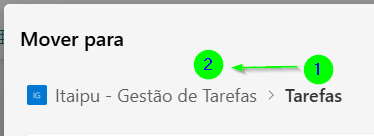
Hello everyone. This is my first post here. I'm facing an issue where I'm unable to move folders. This started after the last SharePoint update. For example, as shown below, I cannot move folder 1 into folder 2. Inheritance policies and read/edit security groups have already been changed, and nothing changed. Anyone else experiencing this? Thank you for the community helping here.666Views0likes6Comments
Moving or Copying Files: Painfully Slow, Loss of Data
Hello All! Our company transitioned over to SharePoint Online about a year ago. One of the largest complaints I have to date, is the time it takes to move or copy files. In cases of one or two files, the time is minimal. But in cases where larger file moves are taking place - the pace of transfer is painfully slow. For example, today it took approx. 30 mins to transfer only 45.8 MB. Earlier this month, an employee spent the entire day waiting for files to transfer, only for her computer to stop responding, and have to re-start the entire process the next day. On our previous server based environment, the same transfer would take less than 30 minutes. Additionally, in some of these larger file moves, users have reported large losses of data. The files were moved, and confirmed, only to come in the next day and they have disappeared. This issue is decreasing adoption and causing our IT team multiple headaches. Any suggestions or helpful feedback?Solved128KViews4likes58Comments
SharePoint Workflow Manager service constantly restarting - InvalidCastException
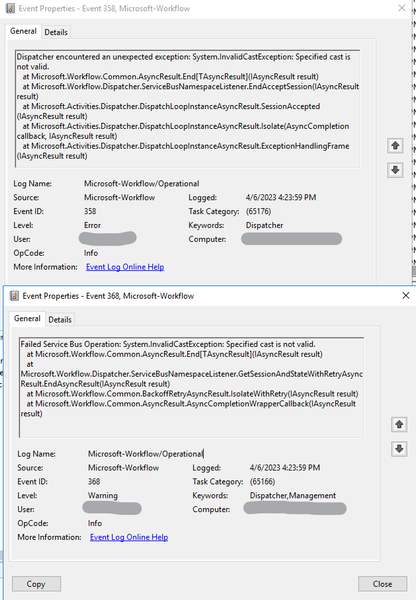
We recently started encountering an issue with the Microsoft Workflow Manager. Every few minutes the Workflow Manager service will crash and restart. We have 3 hosts to manage 2013 workflows in our SharePoint 2016 environment. Workflows in the environment continue to work, but sometimes delayed or unavailable. We went ahead and upgraded to the SharePoint workflow manager that was released this year (2023) as the Microsoft one has been deprecated, still with 3 nodes in the farm. We are still encountering the same issue. All that is recorded in the event viewer is "Failed Service Bus Operation: System.InvalidCastException: Specified cast is not valid." Which is then followed by "Application: Microsoft.Workflow.ServiceHost.exe Framework Version: v4.0.30319 Description: The process was terminated due to an unhandled exception." And after a moment or two, the Workflow Service comes back online. My best guess is that there is an offending workflow that is trying to cast an incompatible value? I can't seem to find it though, and I find it odd that it crashes the workflow service and there is no further information on what workflow or where to look to fix it. Nothing in the SPLogfiles that jumps out either. Here are the screenshots from the Event Viewer:3.3KViews0likes4CommentsBest Practice guide for stretched HA farm?
Hi, Im planning a SharePoint Subscription farm over 2 data centers. Should be pretty simple. Farm will consist of: dc 1: 1 spfe, 1 spapp, 1 sql dc 2: 1 spfe, 1 spapp, 1 sql Sql servers will be AlwaysOn. Im not sure how to set up the sp servers. Is there a preferred way to set it up, with how to? Our domains have 10gb connections so should be more than sufficient for stretched and HA. Can CA site be hosted from multiple servers? How are IPs/DNS/certs handled? What else do I need to get my head around? Thanks. Swan83Views0likes0Comments- 277Views0likes1Comment