2016
67 Topics
Visual report don’t work
Hi I am using msproject 2016 stand alone together with office365. And I get an "unknown error" when I try to use Visual Report. anyone knows how to solve this? I have read somewhere that I need to rollback MS Project to a specific build no. I don’t know if this is the solution. If so. How do I do this and to what build version? Br Rune240Views0likes0CommentsWorkload by week/ month export to Excel
I like to use Visual report, but that doesn’t work.. I have MSProject 2016 and office 365. so I have tried to use save as (export) as xls. But I can’t get the load or week or month. anyone that can help out setup in table format. I think… the I can build the rest in Excel if needed br runeSolved693Views0likes4Comments
How to extract the value of RBS in Enterprise Resource in Project Server 2019?
I try to retrieve the value of RBS in Enterprise Resource in Project Server by using C#/ CSOM. Unfortunately, I just got the Resource Name, as for the value of RBS, I always cannot extract any value from this field. Sometimes, the value of RBS is wrong or the same. I shared the code for you to look at and hope the seasoned people can help me to address it or sharing some idea in this. I appreciate your help. Thanks. Explanation: The Enterprise Resources will be extracted by ID. "projectContext" will load specificRes with all Custom Fields. I'm going to retrieve the value of a specific field (RBS) Finally, When I specify to retrieve the value of "RBS", no matter how I change the Resource Id, the value of RBS is the same Is there any idea on this issue? Thanks for everyone's help. var specificRes = projectContext.EnterpriseResources.GetById(new Guid("46914ae8-3c55-488d-a045-4d1a5aaf1e74").ToString()); projectContext.Load(specificRes, r => r.Name, r => r.CustomFields, r => r.CustomFields.IncludeWithDefaultProperties( lu => lu.LookupTable, lu => lu.LookupEntries)); projectContext.ExecuteQuery(); var cusField = specificRes.CustomFields.FirstOrDefault(cf => cf.InternalName == "Custom_000039b78bbe4ceb82c4fa8c0c400284"); projectContext.Load(cusField); projectContext.ExecuteQuery(); Console.WriteLine(cusField.LookupEntries.First().FullValue);457Views0likes7Comments
Connect MS Project Server 2016 to SharePoint Online
Hello! I have an instance of MS Project Server 2016 on-premise and I want the documents for each project and the site to be based on an online SharePoint. Basically an hybrid solution where the documents are on sharePoint online. Once I create a project, the site would automatically be created on SharePoint online. Is this possible? And if so, how can this be done?Solved528Views0likes1Comment
From Project Desktop to Project Online and no resources imported?
Hello there. I'm asking here because until now MS tech assistance was non existent and i'm having hard times trying to solve this issue. I'd like to import a project from MS Project desktop (client desktop of Microsoft Project Online i downloaded from my account profile) to my PLAN 3 MS Project online, but seems impossible to import the project resources. Why? Every time only a modal informing that X resources were not imported pops up. How can i import my project AND its recources in Project online? Thanks a lot.1.3KViews0likes1Comment
Export Custom Fields & Lookup Tables
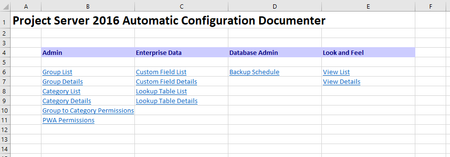
Is there an easy way to export Project Server custom fields & lookup tables? I have previously seen the "Project Server 2016 Automatic Configuration Documenter" shown below which is an export of groups, permissions, users, custom fields, lookup tables, views, etc. but am not sure how to recreate it.552Views0likes0Comments
Unable to view all projects in Project Center 2016 on premise
I am quite familiar with SharePoint but not Project Server. Using Project Server 2016 on premise. Currently logged in as Farm Admin which is also site collection administrator of PWA but when I open PWA site and click on projects, then I only view a few projects while other users see a long list of projects. I am talking about project center where all projects are displayed. There is a user let's call him "user1" which is able to view all projects. I went ahead and added this Farm Admin in same SharePoint groups as that user but still can't view all projects. Then I went into PWA Settings --> Manage Users and there I assigned same groups as "user1" but still problem remains. From where project center is reading permission? Could it be some custom permission defined in SQL Server table?568Views0likes0Comments
Change Enterprise Project Type in Project Server 2016 using CSOM or SharePoint Designer Workflow
I've covered below steps in Project Server 2016: 1. Created a default Enterprise Project Type - 1 and Stage 1. 2. Create a workflow in SharePoint Designer 2013 and associated with EPT1. 3. Assigned PDP. 4. I need to transit to next EPT2 and Stage2 from workflow of Stage1. I am looking for support that How to change Enterprise Project Type (EPT) in Project Server 2016 using CSOM or SharePoint Designer Workflow.509Views0likes0Comments