2013
25 Topics
Finding the recycling bin on Microsoft word
I have had to go on a wild goose chase, to be quite frank with you, for the recycling bin on word. I was about to lock in and have my “academic comeback”, as the bairns say on social media platforms such as TikTok and Instagram, and I was taken off my track to find this stupid recycling bin. I am still yet to find and it and I am very unhappy, not only was google no help but so was Microsoft. 1/ Micro out of 10. Very upset need I remind you. Those special documents are now swimming in the land of the meta, in the river of the Zuckerberg and I can’t do anything about it. Get with the programme Microsoft. sincerely, disappointed.65Views0likes2Comments
Add a signature field and restrict editing
Hi, We're looking for a way to add a signature box where a user can draw or sign while the document is restricted. The user should be able to sign using Word Online, Desktop App, Tablet and Mobile. Please let us know the best way to achieve this.760Views0likes1Comment
Problems with navigation pane on word 2021 - constantly slowness and freezing
Hello, everyone. My name is Diogo. This is my first post. I just bought Office 2021 home version today. I've been using 2013 Office version for a long time and decided to upgrade. The main reason was my daily use of a word doc for studying purposes. The doc is long (at least from my perspective), with sth abou 3100 pages and 1.4 million words. With 2013' version, I had basically two issues when using this file specifically 1. Sometimes when I was saving the file and, before the end, it was shutted down without properly save (I guess this one is done with 2021's autosave option). 2. The navigation pane (titles and search specifically words) was incredibly slow sometimes. In fact, it was almost impossible to open the titles and digit the text at the same time, so I had to keep it on the search columm to keep working the text. The search columm, besides that, used to freeze after a search for 10 seconds, max 15 seconds, maybe, but after I could keep the work progress and typing Well, I bought the 2021 one thinking that would be faster and I would solve this problem, but it is not my experience so far. The overall use is better with this newer version, but it's (much) worse to search words with navigation pane, which is very useful in my daily use of the doc. When the titles panel is open, everytime I digit it freezes a little bit, making harder to use. When I search for a word, it definitely freezes, taking sth about 25, 30 seconds to come back, when it will keep freezing for a while. In simples words: when it comes to use the navigation pane (titles and search, I never use pages miniatures), Word 2021 is, so far, much worse than 2013 Office. The office keeps freezing sometimes, even not using the navigation pane (sth I was not expecting buying this Office 2021, to be honest), but the situation is worse with navigation pane, like I said. P.s. I've been editing this file for 18 months now. At some point and for some reason I can't tell, the automatic numbering option (sorry, I use in portuguese and I don't know the name Microsoft uses in english Word version, but it's on the paragraph tab and allows to divide paragraphs in numbers and letters. I guess it's numbered list or sth similar) stopped working, so I started mumbering everything manually. I don't know if this could be interfering. P.s. 2 Before come here I contacted Microsoft via chatting. He tryed to help me, controlling the PC remotelly and doind some tricks, but at the end he sad it was probably some formatting problem with this precise doc file, so he directed me to his forum Sorry about the long text and thank you for the help Diogo1.9KViews0likes1Comment
MS Word Spanish word Bug
Microsoft Office 2013 all the way to 2021 LTSC has a bug in the spanish language grammar and orthographic checker. The grammar and orthographic checker does not detect and mark the following words: doscientes trescientes cuatrocientes quinientes seiscientes Setecientes Ochocientes Novecientes Correct words would be with "a" or "o" as the last vocals: doscientos trescientos cuatrocientos quinientos seiscientos Setecientos Ochocientos Novecientos All of the former are the spanish names for numbers representing hundreds.Solved227Views0likes3Comments
How to create an editable dropdown list with more than 256 characters in Microsoft Word?
We've tried the following in Microsoft Word however, it did not meet our goal of being able to display more than 256 characters in the dropdown and edit it. We need something that works without issue with Legacy controls and restricted editing. Combo box however, the dropdown list is limited to 256 characters Quick Parts however, when sharing the document with other users, they cannot see the dropdown or quick parts Legacy form dropdown and display the text output using {IF{REF bookmark}}="exact value""text output" however the text output is not editable. If we use a check box, is it possible to hide other options once we check an option?1.8KViews0likes3Comments
Word wrapping inside label templates
Hello! I am creating jar labels in Microsoft Word using Avery label templates. I have a terrible time importing clip art and other online images into my labels. In particular, I am unable to use the "Through Text" wrapping feature so that my images can be side-by-side or through the text on my labels. They insist on being in front of or behind my text and will not respond to text wrapping command to be "Through Text" or "In Line with Text" etc. Can anyone help?? I have Microsoft Office 365 which is operating Word 2013.1.3KViews0likes3Comments
Dividing single word page onto some section?
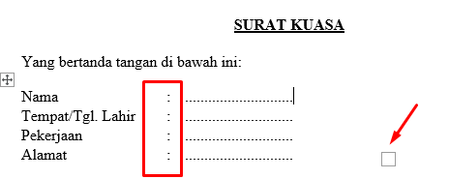
Hello. I apologize for any confusion. I'm unsure if I'm using the correct wording, and I'm unable to find guidance on how to phrase it properly through a Google search. First, here's the document https://docs.google.com/document/d/1jm7HydmqPhTSmdRzF2MD9kD1MVv8TXO4/edit?usp=sharing&ouid=108277566935502146918&rtpof=true&sd=true In the first part of the documents, you will notice a resize-square that is quite useful. It allows me to conveniently move the tabulations (:) forward and backward as a whole, instead of manually using the tab and backspace keys one by one to adjust the positions. Please refer to the screenshot and screen recording below: And this is the screen record how do I demonstrate it https://drive.google.com/file/d/1Z-rcmLiinMYBhgjpDTz2DGjqeQ68Vsn-/view?usp=sharing Then, there's 2nd section, where it just a usual text, without any formatting in indent Similarly, in the third section, there is a similar functionality as in the first section. Instead of manually using tabs or spaces, I can simply resize to reposition the text. Additionally, I can adjust the spacing between the first line (Penerima & Pemberi) and the (.....) without having to manually press the enter button. All of this can be done using the resize button. Here's the screen record if you need it https://drive.google.com/file/d/1bOs58S5dc2i7_wk49OQPuGj5d2y5Q13q/view?usp=sharing Furthermore, all of these actions can be performed within a single page, eliminating the need for the page break function and resulting in three separate pages. Currently, the closest solution I have found is converting my text into an image. However, this method is not as effective as I had hoped.1.9KViews0likes12CommentsHow do I auto resize image once pasted to ms word 2021?
Hi, I have around a hundred photo files that I want to paste onto a single Word document. However, the photos are in different sizes and will be printed on paper at various sizes in the future. I would like the pasted images to automatically stretch to fill the entire Word page. This way, when I change the paper size, margins, etc., they will adjust and fill the Word page appropriately. Is there any way to achieve this?1.3KViews0likes0Comments
How do I remove some section breaks?
I have been preparing a book manuscript. It has some footnotes, and I turned each of 23 chapters into a section and set the footnote counter to restart with every section. This worked fine. (All this is from Office 2013 by the way, running on a PC desktop.) Now, however, I have consolidated some chapters--and I have too many section breaks. I don't know how to remove the ones I don't want any more. Help! Thanks in advance.1.4KViews0likes1Comment