.net
4 Topics
How to fix 'Operation is not valid due to the current state of the object ' in .NET Azure Function?
I have a .NET Azure Function executed by Logic Apps triggered by an SQL connector "When an item is created V2". The function gathers data from multiple APIs and inserts the data into a SQL DB. The function works good for singular records, however, when a batch of records is inserted into the SQL table triggering the function, then the function breaks with the following error: Operation is not valid due to the current state of the object According to multiple threads on the Stack Overflow (i.e. https://stackoverflow.com/questions/8832470/operation-is-not-valid-due-to-the-current-state-of-the-object-error-during-pos ), to resolve the problem the web config file should be configured in the following way: <appSettings> <add key="aspnet:MaxHttpCollectionKeys" value="2001" /> </appSettings> Is there any way to change the web.config file of an Azure Function App? Where I will find it? Or should I create it by myself? Do you have any other ideas on how to resolve the issue?17KViews0likes0Comments
Need Help on Refresh function in .net for overrides the M expression in SSAS Tabular model.
Hi, I need help on the below issue. Function in .net for Overrides the M exrpression In partition of the Table . public void Refresh(RefreshType type, ICollection<OverrideCollection> overrides); public void RequestRefresh(RefreshType type, ICollection<OverrideCollection> overrides); The above two functions are not working for override the old M expression for Paritition query with New Expression. We used the override class then we refresh with above functions unfortunately it is not updating the in the Expression. Code: TOA.Partition partition = m.Tables.Find(Table).Partitions[1]; OverrideCollection oc = new OverrideCollection{ Partitions ={ new PartitionOverride{ OriginalObject =partition, Source = new MPartitionSourceOverride {Expression=expressions}}}}; var listOc = new List<OverrideCollection>(); listOc.Add(oc); partition.RequestRefresh(TOA.RefreshType.Add ,listOc); partition.Refresh(TOA.RefreshType.Add, listOc); Thanks, Santhosh.946Views0likes0CommentsHow to connect Azure Function App to On-prem DNS Server?
I am creating a .NET application that validates domain from an on-prem DNS server. I would like to know how can I integrate my Azure function app to perform nslookup on the on-prem DNS server. Is there a way without using virtual networks or powershell script?898Views0likes2Comments
Setting up Code Coverage data in Azure DevOps Pipeline, C# .NET 9
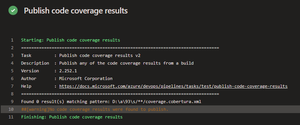
Hello everyone, I would like some assistance with my Azure DevOps pipeline. I am trying to set up Tasks in my Azure DevOps pipeline to collect Code Coverage results, after running UTs using the VsTest Task, to then have a Powershell Task in the Pipeline write to a SQL db the contents of those metrics. The main issue I am encountering is actually finding the published results after the UTs successfully run. I have set up Tasks to publish the results, then find them & then insert, but the publish doesn't seem to actually publish to the directory I specify, or if it does publish, I cannot see where to. Here are the Tasks I currently have set-up. Task to run UTs: steps: - task: VSTest@2 displayName: 'VsTest - testAssemblies' inputs: testAssemblyVer2: | **\$(BuildConfiguration)\*\*test*.dll !**\obj\** runSettingsFile: '$/B3API/Main/B3API.Tests/codecoverage.runsettings' runInParallel: true runTestsInIsolation: false codeCoverageEnabled: true platform: '$(BuildPlatform)' configuration: '$(BuildConfiguration)' failOnMinTestsNotRun: true codecoverage.runsettings file: <?xml version="1.0" encoding="utf-8"?> <RunSettings> <DataCollectionRunSettings> <DataCollectors> <DataCollector friendlyName="Code Coverage"> <Configuration> <Format>cobertura</Format> </Configuration> </DataCollector> </DataCollectors> </DataCollectionRunSettings> </RunSettings> Task to publish results: steps: - task: PublishCodeCoverageResults@2 displayName: 'Publish code coverage results' inputs: summaryFileLocation: '$(System.DefaultWorkingDirectory)/**/coverage.cobertura.xml' pathToSources: '$(System.DefaultWorkingDirectory)/**/coverage' Task to find published file & store into variable: steps: - powershell: | $coverageFile = "$(System.DefaultWorkingDirectory)/**/coverage.cobertura.xml" [xml]$coverageData = Get-Content $coverageFile $coveragePercentage = $coverageData.coverage.@line-rate # Store the coverage data in a variable Write-Host "##vso[task.setvariable variable=coveragePercentage]$coveragePercentage" displayName: 'Store Coverage in variable' The main issue it the Task to publish, it does not publish the results, I think it is due to not finding them in the first place. Thank you for taking the time to read my post, any help would be greatly appreciated, thanks!212Views0likes3Comments