.net
4 Topics
Setting up Code Coverage data in Azure DevOps Pipeline, C# .NET 9
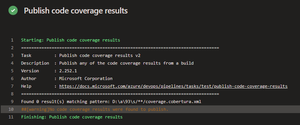
Hello everyone, I would like some assistance with my Azure DevOps pipeline. I am trying to set up Tasks in my Azure DevOps pipeline to collect Code Coverage results, after running UTs using the VsTest Task, to then have a Powershell Task in the Pipeline write to a SQL db the contents of those metrics. The main issue I am encountering is actually finding the published results after the UTs successfully run. I have set up Tasks to publish the results, then find them & then insert, but the publish doesn't seem to actually publish to the directory I specify, or if it does publish, I cannot see where to. Here are the Tasks I currently have set-up. Task to run UTs: steps: - task: VSTest@2 displayName: 'VsTest - testAssemblies' inputs: testAssemblyVer2: | **\$(BuildConfiguration)\*\*test*.dll !**\obj\** runSettingsFile: '$/B3API/Main/B3API.Tests/codecoverage.runsettings' runInParallel: true runTestsInIsolation: false codeCoverageEnabled: true platform: '$(BuildPlatform)' configuration: '$(BuildConfiguration)' failOnMinTestsNotRun: true codecoverage.runsettings file: <?xml version="1.0" encoding="utf-8"?> <RunSettings> <DataCollectionRunSettings> <DataCollectors> <DataCollector friendlyName="Code Coverage"> <Configuration> <Format>cobertura</Format> </Configuration> </DataCollector> </DataCollectors> </DataCollectionRunSettings> </RunSettings> Task to publish results: steps: - task: PublishCodeCoverageResults@2 displayName: 'Publish code coverage results' inputs: summaryFileLocation: '$(System.DefaultWorkingDirectory)/**/coverage.cobertura.xml' pathToSources: '$(System.DefaultWorkingDirectory)/**/coverage' Task to find published file & store into variable: steps: - powershell: | $coverageFile = "$(System.DefaultWorkingDirectory)/**/coverage.cobertura.xml" [xml]$coverageData = Get-Content $coverageFile $coveragePercentage = $coverageData.coverage.@line-rate # Store the coverage data in a variable Write-Host "##vso[task.setvariable variable=coveragePercentage]$coveragePercentage" displayName: 'Store Coverage in variable' The main issue it the Task to publish, it does not publish the results, I think it is due to not finding them in the first place. Thank you for taking the time to read my post, any help would be greatly appreciated, thanks!259Views0likes3Comments
How to connect Azure Function App to On-prem DNS Server?
I am creating a .NET application that validates domain from an on-prem DNS server. I would like to know how can I integrate my Azure function app to perform nslookup on the on-prem DNS server. Is there a way without using virtual networks or powershell script?967Views0likes2Comments
How to fix 'Operation is not valid due to the current state of the object ' in .NET Azure Function?
I have a .NET Azure Function executed by Logic Apps triggered by an SQL connector "When an item is created V2". The function gathers data from multiple APIs and inserts the data into a SQL DB. The function works good for singular records, however, when a batch of records is inserted into the SQL table triggering the function, then the function breaks with the following error: Operation is not valid due to the current state of the object According to multiple threads on the Stack Overflow (i.e. https://stackoverflow.com/questions/8832470/operation-is-not-valid-due-to-the-current-state-of-the-object-error-during-pos ), to resolve the problem the web config file should be configured in the following way: <appSettings> <add key="aspnet:MaxHttpCollectionKeys" value="2001" /> </appSettings> Is there any way to change the web.config file of an Azure Function App? Where I will find it? Or should I create it by myself? Do you have any other ideas on how to resolve the issue?17KViews0likes0CommentsNeed Help on Refresh function in .net for overrides the M expression in SSAS Tabular model.
Hi, I need help on the below issue. Function in .net for Overrides the M exrpression In partition of the Table . public void Refresh(RefreshType type, ICollection<OverrideCollection> overrides); public void RequestRefresh(RefreshType type, ICollection<OverrideCollection> overrides); The above two functions are not working for override the old M expression for Paritition query with New Expression. We used the override class then we refresh with above functions unfortunately it is not updating the in the Expression. Code: TOA.Partition partition = m.Tables.Find(Table).Partitions[1]; OverrideCollection oc = new OverrideCollection{ Partitions ={ new PartitionOverride{ OriginalObject =partition, Source = new MPartitionSourceOverride {Expression=expressions}}}}; var listOc = new List<OverrideCollection>(); listOc.Add(oc); partition.RequestRefresh(TOA.RefreshType.Add ,listOc); partition.Refresh(TOA.RefreshType.Add, listOc); Thanks, Santhosh.950Views0likes0Comments