.csv
16 Topics
HiddenGroupMembershipEnabled - SDS setting?
I have a customer who syncs groups to 365 via a CSV import to SDS. Student groups have the HiddenGroupMembershipEnabled attribute set as true. I'm aware that this attribute cannot be edited and to disable this feature, the group would need to be re-created. Is anyone aware of any setting or configuration in SDS that is automatically setting this attribute on student groups? If there is such a setting, can this be changed? Many thanks for your help. Anthony6.9KViews1like4Comments
Possible problems with periodic sync aproach?
We would like to sync CSV-files periodically. Before the start of each period we would only list courses (sections) starting that period + teachers & students attending these courses on the CSV-files. Will the students and teachers from the classes (sections) of previous periods stay unchanged so that students are not removes from previous courses (sections) etc.?Solved6.1KViews0likes14Comments(Re)moving students from Groups via SDS
Hi, Today I've been testing the School Data Sync with manual SDS files. I'm wondering if there's an option to facilitate a scenario where students should be removed from a certain section, and added into a new section. This might for example happen when a students enrolls into a new year and have switched education path. I've tried to test this scenario by first adding students via SDS to a section, and then removing the users with another SDS import from that same section. The result is that the student is still member of the Group (section) in Office 365. Also, i'ts very unclear to my what the "Active" / "Inactive" paramaters in the CSV should be doing. There are present in the Students, Teachers and Sections CSV files. Many thanks in advance. Regards, Remy5.1KViews0likes10Comments
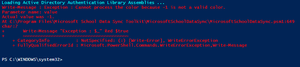
SDS Toolkit Error
I got a new Surfacebook this past week (ya!) and I'm now in the process or re-loading all of my software (boo!). I just tried reinstalling the SDS toolkit, and I'm getting the following error when I try to do a simple start-csvFilesValidation: What the heck? Has anyone seen this before? I tried installing the current toolkit on another machine that had an older version of the toolkit previously and got the same result. Is there a known issue with the current build of the toolkit?Solved2.2KViews0likes4Comments
CSV 2.1 format :AllTeachersSecurityGroup, AllStudentsSecurityGroup was not created
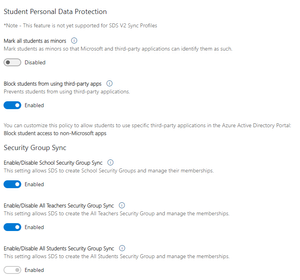
Dear All, Anyone come across this issue when using CSV 2.1? I have turn on : Enable/Disable School Security Group Sync Enable/Disable All Teachers Security Group Sync Enable/Disable All Students Security Group Sync Sync job gave me these two errors: Error GroupTeachers UnmatchedEntry An update to this entry observed in the source could not be processed, because it could not be matched to an entry in the target: JSONSourceDirectory. AllTeachersSecurityGroup Error GroupStudents UnmatchedEntry An update to this entry observed in the source could not be processed, because it could not be matched to an entry in the target: JSONSourceDirectory. AllStudentsSecurityGroup1.3KViews0likes1Comment
UnmatchedEntry errors on Student Enrollment
I'm getting a lot of UnmatchedEntry errors on my SDS upload. I can't seem to figure out what's going on. Looking at just one specific section and I see 6 unmatched entry errors on the Enrollments CSV. There are 2 teachers and 22 students in this section. I checked the Teachers, Enrollments, and Sections CSVs and everything looks good. All students and teachers exist in Azure, their email addresses match but yet SDS keeps throwing errors. The Microsoft Team is never created either. I'm at a loss; has anyone else seen this? Also, this is happening to dozens of sections but I'm singling out one for troubleshooting. Our SDS syncs using Clever CSVs. The same section syncs fine in Clever... Relevant log entries below (sensitive data retracted) SDS Error Log: EntryStatus EntryType ErrorCode ErrorMessage JoiningValue MitigationSteps Operation RecordedTime TenantActionable ReportableIdentifier Error StudentEnrollment UnmatchedEntry An update to this entry observed in the source could not be processed, because it could not be matched to an entry in the target: JSONSourceDirectory. 56045 Update 9/9/2022 15:45 TRUE 56045 Error StudentEnrollment UnmatchedEntry An update to this entry observed in the source could not be processed, because it could not be matched to an entry in the target: JSONSourceDirectory. 56045 Update 9/9/2022 15:45 TRUE 56045 Error StudentEnrollment UnmatchedEntry An update to this entry observed in the source could not be processed, because it could not be matched to an entry in the target: JSONSourceDirectory. 56045 Update 9/9/2022 15:45 TRUE 56045 Error StudentEnrollment UnmatchedEntry An update to this entry observed in the source could not be processed, because it could not be matched to an entry in the target: JSONSourceDirectory. 56045 Update 9/9/2022 15:45 TRUE 56045 Error StudentEnrollment UnmatchedEntry An update to this entry observed in the source could not be processed, because it could not be matched to an entry in the target: JSONSourceDirectory. 56045 Update 9/9/2022 15:45 TRUE 56045 Error StudentEnrollment UnmatchedEntry An update to this entry observed in the source could not be processed, because it could not be matched to an entry in the target: JSONSourceDirectory. 56045 Update 9/9/2022 15:45 TRUE 56045 Sections CSV: School_id Section_id Teacher_id Teacher_2_id Teacher_3_id Teacher_4_id Name Section_number Course_name Course_number Course_description Period Subject Term_name RowNumber 3 56045 979 2027 GLOBAL HISTORY 10 - 0111 - Period 11 1 GLOBAL HISTORY 10 111 GLOBAL HIST 10 1 Social studies 2022-2023 1 Teachers CSV (Names Changed) School_id Teacher_id Teacher_number Teacher_email First_name Middle_name Last_name Title Username 3 979 979 email address removed for privacy reasons Teacher 1 Teacher Teacher1 3 2027 2027 email address removed for privacy reasons Teacher 2 Teacher Assistant Teacher2 There is too much data to redact from the students.csv but I have verified all students listed in the enrollments are also in the students.csv with the same ID.1.3KViews0likes0CommentsSDS reports insufficient privileges on import
Hi There, We've been using classic SDS for a couple of years now to create edu teams for our classes. We have a profile set up for this using "CSV Files: SDS format". Never experienced much troubles with that. Errors could usually be fixed by reading the error report. Up until this schoolyear. This year we are getting a lot of errors concerning "insufficient privileges". Entries like: EntryStatus: Error EntryType: SchoolStudents ErrorCode: AzureActiveDirectoryInsufficientRights ErrorMessage: Insufficient privileges to complete the operation. JoiningValue: School_3 MitigationSteps: <empty> Operation: Update RecordedTime: <some date> TenantActionable: true ReportableIdentifier: 3 About a thousand of those error are shown. EntryType has 4 distinct values: Schoolreference, Schoolstudents, Schoolteachters or SectionReference JoiningValue varies from School_3 up to School_6 ReportableIdentifier changes with the JoiningValue I have no clue as to what SDS is trying to do. Don't know what the problem is other than insufficient privileges. Is there a place (log or something) which will explain what is going on? regards Peter1.2KViews0likes5CommentsModifying CSV files for SDS
Hi! The long introduction is necessary. Sorry! This past spring my school adopted O365 and added its own domain. I created students' and teachers' accounts manually. We log in with our work e-mail addresses (in the format of "john.doe@domain") and use Outlook. With the school year I wanted to use SDS synchronization via API from my school's register. However, according to the tutorial, the schools register sets up its own format of addresses, like "jdoe@domain". Now I need someone to confirm I'm right about the following: synchro via API would create new teachers accounts and force them to abandon their previous ones completely shattering e-mail communication. This is, of course, unacceptable. Now I'm thinking about SDS synchro via CSVs (exported from the register). I'd love to know: 1. If I modify "student.csv" and "teacher.csv" changing Usernames from "jdoe@domain" to "john.doe@domain", will it synchronize well with the existing addresses/accounts? 2. Which option to choose: Existing Users or New Users? I don't understand it: I have existing users who I want to map to new teams but also I'll have some new teachers and students whose accounts need to be created and mapped as above. I'd be immensely grateful for any help. Z.S1.2KViews0likes0CommentsSDS Synchronisation error
In our organization, we have nearly 18,252 Teams to create. When syncing SDS with CSV files, for some Teams we have errors of different types. For example, for a group, we have the following errors: Group Name: 2020-058-GHE600-62 SectionTeamify => 1 error StudentEnrollment => 22 errors TeacherRoster => 1 error TeacherRosterToSectionMember => 1 error What is the cause of these errors?1.2KViews0likes0CommentsSDS erreur de syncrhonisation
Dans notre organisme, nous avons près de 18252 Teams à créer. Lors de la synchronisation SDS avec des fichiers CSV, pour certains Teams, nous avons des erreurs de différents types. Par exemple, pour un groupe, nous avons les erreurs suivants: Nom du groupe : 2020-058-GHE600-62 SectionTeamify => 1 erreur StudentEnrollment => 22erreurs TeacherRoster => 1 erreur TeacherRosterToSectionMember => 1 erreur Quelle est la cause de ces erreurs?903Views0likes0Comments