Forum Discussion

When doing the spelling and grammar check, it doesn't correct small i?

Hello Bhupinder1 ,
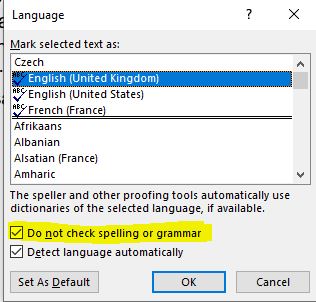
I opened your document and the only time I can replicate your issue is when I have the box with "Do not check spelling or grammar" ticked. I appologize for asking the obvious - but can you please check whether this box is (or not) checked when you double click the language option on your status bar?
Thank you. L.

- Lenka_KerumovaAug 08, 2021Iron Contributor
Hello Bhupinder1 ,
thank you for confirming.
There is one more issue that I could think of: in your autocorrect - do you have the i-I pair present in corrections? In my language the "i" is correct as a standalone and therefore we don't have it commented/included in the autocorrect and it doesn't show as an error just like in your document.
Could it be that this is not for some reason part of your setting?
- Bhupinder1Aug 09, 2021Copper ContributorIf I would type i, it automatically corrects it to I. However, when I paste the whole paragraph, it ignores it along with the punctuations. Could it be because my paragraph doesn't have any punctuations, it doesn't work?!
- Lenka_KerumovaAug 10, 2021Iron Contributor
Bhupinder1 , I think the issue is in the pasting. If i changes to I when you type, it means that the default set up is correct.
It is difficult to judge without seeing it with our own eyes, but I think that when you paste the spellcheck is either 'muted' or is in different language that treats the 'i' differently.
I cannot judge correctly without actually seeing, but I have a hunch that this is the reason.
All posts here are relevant, but we are missing something from your, the correct input. Please check the source and the target setting, check the paste options, check how you paste (do you paste using CTRL+V or do you paste 'Text only'?). The solution is in there, I am confident.