User Profile

Andreas-N
Copper Contributor
Joined Sep 06, 2016


User Widgets
Recent Discussions
Re: Proximity join doesn't work from Teams Desktop app
Pavel Yurevich Thanks for the update, good to hear than you can reproduce the error (at least on a few devices). The response from the o365 case support: "this problem will be fixed in the next desktop and collaboration bar app version in approximately 4-5 weeks"22KViews0likes0CommentsRe: Proximity join doesn't work from Teams Desktop app
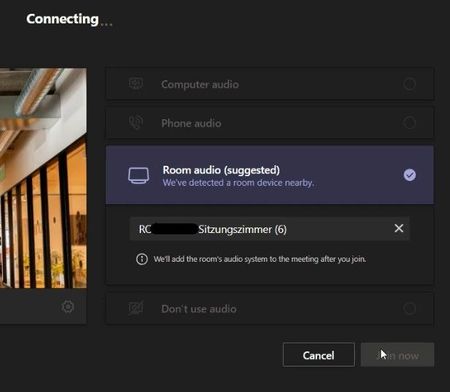
Freddy Mulder thanks for the update! This is a printscreen i took at Friday, Jan 15th 2021 when the proximity join feature worked correctly with the new meeting join experience: The client detected the room and automatically switched to the suggested room audio option. It stopped working a few days after this date, around Tuesday, Jan 19th 202122KViews0likes25CommentsRe: Proximity join doesn't work from Teams Desktop app
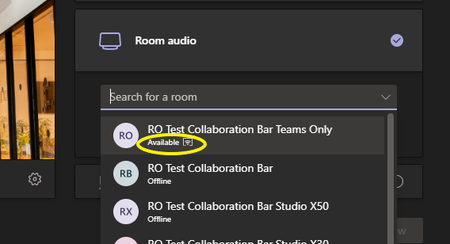
Hi Pavel Yurevich I'm a coworker of BroGale and i can share some additional details of this problem. We deployed around 60 collaboration bars and 30 Teams Rooms of different vendors, and our users relying heavily on the proximity join feature in all of these rooms. It stopped working on all computers on all MTRs and Collab Bars at the same time. The issue also happens if i use a non-corporate-pc (bring your own laptop) and on the mobile apps on android and iphone. Bluetooth is clearly working because it detects the room if you search manually a room device: However, when i join a Live Event in Teams, proximity join is working! It also works when i disable this setting in teams: "Turn on new meeting experience (New meetings and calls will open in separate windows. Requires restarting Teams.)" I think Live events are working because they are still using the old meeting join appearance. I will send you a full list of all MTRs and Collaboration Bars and the MS Case number of our open Case. Tested with Teams Desktop App (64bit): 1.3.00.30866 (64-Bit) and 1.3.00.33674 (64-Bit) Yealink VC210: Teams Admin Agent1.0.0.202006290446.product Firmware118.15.0.42 Company Portal App5.0.4927.0 OEM Agent App1.15.0.20110309 Teams App1449/1.0.96.2020102101 Poly Studio X50 and X30: Teams Admin Agent1.0.0.202006290446.product Firmware3.2.3.280012 Company Portal App5.0.4927.0 OEM Agent App1.0 Teams App1449/1.0.96.202010210122KViews0likes31CommentsRe: Proximity join doesn't work from Teams Desktop app
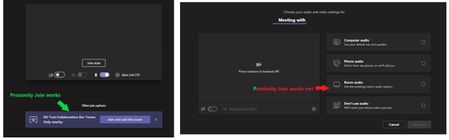
Hi Pavel Yurevich 1. Yes, correct 2. we made additional test with the mobile client, the automatic nearby room discovery works again on the mobile client! In our last tests, the mobile app was crashing (android and iphone) when you wanted to join a room, this seems to be resolved! However, the problem with the desktop app is still present. Here you can see the different behavior with the old and the new meeting pre-join experience (tested on the same PC with the same meeting): Picture on the left: old meeting pre-join experience, the room is automatically discovered Picture on the right: new meeting pre-join experience, the automatic room discovery does not work. But it will find the nearby room with Bluetooth beaconing if you search it manually: Tested with these desktop client versions: 1.3.00.19173 (64-Bit) 1.3.00.30866 (64-Bit) 1.3.00.33674 (64-Bit)22KViews0likes27Comments
Recent Blog Articles
No content to show