User Profile

jlou65535
MCT
Joined Feb 22, 2021


User Widgets
Recent Discussions
Re: AVD - Sign-in issues with O365 applications
Hello, If the case is still ongoing, what is your FSLogix installed version ? Did you already read that article about Microsoft Entra ID Authentication for applications ? https://learn.microsoft.com/en-us/fslogix/troubleshooting-known-issues#resolution-12477Views0likes0CommentsRe: Azure Virtual Desktop - Black Screens on logins - What we've tried so far
tristian1250 Look likes Microsoft should fix it soon : https://www.linkedin.com/posts/jagmeet-singh-69061b23a_avd-knownissues-bug-activity-7246980182027206656-r7Ns?utm_source=share&utm_medium=member_desktop Microsoft has identified a bug affecting Azure Virtual Desktop. Users are now experiencing intermittent black screens for 30 seconds to 3 minutes during sign-in. This issue is linked to the patch update KB5043064 (OS Builds 19044.4894 and 19045.4894), installed on September 10, 2024 After reviewing application logs, we found that the AppXSvc service is crashing due to an uninitialized m_targetUserSidString in the OSIntegrationManagerHost::Initialize. (event ID 1000) Per Microsoft, a permanent fix is pending and is most likely to be fixed with October patch. Here are some workarounds suggested by Microsoft : Uninstall the problematic updates: Go to Settings → Windows Update → Update History → Uninstall Updates. Select KB5043064 then click on Uninstall and reboot your system.8.1KViews0likes6CommentsRe: Need some technical answers about AVD
itzrav Here are answers to your additional questions : 🙂 You are right, here is a list of all eligible licenses you could use : https://learn.microsoft.com/en-us/azure/virtual-desktop/licensing#eligible-licenses-to-use-azure-virtual-desktop. You can buy those license by a reseller in the CSP chanel. But regarding your project scope, it could add complexity. Correct ! Here is the Microsoft definition of AVD external users : https://learn.microsoft.com/en-us/azure/virtual-desktop/licensing#internal-and-external-commercial-purposes : In the context of providing virtualized infrastructure with Azure Virtual Desktop, internal users (for internal commercial purposes) refers to people who are members of your own organization, such as employees of a business or students of a school, including external vendors or contractors. External users (for external commercial purposes) aren't members of your organization, but your customers where you might provide a Software-as-a-Service (SaaS) application using Azure Virtual Desktop. >> I don't think that match your case. Sorry, my bad, the OS size means the OS disk size in GB, then more bigger it is, more expensive it will be. I never use the Azure Virtual Desktop item in the Azure Pricing Calculator tool to be honest, I always use VMs and disks and do some maths. In your project, regarding the number of connected users, only one VM should be enough. 🙂 1 VM = 1 disk , 2 VMs .... Last but not least, Windows 365 Cloud PC, as a easy to purchase licence, could be a easier solution for you ?541Views0likes1CommentRe: Need some technical answers about AVD
Hi itzrav ! Let’s go through them one by one : Multi-Session VMs: Yes, each user who logs into a multi-session VM will have a separate session. This means each user will have their own keyboard input, view of the app, etc Licensing: You need to provide an eligible license for each user that accesses AVD. If you would move forward with a Windows 11 Multi-session, you could need user licenses, like Microsoft 365 Business Premium licenses for each users. Charges for Inactive VMs: Yes, there are charges for inactive (turned off or hibernated) VMs : disk. If your VMs are still active, you will be also charged for compute costs. External Users: External users refer to users who are not part of your organization, such as customers or clients. Azure subscription will be hosted as Microsoft Entra tenant, as considered an organization. OS Size: The “OS Size” refers to the amount of core required by the operating system. It is not a percentage but rather a fraction of the total core capacity. Windows 11 would have a lot of difficulties to run with that small VM size. Peak and Off-Peak Concurrency: These percentages represent the expected maximum and minimum user session concurrency. Peak concurrency is the time when the maximum number of users are expected to be logged in, while off-peak is when the minimum number of users are expected. Concurrency Calculations: The total usage hours are for all users combined. Managed Disks: each AVD VM will only needs one disk. How many VMs Azure Calculator estimated into your quote ? Last but not least, regarding your users needs (iPhones, iPads, Macs, Android devices, ...), why don't you consider to run your application on Azure webapp ? I hope this helps!552Views0likes4CommentsRe: Setting up a virtual desktop for game development
Hello, There is not right answer for your question: - Azure Game Development Virtual Machine is scheduled for retirement on February 1st, 2024. - You can consider using an NC4as T4 v3 VM on Azure, which includes a old Tesla T4 GPU Sorry for that.339Views0likes0CommentsRe: AVD and Bicep
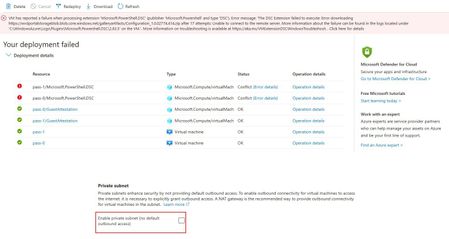
StefanKi Encountering errors during Azure Virtual Desktop deployment? An issue may arise in the DSC phase due to the setup of AADLoginForWindows or Microsoft.PowerShell.DSC extensions. The problem stems from new subnet configurations defaulting to private subnets. To ensure smooth operation, your AVD virtual machines must have a subnet allowing outbound traffic.572Views0likes2CommentsRe: Multiple Disconnections through out the Day.
Hello, Sorry never had that issue before. Some of them already experienced here year ago and suspected UPD protocol: https://www.reddit.com/r/AZURE/comments/13oytb0/random_avd_disconnects_rd_gateway/?rdt=37340 https://techcommunity.microsoft.com/t5/azure-virtual-desktop/azure-virtual-desktop-random-client-disconnects/m-p/2970607/page/2 Some other resolved by installing the latest updates for remote desktop application: https://techcommunity.microsoft.com/t5/azure-virtual-desktop/client-connection-error-of-rdgateway/m-p/3179470 There is also a Microsoft Learn troubleshot page : https://learn.microsoft.com/en-us/troubleshoot/azure/virtual-machines/windows/troubleshoot-rdp-intermittent-connectivity Hope that it will help.1.5KViews0likes0CommentsRe: AVD Adding users to Remote Desktop User Group
XerxesH Just tested on an Azure Virtual Desktop host pool Entra ID join and you are right. But my RDP direct access is also working without being part of Remote Desktop Users Group, as soon my Entra ID user is having the Virtual Machine User Login role on the AVD VMs Why do you want to remove that automation mechanism ? Security purpose ?2.1KViews0likes1CommentRe: Auto Deallocation for Unused Azure Virtual Desktop Personal VMs
That app fa4345a4-a730-4230-84a8-7d9651b86739 is a legacy app as said here : https://robjanssen.it/2021/11/15/conditional-access-for-avd-azure-virtual-desktop/ The right one should be named Azure Virtual Desktop with 9cdead84-a844-4324-93f2-b2e6bb768d07 JL11KViews2likes3CommentsRe: Auto Deallocation for Unused Azure Virtual Desktop Personal VMs
Could you please double check the AVD application ID ? (9cdead84-a844-4324-93f2-b2e6bb768d07) For each schedule phase, could you please try with : - Disconnect settings - When disconnected for (min) : 10 minutes - Log off settings - When logged off for (min) : 5 minutes In a AVD virtual machine activity log, could you see any "Deallocate Virtual Machine" succeeded or failed operations ? Best, JL11KViews1like7Comments
Recent Blog Articles
No content to show