User Profile

TrevorATperfectproject
Brass Contributor
Joined Feb 04, 2021


User Widgets
Recent Discussions
Re: Project Changing % Complete when entered
Brett, this is a bit baffling but I am sure it can be cleared up. I am tempted to try to replicate it from your description, but there is too much missing information (show me the file?). Which particular days/dates are nonworking days? You say that you update remaining duration. Don't you first update the actual start and the actual duration, and then adjust the remaining duration. Perhaps try something different, like instead of "Update Project - Reschedule incomplete work to start on the status date." try input/update the actual start and the actual duration, and then adjust the remaining duration, then use the move button to move incomplete parts to the status date.5Views0likes0CommentsRe: Link Procurement Tasks to deliver Just-In-Time without using up slack?
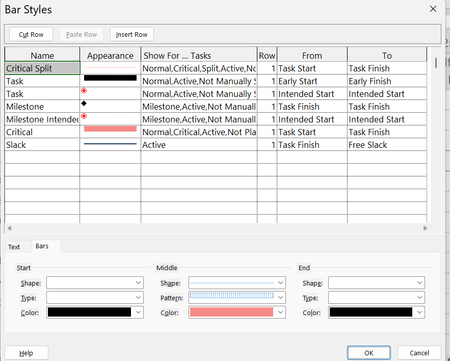
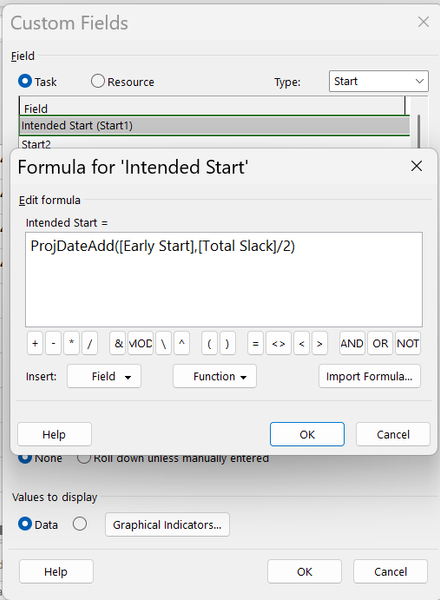
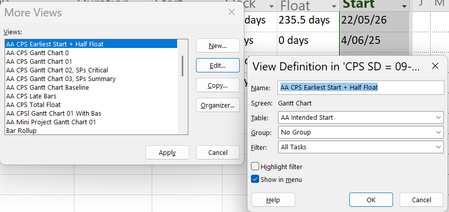
Brett, in addition to the reasons you mention for not ordering and getting stuff asap, such as limited space an the cost of storage, there is also consideration of insurance and warranty dates, and plain ol' cash flow. I've heard it all. However, so what? You still want to start with a clean asap CPM network. Of course, MSP does have ways to present what you say you want to display because it has custom fields, custom views, custom filters, custom groups, custom tables. I would copy the Gantt chart view, call the copy "Intended Order Dates Gantt Chart. Then I would copy the entry table and call the copy "Intended Order Dates Table". Then I would insert a custom start column, say Start1, and rename it "Intended Order Date", which will probably be neither the earliest start or the latest start, but some date in between. Hide all the columns you don't need. You can type in the intended dates or perhaps, better, calculate them as a formula, such as earliest start + half of the total slack (float). Then, in the view, just a matter of formatting the bar styles. Delete all but one of the existing styles, give it a name and a from and to (Start1, Start1). Any help?43Views1like4CommentsRe: Link Procurement Tasks to deliver Just-In-Time without using up slack?
Every task in a critical path network has an earliest start, earliest finish, latest start, latest finish. The early dates are the ones normally displayed in the entry table and in the Gantt chart views. That's because those are of most immediate interests because we want to know first of all how soon can tasks start, and that's also why we need the predecessors as a priority, especially the FS0 one that every task should have. However, that's just what it does out of the box. You can easily make a custom view to display bars for the latest dates (format, bar styles), and of course they are all there in the schedule table, along with the free float and the total float. Stick to good ol' reliable CPM. The most important feature of the method is that we schedule forwards, not backwards. If you are toying with ALAP constraints and weird links, like SF and positive and negative lag, to model just- in-time or some other management fad, you can end up doing a lot of gymnastics which are unnecessary and somewhat futile anyway. Keep it simple. Plan to place an order for parts or materials or something asap. There is a lead time, say 60 days. It has a FS0 successor which is 100 days out. There is 40 days of free float, so you can choose any day between day 1 and day 40 to place the order. Any help?40Views0likes6CommentsRe: %Complete didnt change the Finish Duration
The status date is the vertical red line. Line 1. If the task has been continuously in progress since 20/11/2025, all of the days from 20/11/2025 up to the status date are actual duration (7 days), and the remaining incomplete duration is 5 days and they are all in the future. relative to the status date. Line 2. If the task actually started on 20/11/2025, and % complete is 10%, the actual duration is 1.2 days. Line 3. All of the remaining incomplete part must be moved to the status date. Any help?27Views0likes0CommentsRe: What is a best practice for linking Just-In-Time Tasks?
Sure, date constraints, especially hard ones, are not recommended. All predecessor link types except FS0 are not recommended. Lag, especially negative lag, is not recommended. They are all "constraints", some looser than others. The reason these are not recommended is because the use of them, all mixed together, narrows you options, and of course usually results in a great big tangled mess. However, they all have uses in particular special cases. Even manually scheduled tasks, definitely not recommended, have an occasional use. If you use the SF you will get what you want to display as your "intention". For a bit of extra spice, give it some negative lag as well, so that prep task can't finish until 3 days before important task starts. Can even go SS with negative lag. But displaying the intention is not all there is to it. That has to follow from the basic question that the network modelling is supposed to answer first, which is how soon each task can start and, secondary question, how much float does it have. Before you make that SF link you have that answer, but that information disappears when you make the SF link. There is another way. You already have the information you need without the SF link. The usual Gantt chart view has the early bars going from the start (that's the earliest start) to the (earliest) finish. But you can make a copy of that view, call the copy "AA Late Bars View" and reformat the bar styles in that view to go from the latest start to the latest finish.54Views0likes0CommentsRe: Resource leveling doesnt do anything
Are all of the tasks auto scheduled? Do you have any resources assigned to summaries? Are the task and resource calendars different? What does the over-allocation look like in the resource usage view? What does it look like in the resource graph view?88Views0likes0Comments- 78Views0likes0Comments
Re: Resources histogram export to excel
Chris, Ok. I make this kind of resource histogram every day from MSP. The easiest way, I find, is to copy the data from the grid in the task usage view or resource usage view. The paste it into excel and graph it there. It's definitely copy-able. You have to set up the timesacale. To make it easy to select and copy, narrow all of the timescale down to about 25%, so the columns all have #### (but the data is still there), then select the first cell and use shift, right arrow on the keyboard to select to the end of the row, ctrl-c. Sure, you can use the built-in reports and/or export data to excel, but I do as above.212Views0likes1Comment- 63Views0likes0Comments
Re: "As late as necessary contraint"
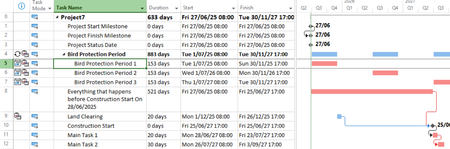
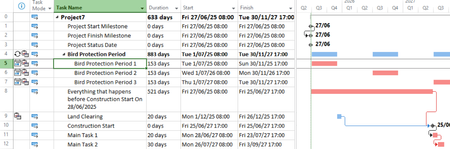
I definitely recommend do not use ALAP in this case, and reserve it for those very few rare circumstances where it is really useful or necessary (almost never). You have seen how it works, and people usually think it means the same as zero free float (slack), which it is not. It sucks all of the total float (slack) out of all of the successors. I also recommend not using weird links, like SF and lag, especially discourage negative lag. Make that manually scheduled task auto scheduled. Schedule everything, including the land clearing, ASAP which is a basic characteristic of Critical Path Method. Then you will know the early and late starts and finishes, free float and total float. See the schedule table. If you switch to the detail Gantt view you can see the total float on the bars in the chart. Make a task calendar which restricts the available dates to the non bird protection periods, and assign that calendar to the land clearing. Make a 7 days/week calendar and assign that to the recurring bird protection period. Now you can choose any date between the earliest star and latest start as the intended date to start the land clearing. Here is a picture. Any help?18Views0likes0CommentsRe: A Pop up for Impacted Milestones
I would like to ask you to reconsider the initial approach of having that bunch of milestones in that section at the top of the list. I see that it is a common practice around the place, but I discourage it. First of all, it is an unnecessary duplication of milestones that are already in the plan, and extra unnecessary work to link all of them as predecessors of the duplicates. It appears to be a solution of a problem, but it creates more problems and more work such as you are exploring now. And it is not a problem that even really exists. To extract and display a selection or subset of the tasks, ie your milestones, the ones you are interested in, use a filter. Have you tried that?610Views0likes1CommentRe: Procedure is greyed out in VBA Insert pulldown
While you have all of the tasks (and summaries) in excel, and they all have leading spaces, why not remove them there before copying them and pasting them into MSP? You could use a nested function like =proper(clean(trim))), and clean it all up in one go. Proper() converts test to title case (or proper noun case), with caps on first character of each word. Clean() removes unprintable characters, whatever they are but anyway they are removed. Trim() removes leading, trailing and double spaces. After, you just go through and re-do the WBS indents in MSP.1.9KViews0likes2CommentsRe: Basic Question - "Cost Variance" always equals "Cost"
esmitheccitThat's how it works. if you input the actual duration which is less than the scheduled duration, then MSP will truncate the task to that lesser duration, there is no remaining duration, and there is now an actual start and an actual finish which replace the scheduled start and scheduled finish. If you input an actual duration greater than scheduled duration, the task is extended, and so on.1KViews0likes0CommentsRe: Basic Question - "Cost Variance" always equals "Cost"
esmitheccit, I can see that you are well on your way to the typical new user experience of using MSP. Before you go round and round in circles, here's a few tips. Don't assume that you know the meaning and definition of a field/column. You can check for precisely what it is by hovering the cursor over the column heading. The variance of something is simply the difference between the current something and the baseline something. If there is no baseline then there is no difference. Baseline values are set when you set a baseline. They can be edited manually as well (don't). You need a rock solid approach to updating progress and re-scheduling as required. Start by practicing with (auto scheduled) tasks which have duration only, so no resource assignments, no work, no cost. You will need to set a status date. Display the status date as a vertical red line on the chart (format, gridlines). The status date will be earlier than a task start, or it goes through the middle, or it is after the task finish. A task has a scheduled/planned start and a scheduled/planned duration and a scheduled/planned finish. After some or all of the task has actually occurred (as at the status date/time), they all turn out to be different than what was scheduled/planned. Use the tracking table to input the actuals, and they will replace the as scheduled/planned. This will take some practice. Once you have that nailed down, then you can try the same thing with work and cost. Use the task usage and resource usage views. Any help so far?1KViews0likes0Comments




Recent Blog Articles
No content to show