User Profile

doctordns
Brass Contributor
Joined Jan 16, 2021


User Widgets
Recent Discussions
Test-SRTopology fails with an error message using PowertShell
Background: 2 servers (SRV1, SRV2) Both have two disks with a T: volume and a G: volume. The former is the replication source.target and G: is the log file disk. I successfully create the SR partnership, like this: (Using PowerShell 7!) PS C:\Foo> # 14. Creating an SR replica partnership PS C:\Foo> $NewSRHT = @{ >> SourceComputerName = 'SRV1' >> SourceRGName = 'SRV1RG1' >> SourceVolumeName = 'S:' >> SourceLogVolumeName = 'G:' >> DestinationComputerName = 'SRV2' >> DestinationRGName = 'SRV2RG1' >> DestinationVolumeName = 'S:' >> DestinationLogVolumeName = 'G:' >> LogSizeInBytes = 2gb >> } PS C:\Foo> New-SRPartnership @NewSRHT RunspaceId : 07a43e6e-05e1-4dc1-9559-281cb66ca541 DestinationComputerName : SRV2 DestinationRGName : SRV2RG1 Id : 19e164bd-67f0-4b65-99ec-c7de97bb6731 SourceComputerName : SRV1 SourceRGName : SRV1RG1 As you can see the partnership is created. However when I run the Test-SRTopology, i get an error message that is not actionale: PS C:\Foo> # 15. Testing the SR Topology PS C:\Foo> $TestSRHT = @{ >> SourceComputerName = 'SRV1' >> SourceVolumeName = 'S:' >> SourceLogVolumeName = 'G:' >> DestinationComputerName = 'SRV2' >> DestinationVolumeName = 'S:' >> DestinationLogVolumeName = 'G:' >> DurationInMinutes = 1 >> ResultPath = 'C:\Foo\' >> Verbose = $True >> } PS C:\Foo> Test-SRTopology @TestSRHT WARNING: Specified cast is not valid. WARNING: System.InvalidCastException WARNING: at Microsoft.FileServices.SR.Powershell.MSFTVolume.get_FileSystemType() at Microsoft.FileServices.SR.Powershell.Volume.GetVolume(String Path, String ComputerName) at Microsoft.FileServices.SR.Powershell.TestSRTopologyCommand.BeginProcessing() Test-SRTopology: Specified cast is not valid. What does "Specified cast is not valid" actually mean and how do I resolve it?:3.5KViews0likes4CommentsRe: Win Server 2019 (17733) - Running Windows Update troubleshooter fails with msdt.exe error
Rob Garrett This is why I just love GitHub and the products supported by GitHub. You find an issue, file it, and you get transparency as to resolution. You can see the folks saying yes, no, or something else. I get a sense out of satisfaction when filling an issue on Github. UserVoice, and the feebadk hub, are just black boxes - you put stuff in and wait. And wait. And maybe things get fixed. Or not. The COM bug that plagues me has been ongoing for 2 years - yet no progress. The only suggestion is that I get a less powerful workstation since my current box is too much of an edge case for the team. When I worked on OSs (I helped to develop two in my career) I'd love to have anyone who can repeatedly break my code. I would be overjoyed with a repo and would fall over backwards to find a resolution.2.6KViews1like0CommentsRe: [server 20303] Issues running containers
Thsanks for your reply 1. Regarding enabling virtualization - I have already set nested virtualization: PS C:\Foo> Get-VM -VMName ch1 Name State CPUUsage(%) MemoryAssigned(M) Uptime Status Version ---- ----- ----------- ----------------- ------ ------ ------- CH1 Off 0 0 00:00:00 Operating normally 10.0 PS C:\Foo> Get-VMProcessor -vmname ch1 | fl *virt* ExposeVirtualizationExtensions : True So that is not a solution. 😞 I do understand that the issue is between the container host version and the container image, but so far, I can find actually ZERO containers that can run with Windows Server 2022, with or without virtualization. If you look at the scripts I have tested, none of them works, whereas these all worked to a degree with Windows Server 2019. This feels like a regression in 2022. Are containers actually tested prior to Insiders released? If so, can you share the tests so I can see how to get containers to run successfully??3.4KViews0likes0CommentsRe: [server 20303] Issues running containers
So with the latest build of Server 2022, I simply can not run any container either natively or via isolation. I have a set of scripts at: https://github.com/doctordns/PACKT-PS7/tree/master/scripts/Ch%2012%20-%20Containers ALL of them fail to run the container. Each of these scripts worked with Server 2019 - and am happy to retest that if needed.3.5KViews0likes0Comments[server 20303] Issues running containers
I have installed containers on my host ( a Hyper-V VM named CH1. After installation and installing PWSH and VS Code, I used this script to configure the server for docker: https://github.com/doctordns/PACKT-PS7/blob/master/scripts/Ch%2012%20-%20Containers/Recipe%2012.1%20-%20Setting%20up%20a%20container%20host.ps1 After installation and reboot, all looks well - I can docker pull, docker search etc. However if I attempt to run the hello-world container, I see this: PS C:\Foo> docker run hello-world docker: Error response from daemon: hcsshim::CreateComputeSystem 90142433e8cebe0abaa7e2e99b026a835008d93f4c9dfd28d83b53184bd01431: The container operating system does not match the host operating system. (extra info: {"SystemType":"Container","Name":"90142433e8cebe0abaa7e2e99b026a835008d93f4c9dfd28d83b53184bd01431","Owner":"docker","VolumePath":"\\\\?\\Volume{d7ea90db-8134-45c0-9ccf-15b742c39627}","IgnoreFlushesDuringBoot":true,"LayerFolderPath":"C:\\ProgramData\\docker\\windowsfilter\\90142433e8cebe0abaa7e2e99b026a835008d93f4c9dfd28d83b53184bd01431","Layers":[{"ID":"b4536180-60ed-5a6d-86d7-a37ed5ce5b11","Path":"C:\\ProgramData\\docker\\windowsfilter\\40283115b35607b66b4d8d7695efcb7458a8d257b436b3f7a390953f43c04fbe"},{"ID":"42828790-7ad8-5ecf-807f-b3e273827547","Path":"C:\\ProgramData\\docker\\windowsfilter\\902d2a8dccd4e30470ae472bdad3eb46ac6e086b06fc80192081fb940c0fbb0c"},{"ID":"a9a80d15-dd55-508d-852d-6cf117cf34a9","Path":"C:\\ProgramData\\docker\\windowsfilter\\811d69326ffcce5cace299f3e56e2fb721528576a1bcb07106dd942e7d19dcc6"}],"HostName":"90142433e8ce","HvPartition":false,"EndpointList":["fd49e246-152a-460c-85b5-95064b53aced"],"AllowUnqualifiedDNSQuery":true}). i understand that this is because WIndows and docker have different versions. But if I attempt to run this with hyper-v, it fails too - like this: S C:\Foo> docker run hello-world --isolation-hyperv docker: Error response from daemon: hcsshim::CreateComputeSystem 112d3c21fa74f58019e3cea40302a17b4775c454515468e1531d05b14d61b86c: The container operating system does not match the host operating system. (extra info: {"SystemType":"Container","Name":"112d3c21fa74f58019e3cea40302a17b4775c454515468e1531d05b14d61b86c","Owner":"docker","VolumePath":"\\\\?\\Volume{7005aac7-0fc8-4f1c-a498-7bd5a777ce70}","IgnoreFlushesDuringBoot":true,"LayerFolderPath":"C:\\ProgramData\\docker\\windowsfilter\\112d3c21fa74f58019e3cea40302a17b4775c454515468e1531d05b14d61b86c","Layers":[{"ID":"b4536180-60ed-5a6d-86d7-a37ed5ce5b11","Path":"C:\\ProgramData\\docker\\windowsfilter\\40283115b35607b66b4d8d7695efcb7458a8d257b436b3f7a390953f43c04fbe"},{"ID":"42828790-7ad8-5ecf-807f-b3e273827547","Path":"C:\\ProgramData\\docker\\windowsfilter\\902d2a8dccd4e30470ae472bdad3eb46ac6e086b06fc80192081fb940c0fbb0c"},{"ID":"a9a80d15-dd55-508d-852d-6cf117cf34a9","Path":"C:\\ProgramData\\docker\\windowsfilter\\811d69326ffcce5cace299f3e56e2fb721528576a1bcb07106dd942e7d19dcc6"}],"HostName":"112d3c21fa74","HvPartition":false,"EndpointList":["4fff9c4f-d11d-4307-acd2-6111c9ed7bef"],"AllowUnqualifiedDNSQuery":true}). i know I am probably missing something trivial - but would appreciate any clues!Solved3.7KViews0likes4Comments[Server 20303.1] DNS Service crashes
I have two DCs that run DNS, with integrated AD zones. I have an AD forest built on a domain with two DCs, and a child domain. In earlier builds of Windows Server, this all works great. However, it looks like DNS now crashes pretty much any time it tries to do anything. Every time I restart DNS, it crashes - my Application log is full of error events: - <Event xmlns="http://schemas.microsoft.com/win/2004/08/events/event"> - <System> <Provider Name="Application Error" /> <EventID Qualifiers="0">1000</EventID> <Version>0</Version> <Level>2</Level> <Task>100</Task> <Opcode>0</Opcode> <Keywords>0x80000000000000</Keywords> <TimeCreated SystemTime="2021-03-17T13:12:13.4750930Z" /> <EventRecordID>26332</EventRecordID> <Correlation /> <Execution ProcessID="0" ThreadID="0" /> <Channel>Application</Channel> <Computer>DC1.Reskit.Org</Computer> <Security /> </System> - <EventData> <Data>dns.exe</Data> <Data>10.0.20303.1</Data> <Data>489408ec</Data> <Data>dns.exe</Data> <Data>10.0.20303.1</Data> <Data>489408ec</Data> <Data>c0000005</Data> <Data>000000000007dec9</Data> <Data>1558</Data> <Data>01d71b2f22fd4762</Data> <Data>C:\Windows\system32\dns.exe</Data> <Data>C:\Windows\system32\dns.exe</Data> <Data>126f4ff8-2316-45b7-812a-f65544ce748c</Data> <Data /> <Data /> </EventData> </Event> I had this issue earlier but it want away with later builds. But now it seems back. A regression?Solved3.6KViews0likes11CommentsRe: [Server Buld 20303.1] IIS 6 Manager crashes trying to edit SMTP Virtual Server Properties
First, that article gives me a 404. Can you check it? Also, how do we relay mail with System.SMTP.Mail? 🙂 My use case is that I want to relay local mail from FSRM which uses unauthenticated SMTP. With Server 2019, I set up a relay on localhost, then relay to my account at SendMail.Org to send on to the real account. It works a treat. Can you suggest an alternative way to achieve these FSRM email reports?35KViews0likes7Comments[Server Buld 20303.1] IIS 6 Manager crashes trying to edit SMTP Virtual Server Properties
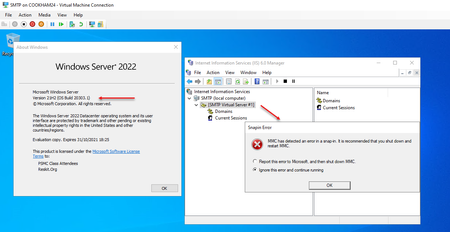
I have installed 20303.1 and added the SMTP Service and add the management tools. Install-WindowsFeature SMTP-Server -IncludeManagementTools After the installation, I bring up the IIS 6 Management Console. If I right-click the [SMTP Virtual Server] node and select properties, I get an error like this: Clues?Solved45KViews2likes29CommentsDFSR Fails toinstall a Replication Group
I am unable to setup DFSR with the latest version of Window Server 2022. Here is the script I am using: # 1. Installing DFS-Replication feature on key servers $SB = { $IHT = @{ Name ='FS-DFS-Replication' IncludeManagementTools = $true } Add-WindowsFeature @IHT } $ICHT = @{ ScriptBlock = $SB ComputerName = 'DC1', 'DC2', 'SRV1', 'SRV2' } Invoke-Command @ICHT | Format-Table -Property PSComputername,FeatureResult, Success # 2. Turning on administrative shares $SB2 = { $SCHT = @{ AutoShareServer = $true AutoShareWorkstation = $true Confirm = $false } Set-SmbServerConfiguration @SCHT "Restarting LanmanServer on $(hostname)" Stop-Service -Name LanManServer -Force Start-Service -Name LanManServer } $CN = @('DC1','DC2','SRV1','SRV2') Invoke-Command -ScriptBlock $SB2 -ComputerName $CN # 3. Viewing DFSR cmdlets - which works fine Import-Module -Name DFSR -WarningAction SilentlyContinue Get-Module -Name DFSR Get-Command -Module DFSR | Measure-Object # 4. Creating replication groups $RGHT1 = @{ GroupName = 'SRVShareRG' DomainName = 'Reskit.Org' Description = 'Replication Group for SRV1, SRV2 shares' } New-DfsReplicationGroup @RGHT1 The final line gives me an error: New-DfsReplicationGroup @RGHT1 New-DfsReplicationGroup: Could not create the replication group named "SRVShareRG". The specified domain does not exist or cannot be contacted. Clues?1.1KViews0likes1CommentRe: [MAJOR ISSUE] b20257, b20262 DNS Server service keeps crashing 0x0374
The suggestion to remove then reinstall DNS has worked. Updating to the latest server dod NOT automatically fix the problem. But on one DC, I removed the dns feature and tools. Rebittef, just to be on the safe side, treinstalled DNS. Since all my zones as AD integrated, they all came back intact and after an hour DNS is stable and working as expected. After 2 hours I repeated the remove and reinstall on DC2 and it, too, is now working. Thanks for the suggestion! The solution is DNS, what was the problem?? 🙂1.8KViews1like2Comments
Recent Blog Articles
No content to show