User Profile

catherine9910
Brass Contributor
Joined Dec 01, 2020


User Widgets
Recent Discussions
Determine training week # based on start date
Hello everyone, I am working on a project, and I am stumped. Attached is an example workbook (please do not change the columns as they are the same as the original project). Simply put, I have a start date and I need to know what week of training they are in up to 8 weeks. If they are not in training, leave it blank (no zero's). The week starts on a Monday Thank you for your help.906Views0likes1Comment- 7.3KViews0likes0Comments
IF + XLOOKUP Formula
Hello, I am trying to put 2 formulas together. I have gotten the XLOOKUP formula to work perfectly, but not when I added the IF statement (only if the column says "HS"). =XLOOKUP(A3,'Automated Stats'!B:B,'Automated Stats'!F:F) but only return if F:F says "HS" if not then return blank =IF(XLOOKUP(A3,'Automated Stats'!B:B,'Automated Stats'!F:F),"HS","") but it returns #VALUE! Update: I added an Example file of what I need. Thank you.8.5KViews0likes8CommentsUsing VBA to Open A Changing File Name
Hello, I am writing a code that will open a SharePoint path, I will select the file I want to open (the name changes). That is where I get stuck, I want the code to copy a range from the changing name file and paste it into another set file name. I just don't know how to determine what the code is for the changing file name and how to get the code to continue once I open it. In red is where I need the code to go for the changing file name. It needs to continue once I open the file. I have used this code in the past, but it was with a C: Drive file and it continued once I opened the file. This is what I have (I changed the name of the SharePoint file as it is a work file): Sub Audit_Sheet() ' ' Audit_Sheet_Data Macro ' ' Sheets("Audit Sheets").Select Columns("B:N").Select Selection.ClearContents ActiveWorkbook.FollowHyperlink Address:="SharePoint.file" filetoopen = ThisWorkbook.Worksheets("Audit Sheets").Range("A1") ActiveWorkbook.Select Sheets("Audit Sheets").Select Columns("B:N").Select Selection.Copy Windows("Voice and Season Training - Official.xlsm").Activate Columns("B:B").Select Selection.PasteSpecial Paste:=xlPasteValues, Operation:=xlNone, SkipBlanks _ :=False, Transpose:=False Application.CutCopyMode = False ActiveWorkbook.Save MsgBox ("Run Complete") End Sub Thanks in advance.1.3KViews0likes0CommentsMultiple Criteria
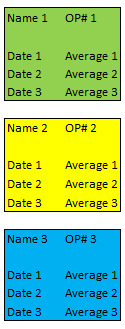
More formula help, please. The problem I am having is when I use a formula, I need it to look up and return a value when the 1st part of the formula changes. For example, if I want A2 on another sheet to look up OP# 2 in column 2, then look up Date 2 and return Average 2 within that yellow box. Or if I want it to look up OP# 3 then only return the average in the blue box. When I write out the formula I don't know how to keep it from trying to look up all of Date 2's (in that column) and returning all of the Average 2's (in that column). I need a formula that will look up only in that colored block based on the OP# I want to look up. I hope that makes sense.4KViews0likes8Comments- 1.7KViews0likes2Comments
Download a Workbook from The Web
Hi Everyone! I am getting married and on my wedding site, I can download an updated list of who is attending/not attending/no response. Well, in order to get an updated list, I go to the site and download a new one and have to delete the old one. I am trying to create a workbook (below) that I can hit a button and it updates it automatically. I have tried to do a query but it says that the data can't download and tried a hyperlink. Neither worked, so now I have moved onto a macro. All I need help with is a way to open the workbook on the website and that's it. I can do the rest from there. Any easy suggestions? Thanks in advance.1.6KViews0likes3Comments
Recent Blog Articles
No content to show