User Profile

RomeroSilva
Copper Contributor
Joined Nov 12, 2020


User Widgets
Recent Discussions
WVD Scaling Script: Doesn't Logoff user sessions and stop VMs during off-peak hours
Hi, We have experienced that during the off-peak hours the scaling script doesn't logoff user sessions and stop VMs when there are active or disconnected sessions. Minimum number of running session host threshold is set to 1 Findings: Script recognize it as off-peak hours but doesn't logoff any user sessions. But we have noticed following log not sure if there is any relation. Number of user sessions is more than 90 % of the max number of sessions allowed with minimum number of running session hosts required (10). Adjusted minimum number of running session hosts required to 2 Any advice or a solution for this ? Thank You! BR, Romero SilvaRe: Problem - Signing Out from WVD
As per Microsoft this task is intended to sync user preferences between multiple devices associated to same user account. Anyway multiple people have reported the same issue on github under the Virtual-Desktop-Optimization-Tool. You can find more info by referring the below URL. https://github.com/The-Virtual-Desktop-Team/Virtual-Desktop-Optimization-Tool/issues/4614KViews0likes0CommentsRe: Problem - Signing Out from WVD
This was caused by after running the optimization script on W10 2004. As a work around you can disable the “Synchronize Language Settings” (Microsoft\Windows\International\Synchronize Language Settings) under the Task Scheduler or do not run the optimization script on the session host. I have on going case with Microsoft and as per them optimization script is not fully supported on W10 20H2. FYI https://github.com/The-Virtual-Desktop-Team/Virtual-Desktop-Optimization-Tool/issues/4614KViews1like2CommentsProblem - Default file association with Remote app in WVD
We are experiencing an issue with WVD Remote apps where default file associations are not working, even though if we configure via GPO using a .xml file. Note that we are only using remote apps and not the full desktop. Any advice on how to resolve this problem? or if not would like to know if it's in the road map to address this problem. Thank You! BR, Romero SilvaProblem - Access Desktop and the remoteapps simultaneously in WVD
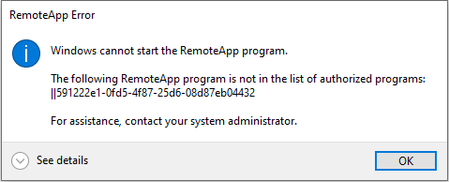
Hi We have published a desktop and multiple applications using the same host pool but when we try to access published app and the desktop simultaneously follow error occurs. Sequence: 1st opened up the published app and then try to open the desktop. Other question is, what is the recommend method to publish apps and desktop? Can we do it using one single host pool or do we have use two different host pools with different FSLogix profile shares. Thanks, RomeroSolved4.6KViews0likes1CommentRe: Publishing an application which residing on a file share
Peter_Beckendorf Correct. It is not installed application. application installation path is network file share. It could be 64bit or 32bit as there are multiple applications (which are located in a network file share). Thanks Romero1.2KViews0likes0Comments

Recent Blog Articles
No content to show