User Profile

RoryRussell
Copper Contributor
Joined Oct 21, 2020


User Widgets
Recent Discussions
Re: RD Web Client (HTML5) Redirected devices
ISAIAS_BERTIN Try this, been a while since I did this. All done in elevated powershell on your RDS server Run: Install-RDWebClientPackage Run: Get-RDWebClientPackage to see all the RDWeb versions Run: Publish-RDWebClientPackage -Type Test -Latest to set up the new test RDWeb version Browse to https://rds.domain.com/RDWeb/webclient-test/index.html to test the new version (replace URL with your RDS URL) To switch production to the new version, run: Publish-RDWebClientPackage -Type Production -Latest5KViews0likes1CommentRD Web Client (HTML5) Redirected devices
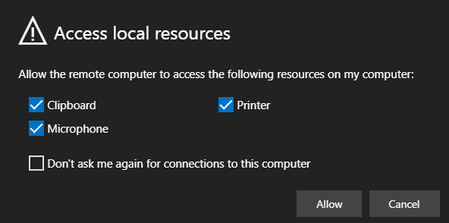
Hi, I've recently installed the new HTML5 RD Web Client and all is working fine, with the exception of smart card redirection. Our users need to authenticate to a secure website (using RDS) with a smart card. We aren't using smart cards to authenticate to RDS, or the VM. When I connect to the VM through RDS, the options for device redirection are only clipboard and printer, not no smart card. If I download the RDP file and connect through mstsc.exe, the smart card works fine. It's only if I open the remote resource in the web browser the smart card isn't redirected. I've enabled the option on the RDS collection to allow smart card redirection, and it's still not working. Am I missing something, or is smart card redirection not available through the web browser session? Cheers
Recent Blog Articles
No content to show