User Profile

egspen2
Copper Contributor
Joined Oct 10, 2020


User Widgets
Recent Discussions
Offset formula for rolling monthly calculations
In columns AU - AY of the attached file, I am trying to use the OFFSET function (within SUM) to calculate the last 11 months, last 10 months, last 9 months, last 8 months, and last 7 months, respectively. I've done this manually in the AY column and when learning offset, the value being returned in cell AZ18 is correct but when I drag that formula down, cell AZ19 is not correct. Is OFFSET the best option here? Thank you in advance.2.7KViews0likes2CommentsRe: Calculate partial month salary
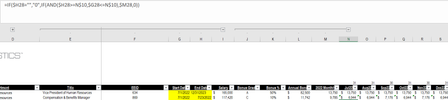
HansVogelaar Sample attached with 3 different scenarios (employees). First is an employee who should have the same value in every month ($13,750) as they are expected to be here July through December. Second is an employee leaving in July, mid-month so should have less than the monthly amount ($9,785) in July and $0 for each remaining month. Third is an employee that should have partial salary in July as they are starting mid-month but should have the same full month for each month of Aug - December.6.5KViews0likes1CommentRe: Calculate partial month salary
HansVogelaar Thank you! A few questions: 1) can you confirm that "$M4" at the end of your example should actually be "$M28"? 2) When I copy that formula to an example of a person whose end date is in the next year (2023 in this case), the only 2022 month that's showing up properly is the first month. See below where after July, the monthly amounts being calculated are greater than the 2022 Monthly salary. What part of the formula is causing this?6.7KViews0likes3CommentsRe: Calculate partial month salary
Fair question but in this instance I'm calculating for salaried employees, not hourly. So, even though I don't actually work 30 or 31 days in a month, I'm paid for that amount of days. Is your comment re: "NETWORKDAYS" speaking to an Excel function?6.7KViews0likes1CommentCalculate partial month salary
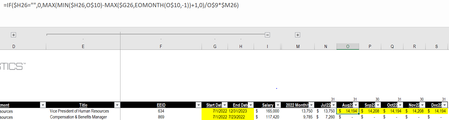
I am trying to figure out the best formula that will calculate either a) a full month of salary or b) a partial month salary if the start or end date indicate an employee was not there for the full month. For example, in the screenshot below, the employee on the second line should only get 23/31 days of salary in July 22 (dates on the top row are EOMONTH) and no salary after July 22.7.4KViews0likes11CommentsUnpivot matrix
I am trying to make a current matrix of data. The matrix is currently set up such that the combination of % to quota (rows) and volume ranges (columns), results in a payout amount. I'm trying to find a way to unpivot (and / or possibly change the volume range format) this data to make it easier to ultimately use a SUMIFS or similar formula that allows me to input any volume and quota numbers that I want and the formula tells me what the bonus payout is based on the matrix inputs. I've attached the current structure of my matrix as well as an example of the three column output I'm looking for.1.6KViews0likes4CommentsIndex Match for querying salary data over time
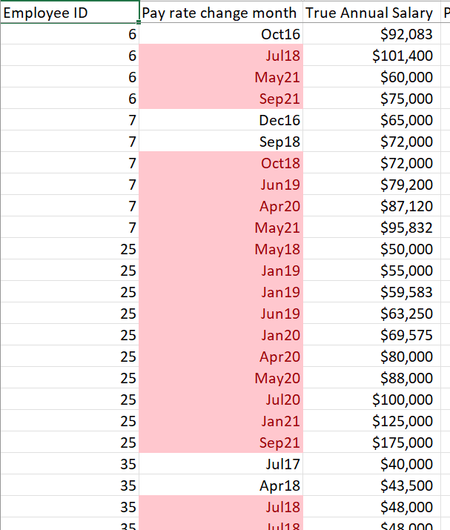
I have a dataset with the columns shown below: As you can see in the sample of the data posted above, some employees have had three or four pay changes (employee #6) while others have had more than that (employee #25). I am ultimately trying to get the data to show the following: 1) Only one line per unique employee ID (rows) 2) One column per unique pay change date I'm looking for a formula to look up a combo of the employee ID and month end date - if the respective employee had a pay change in that month, I want the number to pull into the cell (if they did not, "n/a" or blank / zero). I was initially thinking index match match but since both the ID # and dates are in columns, that's not working.974Views0likes1CommentCustom number formatting - same text before changing numbers
What custom formatting option do I have to pick in order to have the same text appear before different numbers? For example, I'm trying to have cells in consecutive rows show: Customer 1 Customer 2 Customer 3, so on and so forth but just want to be able to add "A1 + 1" and drag it down so that "Customer" automatically populates in front of each number.752Views0likes1CommentSumming data based on multiple criteria - Dynamic formula option?
Attached is a two tab data set representative of a problem I run into frequently. * The "Payroll Source" tab has financial information listed monthly in consecutive columns (i.e. 12 months = 12 columns). * On the "Payroll by division" tab, I'm trying to break out the monthly data by Department and Division, ultimately needing to take what is 1 column in the source data and "allocate" it across rows/ columns based on Department / Division criteria in the respective month. * The main thing I'm trying to solve for is how to create a dynamic formula that allows me to take 12 columns of monthly data from the source tab and "spread" it across 48 columns (4 divisions per month) without having to change the sum range for each new month. I've currently populated the Payroll by Division tab using SUMIFS but that still requires me manually adjusting/changing the Sum Range within that formula whenever a new month starts. How can I change this formula (or use a different one altogether?) that also checks the month on the source tab so that I could basically create the formula in Jan21 of the "Payroll by Division" tab and drag across the rest of the months without having to manually change the Sum Range at the "beginning" of each new month? My first thought is to always add a third criteria - the month - but it's my understanding that the SUMIFS formula can't include row and column criteria, only one or the other. Is that correct?1.1KViews0likes2CommentsRe: SUMIFS using criteria in rows and columns
Riny_van_Eekelen Thanks. I guess my last question would just be to understand what changes you made to the references in the named ranges because I still can't get it to work. Understood on the repeating labels comment that you made - that's why I originally thought of using a SUMIFS.11KViews0likes1CommentRe: SUMIFS using criteria in rows and columns
Riny_van_Eekelen Makes sense. While I follow the concept of index/match / match and how you set it up in the example with the named ranges, I can't seem to get it to work when I tried copying over (see attached). My first thought is maybe there's something wrong with the named ranges or inconsistent formatting between tabs? Can't figure out why I'm getting $0 on rows 7 & 9 on the 'Consolidating' tab.11KViews0likes3CommentsSUMIFS using criteria in rows and columns
Hello - In the attached file, I am trying to create a "consolidating" income statement. I am trying to do this via the 'SUMIFS' function as I have two criteria. The criteria are: 1) the month on row 2 of 'Income Statement 2' tab agrees to the respective date (row 4) on the Consolidating tab 2) the "Consol PL ref" in column B of 'Income Statement 2' tab agrees to the respective income statement caption in column C of of the 'Consolidating' tab. As there are two criteria, I've tried to use a SUMIFS in cell E7 but can't figure out what the issue is.12KViews0likes7CommentsRe: Monthly headcount based on hire date formula
SergeiBaklan Thanks - this makes sense to me and is what I was trying to do. However, when I copy this same formula into my document, I get return different values (for example, I get a no when you get a yes). Did you have to re-format the date or anything with the source file? See attached for my sheet simply updated for the formula you suggested - not sure why we get different answers.21KViews0likes1CommentMonthly headcount based on hire date formula
I am looking to take an employee roster and, using a formula, put a "Yes" if the employee was active as of the respective month (based on comparing the hire date to the last day of the month in question) and "no" if they were hired after the month in question. Said differently, I am trying to create a monthly headcount based on hire date.21KViews0likes7Comments
Recent Blog Articles
No content to show