User Profile

ZahalkaBence
Copper Contributor
Joined Sep 15, 2020


User Widgets
Recent Discussions
Re: Microsoft Edge - Welcome screen vs. don't show policy
Your solution did not work at all. This weird bug happens on freshly installed Windows with new Windows profile as well. The only solution was so far to disable the policy and do the steps on the welcome screen, which we want to avoid. This policy simply breaks the normal behavior of the Edge browser on some PC's.155Views0likes0CommentsRe: Microsoft Edge - Welcome screen vs. don't show policy
This is not a solution. This thing happens on a newly installed PC as well. This happens on newly created Windows profile as well. The only solution so far to disable the policy on these Windwos machines and do that few clicks on the welcome screen.133Views0likes0CommentsMicrosoft Edge - Welcome screen vs. don't show policy
Hi, We have a GPO that disables the Edge welcome screen (sets the SOFTWARE\Policies\Microsoft\Edge key's HideFirstRunExperience variable to 1). On some of our PC's when the user try to run Edge, they get a blank page with invalidurl error. This white page can not be closed, only way to dismiss if you stop edge processes with the taskmanager. If you set the registry value to 0, then it can reach the welcome screen and you have to do the first steps. This policy should disable the welcome screen and not just hrowing an error. how could we avoid this screen to appear? Is there any setting that let Edge think it was already started and omits this screen completely? Why did this bug appeared in the first place? This policy was working for years now, and only show this bug randomly. Edge - stable, latest version; Windows10 22H2;309Views0likes3CommentsRe: WSUS - Why Windows target version GPO / registry setting is not working?
ComputerHabit Yes, I do use targeted groups. I have 10+ different places to manage and this gives me more control over the PC's. They get their membership based on their IP address and I have a test group too. This thing works nicely. I don't think that I should do a windows11 WSUS group under the current groups just to handle this annoying thing. I think the update mechanism should work like Microsoft tell us in their articles (https://learn.microsoft.com/en-us/windows/client-management/mdm/policy-csp-update#productversion / https://admx.help/?Category=Windows_10_2016&Policy=Microsoft.Policies.WindowsUpdate::TargetReleaseVersion&Language=en-us).813Views0likes0CommentsWSUS - Why Windows target version GPO / registry setting is not working?
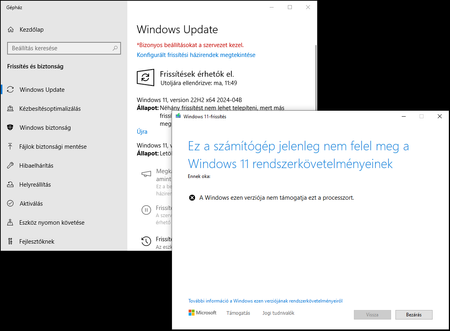
Hi, I would like to set my Windows 10 PC's target version to 22H2 and disable Windows 11 upgrade. I set a GPO to disable the upgrade, but it is not working, my test PC's still get the Windows 11 upgrade (and it fails with unsupported processor error). The registry settings set correctly on the Windows 10 PC, but it is still try to get the update from my WSUS server. What do I miss? How could I tell these PC's to not try this update? According to https://answers.microsoft.com/en-us/windows/forum/all/how-to-stop-or-block-windows-11-update/9f271456-51dd-4716-b69d-0834d552ca83, I did everything correctly, but still I face this problem.Re: Windows 10 clients does not download 2004 (1909) Upgrade from 2016 WSUS Server
buzelac Thank you for showing me the usual WSUS problem solving things, but this one is not anything like in those docs. This problem is specific to the weird mechanism when the client tries to download the update from the server, but only the half of the files does it download from there. The windowsupdatebox.exe is downloaded nicely from it's location, but it tries to download the biggest part (the .esd file with its few GB) from the MS update servers, not from my WSUS server. Anyway, my clients started to download the esd file as well after a few weeks without changing anything. Maybe one of the other updates did fixed the problem, don't know.4.9KViews0likes0CommentsWindows 10 clients does not download 2004 (1909) Upgrade from 2016 WSUS Server
Hi, On our Network there is a Windows Server 2016 running with the latest updates and WSUS. Our clients can update themself from WSUS, but the bigger upgrade to the new Windows 10 versions like the 1909 or 2004 does not work. It seems that the client downloads the "WindowsUpdateBox.exe", but it can not download the .esd file from the server, just throws an error of 0x80070057. The server does contain the .esd file for the upgrade, but the client can not download it. As I have read in many forums, the IIS should contain the MIME-TYPE for the .esd files of application/octet-stream, so I was looking for it and my server already had an entry point for that type. Changing it to application/octet-stream did not change the clients behavior. I have read that these upgrades are quailified as "dynamic updates" and the clients try to download these .esd files from the MS update, not the WSUS server. How could I force them to try the download from our server? All of our clients are behind an authenticated proxy, and it is not an option to let them out to update freely. The GPO which not let them out to the Windows update online would disable Windows store as well, but we need that function to work too. What option do I have left, how could I force the clients to upgrade from WSUS?5.6KViews0likes5Comments
Recent Blog Articles
No content to show