microsoft edge bug
10 Topics
Microsoft Edge Enterprise — Intermittent Blue Coat Proxy Authentication Prompt
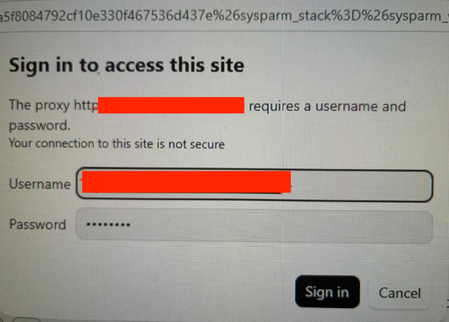
Product: Microsoft Edge for Business / Microsoft Edge Enterprise Component: Proxy authentication, HTTP networking and integrated authentication Operating system: Windows 11 Enterprise Proxy: Blue Coat / Broadcom forward proxy, port 8080 Proxy authentication configuration: Basic Auth/ IWARealm exact authentication method to be confirmed Affected browser: Microsoft Edge for Business Comparison browser: Mozilla Firefox, where the same behaviour has not been observed Impact: Intermittent interruption of browsing and loss of access to existing tabs until the user reauthenticates We are experiencing intermittent, unexpected proxy authentication prompts in Microsoft Edge for Business. The dialog states: Sign in to access this site. The proxy http://[bluecoat-host-url]:8080 requires a username and password. Your connection to this site is not secure. The prompt appears sporadically, sometimes while the browser is idle or while tabs displaying otherwise idle ServiceNow, deepl etc. pages cannot be accessed until user reauthenticates with autofill if proxy password is saved in order to be able to access those sites again. No explicit navigation or user interaction is necessarily taking place when the dialog appears. This behaviour was not observed previously and has become noticeable more recently especially since the migration of a lot of our workloads to the microsoft cloud. Firefox does not appear to exhibit the same symptom under comparable. We suspect that a background request, a new or reused proxy connection, proxy-session reauthentication, or an incomplete integrated-authentication exchange may be triggering the prompt. However, we have not yet identified the exact request or established whether the root cause is Edge, the proxy configuration, PAC routing, or the authentication infrastructure. usage conditions. Edge should silently authenticate to the configured enterprise proxy through the organisation's approved authentication mechanism, without unexpectedly displaying a credential prompt during normal browsing or background activity.54Views0likes1Comment
Broken video playback on Netflix when hardware acceleration is on
For months now, when hardware acceleration is turned on, it's impossible to stream any content on Netflix which shows the D7703-1003 error code. If it's turned off, shows and movies will play as usual but not in 4K or Dolby Vision/Atmos quality because they need hardware acceleration in order to work. As suggested by Netflix website, I've already cleared cookies and browser data multiple times but nothing changes. I've also tried multiple up-to-date versions of Edge (Beta, Canary and the Stable channel version) but I get the same result. Every version after Edge Beta 149.0.4022 (which is the last version that worked for me without issues) has broken playback. I've already sent feedback through the Canary channel but it's an issue that seems it won't be resolved soon enough. Do any of you know a workaround/fix or have idea if it will get fixed considering it's been at least three months since I've encountered this issue?141Views0likes1Comment
Persistent issues with Read Aloud in Edge
I have Windows 11. Today I began having an issue wherein the Read Aloud feature built into Edge doesn't work. I was initially trying to use a similar function on Internet Archive, and noticed that while all the Microsoft voices seemed to be available in the onsite dropdown, the only voices that made any sound were David, Mark, and Zira---none of the "Online (Natural)" voices. I tried to use Read Aloud as a workaround, and found all the buttons greyed out completely. Mind you, everything worked fine yesterday, and I made no changes to my computer in the intervening time. I've opened up two support tickets, but neither live chat agent was able to resolve the issue. Here are the things I've tried with their help: trying the feature on different websites updating & restarting Edge resetting Edge settings to defaults updating & restarting computer switching wifi networks connecting to a hotspot using InPrivate mode using a new Edge profile (rule out interference from extensions) checking that English tts is downloaded in Time & language > Language & region turning Online speech recognition off and back on again resetting experimental features checking sound systems (they work, but just in case) doing a system reset (?) to 24 hours ago, which took about an hour and undid all the updates I just mentioned maybe something else I don't remember? The next thing I am going to try is give my computer a long nap. It's been a while, so maybe it just needs some shut eye. Otherwise, help????2.1KViews0likes2Comments[MS Edge Android] UI Glitch: Suggestions Misaligned in Bottom Search Bar Mode
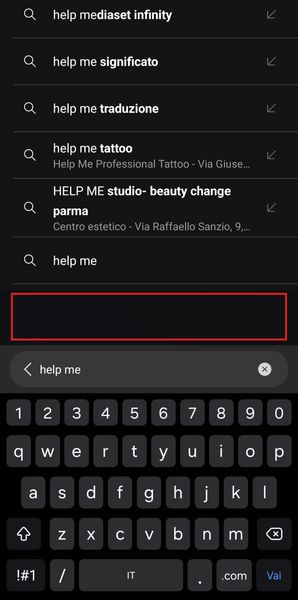
Hi everyone! I'm experiencing a strange issue with the search suggestions when using bottom bar mode. In Microsoft Edge, there's a blank space between the input bar and the suggestions above it, as shown in the attached image (see the red line). Is anyone else seeing this bug? Any idea how to fix it? Thanks in advance358Views0likes1Comment
--js-flags=--noexpose_wasm launch flag causes STATUS_BREAKPOINT
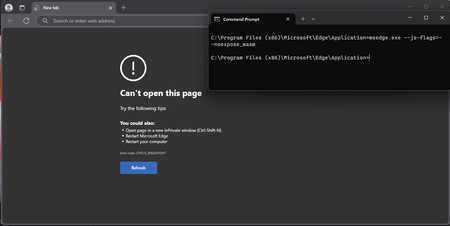
Version 135.0.3179.73 (Official build) (64-bit), Windows 11 Education, also occurs on Windows 10 Education and Windows 10 Pro, been testing this since probably version 129 of Edge. --js-flags=--noexpose_wasm as a launch flag causes STATUS_BREAKPOINT, this is regardless of default configuration and with or without extensions. WASM can be used to discover privileged information about a machine, and this seems to be working in the past according to some users online, but no longer does now. Please can someone advise?402Views0likes1CommentMicrosoft Edge - Welcome screen vs. don't show policy
Hi, We have a GPO that disables the Edge welcome screen (sets the SOFTWARE\Policies\Microsoft\Edge key's HideFirstRunExperience variable to 1). On some of our PC's when the user try to run Edge, they get a blank page with invalidurl error. This white page can not be closed, only way to dismiss if you stop edge processes with the taskmanager. If you set the registry value to 0, then it can reach the welcome screen and you have to do the first steps. This policy should disable the welcome screen and not just hrowing an error. how could we avoid this screen to appear? Is there any setting that let Edge think it was already started and omits this screen completely? Why did this bug appeared in the first place? This policy was working for years now, and only show this bug randomly. Edge - stable, latest version; Windows10 22H2;482Views0likes3CommentsEdge error RESULT_CODE_MISSING_DATA or RESULT_CODE_KILLED_BAD_MESSAGE even in the settings menu.
After the KB5050021 (Windows 11 (23H2)) update, Edge stopped working. The same error appears on all tabs and even in the settings: Error code: RESULT_CODE_MISSING_DATA. I deleted the update, but Edge still didn't work. Edge only partially worked in compatibility mode with Windows 8. Does anyone know what the problem could be? Without compatibility, the error is either RESULT_CODE_MISSING_DATA or RESULT_CODE_KILLED_BAD_MESSAGE, and on any tabs and even in the settings menu. Edge Version 134.0.3124.93 (Official Build) (64-bit) DEV/BETA/CAN also don't work with the same errors. UDP. After the KB5053602 (Windows 11 (23H2)) update, Edge still not working. Is there a solution to this problem?344Views0likes0Comments
Edge 130.0.2849.46 (Official build) (64-bit) Broke Extension(s) - Ublock Origin in this case.
Hello, I know very well that Edge is also moving to MV3. But, there isn't any announcement about complete removal of MV2 yet. Since Edge updated to v130, it broke popular extension like Ublock Origin, for many people. We've reported the issue to extension devs, it but seems that while there are many people who are affected, there still be many that have extension working fine as expected. https://github.com/uBlockOrigin/uBlock-issues/issues/3419 Many people've reported this issue not only on github, but also on reddit as well. The extension was working fine before v130, so we suspect that the cause is Edge update itself. - Issue: The extension loads but cannot run, and its dashboard page cannot load, is completely empty. Turn on/off does not work. Removing/Reinstalling from MSEdge Store also does not work. The only "workaround" for this is setting up a completely new blank local profile, but that will cost all the synced settings and extensions data. Please help us looking into this issue, Thank you. --------------------------------- Browser: Edge 130.0.2849.46 (Official build) (64-bit) Extension: Ublock Origin v1.60.0 Extension source: MSEdge Store System: Windows 10 22H2 19045.5011 (I don't think system info matters because there're people who're on Win11 and have this issue as well)4.2KViews5likes5Comments
Inconsistency of window's new Date() function returns invalid date in Microsoft Edge
We are facing some browser problem while using React as frontend for initialize new Date() object such that new Date().toLocaleString() gives empty string. As this is not the case with Chrome so raising it here. Looking forward to get a permanent solution as of now we have added retries for initialize new Date() object for work around.390Views2likes0Comments