User Profile

sirk78
Copper Contributor
Joined Jul 13, 2020


User Widgets
Recent Discussions
Re: Autofill Data
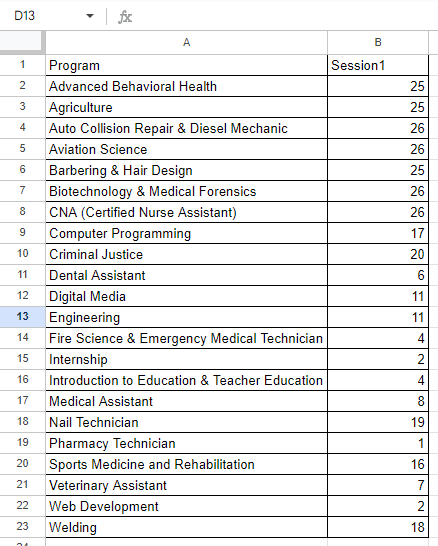
Patrick2788 Here is a modified version of the data. Some participants chose which program they wanted to attend but there are a lot that didn't which is why I have to fill in a program name. This can be random. As mentioned I can do this manually but it would save time if I could add a formula on row E327 to do as i have described previously and then drag it down to the end of the participant name list so that everyone is in a program but less than 27 in each program.1.5KViews0likes3CommentsRe: Autofill Data
I gave that a try and it does return the correct values but I think I need to clarify what the outcome is. Currently, I am manually creating a list of participants in each program limited to 26 people. I have a list of names and I need to assign them to a program until it reaches its max, once the max is reached I move to the next program until it is filled, and so on until all programs have 26 or fewer participants. I do this currently by copying and pasting the name of the program next to a cell with a participant's name and the number under Session1 is updated automatically to reflect the new count. I am looking for a formula that will do this for me so that I can put a formula in the cell next to the name and have it automatically look at the list of programs and number of people assigned and if it is less than 27 it will add the program name, if not it will go to the next program on the list and the see if it has 27 or less. I initially thought that a =IF or =IFS statement would work but I am missing something. I was thinking of something like this =IF(B2<27, A2,(if not go to B3 and if <27 return A3, if not go to B4 and so on down the list).1.5KViews0likes5CommentsAutofill Data
I am trying to speed up a process to autofill some data. I am looking to find a formula that will check to see if B2 is less than 27, if it is return the value of A2, if not go to B3 to see if it is less than 27, if it is return A3, if not go to B4, and so on to the end of the list. Any help would be appreciated.Solved1.7KViews0likes7CommentsFind and Replace Range
Is it possible to use the find and replace feature to find a specific range of numbers between 0-100 in multiple rows/columns cells and replace it with a range value? For example if i had various numbers ranging from 0 to 100 in multiple cells, could i use find to find all numbers between 0 and 10 and replace the cell value with the range of 0-10? If not i would be open to simple workarounds to accomplish the same result.Solved10KViews0likes4Comments
Recent Blog Articles
No content to show