User Profile

Jupiter1
Copper Contributor
Joined May 05, 2020


User Widgets
Recent Discussions
- 921Views0likes0Comments
Help with Formula / Solver
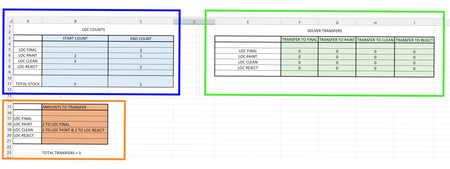
Hi All, Hoping someone can help with formula I am trying to do to transfer figures from start count locations to multiple locations based on the end counts. As there could be several ways to give the same result is this one to use with Excel Solver? I haven't used before, so finding difficult to figure the way to achieve result. So from the table highlighted here with the blue box I have the start counts for each location and then after stock is moved around locations I have the end counts. So what I'd like to do is as these counts change it automatically fills the transfer amounts against the correct locations in table highlighted with orange box. I thought if I use Excel Solver perhaps I could get it to enter the shortest route to give the least amount of transfers by using table created within green box. Then I'd use vlookup formula to enter the instructions into table highlighted here with orange. Currently I have manually inputted result: So instruction is to transfer: 2 from LOC Paint into LOC Final 1 from LOC Clean into LOC Paint 2 from LOC Clean to LOC Reject As long as the total end counts are correct in each location it doesn't matter which start location it is taken from just as long as it uses as fewer transfer operations. Is this possible or is there another way? Many thanks1KViews0likes1CommentFormula to find value between rows with matching data
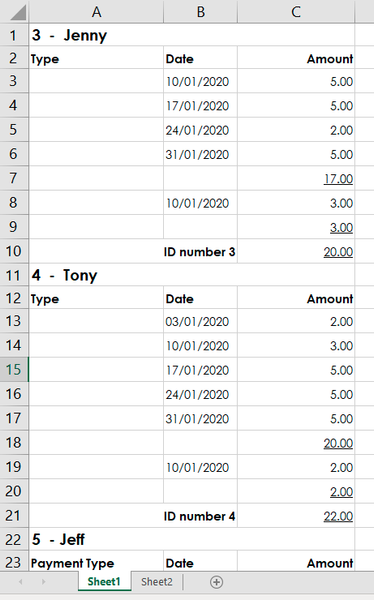
Hi All, I'm trying to get a formula that retrieves an amount from Sheet 1 based on looking at the dates between rows specified for each persons ID. The problem I have is the format of data, as the ID is not against each date. Is there a way to lookup between rows containing certain values? So for instance... on Sheet 2 I want to be able to type a specific date into a cell say the 10/1/20 & it will find the corresponding amount to matching date of each persons ID. So for Jenny (between rows containing her ID 3) it would be 8 & Tony (between rows containing his ID 4)would be 5. Hope it is possible and appreciate any help on this. Many thanks1.7KViews0likes7Commentshelp with Formula
Hi, I have multiple formulas in one cell and want to add the results together and then divide the total by a value of .30 I have this so far but I'm not getting the correct result. I hope someone can point out where I'm going wrong? =IFERROR((AA3+G3),"NOT AVAILABLE")+((VLOOKUP(B3,Colour!$A$2:$B$7,2,FALSE)/0.30)) Many thanks1.1KViews0likes5Comments- 693Views0likes0Comments
#VALUE! ERROR
Hi, I have some cells that have #value! error as there are elements missing from some of the cells included in the formula. I would like to replace the ones that get this with text 'NOT AVAILABLE' but if there is no error then it continues to produce formula result as normal. I have tried this formula below but I can't seem to get it to work. =IF(AA10="#VALUE!","NOT AVAILABLE",(G10+AA10)/0.85) Appreciate if someone could help me Many thanks721Views0likes1CommentFormula Help
Hi All, I hope that someone can help with a formula i am trying to do. I have attached a visual explanation of the formula so far and what I want to additionally calculate. Below is the formula currently but i need to add further to it. Please see attached info to explain. =IF(ISBLANK(N2),0,SUMIFS(SHEET2!G:G,SHEET2!D:D,SHEET1!D2))+IF(ISBLANK(O2),0,SUMIFS(SHEET2!J:J,SHEET2!D:D,SHEET1!D2))+IF(ISBLANK(P2),0,SUMIFS(SHEET2!M:M,SHEET2!D:D,SHEET1!D2))+IF(ISBLANK(Q2),0,SUMIFS(SHEET2!P:P,SHEET2!D:D,SHEET1!D2)) I hope someone can help me with this. Many thanks1.2KViews0likes5CommentsRe: Formula #NA ERROR
mtarler Hi again, one more question… is there a way to allow the cell with this formula to be adjusted manually without the formula disappearing? Example: cell A2 has this formula =if(and(y2>=1,$ag$2>=1),1,"") But if I want to manually delete the result to produce a blank cell (whilst the values are true in y2&ag2)…… it clears the formula also. What I’d like to happen, is if I delete the result in cell A2, it will reinstate once I change the value again in either y2 or AG2 Hope it’s possible1KViews0likes4CommentsFormula #NA ERROR
Hi All, I have a small issue with a formula error, hoping someone can help. I HAVE A FORMULA WHICH RELIES ON TWO CELLS HAVING A VALUE EQUAL OR MORE THAN 1. I’VE USED THE FORMULA BELOW WHICH WORKS IF THERE IS A VALUE IN BOTH ……BUT IF EITHER CELL HAS A VALUE OF 0, THEN IT DISPLAYS ‘#NA’ ERROR. I’D LIKE IT TO JUST DISPLAY A BLANK CELL. =IFS(AND(Y2>=1,$AG$2>=1),1,,1) Many thanks1.1KViews0likes7Comments
Recent Blog Articles
No content to show