User Profile

gfpcp
Copper Contributor
Joined Mar 24, 2020


User Widgets
Recent Discussions
Re: Dimension of Array variable inside LET FUNCTION does not match dimension of the Table assigned
Thank you! the @ made the trick, I learned 2 things today: the reason of the behavior (from the "weird results..." post) and how to solve it for the kind of result I need. Thanks again!689Views0likes2CommentsRe: Dimension of Array variable inside LET FUNCTION does not match dimension of the Table assigned
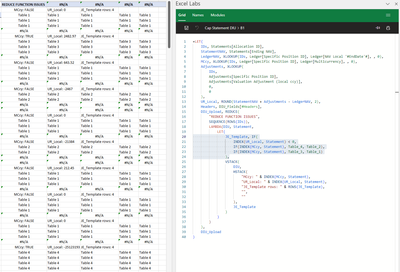
Thanks djclements here is the formula: =LET( IDs, Statements[Allocation ID], StatementNAV, Statements[Ending NAV], LedgerNAV, XLOOKUP(IDs, Ledger[Specific Position ID], Ledger[NAV Local '#EndDate'#], , 0), MCcy, XLOOKUP(IDs, Ledger[Specific Position ID], Ledger[Multicurrency], , 0), Adjustments, XLOOKUP( IDs, Adjustments[Specific Position ID], Adjustments[Valuation Adjustment (local ccy)], 0, 0 ), UR_Local, ROUND(StatementNAV + Adjustments - LedgerNAV, 2), Headers, DIU_Fields[#Headers], DIU_Upload, REDUCE( "REDUCE FUNCTION ISSUES", SEQUENCE(ROWS(IDs)), LAMBDA(DIU, Statement, LET( JE_Template, IF( INDEX(UR_Local, Statement) < 0, IF(INDEX(MCcy, Statement), Table_4, Table_2), IF(INDEX(MCcy, Statement), Table_3, Table_1) ), VSTACK( DIU, HSTACK( "MCcy: " & INDEX(MCcy, Statement), "UR_Local: " & INDEX(UR_Local, Statement), "JE_Template rows: " & ROWS(JE_Template), "", "" ), JE_Template ) ) ) ), DIU_Upload ) Apologies for the image, the argument to the if statements are single elements of an array selected with the index faction; and all arrays used are 1-dimentional. The expected return is a bidimensional array (i.e. the table data). Hope this helps.704Views0likes4CommentsDimension of Array variable inside LET FUNCTION does not match dimension of the Table assigned
I have 4 tables with a different number of rows (1,2,3,4 rows respectively) but when I add the logic highlighted to select which table to assign to the JE_Template variable based on the values of the Statement parameter they all end up stacking the number of rows of the largest table in the if statement (4) as shown below. Any insights as to what is going on (and a possible solution) will be most appreciated! I inserted a line with the value of variables for reference of each iteration so you can see the right table is selected but for some reason the number of rows is always expanded to the rows of the larger table (table 4 in this case). Also, in the case of Table 1 which has only 1 row I don't understand how the JE_Template displays 3 rows populated. I also tried to filter based on the content of the JE_Template but functionality was limited and hit/miss.Solved884Views0likes6Comments
Recent Blog Articles
No content to show