User Profile

RobertWPB
Brass Contributor
Joined Mar 04, 2020


User Widgets
Recent Discussions
- 25KViews1like0Comments
Re: Error code - caa30190
After attempting all previous listed solutions over and over and on different combinations. This sequence worked for me this morning: -Windows Settings > Accounts > Access work or school and REMOVE account -Reboot computer. -Uninstall and Reinstall TEAMS from Microsoft.com -Reboot computer. *Do not launch any other MS application before login to TEAMS -from desktop TEAMS icon , right click and "Run as Administrator" -Select to login using a different account. (Even if your account shows up as default) -enter your account credentials. So far I have closed the application and I was able to re-open it. I will update if further issues arises.41KViews1like4CommentsRe: Error code - caa30190
Pierrea585 no simple fix, some of my colleagues have mentioned hey have been able to restore the application by attempting some of the previous mentioned solutions. Other have mentioned recovering access to the application after having a clean windows image install. This last one I have not attempted. (not feasible on my end)43KViews0likes4CommentsRe: Error code - caa30190
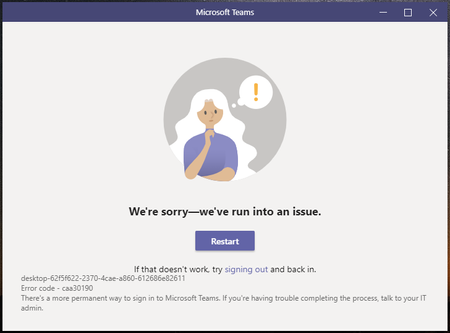
Radiowarsaw Thanks for the update. One of my colleagues was able to log in after selecting to join meeting from outlook. on my case it is not even prompting me to enter my login information. it stays on the error screen no matter how many times I select "Restart".100KViews0likes4CommentsRe: Error code - caa30190
RobertWPB Issue update. Issue has persisted after numerous re-installations. a colleague mentioned he was able to by-pass issue attempting to re-start login screen using the available button several times until prompt to enter login information. (This option has not worked for me) I am able to login to Teams using Chrome, however, I am not able to login using Edge. it automatically defaults to my department shared calendar profile. browser hangs-out when attempting to sign out from shared profile. (no error code is shown)(if page is re-loaded, it goes back to shared profile)103KViews1like1CommentRe: Error code - caa30190
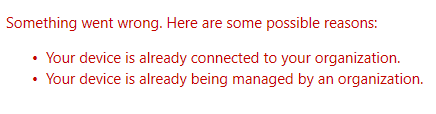
able to fix Word, PP, Excel and outlook clients access following this steps https://www.urtech.ca/2019/03/solved-scrub-office-license-credentials-identity-to-solve-sorry-another-account-from-your-organization-is-already-signed-in-on-this-computer/ still having issues to access Teams and OneNote.103KViews0likes0CommentsRe: Error code - caa30190
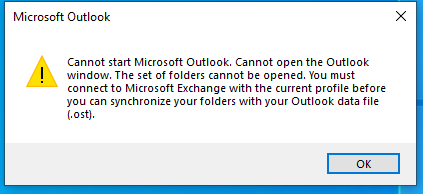
ChrisHoardMVP Hi, Attempted those changes this morning, still unsuccessful. I ended up deleting my .OST mail data file and I am now not able to open any MS Office client product. Ups. 🙂 New error to my bucket. I have not been able to replicate .OST file even after running the MS Office 365 Support and Recovery Assistant repair tool. as always brother, thanks for your suggestions. Thanks.104KViews0likes1CommentRe: Error code - caa30190
ChrisHoardMVP Now my co worker is having the same error after I logged out of his Teams client. he is also not able to log in. It seems that my profile might have been leaving some trace making the Teams client not able to load. Will you know if there might be a location that the application might pull information from other than the previously suggested?104KViews1like3CommentsRe: Error code - caa30190
ChrisHoardMVP Hey Chris, Thanks for the post. I have been running with this issue since the beginning of last week, so far I have uninstalled re-installed the application over 5 times with the issue being preset after each one of them :(. this include uninstalling Teams, Uninstalling office, login and downloading and reinstalling office from Microsoft, then downloading and reinstalling Teams from MS as well. I have too installed the application from the Teams web account and this error does not seems to be wanting to go away.104KViews1like7Comments
Recent Blog Articles
No content to show