User Profile

philrice
Copper Contributor
Joined Feb 23, 2020


User Widgets
Recent Discussions
Re: New Teams Bug - Open file using "Open in App"
Tristan999 & jhassallclarke - you may or may not have discovered this by now, but posting in case it helps yourselves or others. A workaround to this I have found is to change the New Teams Settings > Files and links > File open preference settings and choosing to always use Desktop App to open files instead of in Teams itself. Then all word docs opened display as you would expect on the taskbar as stacked under the Word icon and not Teams. Not what everyone might want I appreciate, but for me I find it preferable.4.4KViews0likes2CommentsRe: Unable to create deployment team in TAC
I would have thought it would be a good idea to put a more suitable message banner in the TAC to let admin know about this issue or remove the the option to run it altogether then if there is an ongoing problem for this amount of time. It has likely led to quite a few admins wasting some time trying to work out why it is not working and placing support requests when they cant2.1KViews3likes1CommentRe: Collections UI
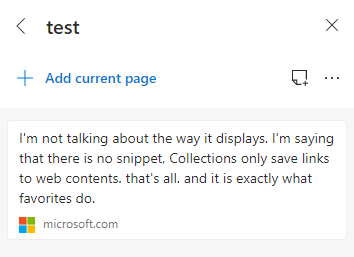
HotCakeX What I mean is that the snippet of text is displayed in the collection sidebar like this : which might be everything you need to save from a page, but you also have the ability to go to that page via the link. You wouldnt see that text in a favorite saved of the same page. Re the anchor links comment I made , I just tried testing and you are completely right and it does not jump to an anchor point in the page. Strange as I swear I was experiencing that behavior yesterday but I cannot recreate it now. I remember thinking it was a useful feature. If I can I will put examples here of course but it certainly doesn't behave in that way by default.2.2KViews0likes1CommentRe: Collections UI
HotCakeX Not exactly, and partly why I said 'sometimes it is subtle' With snippets , yes it does just add a link but with a couple of slightly different behaviors. Firstly in the way the link itself behaves more like a link to an anchor, taking you directly to that part of the page you are referring to. Now technically you could setup a favorite to do the same but far less user friendly or convenient. Often this feature might make little difference and a normal link might function just the same but if a page, say a medical paper published in a journal, is very lengthy then the ability to have the item link to an anchor point within that page can be useful. Secondly, is in the way it displays the item in a collection. If you highlight a paragraph of text and add that as an item then that actual text is displayed in the collection. Following the item link takes you to the page yes - much like a favorite would but with the anchor type behavior I explain above - but the displaying of the text in the collection in that way can be very useful and quite a powerful tool for some. Im sure many will find it useful to have a key phrase displayed but with the ability to then go to the source of the whole article / page.2.2KViews0likes3CommentsRe: Skype vs Microsoft Teams which One is Better for Communication?
Reza_Ameri-Archived Comparing Teams and Skype is an interesting discussion as there is certainly a fair amount of confusion amongst some users as to how they differ etc and the lines are becoming increasingly blurred. Skype for business for example is going to get phased out (ending July 31st 2021) and be replaced by Teams. So in a business environment Teams is the way to go for sure. You can of course (if enabled in O365 settings) include skype accounts in meetings, add them as contacts etc (they dont get all the same features like document collaboration of course). Also, and this is just my feeling & not officially confirmed, I think Skype consumer edition will get phased out also and MS will push people to user Teams 'consumer' version. A strong indication of that was when they released the free Teams version in late 2018. Whilst targeted at small businesses etc and as a direct challenge to slack, I can see this version of teams being pushed as the new skype for end users. So whilst I agree that Skype currently is the tool for 'home' and Teams for 'work' a large part of that is due to people being familiar with Skype as Teams already can fulfill any function Skype can. It will take time to bring Teams into the consciousness of the general public. Its a big call to replace something so well known it has become a verb. For example 'skype me later' is instantly understood were as 'Teams me tonight' would elicit confused looks in response. Im sure Microsoft will want to make any transition very carefully in order to limit any damage such a high profile product and user base such as Skype. The whole COVID-19 situation though will actually have helped them in a way by bringing Teams into public view for considerably more people than before in a very short space of time. That , along with the considerable uptake in the business world that is placing Teams amongst other essential office tools like Word, Excel, Outlook etc will likely only accelerate Teams consumer along the path of replacing Skype.4.7KViews0likes1CommentRe: Collections UI
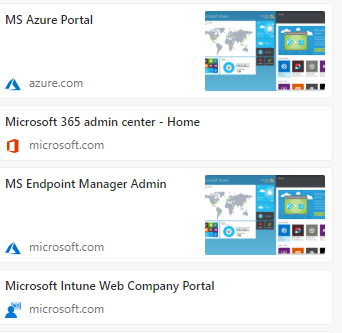
HotCakeX because favorites and collections are different, sometimes it is subtle but it makes a difference in how you use them. For example some of my reasons would be: - You can add notes to collections , you cannot to favorites - You can add 'snippets' of text selected from within a webpage, or an image to a collection which you cannot do with favorites - You can easily send to excel or word the collection bringing it together in a nice format , which is good for research or sharing with others - Collections (imho) are easier and quicker to navigate than favorites. I personally like to have the collection sidebar open most of the time on some of my desktops as it is a good quick way to navigate to certain Admin tools and pages - with collections it is easy to 'open all' items in a collection (much like onetab works), in favorites it is not. Now of course your point is why not use favorites instead when I want to not have thumbnails displayed, so the link to images feature for example sounds like a moot point, but it isnt really as for example I could have a collection with 7 or 8 items which includes some images, some snippets, some notes and a couple of direct web page links. The web page links then display thumbnails that give no useful indication of what they are or have any usefulness. For example try adding azure portal and Endpoint manager in the same collection you get the same useless thumbnail for both that just takes up lots of space : In this case the ability to remove the thumbnail from individual items would be useful.2.2KViews0likes5CommentsRe: Collections UI
HotCakeX it will of course come down to people personal preferences as to if they feel it takes up too much space or not, so having the ability to configure it will mean the feature will be suitable for more people. Same with the thumbnails, it depends on how you use the feature. For me in some of my collections the thumbnails are useless and just take up space. I make sure I know what the items are by editing and naming them in a way that I can quickly identify what each one is. I can also see that in some cases the thumbnail could be useful though , so Im certainly not suggesting that the feature be removed, just the ability to remove thumbnails if you wanted to would be nice ( I would rather have them than not have them at all though)2.3KViews0likes7CommentsRe: Collections UI
hussain5416 I personally quite like the sidebar and styling as it currently is but would welcome the ability to reduce the screen real estate it uses. I am using large screens though , so I imagine on a smaller screen / laptop it would become more of an annoyance. Flexibility and configuration options I guess are the key issues here. As it stands you get what you are given and for many people it wont be ideal.2.3KViews1like9CommentsRe: Collections UI
rosenbloomsnka Agree and would also like to add that when entries have a thumbnail they take up even more space yet there doesnt seem to be a way to remove the thumbnail. I dont even think the thumbnail serves much purpose anyway to be honest , but at least we should be able to remove them individually or as a global setting to 'not display thumbnails'2.3KViews1like0Comments
Recent Blog Articles
No content to show