User Profile

Stephen_Pisano
Copper Contributor
Joined Feb 07, 2020


User Widgets
Recent Discussions
- 602Views0likes0Comments
Re: Totalling a column that includes an ‘IF’ formula that produces a number
Hi Dennis, I’m really sorry but I have no idea as to how to solve your problem. I’ve only used the forum to get help not offer advice as I’m an occasional user of this group. If you posted your problem openly to the forum rather than a direct message I’m sure you’ll find an answer!1.5KViews0likes0CommentsCreating an IF formula to convert a range of numbers from an adjacent column
I am using 16.56 Excel. I am trying to convert a column of numbers that range from 1 to 4. I want to be able to write an IF formula that can reverse convert the numbers into a new column. So column B reads like the example below with the formulas in the cells in Column B. I have the formula in B2 for reversing a single number eg =IF(A2=1,4). However I need the IF formula to be able to cope with 1:4 and reverse the A number in all cases, i.e. 1:4 A B 1 4 2 3 3 2 4 1 I hope this makes sense and wondered if there was a solution out there??Solved2.5KViews0likes3CommentsRe: Totalling a column that includes an ‘IF’ formula that produces a number
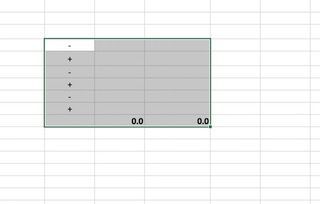
Sergio, I have a new problem that you may be able to solve. I have a new column that relates to a set of individuals. When their scores increase from one test to another I insert a + in the column. When they decrease insert a -. I want to be able to create two formulas in two cells adjacent to the column of +s and -s, one that will give me the number of +s and one for the -s. Is this possible do you think? Steve2.1KViews0likes6CommentsTotalling a column that includes an ‘IF’ formula that produces a number
I have created a column of numbers, 0 or 1, that is produced with an IF command in each cell relating to an adjacent column of cells, eg O20 and so on. When I use a SUM formula eg =SUM(P20:P45) to total the ‘1s the outcome is alway 0. The only way I have discovered to total the column which counts the ‘1s’ is by =SUM(P20+P21 etc) which is time consuming and problematic when adding new rows. Any suggestions out there?2.4KViews0likes15Comments
Recent Blog Articles
No content to show