User Profile

Michael1105
Brass Contributor
Joined 7 years ago


User Widgets
Recent Discussions
Re: Need Help with Error
HansVogelaar, thank you very much for replying to my post. I apologize for the late reply to you. I wound up figuring out what the issue was. It was in the VBA coding that was causing the error. I opened the file in Safe Mode and fixed the code. Thus far the file is able to be saved without issue. Thank you again for replying. I appreciate you taking your valuable time in assisting. Have a wonder day.33Views0likes0CommentsNeed Help with Error
Hello. I'm hoping someone can help with this error. I'm not sure why this error is occurring because I haven't changed anything in this book regarding Active X Controls and this is happening with multiple files of the same type originated from a template that I've created. I've attached the screen print of the errors. These are the steps I've taken to save the file: Click: File-Save As Save As window appears Name file, choose Macro Enabled Workbook Click Save Error message appears: Errors were detected while saving... Click: Continue Save As window appears Click: Save Error message appears: Excel encountered errors during save.... Click: Ok Repairs to 'file name' box appears Click: Close File does not save. I click Save and the same thing happens.78Views0likes3CommentsIssue with saving Macros Personal Macro Workbook in the startup folder must stay open for recording
Hi, I'm hoping one of the Excel gurus can assist me with this issue I am suddenly having with Macros. Suddenly all of the macros I had saved and have been using have dissappeared. I had these Macros set up in a tab and would just click the macro for the job I was running and it would format my document accordingly. As everyone knows, this saves a significant amount of time. Why this happened, I don't know. The only option now is to rebuild them. This is the process I'm doing to rebuild them: Developer tab Record Macro In Record Macro Box Name Macro Store macro in: Personal Macro Workbook Click: OK Error Message Returned: "Personal Macro Workbook in the startup folder must stay open for recording." I don't know how to get this Personal Macro Workbook to open. I thought that this workbook would automatically open at the start up of Excel. This glitch has caused me so much time and energy that it has actually put me behind in my work. I've checked the path and the "Personal.xlsb" file is in the XLSTART folder.21KViews0likes6CommentsDifference between two same calculations
Hello, I'm a bit confused why Excel is giving me a total for two calculations that are exactly the same. I have one calculation based on the "DatedIf" argument of 22 weeks between two dates as the dividing factor for an annual goal of $421,875 resulting in the amount of $19,428.45. (=datedif(start date cell,end date cell,"d")/7=22, $421875/22) I have another calculation (first done on a calculator) but formulated based the simple math argument using 22 weeks as the dividing factor or an annual goal of $421,875 resulting in the amount o $19,176.14 (which is the correct amount corresponding to the calculator result), ($421,875/22). I've attached the file showing the difference. Can someone please assist on the reason why there is this discrepancey? I need for the "datedif"argument version to be correct because it's needed in a workbook I've created for prorating goals.Solved1.8KViews0likes6CommentsMultiple worksheet protection VBA code
Hello Excel Experts, I have the VBA coding to protect and unprotect multiple worksheets. The code only requires the password entry once before locking down the worksheets. Are there lines that can be placed within the code to ask for the password a second time to compare with initial password entered to be sure that the password is entered correctly? This would be similar to the way Excel asks for the password a second time if protecting a single sheet. Any advice would be great! Thank you!Solved1.1KViews0likes2CommentsRepairs to File error message explanation
Hello, I'm hoping one of the experts out there can assist me in letting me know how to find out what the Repairs to 'file name' error is that suddenly began to pop up after adding a new location to one of my worksheets. I'm not doing anything fancy. All I'm doing is copying a grid from one of our branch locations and pasting the copy to the worksheet for a new branch office we are opening. This is the error information that was logged: <?xml version="1.0" encoding="UTF-8" standalone="true"?> -<recoveryLog xmlns="http://schemas.openxmlformats.org/spreadsheetml/2006/main"> <logFileName>error268680_01.xml</logFileName> <summary>Errors were detected in file 'X:\Working-On Projects\2023-Credit Union Goal Scorecard-Monterra.xlsm'</summary> -<removedRecords> <removedRecord>Removed Records: Object from /xl/printerSettings/printerSettings7.bin part (Print options)</removedRecord> </removedRecords> </recoveryLog> I have no idea how to find this error to fix it within the worksheet and I'm afraid this is going to affect the overall performance of the sheet. This workbook is a Goal Scorecard for the Credit Union where I work and the numbers need to be reported accurately to upper management. Can someone please assist in this request? I would greatly appreciate it. Thank you in advance.882Views0likes2CommentsRe: Need an explanation on Compatibility Checker.
THANK YOU SO VERY MUCH!!!! I went into the Log and set the validation to the correct worksheet withing the workbook. How were you able to drill down to find it was within the validation? Is there something I could have done to have found this out? I'm wondering if there is something else similar to this since I still can't break the link within the book.1.3KViews0likes1CommentRe: Need an explanation on Compatibility Checker.
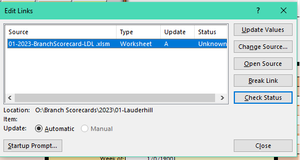
HansVogelaar Thank you for your response. This is strange because this is what I get: In "Data" tab of ribbon-Connections section-->Edit Links Popup: Click: Break Link Popup: Click: Break Links: Popup returns Edit Links window with Source still there: Do you know what could be happening within my Excel software that would cause this to not break but within yours it does?1.3KViews0likes4CommentsRe: Need an explanation on Compatibility Checker.
HansVogelaar. Thank you for your reply. Here is the link to the shared file: https://1drv.ms/x/s!AhzfESS2_HcpimOtyyl-olgD4yxA?e=6dUAdd I downloaded the shared file through the link and now it's not showing the error message. However, the connection to the other workbook is still there. Here is the link for the New Branch Scorecard workbook is connected to: https://1drv.ms/x/s!AhzfESS2_HcpimT95q42nF12afv_?e=umklzv Thank you so very much for taking the time in looking into this for me. I appreciate this very very much. 🙂 Both workbooks should have the sheets unprotected.1.3KViews0likes6CommentsNeed an explanation on Compatibility Checker.
Hi, I've created a workbook that contains macros and somehow through the process of the book's creation I inadvertently created a link between this and another workbook. I started receiving the External Links error message. To try to fix this I have tried to unlink the source and destination workbooks, however, this isn't working. I searched online on how to break the link. One option was to go through Compatiblity Checker. The result is a long list of issues that have to do with Excel 97 - 2003. I am running Office 2016 and have the file saved as a template with the extenson .xltm. I am not understanding why this is an issue because it is my understanding that .xltm isn't the file extention for Excel 97-2003. This is an extensiive workbook that is going to be used to track the sales of our branch locations. I need to be able to fix this ASAP. Can anyone please assist? I would greatly appreciated it. Thank you. I would attached the file however, the format isn't supported. I'm not sure how anyone can assist with this if I can't get the file attached for anyone to see.Solved1.5KViews0likes8CommentsRe: Cell Entry Required before advancing to next cell entry field
I believe your solution is the best for what is needed. Not clearing the row is what caused the confusion. I truly appreciate you taking time out of your day to assist me. Thank you and enjoy the rest of your day.3.3KViews0likes1CommentRe: Cell Entry Required before advancing to next cell entry field
I hadn't. What I am trying to achieve is this (for example): If a date is entered in b15, then Excel will allow for an entry to c15, and so on down the row. If a date is entered in b15, but no entry is entered in c15, then an error message appears requiring entry to c15, (if an entry is entered in c15, but not in d15, then an error msg requiring entry to d15)...and then so on down the row. I hope that makes sense. The way the sheet is now, I am able to bypass entry to M15 and N15 but not able to enter in row 16 because these two cells aren't completed. That isn't going to accomplish my objective. I want to alert the user that when a date is entered then all other fields in the row are required forcing the user to make those entries. We have a very basic log now and our branch staff aren't completing these logs in full as required by the government and the auditors. I am trying to make the log force the user into completing the necessary fields which will help us be in compliance with the two agencies.3.3KViews0likes3CommentsRe: Cell Entry Required before advancing to next cell entry field
Riny_van_Eekelen I want to thank you very much for your prompt response to my post. As far as the merged cells not being able to be merged, that isn't an issue, and I already have a work-around. I downloaded the file and tried entering information on the second line. When entering the date DV came back with an error saying the entry doesn't match the data validation restrictions. I need for the date value to be entered and if that value is entered then entry to the next field is allowed, but if there is no entry to the next field then an error message appears. I hope I'm explaining what is needed correctly.3.4KViews0likes5CommentsCell Entry Required before advancing to next cell entry field
Hello my most valued asset, Excel Community, I am forever grateful to all of you who have assisted me in the hurdles I've had to cross with Excel. I am reaching out to you again with hopes that someone will be again be able to help me solve a dilema. I have been asked to create a log for our branch offices that is required by the Federal Government when a monetary instrument is purchased in cash over $3000. Management is asking that the fields be required before the user advances to the next cell, making each cell in the log mandatory for the line of entry. I thought Data Validation was the answer, however, it doesn't seem to be. I also tried Googling this and the answers are VBA coding but seems to only cover the worksheet prompting an error message upon the closing of the worksheet. I am still thinking Data Validation is the way to go here, however, I'm not too sure how to enter the arguments. I've attached a file with notes for explanation and understanding. I hope one of you most valued experts can again assist.Solved3.7KViews0likes7Comments
Recent Blog Articles
No content to show