User Profile

Schneika
Iron Contributor
Joined Jul 25, 2016


User Widgets
Recent Discussions
Re: Using Power Automate and Syntex to create document with multiple tables HELP?
I dont see the updated reference yet https://learn.microsoft.com/en-us/microsoft-365/syntex/automate-document-generation published date is the older one from 03/15/2023. But i have already raised a Power Platform Service Support Ticket for this issue, dear Steve Pucelik3.1KViews0likes1CommentRe: Using Power Automate and Syntex to create document with multiple tables HELP?
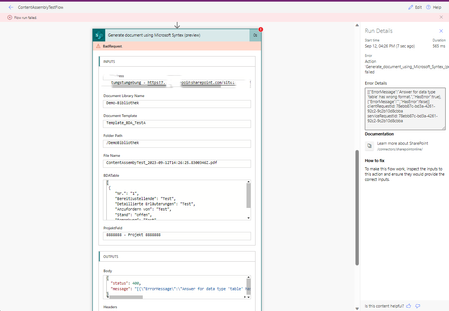
spucelik thanks for your hints. But i can not get it to work. I fail to send the JSON-Objekt for the Table (from a get items select filter) to the TableField in the Syntex action. I always get [{"ErrorMessage":"Answer for data type 'table' has wrong format.","HasError":true},{"ErrorMessage":"","HasError":false}] clientRequestId: b65638ae-5dfb-4100-a224-0327f8c859dc serviceRequestId: b65638ae-5dfb-4100-a224-0327f8c859dc i also get this error when i try to update the Syntex-Template-TableField with a simple JSON-Object (single Item) like this one: [ { "Nr.": "1", "Bereitzustellende": "Test", "Detaillierte Erläuterungen": "Test", "Anzufordern von": "Test", "Stand": "offen", "Bemerkung": "Test" } ] Do you have a working example for a suitable JSON? I tried this without success3.1KViews0likes6CommentsRe: Using Power Automate and Syntex to create document with multiple tables HELP?
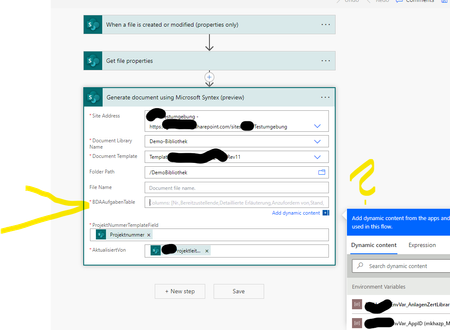
Struggling with the same behavior. spucelik Wayne_Addison rsderby I have a modern Syntex Template with a Table. The Template with Table is supported manually from SharePoint New Menu. In Power automate action (Preview) "Generate document using Microsoft Syntex (preview)" https://learn.microsoft.com/en-us/microsoft-365/syntex/automate-document-generation microsoft wrote: 10. The action does not support images and tables and templates containing these fields are hidden while selecting the templates in the action. But the Template with table is not hidden in the action (instead it is a required column) and therefore i have to add the Table Column Mapping from dynamic content. But this is not working in many variations, because i need a Apply to Each Array in the table mapping. I guess how a Data operation compose could help for a dynamic repeating section to bind the table entries to the table in content assembly? How can i get the action working with tables as expected? Or does the action not working with tables as expected, because of preview state?3.2KViews0likes8CommentsRe: Highlighted content webpart - Filter on managed property using Query variables
Not possible to use dynamic Page-Filter-Properties (Filter-Tokens) like {Page.Property} in Highlighted Content WebPart. Annoying since years... Instead i use the wellknown SPFx React Search WebParts on GitHub which are able to Filter on Page-Tokens like this: {searchTerms} owstaxIdInternalColumnName:{Page.InternalColumnName.Label} (in Case of Managed Metadata Column / Label)2.4KViews0likes0CommentsRe: Employee Birthday Calendar Web Part
WebPart does not render: Something went wrong If the problem persists, contact the site administrator and give them the information in Technical Details. TECHNICAL DETAILS [SPLoaderError.loadComponentError]: ***Failed to load component "e629ef30-a9ec-4713-b39a-2cfa8b323902" (BirthdaysWebPart). Original error: ***Manifest not found for component id "0d910c1c-13b9-4e1c-9aa4-b008c5e42d7d" and version "16.8.6". ***INNERERROR: ***Manifest not found for component id "0d910c1c-13b9-4e1c-9aa4-b008c5e42d7d" and version "16.8.6". ***CALLSTACK: Error at t [as constructor] (https://spoprod-a.akamaihd.net/files/sp-client-prod_2019-06-28.011/sp-pages-assembly_en-us_a0d4d2b534576bc5e1bd120c4f0eacaa.js:45:29877) at new t (https://spoprod-a.akamaihd.net/files/sp-client-prod_2019-06-28.011/sp-pages-assembly_en-us_a0d4d2b534576bc5e1bd120c4f0eacaa.js:169:74253) at Function.e.buildErrorWithVerboseLog (https://spoprod-a.akamaihd.net/files/sp-client-prod_2019-06-28.011/sp-pages-assembly_en-us_a0d4d2b534576bc5e1bd120c4f0eacaa.js:169:86503) at Function.e.buildLoadComponentError (https://spoprod-a.akamaihd.net/files/sp-client-prod_2019-06-28.011/sp-pages-assembly_en-us_a0d4d2b534576bc5e1bd120c4f0eacaa.js:169:82534) at https://spoprod-a.akamaihd.net/files/sp-client-prod_2019-06-28.011/sp-pages-assembly_en-us_a0d4d2b534576bc5e1bd120c4f0eacaa.js:169:10392915KViews0likes0CommentsRe: Modern Team Sites - Highlighted Content filtering not working
Hello, the [Me]-Token is an essential requirement for personalized Content-aggregation. Also we Need advanced Field-Mapping and custom Display Templates. When do you release your Backlog to the First-Release? best regards IPI GmbH Karl G. Schneider2.2KViews0likes0Comments
Recent Blog Articles
No content to show