User Profile

penguinapplesauce
Copper Contributor
Joined Sep 27, 2019


User Widgets
Recent Discussions
Need help removing wrap text from 3 cells, not as easy as it sounds
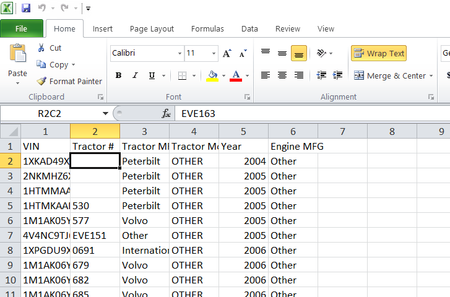
A customer sent me an excel file that I need to save as a CSV so it can be loaded into a system. When I open the document as a CSV file cells B2, B3, and B4 are showing blank, however if you expand the column or remove the wrap text selection the value you will display BUT WILL NOT SAVE THAT WAY. If I open the excel version copy the data and paste in note pad I get total gibberish, however copying and pasting from CSV into note pad shows the data with a comma delimiter but the volumes from column B all have quotes around them............ I am completely stumped on what to do. I have tried clearing all formulas, selecting the entire sheet and adding wrap text then removing it, selecting only the affected cells and removing the wrap text option, copying and pasting values, copying and pasting as text, and after each attempt I would save the document, re-open it, and sure enough those 3 cells would be selected to wrap text.Solved11KViews0likes4Comments
Recent Blog Articles
No content to show