User Profile

Le_Michel
Brass Contributor
Joined Aug 28, 2019


User Widgets
Recent Discussions
Re: Security Baselines not seeing devices in device groups
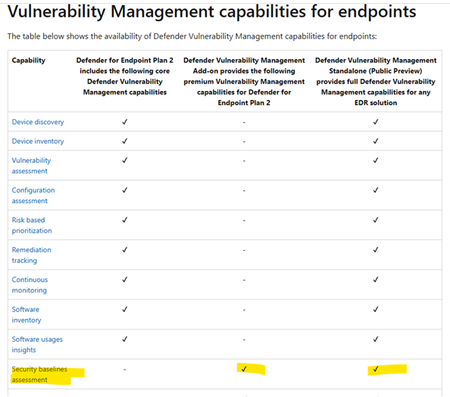
AlexFogden Check if you have the correct licences for these devices. You can also enable the trial. https://learn.microsoft.com/en-us/microsoft-365/security/defender-vulnerability-management/defender-vulnerability-management-capabilities?view=o365-worldwide4.4KViews0likes0CommentsExplanation about redirection guard
Hello, I need some explanation about redirection guard. https://learn.microsoft.com/en-us/windows/client-management/mdm/policy-csp-printers#configureredirectionguardpolicy What is the additional protection if this setting is enabled ? What kind of attacks are prevented ? Regards.Solved8.4KViews0likes1CommentMBAM group policies to encrypt removable media
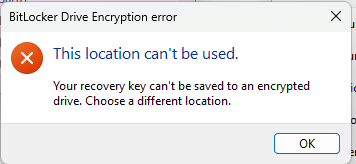
Hello, I need help to configure MBAM group policies to encrypt removable storage. It should work like this : - User type a password to unlock the drive - MBAM is used for recovey in case the user forgets the password. My issue is that when the user turns on Bitlocker, he is prompted to save password. But the user has no other location to save password since all local drives are also encrypted. MBAM recovery is enough if the user forgets the password. So there is no need for the user to save recovery information. Is there a way to disable this step ?489Views0likes1CommentRe: MECM co-management enrollment not working
yannick_sierro Yes, it's solved. All co-management policies were duplicated in the SCCM database. And the client received the corrupted policies. The cause is that the first time we tried to activate the cloud attach, the operation did not complete due to lack of permissions on azure. Some uncomplete policies were left in the database. We removed the cloud attach, deleted policies from the DB with help of the escalation engineer and recreated the cloud attach.29KViews0likes3CommentsRe: MECM co-management enrollment not working
Finally had a meeting with an escalation engineer that found the issue. it seems that all co-management policies are duplicated in the SCCM database. And the client receives the corrupted policies. The cause is that the first time we tried to activate the cloud attach, the operation did not complete due to lack of permissions on azure. Some uncomplete policies were left in the database. Next week, we will work with the escalation engineer again to remove the cloud attach, delete policies from the DB and recreate the cloud attach.26KViews0likes7CommentsMECM co-management enrollment not working
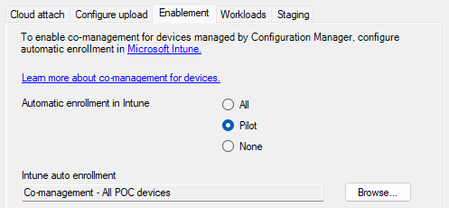
Hello, We are trying to enroll devices in intune using MECM Devices are Hybrid azure AD joined. Devices are member of the pilot collection : CoManagementHandler.log shows the following records : Auto enrollment agent is initialized. CoManagementHandler 12/09/2022 13:59:57 1712 (0x06B0) Could not check enrollment url, 0x00000001: CoManagementHandler 12/09/2022 13:59:57 1712 (0x06B0) Device is not enrolled. CoManagementHandler 12/09/2022 13:59:57 1712 (0x06B0) AAD-Join Info: type = 1 DeviceId = 'DeviceID' TenantId = 'TenantID' JoinUserEmail = 'fooUser@company.com' TenantName = 'Name' EnrollmentUrl = 'https://enrollment.manage.microsoft.com/enrollmentserver/discovery.svc' CoManagementHandler 12/09/2022 13:59:57 1712 (0x06B0) Set device to not externally managed CoManagementHandler 12/09/2022 13:59:57 1712 (0x06B0) Could not check enrollment url, 0x00000001: CoManagementHandler 12/09/2022 13:59:57 1712 (0x06B0) Device is not MDM enrolled yet. All workloads are managed by SCCM. CoManagementHandler 12/09/2022 13:59:57 1712 (0x06B0) Value of CoManagementFlags retrieved: 0x2001 CoManagementHandler 12/09/2022 13:59:57 1712 (0x06B0) Checking MDM_ConfigSetting to get Intune Account ID CoManagementHandler 12/09/2022 13:59:57 1712 (0x06B0) Expected MDM_ConfigSetting instance is missing, can't retrieve Intune SA Account ID. CoManagementHandler 12/09/2022 13:59:57 1712 (0x06B0) Co-Management is disabled. Expect MDM_ConfigSetting instance to be deleted. CoManagementHandler 12/09/2022 13:59:57 1712 (0x06B0) Current workload settings is not compliant. Setting enabled = 0, workload = 8193. CoManagementHandler 12/09/2022 13:59:57 1712 (0x06B0) Checking MDM_ConfigSetting to get Intune Account ID CoManagementHandler 12/09/2022 13:59:57 1712 (0x06B0) Expected MDM_ConfigSetting instance is missing, can't retrieve Intune SA Account ID. CoManagementHandler 12/09/2022 13:59:57 1712 (0x06B0) Updating comanagement registry key to 0x2001 CoManagementHandler 12/09/2022 13:59:57 1712 (0x06B0) CoManagement flags registry key updated. CoManagementHandler 12/09/2022 13:59:57 1712 (0x06B0) Nothing is changed for RS2, keep executing. CoManagementHandler 12/09/2022 13:59:57 1712 (0x06B0) Setting co-management RS3 flags CoManagementHandler 12/09/2022 13:59:57 1712 (0x06B0) Nothing is changed for RS3, ENDOK. CoManagementHandler 12/09/2022 13:59:57 1712 (0x06B0) Could not check enrollment url, 0x00000001: CoManagementHandler 12/09/2022 13:59:57 1712 (0x06B0) Device is not MDM enrolled yet. All workloads are managed by SCCM. CoManagementHandler 12/09/2022 13:59:57 1712 (0x06B0) Value of CoManagementFlags retrieved: 0x2001 CoManagementHandler 12/09/2022 13:59:57 1712 (0x06B0) Could not check enrollment url, 0x00000001: CoManagementHandler 12/09/2022 13:59:57 1712 (0x06B0) Device is not provisioned CoManagementHandler 12/09/2022 13:59:57 1712 (0x06B0) Default CSP is Microsoft Enhanced RSA and AES Cryptographic Provider CoManagementHandler 12/09/2022 13:59:57 1712 (0x06B0) Default CSP Type is 24 CoManagementHandler 12/09/2022 13:59:57 1712 (0x06B0) Calculating hash with 32772 algorithm using 'Microsoft Enhanced RSA and AES Cryptographic Provider' CSP. CoManagementHandler 12/09/2022 13:59:57 1712 (0x06B0) State ID and report detail hash are not changed. No need to resend. CoManagementHandler 12/09/2022 13:59:57 1712 (0x06B0) User 'S-1-5-21-SID' is logged on. CoManagementHandler 12/09/2022 14:00:03 9244 (0x241C) Check if it's enrollment pending and if it's already enrolled.... CoManagementHandler 12/09/2022 14:00:03 9244 (0x241C) UserLogon: enrollment isn't pending. CoManagementHandler 12/09/2022 14:00:03 9244 (0x241C) Released global agent cache. CoManagementHandler 12/09/2022 14:00:03 9244 (0x241C) There is no scheduled tasks under "EnterpriseMgmt" Baselines are evaluated like this : Eventlog shows : MDM ConfigurationManager: Command failure status. Configuraton Source ID: (SourceID), Enrollment Type: (WMIBridge), CSP Name: (EnrollmentStatusTracking), Command Type: (Clear: first phase of Delete), Result: (./Device/Vendor/MSFT/EnrollmentStatusTracking/DevicePreparation/PolicyProviders/ConfigMgr/LastError). MDM ConfigurationManager: Command failure status. Configuraton Source ID: (SourceID), Enrollment Type: (WMIBridge), CSP Name: (Policy), Command Type: (Clear: first phase of Delete), Result: (./Device/Vendor/MSFT/Policy/Config/Security/AllowAddProvisioningPackage). Can someone help ?Solved32KViews0likes15CommentsRe: Bitlocker compliance policies and MBAM
Thanks for your answer. My main concern is to avoid that intune will launch any remediation that will not save recovery key in MBAM database. it seems that intune allows to configure remediation actions for android and iOs but not for Windows.1.4KViews0likes1CommentBitlocker compliance policies and MBAM
Hello, For the moment, we use MBAM to manage bitlocker encryption keys. We would like to use MEM compliance policy to audit encryption of our Windows devices (audit only - no remediation). I would like to know if configuring "Require encryption of data storage on device." or "Require BitLocker" will try to remediate a non-compliant device. I want to avoid a situation where device is encrypted after remediation and Keys are not stored into MBAM database.1.5KViews0likes3CommentsRe: link to local file
HotCakeX Hello, we are experiencing a similar issue. We have a SharePoint site with links to a fileshare where we have scripts used by support teams. Microsoft' promise was if it works with edge legacy it will work with the new edge and in this case it works with edge legacy. Opening my SharePoint site in IE mode is of course not an option !25KViews1like0CommentsRe: Updating Edge via Software Update (SCCM)
Finally found the answer in this new article : https://docs.microsoft.com/en-us/DeployEdge/deploy-edge-plan-deployment Define your update strategy and policies You also want to determine how you want to do updates after you deploy Microsoft Edge: Allow Microsoft Edge to update itself (default). If you choose to allow automatic updates of Microsoft Edge, then Microsoft Edge will automatically update itself at the pace determined by the channel(s) you deployed. Update Microsoft Edge at your own pace. If you prefer to have explicit control over when updates are deployed, you can disable automatic updates and deploy it yourself (see the https://docs.microsoft.com/DeployEdge/microsoft-edge-update-policies.) After you disable automatic updates you can deploy updates for each channel using one of the following tools: https://docs.microsoft.com/intune/apps/apps-windows-edge?toc=https://docs.microsoft.com/DeployEdge/toc.json&bc=https://docs.microsoft.com/DeployEdge/breadcrumb/toc.json https://docs.microsoft.com/DeployEdge/deploy-edge-with-configuration-manager the deployment tool of your choice. Regardless of your update strategy, we recommend leveraging a ringed deployment strategy. With automatic updates, this means having a representative sample of users running the Beta Channel, to identify issues with what will become the Stable Channel. With manual updates, this might also include additional validation of a pilot group after a new Stable Channel build is released. This is followed by broad deployment.8.5KViews0likes0CommentsRe: Updating Edge via Software Update (SCCM)
lexcyn Hello, Can you clarify this : "Customers will be able to control the flow of updates, either by leveraging our general updating mechanisms and using policies to pause updates at a particular version while testing compatibility with a small set of pilot users, or by using the provided offline installers (MSIs and PKGs) to push updates directly to their managed devices on their own schedule." Ok, let's assusme that I deploy the enterprise MSI. By default, edge will be automatically updated. Is this correct ? I checked the policies and cannot see any setting to pause update at a particular version. Google Chrome has the GPO setting : "Target version prefix override" but I do not find equivalent setting for Edge.8.6KViews0likes1Comment
Recent Blog Articles
No content to show