User Profile

Rodawing
Brass Contributor
Joined Aug 21, 2019


User Widgets
Recent Discussions
Outlook 365 Delayed Delivery Issues
Delayed Delivery/Outbox messages not sending after editing. We use Delay Delivery a great deal. When you use this, after hitting Send the message goes to the Outbox to wait in a que for the date and time chosen to be delivered. Here is the issue. 1) Before you could preview a message in the Outbox without the message being changed to edit mode. Outbox does not allow Reading Pane but Outlook shows 2-lines of the message for preview purposes. Changing between messages did not affect the message's status in the Sent queue. Now, if you click on any message in the Outbox it removes the message from the Sent queue and will not deliver that message even if you remove the Delay Delivery entirely. It is as if it becomes corrupted, this happens to all messages after making an edit. 2) Before you could open any message in the Outbox to edit details within, click Send, and it would be returned to the Sent queue so when the Delay Delivery date and time arrived the message would go. Now, if you open a message to edit it and click Send to put it back into the Sent queue, it does not work. The message will appear as a draft and give a sent status of none. Even after going back into the message and selecting Delayed Delivery the message will not send and stay as a draft. All of these things I am describing used to work fine. I have updated to the latest version of Office and cleared all Outlook data in the local and roaming user folders.Solved11KViews3likes4CommentsRe: Outlook 365 Delayed Delivery Issues
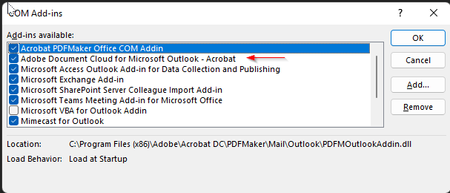
Rodawing I have found the issue. It is caused by and Adobe Acrobat Pro add-in. The issue is with the Adobe Document Cloud for Microsoft Outlook – Acrobat Add-in. If the Add-in is enabled and Edge is set as the default PDF viewer you cannot send a delayed delivery message. (it will immediately change to a draft and stay in the Outbox) Delayed delivery will also not work if you have Acrobat Reader DC set as the default PDF viewer and the Adobe Document Cloud for Microsoft Outlook – Acrobat Add-in enabled. If you disable this Add-in and have Edge set as the default PDF viewer, delayed delivery works fine.10KViews3likes3CommentsRe: Edge Target Channel Override
I manage all of our Edge updates and policies using Endpoint Manager (Intune) the Edge install is managed using Configuration Manager. We are currently on the Stable 95 version. What bothers me is when Microsoft says they are releasing a feature and then it takes 4-6 months for it to show up.3KViews0likes2CommentsEdge Target Channel Override
Has anyone seen the option to select the "Extended Stable" release using the Target Channel Override option that is supposed to be found under the “Microsoft Edge Update >Applications>Microsoft Edge” when creating or editing configuration profiles for Edge?3.3KViews0likes4Comments
Recent Blog Articles
No content to show